Freedom251 › Print Management Software
QZ Tray
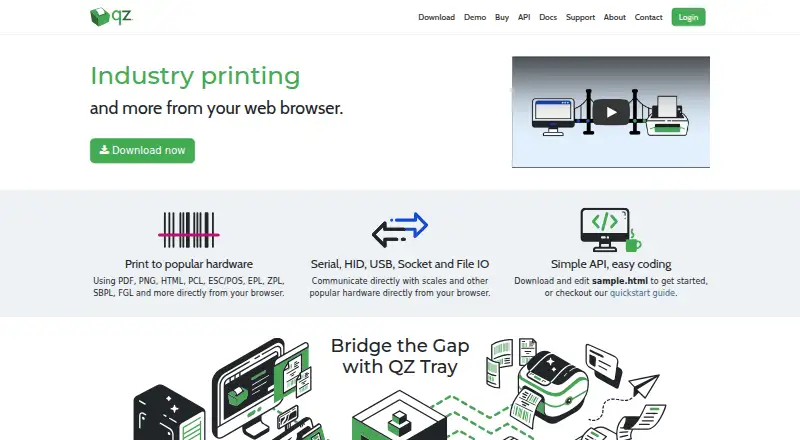
What QZ Tray is
QZ Tray connects a web client to local printers and attached devices, allowing browser-based printing and communication with hardware. Its JavaScript connector provides printing and device communication from JavaScript. Supported print formats include PDF, PNG, HTML, PCL, ESC/POS, EPL, ZPL, SBPL, and FGL. For hardware communication, it supports serial, HID, USB, socket, and file I/O. Listed compatible printer brands include Zebra, SATO, Epson, Citizen, Star, Boca, and Dymo. The desktop software runs on Windows, macOS, and Linux, including Intel and ARM or Apple Silicon systems; supported platforms also include iOS, Android, and ChromeOS. QZ Tray can be downloaded and used free, and a free demonstration is available with warnings. Removing print dialogue warnings and enabling silent printing requires message signing with a certificate and private key. QZ says signing keys are generated in the customer's browser and it never receives a copy of the private key. Only one QZ Tray instance can run at a time on a machine because it uses a localhost WebSocket connection to a single port. QZ Industries, LLC was founded in 2013 and operates from Canastota, New York.
Who it suits
QZ Tray suits developers and organizations that need browser-based printing or communication between a web client and local hardware. Its listed formats and connection methods cover a range of printers and attached devices, while its desktop software supports Windows, macOS, and Linux.
What it does well
- Connects web clients to local printers and attached devices.
- Supports ten listed print formats.
- Communicates over serial, HID, USB, socket, and file I/O.
- Lists compatibility with seven printer brands.
- Free download, use, and demonstration are available.
What to know first
- Only one QZ Tray instance can run per machine.
- Silent printing requires message signing with a certificate and private key.
- Free public community support is best-effort.
Limits
The free demonstration includes warnings. Only one QZ Tray instance can run on a machine; removing print dialogue warnings and enabling silent printing requires message signing.
Plans
| Plan | Billed and limits | Price |
|---|---|---|
| Sponsored Support | Annual renewal at reduced rate · Special qualifications required · 1 year trusted key pair · critical bug fix support · 48-hour email support · software updates · phone support by appointment | Free |
| Company Branded + Premium Support | Annual renewal at reduced rate · 1 year critical bug fix support · 48-hour email support · software updates · trusted key pair · phone support by appointment · custom build portal | $3,499 a year |
| Premium Support | Annual renewal at reduced rate · 1 year trusted key pair · critical bug fix support · 48-hour developer email support · software updates · phone support by appointment | $749 a year |
As qz.io lists them, read 7 Oct 2026. The maker's own page has the final word.
Getting started
- Open the QZ Tray website.
- Download QZ Tray for Windows, macOS, or Linux.
- Connect a web client through the JavaScript connector.
- Use the free version, or review the support plans.
- Sign messages with a certificate and private key to remove print dialogue warnings and enable silent printing.
Overview
QZ Tray is a desktop bridge that lets browser-based software print to local printers and communicate with attached devices. It is a focused fit for developers building web workflows around nearby hardware, rather than organizations seeking centralized print management.
Its broad format and connection support is compelling for that job, and free use is possible with warnings. The key trade-offs are that silent printing requires signed messages and only one instance can run on a machine.
Key features
QZ Tray prints PDF, PNG, HTML, PCL, ESC/POS, EPL, ZPL, SBPL and FGL from a browser. That breadth serves both document output and specialized printer workflows, including label printing. Compatible brands include Zebra, SATO, Epson, Citizen, Star, Boca and Dymo.
It also communicates with hardware over serial, HID, USB, socket and file I/O. A JavaScript connector exposes printing and device communication to web clients, making QZ Tray useful when an application needs to interact with equipment beyond ordinary browser printing.
Free use and demonstrations come with warnings. Removing print-dialogue warnings and enabling silent printing requires message signing with a certificate and private key. QZ says signing keys are generated in the customer's browser and it does not receive the private key; teams still need to account for signing when designing a silent-printing workflow.
Pricing
QZ Tray can be downloaded and used free, with warnings; the maker also offers a free demonstration. That is a practical starting point for evaluation or workflows that can tolerate the warnings. Free public community support is best-effort.
Sponsored Support costs nothing, billed annually with renewal at a reduced rate, and requires special qualifications. It includes a one-year trusted key pair, critical bug-fix support, software updates, 48-hour email support and phone support by appointment.
Premium Support costs $749 a year, billed annually with renewal at a reduced rate. It adds a one-year trusted key pair, critical bug-fix support, software updates, 48-hour developer email support and phone support by appointment. This is the paid fit for teams that need signing credentials and a defined support response.
Company Branded + Premium Support costs $3,499 a year, billed annually with renewal at a reduced rate. It includes a one-year trusted key pair, critical bug-fix support, software updates, 48-hour email support, phone support by appointment and a custom build portal. The branded build option is aimed at companies that need a tailored distribution path; it costs substantially more than Premium Support.
Platforms
The desktop application runs on Windows, macOS and Linux, including Intel and ARM or Apple Silicon systems. QZ Tray is also associated with web, Android and iOS support, and mobile printing is supported. Deployment is on-premises, which suits local device connections rather than a cloud-only installation.
Who it's for
QZ Tray is strongest for developers and organizations whose web clients must print locally or exchange data with attached hardware. Its mix of desktop operating systems, printer formats and device interfaces gives those workflows room to span different equipment. It is less suitable when an organization needs multiple QZ Tray instances on one machine: its localhost WebSocket connection uses a single port, so only one instance can run at a time.
Pros and cons
- Broad printing coverage: Nine supported formats and compatibility with named printer brands suit varied browser-based output needs.
- Device communication beyond printers: Serial, HID, USB, socket and file I/O support makes it useful for web clients tied to local equipment.
- Free entry point: Download, use and demonstration are possible without paying, but warnings remain.
- Signing is required for silent printing: Teams seeking warning-free output must configure certificate-based message signing.
- One-instance limit: A machine cannot run multiple QZ Tray instances, which constrains deployments that need separate local connections.
Alternatives
For a broader comparison, browse Print Management Software.
Choose ezeep if its free plan's support for up to 10 users, one connector, unlimited user print jobs and 50 API pages per month per organization better matches your needs. Choose PrintNode if a usage-capped starting point suits you: its free Lite plan allows 50 prints per month on one computer, with no charge or card details. Consider LRS VPSX as another paid print-software option.
Pharos Uniprint is an on-premises print-management option for colleges and universities. PrinterLogic is another paid option, with pricing shown for print-queue bands. YSoft SAFEQ Platform offers modular print management. MyQ X has a free plan and a paid Enterprise tier. Synappx Cloud Print uses a pay-as-you-go subscription.
Verdict
Choose QZ Tray when a web client needs to print locally or communicate with attached devices across its supported formats and connection types. Its breadth and free entry point make it a focused solution for those workflows; look elsewhere if you need multiple QZ Tray instances on one machine, or if silent printing without signed messages is a requirement you cannot accommodate.
Verdict
Choose QZ Tray if your web client needs to print locally or communicate with attached devices across its supported formats and connection types. Look elsewhere if you need multiple QZ Tray instances on one machine; silent printing also requires signed messages.
Questions
Can I use QZ Tray for free?
Yes. It can be downloaded and used for free, and a free demonstration is available with warnings.
What does QZ Tray connect?
It connects a web client to local printers and attached devices for printing and device communication.
Which platforms does it support?
Desktop availability includes Windows, macOS, and Linux. Supported platforms also include iOS, Android, and ChromeOS.
What does silent printing require?
Removing print dialogue warnings and enabling silent printing requires message signing with a certificate and private key. QZ says signing keys are generated in the customer's browser and it never receives a copy of the private key.
What support plans are available?
Sponsored Support is free and requires special qualifications. Premium Support is $749 a year, and Company Branded + Premium Support is $3,499 a year.
Can multiple QZ Tray instances run on one machine?
No. Only one instance can run at a time because QZ Tray uses a localhost WebSocket connection to a single port.
Facts from QZ Tray's own pages
- API
- The JavaScript connector enables printing and device communication from JavaScript. · qz.io, 7 Oct 2026
- Company
- QZ Industries, LLC describes itself as a small software development company operating from Canastota, New York. · qz.io, 7 Oct 2026
- Compatibility limit
- Only one QZ Tray instance can run at a time on a machine because it uses a localhost WebSocket connection to a single port. · qz.io, 7 Oct 2026
- Desktop platforms
- QZ Tray is available for Windows, macOS and Linux and supports Intel and ARM or Apple Silicon systems. · qz.io, 7 Oct 2026
- Device communication
- It communicates with hardware over serial, HID, USB, socket and file I/O. · qz.io, 7 Oct 2026
- Founded
- 2013 · qz.io, 28 Sept 2026
- Free use and demo
- QZ Tray can be downloaded and used for free, and the maker says it can be demonstrated free with warnings. · qz.io, 7 Oct 2026
- Headquarters
- Canastota, New York, United States · qz.io, 28 Sept 2026
- Printer support
- The site lists Zebra, SATO, Epson, Citizen, Star, Boca and Dymo among compatible printer brands. · qz.io, 7 Oct 2026
- Print formats
- It supports PDF, PNG, HTML, PCL, ESC/POS, EPL, ZPL, SBPL and FGL printing from a browser. · qz.io, 7 Oct 2026
- Private key handling
- The maker says signing keys are generated in the customer's browser and QZ never receives a copy of the private key. · qz.io, 7 Oct 2026
- Security signing
- Message signing with a certificate and private key is required to remove print dialogue warnings and enable silent printing. · qz.io, 7 Oct 2026
- Support
- The maker offers free public community support on a best-effort basis and premium support with a two-business-day response. · qz.io, 7 Oct 2026
- What it does
- QZ Tray connects a web client to local printers and attached devices for printing and device communication. · qz.io, 7 Oct 2026
Where QZ Tray stands on Freedom251
- Print Management Software#4 of 37