Freedom251 › Document Control Software

QualiVault
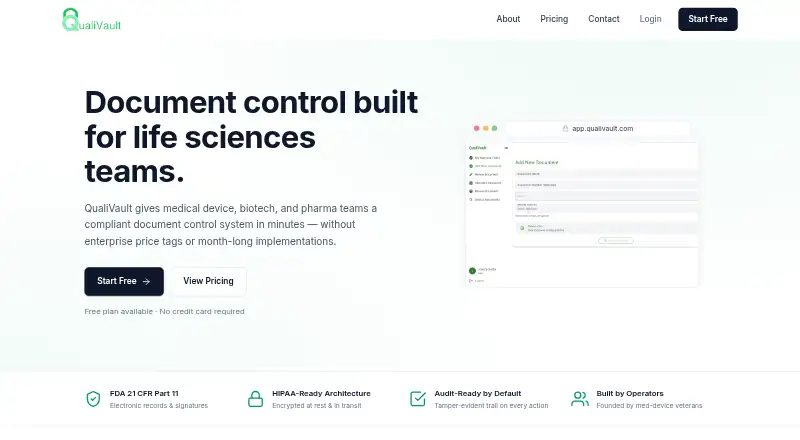
What QualiVault is
QualiVault is a web-based document control service for medical device, biotech, and pharmaceutical teams. It manages document versions, review cycles, and effective dates, with role-based permissions for authors, reviewers, approvers, and observers. Automated notifications cover approvals, periodic reviews, and training. One-click compliance reports assemble packets for FDA inspections and ISO audits. QualiVault states that it supports electronic records and signatures compliant with 21 CFR Part 11, including verified user identities and tamper-evident audit trails. The maker also says documents are encrypted at rest and in transit, actions are recorded in an immutable audit trail, and its infrastructure uses isolated tenancy. It says it can integrate with customers’ document sources and identity providers, build specific integrations during standard onboarding, and provide migration that preserves document structure. The service has a perpetual free tier and monthly paid plans: Basic is $9.99, Plus is $29.99, and Pro is $49.99. The free tier has a two-seat cap and 50 KB of storage; higher tiers provide additional storage and, on Plus and Pro, more included seats. Enterprise pricing is by contact.
Who it suits
QualiVault suits life sciences teams that need controlled document versions, reviews, approvals, and electronic signatures. It may fit medical device, biotech, and pharma organizations preparing compliance reports or managing staff training notifications.
What it does well
- Tracks versions, review cycles, and effective dates.
- Automates approval, periodic review, and training notifications.
- Provides role-based permissions for four document roles.
- Creates one-click packets for FDA inspections and ISO audits.
- Offers migration that preserves document structure.
What to know first
- Free is capped at two seats and 50 KB of storage.
- Basic is capped at two seats and 5 GB of storage.
- Plus and Pro charge $6.99 monthly for each additional seat.
- Enterprise pricing requires contacting the company.
Limits
Free has a hard cap of two seats and 50 KB of document storage. Basic has two seats and 5 GB; Plus includes three seats and 25 GB, while Pro includes five seats and 100 GB. Plus and Pro list an additional-seat charge of $6.99 per month.
Plans
| Plan | Billed and limits | Price |
|---|---|---|
| Free | Perpetual free tier · No credit card · 2 seats hard cap · 50 KB document storage · document control · audit trail · basic reporting · 21 CFR Part 11 | Free |
| Plus | Billed monthly · $6.99 per additional seat · 3 seats included · 25 GB storage · role-based access · advanced reporting · compliance reports · email notifications · phone support | $29.99 a month |
| Pro | Billed monthly · $6.99 per additional seat · 5 seats included · 100 GB storage · advanced analytics · training management · supplier management · priority support · dedicated account manager | $49.99 a month |
| Basic | Billed monthly · Cancel anytime · 2 seats hard cap · 5 GB storage · Free features · email support | $9.99 a month |
| Enterprise | Contact for Enterprise pricing · Over 50 seats · dedicated tenancy · custom DPAs · invoiced annual billing | On request |
As qualivault.com lists them, read 14 Oct 2026. The maker's own page has the final word.
Getting started
- Open the QualiVault website.
- Start with the perpetual free tier or choose a monthly paid plan.
- Use the web service to manage documents and assign role-based permissions.
- Connect document sources or identity providers; specific integrations can be built during standard onboarding.
- Arrange migration with QualiVault if you need to move existing documents.
QualiVault is a web-based document-control system for medical device, biotech, and pharma teams. It is strongest for groups that need formal document review, sign-off, and auditability rather than general file storage. Its specialized controls come with a web-only platform and tight entry-plan limits.
Overview
QualiVault brings revision history, review cycles, effective-dating, approval workflows, electronic signatures, and role-based permissions into one document process. That makes it relevant when teams must manage changing controlled documents and distinguish authors, reviewers, approvers, and observers. The maker says it supports 21 CFR Part 11 compliant electronic records and signatures, with verified user identities and tamper-evident audit trails; it also describes encryption at rest and in transit, immutable action records, and isolated tenancy. These are meaningful controls for regulated work, not a substitute for assessing an organization’s own compliance requirements.
Automated notifications cover approvals, periodic reviews, and training, while one-click compliance reports produce inspection-ready packets for FDA inspections and ISO audits. The reporting focus is useful for teams preparing evidence, although QualiVault’s stated scope remains document control rather than a broad quality-management suite.
Key features
- Controlled document lifecycle: Versioning, review cycles, and effective dates help teams keep changes and document status within a defined process.
- Approvals and signatures: Workflow notifications and electronic signatures support formal review and sign-off, with identity verification and audit trails adding traceability.
- Permissions and reporting: Role-based access separates document responsibilities, and compliance reports assemble records into inspection-oriented packets.
- Connections and migration: QualiVault says it can integrate with customers’ document sources and identity providers, with specific integrations built during standard onboarding.
The founders say they previously built and shipped an FDA-regulated medical device, which gives the product’s life-sciences focus some relevant context. That background does not change the need for buyers to assess fit against their own processes.
Pricing
The Free tier costs nothing, is perpetual, requires no credit card, and includes two seats with a hard cap and 50 KB of storage. It offers a way to start without a recurring bill, but 50 KB makes it a narrow evaluation or minimal-use option, not a workable repository for most active document programs. Free support is community-based.
Basic costs $9.99 a month, billed monthly with cancellation anytime. It keeps the two-seat hard cap but raises storage to 5 GB and includes email support. This is the lowest paid step for a very small team needing usable storage, but it does not expand the number of users beyond Free.
Plus costs $29.99 a month, billed monthly, and includes three seats and 25 GB of storage; additional seats cost $6.99 each. Phone support is included. It fits a small group that needs more room and a modestly larger review circle, though each added user raises the monthly cost.
Pro costs $49.99 a month, billed monthly, with five seats, 100 GB of storage, and priority support with an account manager. Additional seats cost $6.99 each. This is the more capable published tier for a small team that values higher capacity and escalated support, but it remains limited to five included seats.
Enterprise has custom pricing for teams over 50 seats or organizations needing dedicated tenancy, custom DPAs, or invoiced annual billing. The gap between five included Pro seats and the stated Enterprise threshold makes expansion terms worth clarifying for teams that outgrow the smaller tiers.
There is no free trial. Buyers therefore have a perpetual free tier for initial use, but its tiny storage allowance sharply limits what it can demonstrate with real document sets.
Platforms
QualiVault runs on the web. Teams requiring a native mobile app, self-hosted deployment, or an API platform should consider whether a web-only service meets their operating needs.
Who it's for
QualiVault is aimed at life-sciences organizations, especially medical device, biotech, and pharmaceutical teams that manage controlled documents and need review, signature, and audit records. It is a more natural choice for a small team with a defined document-control need than for a large organization seeking a wide quality-management platform. The Free and Basic tiers are constrained to two seats, while Plus and Pro provide only three and five included seats respectively.
Pros and cons
Pros
- Combines version control, review workflows, effective dating, electronic signatures, and role-based access for regulated document processes.
- Automated reminders and one-click compliance packets address recurring reviews and inspection preparation.
- Published monthly tiers have clear storage and seat allowances, with additional seats priced on Plus and Pro.
- Migration support and onboarding-built integrations may help teams transition existing documents and systems.
Cons
- Free storage is only 50 KB, making the no-cost tier too restricted for a substantive document library.
- Free and Basic stop at two seats, and even Pro includes only five, which can constrain multi-function review teams.
- There is no free trial, so evaluating larger real-world workflows depends on accepting the free tier’s storage cap or moving to a paid plan.
- The platform is web-only, and Enterprise pricing is custom rather than published.
Alternatives
Compare document control software if you want to survey the category before choosing a specific product.
- GatesFlow QMS is worth considering for teams that want a free tier with generous usage limits for individuals or small teams, or a starting paid plan at $20 a month with more storage and programs; it also offers a free trial and API access.
- Ketryx may suit a startup or scaling company looking for a free option tied to having raised less than $2 million, with a separate startup tier for organizations under 200 people.
- Qualsys EQMS is an alternative if Android or iOS access matters alongside web use.
- AssurX Document Management may be a better fit if self-hosting or mobile platforms matter; it uses custom-quote pricing and has no free trial.
- ComplianceQuest is another paid option with Android, iOS, API, and web platforms and customized pricing.
- IQVIA SmartSolve Complaint Management is a paid alternative with mobile and web platforms and pricing available by contacting sales.
- MasterControl Document Control may suit buyers seeking named-user licensing and packages tailored to their needs; it is paid and priced to customer requirements.
Verdict
Choose QualiVault when a life-sciences team needs document versioning, controlled review, signatures, and traceable compliance reporting in a focused web service. Its combination of lifecycle controls and migration support is the central case for it. Look elsewhere if your team needs mobile or self-hosted access, a meaningful no-cost storage allowance, or a clearly priced path well beyond five seats.
Verdict
Choose QualiVault if your life sciences team needs document control with review workflows, electronic signatures, and compliance reporting. The free tier is limited to two seats and 50 KB, while larger teams may need a paid plan or Enterprise pricing.
Questions
Is QualiVault free?
Yes. Its perpetual Free tier costs 0.00 USD and does not require a credit card. It is capped at two seats and 50 KB of document storage.
How much do the paid plans cost?
Basic costs $9.99 a month, Plus costs $29.99 a month, and Pro costs $49.99 a month. Enterprise pricing is by contact.
What platforms does QualiVault support?
QualiVault is available on the web.
Does QualiVault support electronic signatures and audit trails?
Yes. The listed capabilities include electronic signatures and an audit trail. The company states that it supports 21 CFR Part 11 compliant electronic records and signatures, verified identities, and tamper-evident audit trails.
Can QualiVault integrate with existing systems?
QualiVault says it integrates with customers’ document sources and identity providers. It says specific integrations can be built during standard onboarding.
Who makes QualiVault?
The founders say they previously built and shipped an FDA-regulated medical device.
Facts from QualiVault's own pages
- Access controls
- Role-based permissions are available for authors, reviewers, approvers, and observers. · qualivault.com, 5 Oct 2026
- API and SDK availability
- The official pages opened describe integrations but provide no public API reference, SDK download or developer portal. · qualivault.com, 14 Oct 2026
- Approval workflow
- Controlled documents can move through author, reviewer, approver and observer roles. · qualivault.com, 14 Oct 2026
- Audit trail
- Every action is recorded in a signed, tamper-evident audit trail. · qualivault.com, 14 Oct 2026
- Company background
- The founders say they previously built and shipped an FDA-regulated medical device. · qualivault.com, 5 Oct 2026
- Company legal name
- The website footer identifies the business as QualiVault LLC. · qualivault.com, 14 Oct 2026
- Compliance
- The product states that it supports 21 CFR Part 11 compliant electronic records and signatures, with tamper-evident audit trails and verified user identities. · qualivault.com, 5 Oct 2026
- Compliance positioning
- QualiVault markets every plan, including Free, as 21 CFR Part 11 compliant and describes its architecture as HIPAA-ready and ISO 13485 friendly. · qualivault.com, 14 Oct 2026
- Documentation depth
- The official site contains marketing pages, pricing FAQs and contact support but no linked technical documentation or help center was shown. · qualivault.com, 14 Oct 2026
- Document control
- The system provides document versioning, review cycles and effective dates. · qualivault.com, 14 Oct 2026
- Electronic signatures
- Electronic approvals are presented as compliant with FDA 21 CFR Part 11 and require no plug-in. · qualivault.com, 14 Oct 2026
- Founder background
- The About page says the founders previously built and shipped an FDA-regulated medical device. · qualivault.com, 14 Oct 2026
- Free-tier behavior
- The Free tier is permanent, has no trial countdown or automatic upgrade, and keeps data accessible after cancellation within its limits. · qualivault.com, 14 Oct 2026
- Getting started
- The company says teams commonly upload their first controlled document within an hour of signup. · qualivault.com, 14 Oct 2026
- Headquarters and founding year
- The About page does not state a headquarters or founding year. · qualivault.com, 5 Oct 2026
- Independent-review coverage
- The opened G2, TrustRadius, Gartner and Capterra directory pages do not show a QualiVault product profile, so repeated independent praise or complaints could not be verified there. · trustradius.com, 14 Oct 2026
- Integrations
- QualiVault says it connects to customer document sources and identity providers and can build requested integrations during onboarding. · qualivault.com, 14 Oct 2026
- Licence
- The official pages opened do not state an open-source licence or publish source code. · qualivault.com, 14 Oct 2026
- Limit: enterprise pricing
- Organizations needing more than 50 seats, dedicated tenancy or custom DPAs must request Enterprise pricing. · qualivault.com, 14 Oct 2026
- Limit: entry seats
- Free and Basic accounts cannot exceed two seats without moving to Plus or Pro. · qualivault.com, 14 Oct 2026
- Limit: entry storage
- The Free plan allows only 50 KB of document storage, while Basic allows 5 GB. · qualivault.com, 14 Oct 2026
- Limit: feature gating
- Role-based access and one-click compliance reports begin at Plus, while training and supplier management begin at Pro. · qualivault.com, 14 Oct 2026
- Migration
- The maker says it performs hands-on migration while retaining legacy document structure. · qualivault.com, 14 Oct 2026
- News
- No dated QualiVault press release or launch announcement was found in the opened web results; the site itself is copyright-marked 2026. · qualivault.com, 14 Oct 2026
Where QualiVault stands on Freedom251
- Document Control Software#4 of 26