Freedom251 › Time Clock Software

Punchly
What Punchly is
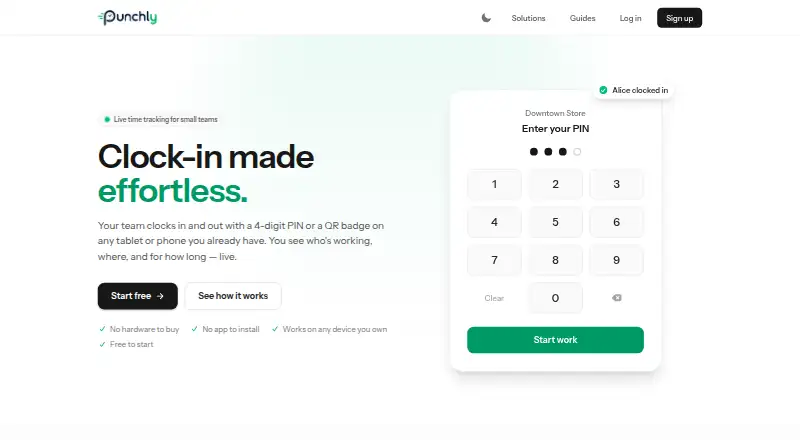
Punchly is a staff time-recording service for businesses that need to view current activity and produce worked-hours reports. Staff can clock in or out with a four-digit PIN or QR badge using a browser-based device. Each workplace has a private kiosk link that can be opened on a tablet or phone, without installing an app. A live dashboard shows who is working, their location, and how long they have been on shift. Reports give timezone-correct totals by employee and location for a day, week, month, or custom range. Businesses can manage multiple workplaces, each with its own kiosk and on-shift team. Punches from an unexpected network are flagged to help identify off-site or buddy clock-ins. Clock-in photos are optional and visible only to the owning company. Punchly says it uses encryption in transit, hashed passwords, and access controls that limit company data to its owner. It is free during early access, though paid plans and billing terms may be introduced with notice. The service warns that features may change or interruptions may occur, and advises keeping independent backups of required time or payroll records.
Who it suits
Punchly is intended for in-person teams such as cafes, shops, and salons. It may suit businesses that need shift visibility and worked-hours totals across multiple locations.
What it does well
- Kiosk links work on a tablet or phone without an app.
- Dashboard shows staff location and time on shift.
- Reports cover custom ranges and multiple locations.
- Optional clock-in photos are visible only to the owning company.
What to know first
- The service is in early access and may be interrupted.
- Features may change during early access.
- Paid plans and billing terms may be introduced.
Limits
The Early access plan is free during early access. Features may change and interruptions may occur; paid plans and billing terms may be introduced with notice.
Plans
| Plan | Billed and limits | Price |
|---|---|---|
| Early access | Free during early access; paid plans and billing terms may be introduced with notice | Free |
As punchly.co.uk lists them, read 9 Oct 2026. The maker's own page has the final word.
Getting started
- Visit the Punchly website.
- Open the private kiosk link for a workplace on a browser-based device, such as a tablet or phone.
- Have staff clock in or out with a four-digit PIN or QR badge.
- Use the live dashboard to view current shifts and locations.
- Generate worked-hours reports for a day, week, month or custom range.
Punchly is a browser-based attendance system for businesses whose staff work at physical sites. It is most suitable for cafes, shops, salons and similar employers that can provide a shared kiosk for clock-ins. The main appeal is a free way to combine on-site punches, live shift visibility and timezone-aware reporting, while its early-access status demands a cautious approach to records and continuity.
Overview
Punchly organizes timekeeping around a private browser kiosk for each workplace. Employees identify themselves with a four-digit PIN or QR badge, and managers can see current attendance across one or more sites. That model removes the need for every employee to install an app, but it assumes people begin and end work where the kiosk is located. Although Android and iOS are supported platforms, mobile clock-in is not offered, so a phone cannot be used to record a remote or off-site punch.
Key features
Kiosk clock-ins
Every workplace receives its own private kiosk link, usable on a tablet or phone browser. PIN and QR-badge options provide a straightforward shared-device workflow, and no app is required on the kiosk. This suits fixed-location teams with a clear clock-in point. It is a poor match for mobile workers, field staff or anyone who must clock in away from the premises.
Live shifts and multiple locations
The live dashboard shows who is working, their location and elapsed shift time. Separate kiosks and on-shift teams can be assigned to multiple workplaces, giving an owner a consolidated view without blending sites together. Punches from an unexpected network are flagged, which can draw attention to off-site or buddy clock-ins. The flag is an investigation cue rather than proof of misconduct, so it should complement an attendance policy rather than replace one.
Reports, photos and controls
Worked-hours reports calculate timezone-correct totals by employee and location for daily, weekly, monthly or custom periods. That range is useful for payroll preparation across sites and time zones. Optional clock-in photos are visible only to the owning company, allowing an employer to add a visual check without exposing images to other users. Punchly says data in transit is encrypted, passwords are hashed and access controls scope company data to its owner.
When an account closes, personal data is deleted or anonymised within 12 months unless a longer legal retention period applies. Because the product is early access, features may change and interruptions may occur; teams with payroll or compliance obligations should maintain independent copies of required records.
Pricing
The Early access plan costs free. It is free during early access, with paid plans and billing terms potentially introduced with notice. The plan includes the browser kiosk workflow, live dashboard, multi-location support, fraud flags, optional private clock-in photos and attendance reports. There is no published seat quota or trial period to manage, but the absence of guaranteed long-term pricing matters to businesses planning a fixed budget. This plan is a sensible starting point for small in-person teams that can tolerate an evolving service; organizations needing contractual pricing or guaranteed continuity should be more cautious.
Platforms
Punchly is available on Android, iOS and the web. The kiosk runs in a browser on a tablet or phone, and mobile clock-in is not available. In practice, the platform list describes where the service can be accessed, not a mobile punch option for employees.
Who it's for
Punchly fits owners and managers of cafes, shops, salons and other in-person operations with one or several workplaces. It is especially relevant when a shared tablet or phone can remain at each entrance and managers need a current view of attendance. Remote, traveling or distributed teams should look elsewhere because punches must be made through the kiosk process. Employers relying on legally significant payroll evidence also need their own backups and a contingency plan for early-access interruptions.
Pros and cons
- Pro: Shared browser kiosks avoid requiring staff to install an app and keep clock-ins tied to a workplace.
- Pro: Live visibility includes worker, location and time-on-shift information across multiple sites.
- Pro: Timezone-correct reports can be filtered by employee, location and useful date ranges.
- Pro: Unexpected-network flags and optional company-only photos add practical attendance checks.
- Con: No mobile clock-in means staff cannot punch from outside the kiosk location.
- Con: Early-access changes and possible interruptions make independent records necessary.
- Con: Future paid plans and billing terms may be introduced, reducing long-term price certainty.
- Con: Network flags identify anomalies but do not by themselves establish that a punch was fraudulent.
Alternatives
For a broader comparison, see Time Clock Software.
Choose ClockIt instead if you need a free-for-life plan with unlimited users and a wider platform set, including mobile, web, kiosk, desktop, Slack and Teams options. Fareclock is the better direction for teams wanting paid plans with GPS time tracking and shift scheduling, including a Pro rate of $1.65 a month plus its base charge. Jibble suits organizations seeking a forever-free unlimited-user tier with geofences and a work schedule. Pick PunchFlow when a small team needs a clearly capped free plan of up to two employees and one kiosk with CSV export. ClockOut is preferable for up to two people who need GPS punches, basic scheduling, pay estimates and CSV export. TimeClock Wizard offers unlimited users on its free tier and a separate annual Pro structure. PunchClock Pro is worth considering for a web-only setup capped at one company, one site and 10 employees on its free plan. Aladtec is an option for buyers prepared to request a demo for custom pricing.
Verdict
Choose Punchly if you run fixed-location teams and want a no-cost, browser-based kiosk with live multi-site visibility and timezone-correct attendance reports. Its shared-device design is the strongest reason to adopt it. Look elsewhere if employees need mobile or remote clock-ins, if you require established pricing and continuity, or if payroll records cannot depend on an early-access service without independent backups.
Verdict
Punchly combines browser-based clock-ins with live shift visibility and timezone-correct reports. Its early-access status makes independent records important for required time or payroll data.
Questions
How much does Punchly cost?
The Early access plan costs nothing during early access. Paid plans and billing terms may be introduced with notice.
Which platforms does Punchly support?
Punchly is listed for Android, iOS and web. Staff clock in or out through a browser-based device; mobile clock-in is unavailable.
Do staff need to install an app to clock in?
No. A workplace kiosk link can be opened on a tablet or phone in a browser, and no app is required.
What reports can Punchly produce?
Reports show timezone-correct worked-hours totals by employee and location for a day, week, month or custom range.
Who operates Punchly?
Punchly is operated by Viktoras Chorunas, a sole trader rather than a registered company.
Is Punchly in early access?
Yes. The service is free during early access, and features may change or interruptions may occur.
Facts from Punchly's own pages
- Clock-in methods
- Staff can clock in or out with a four-digit PIN or a QR badge on a browser-based device. · punchly.co.uk, 9 Oct 2026
- Clock-in photos
- Clock-in photos are optional and viewable only by the owning company. · punchly.co.uk, 9 Oct 2026
- Data retention
- After an account closes, Punchly says it deletes or anonymises personal data within 12 months unless law requires longer retention. · punchly.co.uk, 9 Oct 2026
- Early-access limitation
- The service is early access, features may change and interruptions may occur; the terms advise keeping independent backups of required time or payroll records. · punchly.co.uk, 9 Oct 2026
- Fraud flags
- Punches from an unexpected network are flagged to help identify off-site or buddy clock-ins. · punchly.co.uk, 9 Oct 2026
- Intended users
- Punchly describes itself as purpose-built for cafes, shops, salons and other in-person teams. · punchly.co.uk, 9 Oct 2026
- Kiosk setup
- Each workplace gets a private kiosk link that can be opened on a tablet or phone; no app is required. · punchly.co.uk, 9 Oct 2026
- Live dashboard
- The dashboard shows who is working, their location and how long they have been on shift. · punchly.co.uk, 9 Oct 2026
- Locations
- Punchly supports multiple workplaces, each with its own kiosk and team on shift. · punchly.co.uk, 9 Oct 2026
- Maker
- Punchly is an independent early-access project operated by Viktoras Chorunas, a sole trader rather than a registered company. · punchly.co.uk, 9 Oct 2026
- Purpose
- Punchly lets businesses record staff working time, view live activity and produce worked-hours reports. · punchly.co.uk, 9 Oct 2026
- Reports
- Worked-hours reports provide timezone-correct totals by employee and location for a day, week, month or custom range. · punchly.co.uk, 9 Oct 2026
- Security
- Punchly says it uses encryption in transit, hashed passwords and access controls that scope company data to its owner. · punchly.co.uk, 9 Oct 2026
Where Punchly stands on Freedom251
- Time Clock Software#5 of 28