Freedom251 › Time Clock Software

ClockIt
What ClockIt is
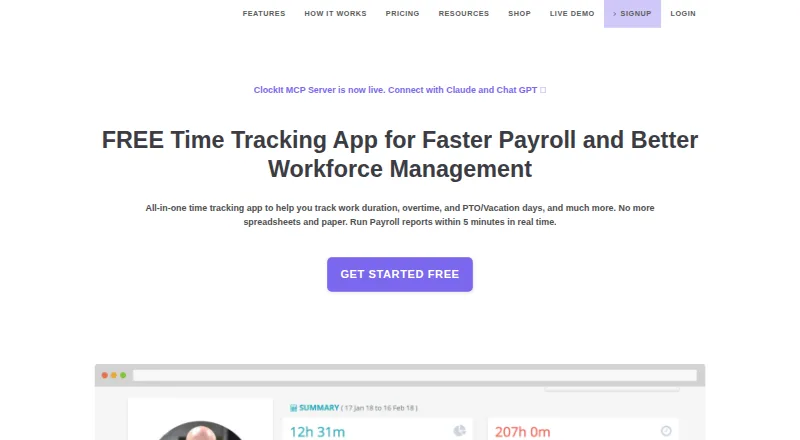
ClockIt is a business time clock and productivity tool for time tracking, scheduling, task management, payroll reporting and attendance. Employees can clock in and out through mobile, web, Slack, Microsoft Teams, Google Chat, kiosk, desktop or biometric methods, with attendance data synced in real time. Managers can configure job-site geofences and location capture to limit where clock-ins or outs are accepted. ClockIt supports custom shifts and schedules, notifications, PTO accruals, leave requests and approval flows. Project and task tracking records billable hours, projects and job codes for reporting and client billing. Reports cover work duration, overtime and PTO, with CSV and Excel export. The desktop app for Mac, Windows and Linux can track project and task hours and take periodic screenshots. ClockIt is available on Android, iOS, Linux, macOS, web and Windows, as well as through an API. The free plan includes unlimited users and basic time tracking. Paid plans start at $2.99/user/mo. ClockIt runs on its own servers and does not support on-site installation on a customer's infrastructure.
Who it suits
ClockIt suits businesses tracking attendance, schedules, leave and project hours, including teams that need mobile or biometric clock-ins. The maker also describes its desktop time tracking for freelancers, remote teams and project managers.
What it does well
- Free plan supports unlimited users
- Multiple clock-in methods include mobile and biometrics
- Geofences can limit clock-in locations
- Payroll reports export to CSV and Excel
What to know first
- Does not support on-site installation
- Organizations over 100 users must contact support for special pricing
Limits
The free plan provides basic time tracking and attendance dashboards. PTO, schedules, notifications, project and task tracking, payroll reports, geofencing, location capture and API access are included in the paid plans. Organizations with more than 100 users are directed to contact support for special pricing plans with dedicated support.
Plans
| Plan | Billed and limits | Price |
|---|---|---|
| FREE | FREE for Life · Unlimited Users · Basic Time Tracking · Mobile, Web, Kiosk, Slack, Teams, Desktop and Biometrics · Basic real time attendance dashboards · Online Support | Free |
| Monthly | USD/user/mo · Everything from Free · PTO and vacation tracking · Corrections and manual time · Schedules and shifts · Notifications · Projects and task tracking · Payroll reports · Route planning · IP restrictions, geofencing and location capture · API access · Priority Support | $2.99 a month |
| Annually | USD/user/year · Everything from Free · PTO and vacation tracking · Corrections and manual time · Schedules and shifts · Notifications · Projects and task tracking · Payroll reports · Route planning · IP restrictions, geofencing and location capture · API access · Priority Support | $29.90 a year |
As clockit.io lists them, read 28 Sept 2026. The maker's own page has the final word.
Getting started
- Open https://clockit.io/.
- Choose the free plan or a paid plan; the site also offers a 14-day trial.
- Use ClockIt on Android, iOS, Linux, macOS, Windows or the web.
- Set up employee clock-ins through supported options such as mobile, kiosk, desktop, Slack, Teams or biometrics.
Overview
ClockIt is a business time clock and productivity platform that brings attendance, schedules, leave and project hours into one service. It suits employers coordinating different kinds of work and clock-in routines. Its unlimited-user free plan is a strong starting point, but scheduling, PTO and reporting tools sit behind a per-user paid plan.
Attendance records sync in real time across clock-in methods, giving managers a shared view without requiring every employee to use the same device. ClockIt runs on its own servers and does not support installation on a customer’s infrastructure, so it is not a fit for organizations that require on-premises hosting.
For more options in the category, see our Time Clock Software list.
Key features
Flexible attendance collection
Employees can clock in and out through mobile apps, the web, kiosks, desktop software, Slack, Microsoft Teams, Google Chat or biometric devices. That range can accommodate workplaces with a mix of office, field and shared-device routines. The free plan includes basic time tracking through these channels, while paid plans add corrections and manual time entry for teams that need to adjust records.
Location controls, schedules and leave
Paid plans include geofencing, location capture and IP restrictions, allowing managers to restrict clock-ins or clock-outs to configured job sites or network conditions. These controls can help field teams, though they may be excessive for employers who do not need location-based attendance rules. Custom shifts, notifications and work and break durations support scheduling; PTO tools cover accruals, holidays, employee requests and approvals.
Project hours and payroll reporting
Project and task tracking records billable hours, projects and job codes for reporting and client billing. Payroll reports combine work duration, overtime and PTO data and can be exported to CSV or Excel. That makes ClockIt more useful than a basic clock for businesses connecting time records to payroll or project accounting, although the reports are not a substitute for a payroll system.
Desktop monitoring and integrations
ClockIt’s desktop app for Mac, Windows and Linux can track project and task hours and capture periodic screenshots. Screenshot capture may suit teams that need project oversight, but it is a meaningful monitoring trade-off for employees. Clocking is described for Slack, Microsoft Teams and Google Chat; the integrations page also lists QuickBooks, Xero, ADP, Asana and Paychex, with several marked Coming Soon.
ClockIt says sensitive and credit information is encrypted using SSL and personal information is held behind secured networks with limited access. Free users receive online support; paid users receive priority support, with a help site and scheduled calls also offered.
Pricing
The FREE plan costs free, billed FREE for Life, and allows unlimited users. It includes basic time tracking, mobile, web, kiosk, Slack, Teams, desktop and biometric clocking, basic real-time attendance dashboards and online support. The unlimited seats make it a practical way to cover a whole workforce, but it omits the paid plan’s PTO, schedules, projects, payroll reports and location controls.
Monthly costs $2.99 a month, billed USD/user/mo. It adds PTO and vacation tracking, corrections and manual time, schedules and shifts, notifications, projects and tasks, payroll reports, route planning, IP restrictions, geofencing, location capture, API access and priority support. This is the direct upgrade for teams that need workforce planning and reporting, though per-user billing makes the free plan more attractive for organizations that only need basic attendance.
Annually costs $29.90 a year, billed USD/user/year, and includes the same paid features as Monthly. The annual rate is lower than paying the monthly rate for twelve months, in exchange for annual billing. A 14-day trial is offered. Organizations with more than 100 users are directed to contact support for special pricing plans with dedicated support.
Platforms
ClockIt supports Android, iOS, Linux, macOS, web and Windows, and provides an API. The broad platform coverage and chat-based clocking options give teams several ways to fit time capture into their existing routines.
Who it's for
ClockIt is best for employers that want attendance tracking alongside shifts, PTO and project hours, especially when staff use different devices or work at multiple job sites. Freelancers, remote teams and project managers may also find its desktop project tracking useful. It is less suitable for organizations that need self-hosting, or for those seeking only a basic clock and unwilling to pay per user for scheduling and reporting.
Pros and cons
- Unlimited users on the free plan: basic time tracking can cover a workforce without a seat cap.
- Many clock-in methods: mobile, web, kiosk, desktop, chat and biometric options accommodate varied attendance routines.
- Paid tools span attendance through reporting: PTO, shifts, project hours, payroll exports and location controls can sit alongside timekeeping.
- Per-user paid pricing: access to scheduling, PTO and reports costs more as the workforce grows.
- No customer-hosted installation: organizations requiring on-premises deployment need another product.
- Screenshot capture is available: it can add project oversight, but teams should weigh that monitoring against employee expectations.
Alternatives
- Jibble is another freemium time clock option, with a free plan that includes two geofences and one work schedule.
- PunchFlow may suit a very small team: its free plan covers up to two employees and one kiosk, with core time clocking and basic reports.
- ClockOut is worth comparing for a small group, since its free plan covers up to two people and includes GPS punches, basic scheduling, pay estimates and CSV export.
- TimeClock Wizard is another freemium option for web, iOS and Android.
- PunchClock Pro is a freemium option available on the web.
- Punchly is a free web-based option.
- Aladtec uses paid pricing provided through a demo request rather than a public price.
- OnTheClock is a paid alternative with a free trial and a plan at $4 a month, billed $4/employee/month plus a $5 base fee per month after a free 30-day trial.
Verdict
Choose ClockIt if your team needs more than a clock: its unlimited-user free plan handles basic attendance, and paid tiers add the schedules, PTO, project tracking and payroll reporting that connect timekeeping to daily operations. Look elsewhere if self-hosting is essential or if per-user charges for those broader tools do not fit your budget.
Verdict
ClockIt combines attendance tracking with scheduling, PTO, project hours and payroll reporting. The free plan covers basic tracking for unlimited users, while paid plans start at $2.99/user/mo.
Questions
Is ClockIt free?
Yes. Its FREE plan is listed as free for life and supports unlimited users with basic time tracking.
How much do paid plans cost?
The monthly plan is $2.99 per user per month. The annual plan is $29.90 per user per year. A 14-day trial is also offered.
Which platforms does ClockIt support?
ClockIt lists Android, iOS, Linux, macOS, web and Windows, along with API access.
Which tools can employees use to clock in?
Clock-ins are supported through mobile, web, kiosk, desktop, Slack, Microsoft Teams, Google Chat and biometric devices.
Does ClockIt integrate with accounting or project tools?
Its integrations page lists QuickBooks, Xero, ADP, Asana and Paychex, with several marked Coming Soon. It also describes clocking in through Slack, Microsoft Teams and Google Chat.
Can ClockIt be installed on a company’s own servers?
No. ClockIt says it runs only on its own servers and does not support on-site installation on a customer’s infrastructure.
Facts from ClockIt's own pages
- Attendance
- Employees can clock in and out through mobile, web, Slack, Teams, kiosk, desktop or biometric methods, with data synced in real time. · clockit.io, 28 Sept 2026
- Audience
- ClockIt describes its desktop time tracking as suitable for freelancers, remote teams and project managers. · clockit.io, 28 Sept 2026
- Desktop monitoring
- The desktop app for Mac, Windows and Linux can track project and task hours and capture periodic screenshots. · clockit.io, 28 Sept 2026
- Founded
- 2016 · clockit.io, 28 Sept 2026
- Hosting
- ClockIt says it runs only on its own servers and does not support on-site installation on a customer’s infrastructure. · clockit.io, 28 Sept 2026
- Integrations
- The integrations page describes clocking in and out through Slack, Microsoft Teams and Google Chat, and lists QuickBooks, Xero, ADP, Asana and Paychex, several marked Coming Soon. · clockit.io, 28 Sept 2026
- Location controls
- Managers can configure job-site geofences and location capture to restrict where employees clock in or out. · clockit.io, 28 Sept 2026
- Payroll reports
- ClockIt reports provide work duration, overtime and PTO data with one-click CSV and Excel export. · clockit.io, 28 Sept 2026
- Plan limits
- The pricing page directs organizations with more than 100 users to contact support for special pricing plans with dedicated support. · clockit.io, 28 Sept 2026
- Product
- ClockIt is a time clock and productivity tool for business time tracking, scheduling, task management, payroll and reporting. · clockit.io, 28 Sept 2026
- Project tracking
- Project and task tracking supports billable hours, tasks, projects and job codes for reporting and client billing. · clockit.io, 28 Sept 2026
- PTO
- PTO features include accruals, holiday and leave tracking, employee leave requests and approval flows. · clockit.io, 28 Sept 2026
- Scheduling
- ClockIt supports custom employee shifts and schedules, with shift notifications and work and break durations. · clockit.io, 28 Sept 2026
- Security and privacy
- ClockIt’s privacy policy says sensitive and credit information is encrypted using SSL and personal information is held behind secured networks with limited access. · clockit.io, 28 Sept 2026
- Support
- The site offers online support on its free plan and priority support on its paid plans, and links to a help site and scheduled calls. · clockit.io, 28 Sept 2026
Where ClockIt stands on Freedom251
- Time Clock Software#1 of 28