Freedom251 › Time Clock Software
ClockOut
What ClockOut is
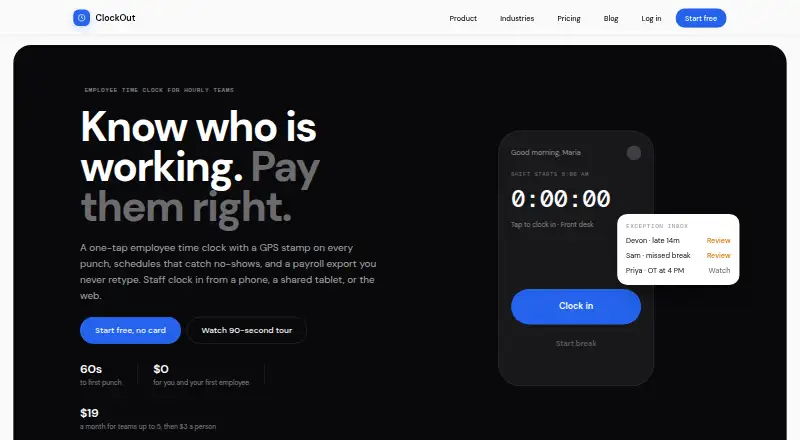
ClockOut is a GPS time clock, scheduling, and payroll-preparation tool for hourly and shift-based teams. Employees can clock in and out through a phone app, browser, or shared-tablet kiosk using a PIN or QR badge; each punch records time and GPS location. Scheduling includes recurring shifts, open shifts, swaps, and confirmations. An exception inbox gathers missed clock-outs, late arrivals, skipped breaks, and overtime alerts. Starter adds PTO balances and accrual, request and approval workflows, and kiosk mode. Pro produces payroll-formatted CSV files for ADP, Gusto, and QuickBooks, but those files need to be downloaded and imported manually. Clock-in and clock-out punches can be saved without a connection and synced with their original tap time later; breaks require a connection. ClockOut says it records location at punches, discards optional boundary checks made during a shift, and does not track location off the clock. The free plan costs nothing for up to two people. Starter is $19 a month and Pro is $39 a month; each paid plan includes five people, with additional-person charges listed.
Who it suits
ClockOut is aimed at hourly and shift-based teams, including businesses in restaurants, healthcare, construction, cleaning, and home care. The free plan suits a team of up to two people; larger teams can consider paid plans.
What it does well
- Phone, browser, and shared-tablet clock-in options.
- Scheduling supports swaps, open shifts, and recurring shifts.
- Offline punches sync with their original tap time.
- Starter includes PTO requests, balances, and approvals.
- Pro exports payroll-formatted CSVs for three named systems.
What to know first
- Break tracking requires an internet connection.
- Payroll CSVs require manual download and import.
- Starter costs $19 a month.
- Pro costs $39 a month.
Limits
The free plan is limited to two people. Starter costs $19 a month and includes five people, then charges $3 per extra person per month; Pro costs $39 a month and includes five people, then charges $6 per extra person per month. Breaks require a connection, and Pro payroll files must be downloaded and imported manually.
Plans
| Plan | Billed and limits | Price |
|---|---|---|
| Free | $0 forever · Up to 2 people, including you · GPS punches · Basic scheduling · Pay estimates · CSV export | Free |
| Starter | $19 per month; includes 5 people, then $3 per extra person per month · Unlimited employees · Geofence enforcement · Recurring schedules · PTO · Kiosk mode · Exception inbox | $19 a month |
| Pro | $39 per month; includes 5 people, then $6 per extra person per month · Unlimited employees · Multiple locations · Payroll runs · ADP, Gusto, QuickBooks export · Compliance rules · API access | $39 a month |
As useclockout.com lists them, read 2 Oct 2026. The maker's own page has the final word.
Getting started
- Visit the ClockOut website.
- Choose the free plan, Starter, or Pro.
- Use the Android, iOS, or web app to clock in, or use a shared-tablet kiosk with PIN or QR badge.
- Set up schedules and, with Starter or Pro, use kiosk mode and the exception inbox.
- Use Pro for payroll CSV exports or API access.
Overview
ClockOut combines GPS-backed time punches with shift planning and attendance review for hourly teams. It is best suited to small operators that need staff to clock in by phone, browser, or shared tablet and can manage payroll through file handoffs. Its appeal is a practical span from scheduling to payroll preparation; its key compromise is that payroll exports are not automatic.
Key features
Employees can punch in and out from a phone app, web browser, or shared tablet using a PIN or QR badge. Each punch records its time and GPS location, and geofence enforcement is included in the paid plans. ClockOut says optional boundary checks while employees are clocked in are discarded and that it does not track location off the clock. That offers a defined approach to location privacy, though teams should still weigh whether collecting location at punches suits their workforce.
Scheduling supports recurring shifts, open shifts, swaps, and confirmations. Managers also get an exception inbox for missed clock-outs, late arrivals, skipped breaks, and overtime alerts. These tools help bring routine attendance issues together, but they do not resolve exceptions or replace timesheet approval work.
Clock-in and clock-out punches can be saved offline and sync with their original tap time once a device reconnects. That is useful for teams with patchy connectivity, but breaks require a connection, so the offline support has a meaningful boundary.
Starter adds PTO balances and accruals, requests and approvals, and kiosk mode. Pro adds multiple locations, payroll runs, compliance rules, API access, and payroll-formatted CSV exports for ADP, Gusto, and QuickBooks. Those files must be downloaded and imported manually, making Pro a preparation tool rather than an automated payroll connection.
Pricing
Free costs nothing, billed $0 forever, and covers up to 2 people including the account holder. It includes GPS punches, basic scheduling, pay estimates, and CSV export, making it a low-commitment option for a very small team. The cap makes it unsuitable once more than two people need access.
Starter costs $19 a month, billed $19 per month. It includes 5 people, then charges $3 per extra person per month; the plan also describes unlimited employees. With geofence enforcement, recurring schedules, PTO, kiosk mode, and an exception inbox, it is the natural fit for teams that need ongoing shift and attendance management. Compared with Free, it adds those operating tools but raises the monthly cost as headcount grows.
Pro costs $39 a month, billed $39 per month. It includes 5 people, then charges $6 per extra person per month, while also describing unlimited employees. Multiple locations, payroll runs, exports for three named payroll services, compliance rules, and API access target teams with more complex operations. The higher per-person charge and manual export workflow are reasons to look elsewhere if automated payroll is essential.
A 14-day trial is offered. Customer support is by email at [email protected], with the site saying a human replies.
Platforms
ClockOut is available on Android, iOS, and the web, with API access included in Pro. Its phone and browser options give workers alternatives to a shared tablet; kiosk mode supports PIN or QR-badge punches on Starter and Pro.
Who it's for
ClockOut is aimed at hourly and shift-based teams, including small businesses in restaurants, healthcare, construction, cleaning, and home care. It is a good match when managers need recurring schedules, attendance exception review, and a straightforward way to prepare payroll files. Teams needing full offline break tracking or automatic payroll transfers should consider a different fit.
Pros and cons
- Pro: Scheduling, punches, and attendance exceptions sit in one workflow, reducing the need to handle those tasks as separate tools.
- Pro: Offline clock-in and clock-out punches retain their tap time, which can help when connectivity drops.
- Pro: Kiosk mode supports PIN and QR-badge punches on shared tablets, while phone and web punches provide other options.
- Con: Breaks need a connection, limiting the usefulness of offline timekeeping.
- Con: Payroll exports require manual download and import, so ClockOut does not complete the payroll handoff on its own.
- Con: Starter and Pro charge extra per person above the included five, and Pro's extra-person rate is higher.
Alternatives
Time Clock Software is the broader category guide for readers comparing time-clock options.
Consider ClockIt if you want a free plan with unlimited users or need its wider platform coverage, including Linux, macOS, and Windows. Choose Fareclock if you prefer a paid plan with a stated per-user rate and GPS tracking with shift scheduling; its Basic plan is for up to five users.
Jibble offers a free plan for unlimited users, with two geofences and one work schedule. PunchFlow has a free plan for up to two employees and one kiosk, with core time-clock tools and basic reports and CSV export.
Punchly is another option. TimeClock Wizard offers a free plan with unlimited users and basic employee time tracking. PunchClock Pro has a free plan for one company, one site, and up to ten employees, with basic PDF reports, geofencing, and kiosk included.
Aladtec is another paid alternative.
Verdict
ClockOut is a strong choice for small hourly teams that want shift scheduling, GPS punches, and attendance issues in one place, with payroll files ready for a manual handoff. Choose it if those connected workflows matter more than automated payroll or fully offline timekeeping; look elsewhere if either limitation would disrupt daily operations.
Verdict
ClockOut combines time punches, shift scheduling, attendance exceptions, and payroll preparation for hourly teams. Its offline punch support has a specific boundary: breaks still need connectivity, and payroll exports require manual handling.
Questions
Does ClockOut have a free plan?
Yes. The free plan costs nothing, billed at $0 forever, and covers up to two people, including you.
How much do the paid plans cost?
Starter is $19 a month and Pro is $39 a month. Both include five people; extra people cost $3 a month each on Starter and $6 a month each on Pro.
Is there a free trial?
Yes. ClockOut lists a 14-day trial.
Which platforms does ClockOut support?
ClockOut is listed for Android, iOS, web, and API. Clock-ins can also be made through a web browser or shared-tablet kiosk.
Can ClockOut prepare payroll exports?
Pro generates payroll-formatted CSV files for ADP, Gusto, and QuickBooks. The files must be downloaded and imported manually.
Who makes ClockOut, and how can customers contact the company?
ClockOut's website invites customers to email [email protected] and says a human replies. Its headquarters are in Houston, Texas, United States.
Facts from ClockOut's own pages
- Attendance review
- An exception inbox collects issues such as missed clock-outs, late arrivals, skipped breaks, and overtime alerts. · useclockout.com, 2 Oct 2026
- Clock-in
- Employees can clock in and out from the app, with each punch recording the time and GPS location. · useclockout.com, 2 Oct 2026
- Customer support
- The site invites customers to email [email protected] and says a human replies. · useclockout.com, 2 Oct 2026
- Headquarters
- Houston, Texas, United States · useclockout.com, 28 Sept 2026
- Intended users
- ClockOut is presented for hourly and shift-based teams, including small businesses and teams in industries such as restaurants, healthcare, construction, cleaning, and home care. · useclockout.com, 2 Oct 2026
- Kiosk
- Starter and Pro include kiosk mode for shared tablets, where employees clock in with a PIN or QR badge. · useclockout.com, 2 Oct 2026
- Location privacy
- ClockOut stores location at clock-in and clock-out; its optional boundary checks while clocked in are discarded, and it says it does not track location off the clock. · useclockout.com, 2 Oct 2026
- Offline use
- Clock-in and clock-out punches can be saved offline and sync with their original tap time when the device reconnects; breaks require a connection. · useclockout.com, 2 Oct 2026
- Payroll exports
- Pro generates payroll-formatted CSV files for ADP, Gusto, and QuickBooks; the files must be downloaded and imported manually. · useclockout.com, 2 Oct 2026
- Product
- ClockOut is a GPS time clock, scheduling, and payroll-preparation tool for hourly teams. · useclockout.com, 2 Oct 2026
- PTO
- Starter includes PTO balances and accrual, and supports PTO requests and approvals. · useclockout.com, 2 Oct 2026
- Scheduling
- The product supports recurring schedules, open shifts, shift swaps, and shift confirmations. · useclockout.com, 2 Oct 2026
Where ClockOut stands on Freedom251
- Time Clock Software#2 of 28