Freedom251 › Time Clock Software

PunchFlow
What PunchFlow is
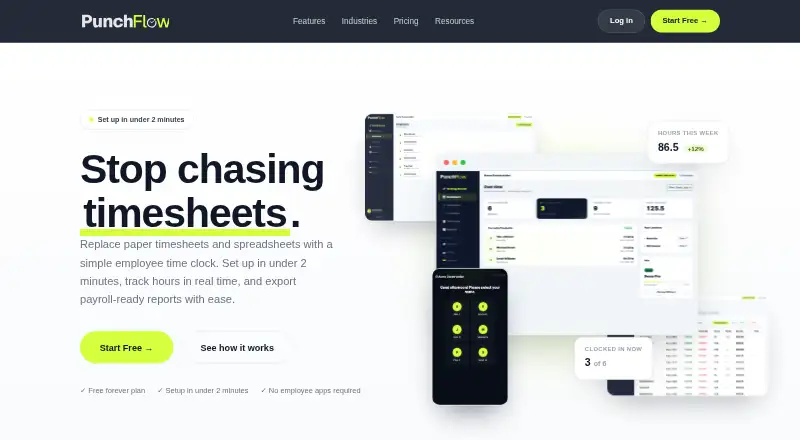
PunchFlow is a browser-based employee time clock for small businesses and shift-based teams. Staff clock in at a shared kiosk by selecting their name and entering a unique four-digit PIN; they do not need an app, login, or individual account. Managers can maintain pay rates and employee history, manage multiple kiosk locations, and view who is working on a live dashboard. Reports show hours, breaks, and estimated pay by employee and date range, with CSV and PDF exports. Xero, MYOB, QuickBooks, and compatible payroll tools are export destinations, but the workflow uses CSV export and upload rather than a native payroll API. The kiosk runs in a browser on tablets, phones, laptops, and desktops without installation. The free plan covers up to two employees and one kiosk. Paid plans start at 10 AUD/mo; Pro adds GPS and IP restrictions, an employee portal, and a full audit log.
Who it suits
It suits small businesses and shift-based teams, including cafes, retail stores, trades businesses, and small offices. It is designed for teams that can use a shared PIN kiosk rather than individual mobile clock-ins.
What it does well
- Kiosk clock-ins need no employee app or account.
- Live dashboard shows who is working.
- Reports include hours, breaks, and estimated pay.
- Daily, weekly, and monthly database backups are listed.
What to know first
- No mobile clock-in; the method is PIN kiosk.
- Payroll workflow requires CSV export and upload.
- Free plan covers up to two employees and one kiosk.
Limits
The Free plan covers up to 2 employees and 1 kiosk, with core time clock features and basic reports with CSV export. The lowest-cost paid plan, Basic, costs A$10 a month and covers up to 6 employees and 3 kiosks.
Plans
| Plan | Billed and limits | Price |
|---|---|---|
| Free | Up to 2 employees · 1 kiosk · Core time clock · Basic reports & CSV export | Free |
| Basic | Up to 6 employees · 3 kiosks · Email notifications · Break tracking · PDF exports & pay slips · Pay tracking · Raw punch log | A$10 a month |
| Pro | Up to 15 employees · 10 kiosks · GPS & IP restrictions · Employee portal · Full audit log | A$25 a month |
| Unlimited | Unlimited employees · Unlimited kiosks · Priority support | A$99 a month |
As punchflowapp.com lists them, read 30 Sept 2026. The maker's own page has the final word.
Getting started
- Visit the PunchFlow website and choose a plan.
- Open PunchFlow in a browser on a tablet, phone, laptop, or desktop to use it as a kiosk.
- Add employees and their pay rates and history.
- Set up a kiosk location and have employees select their name and enter their unique four-digit PIN.
- Export hours, breaks, and estimated pay reports as CSV or PDF as needed.
PunchFlow is a browser-based time clock for small, shift-based workplaces that want employees to clock in at a shared device. Its strongest fit is a team that values simple PIN clock-ins and payroll-oriented reports over mobile clocking or automated payroll syncing.
Small teams can start free, but headcount limits rise in paid tiers, and payroll still requires a CSV handoff.
Overview
Staff choose their name and enter a unique four-digit PIN at a shared kiosk; they need neither an individual account nor an app. Managers can see who is working on a live dashboard, maintain pay rates and employee history, and use multiple kiosk locations. This suits cafes, retail stores, trades businesses and small offices with a shared clock-in point. It is a poor match for teams that need employees to clock in from their phones: PunchFlow does not offer mobile clock-in.
Reports cover hours, breaks and estimated pay by employee and date range, with CSV and PDF exports. PunchFlow names Xero, MYOB, QuickBooks and compatible payroll tools as destinations, but the process is export and upload, not a native payroll API connection. That is workable for periodic manual handoffs, not for businesses expecting payroll data to sync automatically.
Key features
The browser-based kiosk runs on tablets, phones, laptops and desktops without installation, and setup takes under two minutes. That keeps deployment simple for shared devices, though the clock-in method remains PIN kiosk rather than mobile punching.
Break tracking and pay tracking start on Basic. Free provides basic reports and CSV export; PDF exports and pay slips also begin on Basic. Pro adds an employee portal where staff can review timesheets and earnings and flag a punch for an administrator to approve or decline. That gives employees a route to raise errors, while leaving the final decision with management.
GPS radius and IP restrictions can limit clock-ins to approved places, and GPS/IP capture is optional. These controls may help teams manage location-based attendance, but they do not change the kiosk-centered clock-in model. PunchFlow says PINs are bcrypt-hashed, failed attempts trigger lockout, and connections use HTTPS. It also says its database is backed up daily, weekly and monthly, and customer data is used to run accounts rather than sold or shared.
The raw punch log is included on Basic; Pro adds the full audit log, which records manual punch changes with the editor, time and original value. That distinction matters to managers who need a traceable record of corrections. PunchFlow says support replies within one business day; Unlimited includes priority support.
Pricing
PunchFlow has a free tier and paid plans from A$10 a month. There is no free trial, so the Free plan is the route to assess the core clock-in and reporting workflow before paying.
- Free — free: Up to 2 employees and 1 kiosk, core time clock, basic reports and CSV export. It suits a very small team testing shared-kiosk attendance, but the two-person ceiling makes it restrictive for most staffed workplaces.
- Basic — A$10 a month: Up to 6 employees and 3 kiosks, plus email notifications, break tracking, PDF exports and pay slips, pay tracking and a raw punch log. This is the practical entry point for a small team needing more than basic CSV reporting, though it lacks Pro's employee portal, GPS/IP restrictions and full audit log.
- Pro — A$25 a month: Up to 15 employees and 10 kiosks, with GPS/IP restrictions, the employee portal and full audit log. It fits growing teams that need location controls and more visibility into employee timesheets and edits; the 15-employee limit still rules out larger workforces.
- Unlimited — A$99 a month: Unlimited employees and kiosks, plus priority support. This is the clear tier for larger or multi-site teams that would otherwise outgrow Pro, but costs substantially more than the capped plans.
The published plan prices are monthly except Free, which is free; no annual term is stated. Check that the employee and kiosk caps match the intended rollout before choosing a tier.
Platforms
PunchFlow lists Android, iOS, macOS, web and Windows. Its kiosk works through a browser on phones, tablets and computers without installation; platform availability should not be mistaken for mobile clock-in, which PunchFlow does not provide.
Who it's for
PunchFlow is aimed at small businesses and shift-based teams, including cafes, retail stores, trades businesses and small offices. It is most compelling when staff share a clock-in station and managers want payroll-oriented reports without assigning every employee an app account. Businesses that require mobile punching, automated payroll integration or more than 15 employees should weigh those constraints against the higher Unlimited price or consider another product.
Pros and cons
- Pro: Staff clock in with a PIN on a shared device, avoiding individual app installation and accounts.
- Pro: Even the free tier includes basic reports and CSV export, giving very small teams a way to produce payroll-oriented records without a subscription.
- Pro: Pro's portal and full audit log give employees a way to flag punches and managers a record of manual changes.
- Con: No mobile clock-in means employees cannot use their phones as their time clock.
- Con: Payroll handoff uses CSV export and upload rather than a native API connection, leaving a manual step.
- Con: Free and Basic cap teams at 2 and 6 employees respectively, while Pro stops at 15; larger teams must move to Unlimited.
Alternatives
Browse Time Clock Software for more options. Consider these alternatives when their stated plan details or platform support better fit your team:
- ClockIt has a free-for-life plan for unlimited users and lists mobile, web, kiosk, Slack, Teams and desktop tracking, making it worth considering if those access methods matter more than PunchFlow's low-cost small-team tiers.
- Fareclock offers GPS time tracking, shift scheduling and a free trial; consider it if you want to assess a product with those features before committing. Its Basic plan covers up to 5 users.
- Jibble has a forever-free plan for unlimited users that includes two geofences and one work schedule, so it may suit a larger team prioritizing a free tier and those controls.
- ClockOut offers a free plan for up to two people with GPS punches, basic scheduling, pay estimates and CSV export; consider it if those features matter more than PunchFlow's shared kiosk approach.
- TimeClock Wizard offers unlimited users on its free plan for basic employee time tracking, making it an option when user count is the priority.
- PunchClock Pro includes geofencing and kiosk features in a free plan for up to 10 employees at one site; consider it if that combination suits your team.
- Aladtec is another paid option to compare.
- ExakTime starts its Time Essential plan at $9 a month, billed annually per employee, and includes mobile time and attendance, GPS/location tracking, perimeter control and meal-break tracking; consider it if mobile attendance and location controls are central.
Verdict
PunchFlow is a sound choice for a small, shift-based team that wants quick shared-kiosk clock-ins, straightforward attendance reports and a low-cost start. Choose it for the no-account PIN workflow and payroll-ready exports; look elsewhere if mobile clock-in or automatic payroll syncing is essential, or if your workforce will exceed the lower plans' employee caps.
Verdict
PunchFlow centers timekeeping on shared kiosks and offers reports for payroll workflows. Check the employee and kiosk limits, plus the CSV upload process, before selecting a plan.
Questions
Is PunchFlow free?
Yes. Its Free plan costs nothing and covers up to 2 employees and 1 kiosk.
How much do paid plans cost?
Basic costs A$10 a month, Pro costs A$25 a month, and Unlimited costs A$99 a month.
Which devices can run the kiosk?
The kiosk runs in a browser on tablets, phones, laptops, and desktops without installation.
Do employees need an app or account to clock in?
No. They select their name at a shared kiosk and enter a unique four-digit PIN.
Does PunchFlow connect directly to Xero, MYOB, or QuickBooks?
Those services are listed as export destinations, but the current workflow is to export and upload a CSV rather than use a native payroll API integration.
Which plan includes employee timesheets and earnings access?
The employee portal is available on Pro and higher plans. Employees can view timesheets and earnings and flag a punch for administrator review.
Facts from PunchFlow's own pages
- Audit history
- The product records clock-in and clock-out events, and its full audit log records manual punch changes with the editor, time, and original value. · punchflowapp.com, 30 Sept 2026
- Backups
- PunchFlow says its database is automatically backed up daily, weekly, and monthly. · punchflowapp.com, 30 Sept 2026
- Data use
- PunchFlow says it does not sell or share customer data and uses it only to run the account. · punchflowapp.com, 30 Sept 2026
- Employee portal
- On Pro and higher plans, employees can view their timesheets and earnings and flag a punch for an administrator to approve or decline. · punchflowapp.com, 30 Sept 2026
- Headquarters
- Campbellfield, Victoria, Australia · punchflowapp.com, 28 Sept 2026
- Kiosk clock-in
- Employees select their name and enter a unique 4-digit PIN on a shared kiosk; they do not need an app, login, or individual account. · punchflowapp.com, 30 Sept 2026
- Location controls
- GPS radius and IP address restrictions can limit where employees clock in, and GPS/IP capture is optional. · punchflowapp.com, 30 Sept 2026
- Management
- The product manages employee pay rates and history, supports multiple kiosk locations, and provides a live dashboard of who is working. · punchflowapp.com, 30 Sept 2026
- Payroll exports
- PunchFlow lists Xero, MYOB, QuickBooks, and CSV-compatible payroll tools as export destinations; its current workflow is CSV export and upload rather than a native payroll API integration. · punchflowapp.com, 30 Sept 2026
- Purpose
- PunchFlow is a browser-based employee time clock intended to replace paper timesheets and spreadsheets with kiosk clock-ins and payroll-ready reports. · punchflowapp.com, 30 Sept 2026
- Reports
- Reports show hours, breaks, and estimated pay by employee and date range, with CSV and PDF exports. · punchflowapp.com, 30 Sept 2026
- Security
- PunchFlow says employee PINs are bcrypt-hashed, failed attempts trigger automatic lockout, and connections use HTTPS encryption. · punchflowapp.com, 30 Sept 2026
- Setup and devices
- PunchFlow says the kiosk runs in a browser on tablets, phones, laptops, and desktops without installation, and setup takes under two minutes. · punchflowapp.com, 30 Sept 2026
- Support
- The Help Centre says PunchFlow replies to support inquiries within one business day; the Unlimited plan includes priority support. · punchflowapp.com, 30 Sept 2026
- Who it serves
- PunchFlow describes its audience as small businesses and shift-based teams, including cafes, retail stores, trades businesses, and small offices. · punchflowapp.com, 30 Sept 2026
Where PunchFlow stands on Freedom251
- Time Clock Software#4 of 28