
Pumble
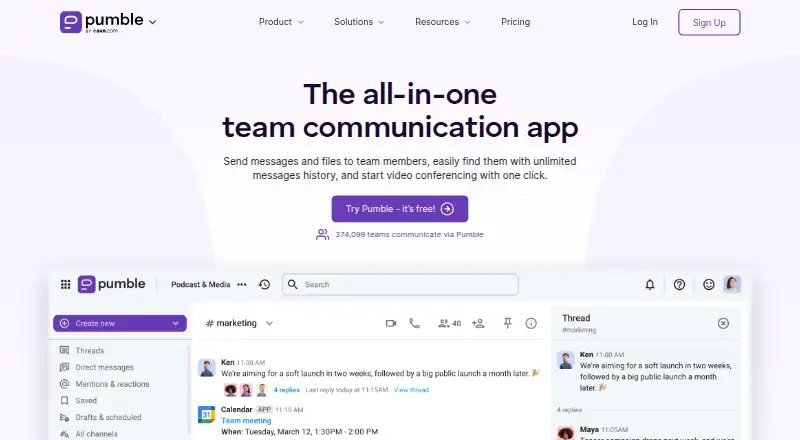
What Pumble is
Pumble is a team communication and collaboration app for businesses, available on web, Windows, macOS, Linux, iOS, and Android. Teams can use public and private channels, direct messages, group chats, and threaded replies, as well as share files and links or send voice and video messages. Search covers past conversations and files. Voice and video conferencing includes screen sharing, meeting links, and in-call messaging. Its publicly available API can be used to create private or public integrations, and API access is available on any subscription. The free plan includes unlimited users, channels, and message history, with 10 GB of workspace storage and up to three apps and integrations, excluding Clockify and Plaky from the limit. Paid plans start at $2.49/user/mo billed annually, and paid features can be tried for seven days without a credit card. Enterprise adds SSO, data retention controls, and an administrative audit log.
Who it suits
Pumble suits businesses and teams that want chat, file sharing, and meetings across desktop and mobile platforms. Its free plan is described as suitable for startups and nonprofit organizations.
What it does well
- Unlimited users, channels, and message history on Free.
- Works on web, desktop, and mobile platforms.
- API access is available on any subscription.
- Seven-day paid-feature trial requires no credit card.
- Enterprise includes SSO, retention controls, and audit log.
What to know first
- Free plan allows up to three apps and integrations.
- Free plan includes 10 GB storage per workspace.
- Paid plans start at $2.49/user/mo billed annually.
Limits
The Free plan includes 10 GB of storage per workspace and allows up to three apps and integrations, with native Clockify and Plaky integrations excluded from that count. Pro includes 10 GB per seat and up to 10 apps and integrations; Business includes 20 GB per seat, while Enterprise includes 100 GB per seat.
Plans
| Plan | Billed and limits | Price |
|---|---|---|
| Free | Unlimited users · unlimited message history · unlimited channels · 10 GB storage per workspace · up to 3 apps and integrations, plus Clockify and Plaky | Free |
| Pro | per seat/month billed annually (or $2.99 if billed monthly) · 10 GB storage per seat · up to 10 apps and integrations · group meetings · screen sharing | $2.49 a month |
| Business | per seat/month billed annually (or $4.99 if billed monthly) · 20 GB storage per seat · unlimited integrations · meeting recordings · guest users · advanced channel analytics | $3.99 a month |
| Enterprise | per seat/month billed annually (or $7.99 if billed monthly) · 100 GB storage per seat · SSO · data retention · audit log · full organization analytics | $6.99 a month |
| Productivity Suite | per seat/month billed annually (or $15.99 if billed monthly) · Enterprise Pumble, Clockify, and Plaky features | $12.99 a month |
As pumble.com lists them, read 2 Oct 2026. The maker's own page has the final word.
Getting started
- Visit https://pumble.com/.
- Choose the Free plan or a paid subscription; Pro starts at $2.49 per seat/month billed annually.
- Try paid features for seven days without a credit card if you want to evaluate them.
- Open Pumble on the web or use its Windows, macOS, Linux, iOS, or Android platform.
- Create channels and conversations, then add integrations within your plan's allowance or use the API, available on any subscription.
Pumble is a team communication and collaboration app for businesses. It is a strong fit for startups and nonprofits that want room to grow on a free chat plan, and for teams that need meetings, integrations, or administrative controls at a predictable per-seat price. Its best case is keeping team conversations searchable without a user or history cap; the free tier’s workspace storage and app limits are the first constraints to weigh.
Overview
Public and private channels, direct messages, group chats, threaded replies, and search across conversations and files cover everyday team communication. Voice and video messages, file and link sharing, and conferencing extend Pumble beyond chat. That breadth makes it a practical hub for teams coordinating work in one place, though organizations with large files or many connected tools may outgrow the free plan’s 10 GB workspace storage and three-app integration allowance.
Key features
Chat, files, and meetings
Unlimited channels and message history on Free let teams keep conversations accessible without paying for additional users. Pumble also supports voice and video conferencing, meeting links, screen sharing, and in-call messaging. Group meetings and screen sharing are included in Pro and above, making that tier a sensible starting point for teams that need those capabilities. Meeting recordings are reserved for Business.
Integrations and administration
Integrations include Google Calendar, Plaky, Clockify, Calendly, GitHub, Gmail, Google Drive, Jira, Polls, RSS, and Zapier. The Free plan permits up to three apps and integrations, with native Clockify and Plaky integrations excluded from that cap; Pro raises the allowance to ten, while Business offers unlimited integrations. The publicly available API can be used to create private or public integrations on any subscription, a useful option for teams with development capacity.
Enterprise adds SSO through SAML2 or OAuth2, data retention controls, an administrative audit log, and full organization analytics. CAKE.com’s security page describes SOC 2 Type II reporting, ISO/IEC 27001:2022 certification, and GDPR coverage. Enterprise also includes priority customer support; qualifying customers can get a dedicated success representative.
Pricing
Pumble is freemium, with paid plans starting at $2.49 per user/month billed annually and a 7-day trial of paid features without a credit card. Annual prices are per seat per month; monthly billing costs more, so teams should compare the term they intend to keep.
- Free — free: Unlimited users, message history, and channels, plus 10 GB storage per workspace and up to three apps and integrations alongside Clockify and Plaky. It suits startups and nonprofits that need persistent team chat, but shared storage and the integration cap may pinch as usage grows.
- Pro — $2.49 a month billed per seat/month billed annually, or $2.99 if billed monthly: 10 GB storage per seat, up to ten apps and integrations, group meetings, and screen sharing. This is the step up for teams that need those meeting features and more storage than Free offers.
- Business — $3.99 a month billed per seat/month billed annually, or $4.99 if billed monthly: 20 GB storage per seat, unlimited integrations, meeting recordings, guest users, and advanced channel analytics. Choose it when external guest access, recordings, or integration freedom matter more than keeping the seat price low.
- Enterprise — $6.99 a month billed per seat/month billed annually, or $7.99 if billed monthly: 100 GB storage per seat, SSO, data retention, audit log, and full organization analytics. It is aimed at organizations that need stronger access and administration controls.
- Productivity Suite — $12.99 a month billed per seat/month billed annually, or $15.99 if billed monthly: Enterprise Pumble features together with Clockify and Plaky features. It fits teams seeking those three products in one subscription rather than Pumble alone.
Platforms
Pumble is available on the web, Windows, macOS, Linux, iOS, and Android. An API is also available on any subscription, including Free.
Who it's for
Pumble suits teams that value unlimited users and searchable message history more than generous free storage, and those that want a gradual path from chat to meetings and administrative controls. Teams that need little more than chat can start without a per-seat bill. Organizations requiring recordings, guest users, extensive integrations, or enterprise controls should compare the relevant paid tier against the total seat cost. It is less compelling for teams that need ample shared storage or a broad integration set at no charge.
Pros and cons
- Pro: Free has unlimited users, channels, and message history, so teams can retain and search conversations without a user cap.
- Pro: API access on any subscription gives teams a route to build custom integrations without first upgrading.
- Pro: Paid plans add distinct steps for meetings, storage, integrations, and security controls, letting teams pay for capabilities they need.
- Con: Free storage is 10 GB per workspace, a shared allowance that may be limiting for teams regularly sharing files.
- Con: Free supports only up to three apps and integrations, which may be restrictive for teams relying on several connected services.
- Con: Monthly billing costs more than annual billing on every paid plan, and seat-based pricing can raise costs as a team grows.
Alternatives
Lark is worth comparing for teams whose needs align with its Starter plan’s 20 users, 100 GB storage, 18 months of message history, and 1,000 automations per month.
Microsoft Teams Free is an alternative for teams whose group meetings can stay within 100 participants and 60 minutes, with 5 GB cloud storage.
Chanty offers a free plan for teams of up to five members, with 20 GB storage per team, up to ten integrations, and one guest user.
Notion is an option for individuals focused on organizing personal projects and life with pages, blocks, databases, and basic collaboration.
Rocket.Chat is another freemium team communication option, with a free Starter plan for 50 users.
Slack is a comparable freemium chat app; its Free plan includes up to ten apps but limits message history to 90 days.
Wire is an alternative for readers who prioritize a fully open-source codebase available on GitHub for verification.
Zoho Cliq offers a free plan with 100 participants per group, 10,000 searchable messages, and 100 GB storage per organization.
Browse more options in Team Collaboration Software or Team chat apps.
Verdict
Pumble is a strong choice for startups, nonprofits, and growing teams that want unrestricted users and message history before committing to per-seat pricing. Its clearest advantage is the free plan’s persistent, unlimited team chat, with paid tiers adding useful meeting, integration, storage, and administration options. Look elsewhere if generous shared storage or a wider free integration allowance is essential, and price paid tiers carefully when seat counts are high.
Verdict
Pumble covers team messaging, file sharing, and meetings, with unlimited message history on the free plan. Teams should consider the free plan's storage and integration limits and the per-seat pricing of paid tiers.
Questions
Is Pumble free?
Yes. The Free plan costs nothing and includes unlimited users, message history, and channels, with 10 GB of workspace storage.
What do the paid plans cost?
Pro is $2.49 per seat/month billed annually, Business is $3.99, Enterprise is $6.99, and Productivity Suite is $12.99. Monthly billing is also listed at $2.99, $4.99, $7.99, and $15.99 respectively.
Can I try paid features before subscribing?
Yes. Paid features can be tried free for seven days without a credit card.
Which platforms does Pumble support?
Pumble is available on the web, Windows, macOS, Linux, iOS, and Android.
Can I use integrations or the API on the Free plan?
The Free plan allows up to three apps and integrations, excluding native Clockify and Plaky integrations. API access is available on any subscription.
What does Enterprise add?
Enterprise includes SSO using SAML2 or OAuth2, data retention controls, and an administrative audit log. It also provides 100 GB of storage per seat, full organization analytics, and priority customer support.
Facts from Pumble's own pages
- Channels
- Yes · pumble.com, 20 Sept 2026
- Chat
- It supports public and private channels, direct messages, group chats, and threaded replies. · pumble.com, 2 Oct 2026
- Collaboration
- Users can send voice and video messages, share files and links, and search past conversations and files. · pumble.com, 2 Oct 2026
- Compliance
- CAKE.com’s security page describes a SOC 2 Type II report, ISO/IEC 27001:2022 certification, and GDPR coverage. · cake.com, 2 Oct 2026
- Custom integrations
- Pumble says its API is publicly available for creating private or public integrations, and API access is available on any subscription. · pumble.com, 2 Oct 2026
- Free plan
- Yes · pumble.com, 20 Sept 2026
- Free-plan limits
- The Free plan allows up to 3 apps and integrations, excluding native Clockify and Plaky integrations, and includes 10 GB storage per workspace. · pumble.com, 2 Oct 2026
- Guest access
- Yes · pumble.com, 20 Sept 2026
- Integrations
- The integrations page lists Google Calendar, GitHub, GitLab, Gmail, Google Drive, Jira, Trello, Zapier, Zendesk, and Zoom, among others. · pumble.com, 2 Oct 2026
- Intended users
- Pumble describes its free plan as suitable for startups and nonprofit organizations. · pumble.com, 2 Oct 2026
- Meetings
- Pumble offers voice and video conferencing, screen sharing, meeting links, and in-call messaging. · pumble.com, 2 Oct 2026
- Message history
- unlimited · pumble.com, 20 Sept 2026
- Platforms
- Pumble lists web, Windows, Mac, Linux, Android, and iOS availability. · pumble.com, 2 Oct 2026
- Purpose
- Pumble describes itself as a team communication and collaboration app for businesses. · pumble.com, 2 Oct 2026
- Security controls
- The Enterprise plan includes SSO using SAML2 or OAuth2, data retention controls, and an administrative audit log. · pumble.com, 2 Oct 2026
- Paid from
- 2.49 · pumble.com, 20 Sept 2026
- Support
- The pricing page lists priority customer support for Enterprise and a dedicated success representative for qualifying customers. · pumble.com, 2 Oct 2026
- Trial
- The pricing FAQ says paid features can be tried free for 7 days without a credit card. · pumble.com, 2 Oct 2026
Where Pumble stands on Freedom251
- Team chat apps#13 of 63
- Business Instant Messaging - Enterprise Software#9 of 21
- Instant Messaging Software#13 of 30
- Remote Working software#10 of 22
- Business Instant Messaging - Midmarket Software#11 of 22
- Team Communication Software#12 of 23
- Team Collaboration Software#16 of 25