Freedom251 › Google Workspace Communication Tools

Chanty
by Chanty
What Chanty is
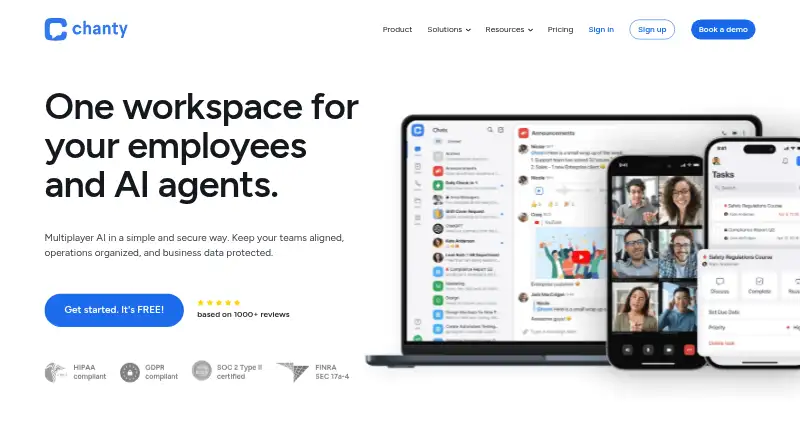
Chanty is a team chat and collaboration tool for communication and shared work. It offers channels, guest access, and unlimited message history. Teams can create tasks from scratch or turn messages into tasks, then assign and filter them, set due dates, and arrange work on a Kanban board. Messaging includes @mentions, pinned messages, code snippets, threads, searchable history, reactions, file sharing, and an in-app media player. Audio and video calls include screen sharing, with up to 1,000 video participants and up to 49 videos on screen. Chanty provides apps for Windows, macOS, Linux, Android, and iOS, plus web access in major browsers. Zapier connects Chanty with more than 1,000 other apps without coding experience; listed integrations also include Google Drive, Dropbox, GitHub, Trello, and Jira. Its stated security measures include TLS 1.2 or higher, encryption for files and file storage, and regular database snapshots stored in a separate data center. The free plan is billed forever and supports up to five team members, 20GB of team storage, and up to 10 integrations. Business is listed at $4 a month billed monthly; the pricing note also lists paid plans from $3/user/mo (annual).
Who it suits
Chanty suits small and medium teams that want chat, calls, and task management in one collaboration tool. It can also fit teams that rely on integrations, guest access, or web and desktop or mobile apps across the listed platforms.
What it does well
- Unlimited message history, channels, and guest access.
- Turn messages into tasks and manage them on a Kanban board.
- Audio and video calls support screen sharing.
- Apps for Windows, macOS, Linux, Android, and iOS, plus web access.
- Zapier connects Chanty with more than 1,000 other apps.
What to know first
- The free plan supports up to five team members.
- The free plan limits storage to 20GB per team and integrations to 10.
- Business is listed at $4 a month billed monthly.
Limits
The free plan is billed forever and allows up to five team members, 20GB of storage per team, up to 10 integrations, and one guest user. The pricing note lists paid plans from $3/user/mo (annual), while Business is listed at $4 a month billed monthly.
Plans
| Plan | Billed and limits | Price |
|---|---|---|
| Free | forever · Up to 5 team members · 20GB storage per team · Up to 10 integrations · 1 guest user · Community support | Free |
| Business | $36.00 per user per year (= $3.00 per user/month, billed annually) · Unlimited group chats and channels · 20GB secure storage per user · Unlimited group calls and screen sharing · HIPAA compliance and BAA · SSO, 2FA and access controls · 99.9% guaranteed uptime · 24x7 support | $36 a year |
| Enterprise | Contact sales for pricing · White labeling and embedding · SCIM provisioning · Enterprise API · On-premise possibility · US, EU and APAC data residency · DLP, compliance and governance · Dedicated support and SLA | On request |
As chanty.com lists them, read 28 Sept 2026. The maker's own page has the final word.
Getting started
- Visit the Chanty website.
- Choose the free plan or review the Business and Enterprise plans.
- Use web access or choose an app for Windows, macOS, Linux, Android, or iOS.
- Create a team and invite members; the free plan supports up to five team members.
- Connect integrations such as Zapier or Google Drive if needed.
Chanty brings team chat, calls, and task management into one collaboration app. It suits small and midsize teams that want to turn conversations into assigned work without switching tools. Its unlimited message history and built-in task board are compelling; the five-member free-plan cap makes the paid cost a key consideration as a team grows.
Overview
Channels, guest access, searchable history, and messaging tools such as threads, mentions, pinned messages, reactions, code snippets, file sharing, and an in-app media player give teams several ways to keep discussions organized. Message history is unlimited, which helps teams that need to revisit older decisions. The free plan allows five team members, one guest, and ten integrations, so it is best suited to a small group with a modest app stack.
Key features
Tasks can start from scratch or from a message, then be assigned, filtered, given due dates, and viewed on a Kanban board. That link between chat and follow-up work is useful when action items emerge in conversation. Teams that need more specialized project planning may still need another tool.
Audio and video calls include screen sharing, with a stated capacity of up to 1,000 video participants and 49 videos on screen. That participant limit accommodates large calls, while the on-screen video cap matters to meetings where many people need to appear at once.
Integrations span file storage, calendars, development tools, and project apps, including Google Drive, Dropbox, GitHub, Jira, Trello, Asana, ClickUp, and Monday.com. Chanty also says Zapier can connect it to more than 1,000 apps without coding, giving teams a route to broader automation beyond the ten integrations allowed on Free.
Chanty says it uses TLS 1.2 or higher, forward secrecy, AES-128-GCM, file and storage encryption, and application and infrastructure penetration tests. It also describes regular database snapshots stored in a separate data center to support recovery after a severe Amazon failure. Its enterprise-grade compliance standards include HIPAA, ISO 27001, ISO 9001, SOC 2, GDPR, DPF, FINRA, and C5.
Pricing
The Free plan costs nothing, billed forever. It includes up to five team members, 20GB of team storage, ten integrations, one guest user, and community support. It is a workable starting point for a small team, but the member, guest, and integration caps can make it a short-lived option for groups that are growing or rely on several connected services.
Business is $4 a month, billed monthly, and includes Business plan features. The monthly term avoids an annual commitment, but teams should compare the per-user cost with their headcount before moving beyond Free. Chanty advertises paid pricing from $3/user/mo (annual), a lower per-user rate with an annual term.
Enterprise has custom pricing and includes unlimited integrations and US, EU, and APAC data residency. Those terms are aimed at organizations that need broader integration capacity or regional data hosting; teams should request pricing to assess the cost. Chanty advertises 24/7 user support, and the Business plan includes a 24x7 support line.
Platforms
Chanty supports web access and apps for Windows, macOS, Linux, iOS, and Android. An API and self-hosted option are also listed, giving teams additional ways to fit the product into their environment.
Who it's for
Chanty is a good fit for small and midsize teams that want messaging, calls, and lightweight task tracking together, especially when searchable, unlimited history matters. The free tier works for groups of up to five members with limited integration needs. Larger teams should weigh the paid per-user cost, while organizations requiring unlimited integrations or regional data residency may find Enterprise more relevant.
Pros and cons
- Unlimited message history: Teams can search and revisit older conversations without a stated history cutoff.
- Tasks tied to chat: Turning messages into assigned, due-dated Kanban tasks gives conversation-born work a clear next step.
- Broad call capacity: Calls support screen sharing and up to 1,000 video participants, although only 49 videos can appear on screen.
- Restrictive free tier: Five members, one guest, and ten integrations may push a growing team to a paid plan quickly.
- Enterprise costs require a quote: Custom pricing makes it harder to estimate the plan against a set budget.
Alternatives
Lark is worth comparing for teams that can use its Starter allowance of 20 users, 100 GB of storage, 18 months of message history, and 1,000 monthly automations; Chanty instead offers unlimited message history.
Microsoft Teams may suit groups that value a free plan with 100 participants, 60-minute group meetings, and 5 GB of cloud storage. Chanty offers unlimited message history and built-in task management.
Notion is an alternative for individuals organizing personal projects and life with pages, blocks, databases, and basic collaboration.
Pumble is worth considering if an unlimited-user free plan and unlimited channels matter more than Chanty's five-member free tier; its free plan also includes unlimited message history and 10 GB of workspace storage.
Rocket.Chat is an alternative with a free Starter plan for 50 users and a self-hosted option.
Slack may fit teams comfortable with a free plan that limits message history to 90 days and apps to ten; Chanty offers unlimited history.
Wire is an alternative for teams that prioritize a fully open-source product.
Zoho Cliq is worth comparing for its free allowance of 100 participants per group, 10,000 searchable messages, and 100 GB of organizational storage.
Browse more options in Team Collaboration Software and Team chat apps.
Verdict
Choose Chanty if your small or midsize team wants chat, calls, and straightforward task tracking in one place, with unlimited message history and a free tier for up to five members. Look elsewhere if you need a larger free team, more than one guest, or a clear Enterprise price before committing.
Verdict
Choose Chanty if your team wants chat, task management, calls, and integrations in one tool, with a free plan for up to five members. Look elsewhere if your team needs more than five members on a free plan, or compare the paid plan cost against your team size.
Questions
Does Chanty have a free plan?
Yes. Free costs nothing, billed forever, for up to five team members, 20GB of team storage, and up to 10 integrations.
What platforms does Chanty support?
It lists web, Windows, macOS, Linux, iOS, and Android.
Does Chanty include task management?
Yes. Users can create tasks or turn messages into tasks, assign and filter them, set due dates, and use a Kanban board.
What does Business cost?
Business is listed at $4 a month, billed monthly. The pricing note lists paid plans from $3/user/mo (annual).
What integrations are listed?
They include Zapier, Google Drive, Dropbox, GitHub, Trello, Jira, and others. Chanty says Zapier connects it with more than 1,000 other apps.
Where is Chanty based, and when was it founded?
Chanty is headquartered in New York, NY, USA, and was founded in 2017.
Facts from Chanty's own pages
- Backup practice
- Chanty says it takes regular database snapshots and stores them securely in a separate data center to support restoration after a severe Amazon failure. · chanty.com, 28 Sept 2026
- Calls
- Chanty supports audio and video calls, screen sharing, up to 1,000 video participants, and up to 49 videos on screen. · chanty.com, 28 Sept 2026
- Channels
- Yes · chanty.com, 20 Sept 2026
- Compliance
- The pricing page lists HIPAA, ISO 27001, ISO 9001, SOC 2, GDPR, DPF, FINRA, and C5 among its enterprise-grade data-protection standards. · chanty.com, 28 Sept 2026
- Founded
- 2017 · chanty.com, 28 Sept 2026
- Free plan
- Yes · chanty.com, 20 Sept 2026
- Guest access
- Yes · chanty.com, 20 Sept 2026
- Headquarters
- New York, NY, USA · chanty.com, 28 Sept 2026
- Integrations
- Official integrations include Zapier, Google Drive, Dropbox, OneDrive, YouTube, Vimeo, GitHub, GitLab, Bitbucket, Trello, Asana, Google Calendar, Jira, and others. · chanty.com, 28 Sept 2026
- Message history
- unlimited · chanty.com, 20 Sept 2026
- Messaging features
- The product includes @mentions, pinned messages, code snippets, threads, searchable history, reactions, file sharing, and an in-app media player. · chanty.com, 28 Sept 2026
- Supported platforms
- web,Windows,macOS,Linux,iOS,Android · chanty.com, 20 Sept 2026
- Security controls
- Chanty states that it uses TLS 1.2 or higher, forward secrecy, AES-128-GCM, file-system and file-storage encryption, and application and infrastructure penetration tests. · chanty.com, 28 Sept 2026
- Paid from
- 3 · chanty.com, 20 Sept 2026
- Support
- Chanty advertises 24/7 user support, while the Business plan includes a 24x7 support line. · chanty.com, 28 Sept 2026
- Supported devices
- Chanty provides apps for Windows, macOS, Linux, Android, and iOS, plus web access in major browsers including Chrome, Safari, Edge, and Mozilla. · chanty.com, 28 Sept 2026
- Target teams
- The founder describes Chanty’s goal as serving the communication and collaboration needs of small and medium teams. · chanty.com, 28 Sept 2026
- Task management
- Users can create tasks from scratch or turn messages into tasks, assign and filter them, set due dates, and use a Kanban board. · chanty.com, 28 Sept 2026
- What it does
- Chanty is a team chat and collaboration tool with unlimited message history and productivity features for teams and businesses. · chanty.com, 28 Sept 2026
- Zapier automation
- Chanty says Zapier connects it with more than 1,000 other apps without coding experience. · chanty.com, 28 Sept 2026
Where Chanty stands on Freedom251
- Google Workspace Communication Tools#3 of 26
- Team Communication Software#3 of 23
- Business Instant Messaging - Midmarket Software#3 of 22
- Business Instant Messaging - Enterprise Software#3 of 21
- Team Collaboration Software#4 of 25
- Instant Messaging Software#6 of 30
- Team chat apps#14 of 63
- Remote Working software#5 of 22