
Rocket.Chat
by Rocket.Chat
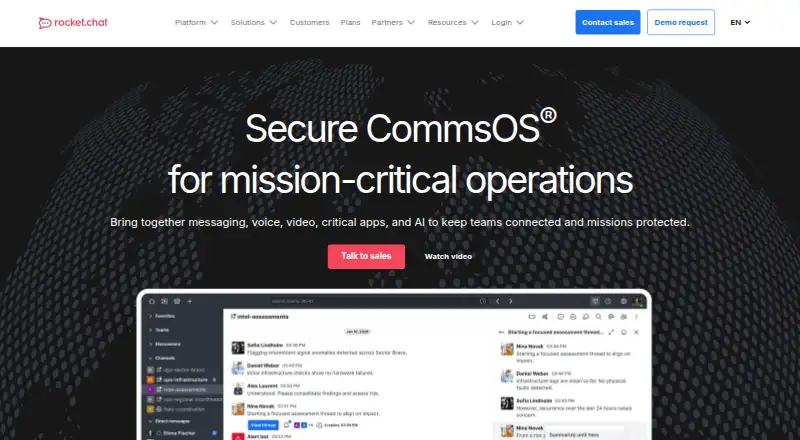
What Rocket.Chat is
Rocket.Chat is a messaging platform with channels, guest access, and unlimited message history. It runs on web, Windows, macOS, Linux, iOS, and Android, and is also listed for API and self-hosted use. Integrations include GitHub, Google Calendar, Google Drive, Google Meet, Jira Cloud, Microsoft Teams, Pexip, Telegram, Trello, WhatsApp, Zapier, and Zoom. The free Starter plan is listed for up to 50 users. Community is listed for 100 concurrent users, while prices for that and the other named paid options are not provided. Commercial describes dedicated cloud hosting and on-premises, private cloud, isolated VPC/VPN, or air-gapped deployment, with high availability and disaster recovery. Government lists sovereign or air-gapped deployment, access controls, encryption, sign-on options, and audit logs. Defense describes air-gapped and SCIF-ready deployment, controlled federation, and mission-critical communications. Rocket.Chat was founded in 2015 and is headquartered in Wilmington, Delaware.
Who it suits
Rocket.Chat may suit teams that need messaging across web, desktop, and mobile, or want self-hosted deployment. Its named plans also address organizations seeking private, sovereign, or air-gapped environments.
What it does well
- Free Starter plan supports up to 50 users.
- Includes channels, guest access, and unlimited history.
- Integrates with a broad range of listed services.
- Supports self-hosted use and multiple platforms.
What to know first
- Starter is limited to 50 users.
- Other named plans have no listed prices.
- Some deployment options are air-gapped or on-premises.
Limits
The free Starter plan supports up to 50 users. The Community plan lists 100 concurrent users.
Plans
| Plan | Billed and limits | Price |
|---|---|---|
| Community | fully open-source · self-hosted · experimentation or small internal teams · no production-grade compliance, support or reliability features | Free |
| Starter | self-managed/self-hosted · up to 50 users · one workspace per organization · many premium capabilities with usage limits | Free |
| Government | custom users · on-premises or sovereign cloud · air-gapped deployment · FIPS license add-on available | On request |
| Commercial | custom users · premium/dedicated hosting · on-premises, private cloud or isolated deployment | On request |
| Defense | custom users · air-gapped/SCIF-ready · DoD ATO up to IL6 · FIPS license add-on available | On request |
As rocket.chat lists them, read 15 Oct 2026. The maker's own page has the final word.
Getting started
- Visit the Rocket.Chat website.
- Choose a supported access route: web, Windows, macOS, Linux, iOS, Android or API.
- Alternatively, choose a self-hosted deployment.
- Select Starter for a free plan for up to 50 users, or review the other named plans.
- Connect any listed integrations that fit your team's tools.
Overview
Rocket.Chat is a team messaging platform for organizations that want channel conversations, guest access and the choice of hosted or self-managed deployment. Its appeal is breadth: the free Starter plan covers up to 50 users, while higher tiers are shaped around larger teams and controlled environments.
It is a stronger fit for teams that value deployment choice and long-lived message history than for buyers seeking clearly priced paid plans. Choose it when those capabilities matter; compare alternatives if you need to budget a paid tier before contacting the maker.
Key features
Channels, guests and history
Channels help keep conversations organized, and guest access lets teams include people from outside the organization. Unlimited message history is a meaningful advantage for teams that need to refer back to older discussions, rather than work within a stated retention window.
Integrations and access
Rocket.Chat names connections to GitHub, Google Calendar, Google Drive, Google Meet, Jira Cloud, Microsoft Teams, Pexip, Telegram, Trello, WhatsApp, Zapier and Zoom. That range can make it relevant to teams already using several of those services, though the integration list alone does not establish what each connection can do.
Pricing
Starter costs nothing, billed monthly, and supports 50 users. It is the clear starting point for a small team that can work within that cap. The entry plan gives up the specialized deployment and administrative choices described on higher tiers.
Community has custom pricing and supports 100 concurrent users, a fit for teams whose scale is better measured by simultaneous users. Commercial has custom pricing and is aimed at organizations needing on-premises, private-cloud, isolated VPC/VPN or air-gapped deployment, dedicated cloud hosting, high availability and disaster recovery, messaging, calls, screen sharing, an open API or custom integrations.
Government has custom pricing and adds deployment options including sovereign cloud, granular role-based access control, end-to-end encryption, SSO, LDAP, SAML 2.0, AD and tamper-evident audit logs. Defense is also custom pricing, for air-gapped and SCIF-ready deployment, DoD ATO up to IL6, controlled federation and mission-critical communications; FIPS 140-3 support is an add-on. These plans address distinct operational requirements, but their custom pricing makes direct cost comparison difficult.
Platforms
Rocket.Chat supports web, Windows, macOS, Linux, iOS and Android, alongside self-hosted deployments and an API. That combination suits teams spanning desktop and mobile devices or requiring a self-managed option.
Who it's for
Small teams can start with Starter, while organizations with specialized hosting, resilience or security needs may find the higher tiers more relevant. Teams that need published paid-plan costs, or whose membership exceeds Starter's 50-user limit and does not match a higher tier's described requirements, should compare options before committing.
Pros and cons
- Pros: Starter allows up to 50 users at no charge, a useful entry point for a small team.
- Pros: Unlimited message history avoids a stated retention cap, helping teams keep older conversations available.
- Pros: Self-hosting and plans for isolated, sovereign and air-gapped deployments give organizations deployment choices beyond standard hosted access.
- Cons: Community, Commercial, Government and Defense have custom pricing, making paid costs harder to assess upfront.
- Cons: Starter's 50-user cap makes it unsuitable for a team that needs more seats without moving to another plan.
Alternatives
Wire is worth considering for buyers who prioritize a maker-stated fully open-source codebase available on GitHub for verification; it also has a free plan and supports web, desktop and mobile platforms.
8seats may suit a smaller team seeking a defined free allowance: its Starter supports up to 10 employees, unlimited guests, 365-day message history and 1 GB storage. Troop Messenger is another comparison for buyers interested in a free plan whose stated terms include 1–50 users and 50 GB storage.
Element, eXpress, Mattermost, TigerConnect Physician Scheduling and Crypho are alternatives to compare when evaluating team communication software.
For broader comparisons, see Secure Team Chat Software, Team chat apps and Team Collaboration Software.
Verdict
Rocket.Chat is a sensible choice for teams that want channel-based messaging, guest access, uncapped message history and a path to self-managed or specialized deployments. Its main drawback is that all named plans beyond Starter have custom pricing, so organizations that need predictable, published costs should look elsewhere or request pricing before deciding.
Verdict
Rocket.Chat offers core messaging features on a free plan, with named options describing additional deployment and administrative choices. Check the plan details and request pricing for options beyond Starter.
Questions
Is Rocket.Chat free?
Yes. Starter is listed as free and supports 50 users.
Which platforms can I use Rocket.Chat on?
Rocket.Chat supports web, Windows, macOS, Linux, iOS, Android, API access and self-hosting.
Does Rocket.Chat support integrations?
Yes. Listed integrations include GitHub, Google Calendar, Google Drive, Google Meet, Jira Cloud, Microsoft Teams, Pexip, Telegram, Trello, WhatsApp, Zapier and Zoom.
Can guests use Rocket.Chat, and how much message history is available?
Guest access is supported, and message history is unlimited.
What does the Community plan include?
Community lists support for 100 concurrent users.
Who makes Rocket.Chat?
Rocket.Chat is the maker. The company was founded in 2015 and is headquartered in Wilmington, Delaware, United States.
Facts from Rocket.Chat's own pages
- AI
- Rocket.Chat provides AI features such as thread summarization, translation and answers based on records that each user is authorized to see. · rocket.chat, 15 Oct 2026
- API
- Rocket.Chat documents REST APIs for users, rooms, Omnichannel and other workspace capabilities, alongside a Realtime API and Livechat Widget API. · developer.rocket.chat, 15 Oct 2026
- Capterra rating
- 4.3 out of 5 from 156 reviews. · capterra.com, 15 Oct 2026
- Channels
- Yes · rocket.chat, 20 Sept 2026
- Client applications
- Official clients are available for Windows, macOS, Linux, iOS and Android. · docs.rocket.chat, 15 Oct 2026
- Company headquarters and founding
- LinkedIn lists headquarters in Wilmington, Delaware and a 2015 founding year. · linkedin.com, 15 Oct 2026
- Company size
- LinkedIn lists Rocket.Chat as a privately held software-development company with 51–200 employees. · linkedin.com, 15 Oct 2026
- Compliance
- Rocket.Chat states that its information-security program follows the ISO 27001 framework and documents GDPR, LGPD and FIPS 140-3-related controls. · docs.rocket.chat, 15 Oct 2026
- Database and storage
- Rocket.Chat 8.x requires MongoDB 8.0 or later, and the documentation recommends S3, Google Cloud Storage or MinIO for uploaded files. · docs.rocket.chat, 15 Oct 2026
- Developer documentation
- Developer documentation covers architecture, server, desktop and mobile development environments, Apps-Engine, customization, APIs, Omnichannel and contribution guidelines. · developer.rocket.chat, 15 Oct 2026
- Federation
- The platform advertises native Matrix and XMPP federation for server-to-server interoperability. · rocket.chat, 15 Oct 2026
- Federation news
- A July 14, 2026 Rocket.Chat Labs article described moving Matrix federation into the Rocket.Chat server as an embedded library without a second backend or database. · rocket.chat, 15 Oct 2026
- Founded
- 2015 · rocket.chat, 23 Sept 2026
- Free plan
- Yes · rocket.chat, 20 Sept 2026
- G2 rating
- 4.2 out of 5 from 373 reviews. · g2.com, 15 Oct 2026
- GetApp rating
- 4.3 out of 5 from 156 reviews. · getapp.com, 15 Oct 2026
- Guest access
- Yes · rocket.chat, 20 Sept 2026
- Headquarters
- Wilmington, Delaware, United States · rocket.chat, 23 Sept 2026
- Integrations
- The marketplace lists integrations including Trello, Zapier, Zoom and Rocket.Chat AI, and supports public and private apps. · rocket.chat, 15 Oct 2026
- Legal maker name
- The Apple App Store identifies the developer as Rocket.Chat Technologies Corp. · apps.apple.com, 15 Oct 2026
- Licence
- Code outside the enterprise directories is MIT-licensed; enterprise directories use a separate enterprise licence and third-party components retain their original licences. · github.com, 15 Oct 2026
- Limit: maintenance effort
- A Gartner reviewer says Rocket.Chat requires significant maintenance and experimentation rather than being a switch-on-and-forget service. · gartner.com, 15 Oct 2026
- Limit: notifications and search
- Independent reviewers report inconsistent notifications, lag, and search results that can miss the intended messages. · capterra.com, 15 Oct 2026
- Limit: support and operations
- Reviews mention difficulty contacting support and the need for Linux, hosting and infrastructure skills for self-managed deployments. · softwareadvice.com, 15 Oct 2026
Where Rocket.Chat stands on Freedom251
- Team chat apps#1 of 63
- Instant Messaging Software#1 of 30
- Secure Team Chat Software#1 of 30
- Google Workspace Communication Tools#1 of 26
- Team Collaboration Software#1 of 25
- Team Communication Software#1 of 23
- Remote Working software#1 of 22
- Business Instant Messaging - Midmarket Software#1 of 22
- Business Instant Messaging - Enterprise Software#1 of 21