Nextcloud Talk
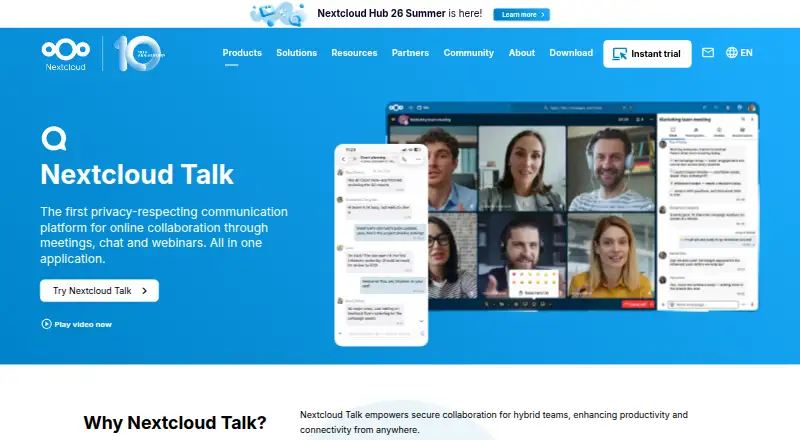
What Nextcloud Talk is
Nextcloud Talk combines chat, meetings, and webinars in one communication platform. It supports private, group, and public calls, invitations for external participants by URL, and chat that remains available after a call. People can share Nextcloud Files documents in chats, connect rooms with files, calendars, and tasks, and work through online office sidebars. Talk also supports federated chats and calls across Nextcloud servers, plus bridges to services such as IRC, Slack, Microsoft Teams, Matrix, Mattermost, and XMPP.
Talk can be self-hosted on premises or hosted by a trusted local provider. It runs in a browser and has Windows, macOS, Linux, iOS, and Android clients, with a public API for app access. Nextcloud describes end-to-end encrypted calls, layered encryption, brute force protection, suspicious-login detection, and a security bug bounty. Typical private setups handle 6–10 call participants, or up to 20 with good network connections and no video. Webinars, public video conferencing with a lobby, and SIP phone dial-in require the High Performance Backend. Nextcloud is headquartered in Stuttgart, Germany, and was founded in 2016.
Who it suits
Nextcloud Talk suits organizations that want chat and calls alongside Nextcloud files, calendars, tasks, and office collaboration. Its self-hosting options and bridges to external communication services may appeal to teams that need control over hosting or cross-service communication.
What it does well
- Combines meetings, chat, and webinars.
- Guests can join calls through an invitation URL.
- Chat remains available after calls end.
- Supports federation and bridges to numerous communication services.
- Offers browser, desktop, and mobile access.
- Nextcloud describes end-to-end encrypted calls and layered security protections.
What to know first
- Enterprise plans start at 100 users.
- Talk is optional on those plans and costs extra.
- Webinars, public video calls with a lobby, and SIP dial-in require the High Performance Backend.
- Typical private setups handle 6–10 participants, or up to 20 without video.
Limits
Nextcloud says typical private deployments handle 6–10 call participants, or up to 20 when connections are good and participants do not use video. Webinars, public video conferencing with a lobby, and SIP dial-in require the High Performance Backend; large calls also need substantial dedicated bandwidth and processing capacity.
Plans
| Plan | Billed and limits | Price |
|---|---|---|
| Premium | Starting at 100 users for 104.99€/user/year · minimum 100 users · Nextcloud Talk is optional at extra cost | €104.99 a year |
| Ultimate | Starting at 100 users for 204.75€/user/year · minimum 100 users · Nextcloud Talk is optional at extra cost | €204.75 a year |
| Standard | Starting at 100 users for 71.29€/user/year · minimum 100 users · Nextcloud Talk is optional at extra cost | €71.29 a year |
As nextcloud.com lists them, read 8 Oct 2026. The maker's own page has the final word.
Getting started
- Visit the Nextcloud Talk website.
- Choose whether to self-host Talk, use a trusted local provider, or explore a Nextcloud hosted option.
- Install and enable the optional Talk app for your Nextcloud deployment.
- Use the browser, Windows, macOS, Linux, Android, or iOS client.
- For webinars, public video calls with a lobby, or SIP dial-in, use the High Performance Backend.
Verdict
Choose Nextcloud Talk if you want communication integrated with Nextcloud collaboration tools, with self-hosting and external service bridges. Look elsewhere if you need a plan below the 100-user minimum, or if you need webinar and public-call features without the High Performance Backend.
Questions
Is Nextcloud Talk open source?
Yes. The pricing note describes it as open source.
Is there a free option?
Nextcloud lists free single-user provider accounts with 2 GB or more storage. It also offers a free 30-day test of the hosted High Performance Backend.
What do the listed paid plans cost?
Standard is €71.29 a year, Premium is €104.99 a year, and Ultimate is €204.75 a year. Each starts at 100 users, and Talk is optional at extra cost.
Which platforms are supported?
Talk is available on the web, Windows, macOS, Linux, iOS, and Android. Desktop clients and mobile apps are listed.
Which services does it integrate with?
Listed integrations include Nextcloud Files, Groupware, Calendar, Deck, and Whiteboard, as well as Matterbridge, Microsoft Teams, Discord, Matrix, IRC, Slack, Mattermost, XMPP, Pexip, and SIP.
What is required for webinars or SIP dial-in?
The High Performance Backend is required for webinars, public video conferencing with a lobby, and SIP phone dial-in.
Facts from Nextcloud Talk's own pages
- Apps
- Nextcloud lists Talk desktop clients for Windows, macOS and Linux, mobile apps for Android and iOS, and browser use. · nextcloud.com, 8 Oct 2026
- Backend requirement
- Webinars and public video conferencing with a lobby, plus SIP phone dial-in, require the Nextcloud Talk High Performance Backend. · nextcloud.com, 8 Oct 2026
- Calls and chat
- Talk supports private, group and public calls, external participants invited by URL, and chat that remains available after a call ends. · nextcloud.com, 8 Oct 2026
- Channels
- No · nextcloud.com, 20 Sept 2026
- Collaboration
- Users can share Files documents in chats, link chat rooms with files, calendars and tasks, and collaborate through online office sidebars. · nextcloud.com, 8 Oct 2026
- Developer integration
- Nextcloud’s developer manual says apps can access Talk capabilities through a public API and that Talk is an optional app that must be installed and enabled. · docs.nextcloud.com, 8 Oct 2026
- Federation and bridges
- Talk supports federated chats and calls across Nextcloud servers and bridging to services including IRC, Slack, Microsoft Teams, Matrix, Mattermost and XMPP. · nextcloud.com, 8 Oct 2026
- Founded
- 2016 · nextcloud.com, 28 Sept 2026
- Free option and trial
- Nextcloud lists free single-user provider accounts with 2 GB or more storage and offers a free 30-day test of the hosted High Performance Backend. · nextcloud.com, 8 Oct 2026
- Guest access
- Yes · nextcloud.com, 20 Sept 2026
- Headquarters
- Stuttgart, Germany · nextcloud.com, 28 Sept 2026
- Integrations
- Nextcloud Files,Nextcloud Groupware,Nextcloud Calendar,Nextcloud Deck,Nextcloud Whiteboard,Matterbridge,Microsoft Teams,Discord,Matrix,IRC,Slack,Mattermost,XMPP,Pexip,SIP · nextcloud.com, 20 Sept 2026
- Large calls
- The High Performance Backend supports webinars and large calls with hundreds or thousands of participants, but requires significant dedicated bandwidth and processing capacity. · nextcloud.com, 8 Oct 2026
- Supported platforms
- web,Windows,macOS,Linux,iOS,Android · nextcloud.com, 20 Sept 2026
- Privacy and compliance
- Nextcloud says self-hosting keeps communications and metadata on the organization’s infrastructure and cites GDPR and CCPA among relevant compliance regimes. · nextcloud.com, 8 Oct 2026
- Purpose
- Nextcloud Talk combines meetings, chat and webinars in one communication platform. · nextcloud.com, 8 Oct 2026
- Security
- The product page describes end-to-end encrypted calls, multi-layered encryption, brute force protection, suspicious-login detection and a $10,000 security bug bounty. · nextcloud.com, 8 Oct 2026
- Self-hosting
- Talk is a self-hosted, on-premises audio, video and chat service that can also be hosted by a trusted local provider. · nextcloud.com, 8 Oct 2026
- Small deployment limits
- Nextcloud says a typical private setup handles calls with 6–10 participants, or up to 20 when participants have good network connections and do not use video. · nextcloud.com, 8 Oct 2026
- Support
- The enterprise pricing page lists portal support and response times of two business days for Standard, one business day for Premium, and 1h, 4h, 12h or 24h for Ultimate. · nextcloud.com, 8 Oct 2026
Where Nextcloud Talk stands on Freedom251
- Team chat apps#10 of 63
- Video conferencing apps#9 of 46
- Web and Video Conferencing - Enterprise Software#8 of 22
- Video Conferencing Software#16 of 43
- Web Conferencing Software#9 of 22
- Business Instant Messaging - Midmarket Software#10 of 22
- Secure Video Conferencing Software#13 of 28
- Team Communication Software#11 of 23
- Web and Video Conferencing - Midmarket Software#12 of 23
- Team Collaboration Software#14 of 25