Freedom251 › Presentation software

PowerPoint for the web
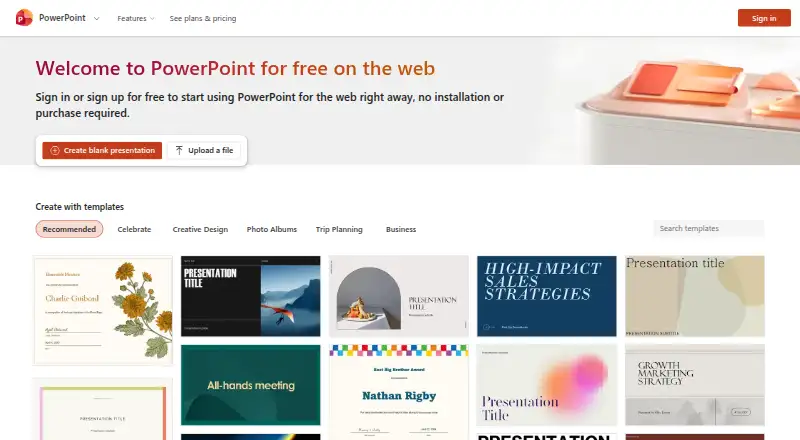
What PowerPoint for the web is
PowerPoint for the web lets you create, edit, save, and share presentations in a browser. Changes are saved automatically, and multiple authors can work on one presentation at the same time. The free Microsoft PowerPoint plan is for one person and includes 5 GB of cloud storage. You can open files from OneDrive, SharePoint, or Dropbox, edit .pptx, .ppsx, and .odp files, and download presentations as .pptx, .pdf, .odp, or JPEG images, one image per slide. Files up to 2 GB can be opened.
The service is available on the web, Android, and iOS, with an embeddable player and restricted access control. Microsoft says it secures data at rest and in transit and lets customers control their data. The web editor cannot insert charts or equations; inserting video or audio from a PC requires desktop PowerPoint.
Who it suits
It suits people who want to create or collaborate on presentations in a browser, including users working with files from OneDrive, SharePoint, or Dropbox. The free plan is listed for one person.
What it does well
- Automatically saves changes
- Multiple authors can work simultaneously
- Opens files up to 2 GB
- Exports to .pptx, .pdf, .odp, and JPEG
- Available on web, Android, and iOS
What to know first
- Cannot insert charts or equations in the web version
- PC video and audio insertion requires desktop PowerPoint
- Free plan includes 5 GB cloud storage
Limits
The free plan includes 5 GB of cloud storage. The web editor cannot insert charts or equations, and inserting video or audio files from a PC requires desktop PowerPoint.
Plans
| Plan | Billed and limits | Price |
|---|---|---|
| Microsoft PowerPoint | One person · web, iOS, and Android · 5 GB cloud storage · sharing and real-time collaboration · basic templates, fonts, icons, and stickers · dictation and voice commands | Free |
| Microsoft 365 Family | Subscription automatically renews unless canceled in Microsoft account. · 1 to 6 people · 5 devices per person at once · 2 TB shared secure cloud storage | $12.99 a month |
| Microsoft 365 Family | Subscription automatically renews unless canceled in Microsoft account. · 1 to 6 people · 5 devices per person at once · 2 TB shared secure cloud storage | $129.99 a year |
| Microsoft 365 Premium | Subscription automatically renews unless canceled in Microsoft account. · Includes PowerPoint · advanced Copilot chat and AI features · 2 TB shared storage with Family benefits | $19.99 a month |
| Microsoft 365 Premium | Subscription automatically renews unless canceled in Microsoft account. · Includes PowerPoint · advanced Copilot chat and AI features · 2 TB shared storage with Family benefits | $199.99 a year |
| Microsoft 365 Personal | Subscription automatically renews unless canceled in Microsoft account. · 1 person · 5 devices at once · 1 TB secure cloud storage · desktop apps including PowerPoint | $9.99 a month |
| Microsoft 365 Personal | Subscription automatically renews unless canceled in Microsoft account. · 1 person · 5 devices at once · 1 TB secure cloud storage · desktop apps including PowerPoint | $99.99 a year |
As powerpoint.cloud.microsoft lists them, read 9 Oct 2026. The maker's own page has the final word.
Getting started
- Open https://powerpoint.cloud.microsoft/en-us/.
- Use the free Microsoft PowerPoint plan for one person on the web, iOS, or Android.
- Create a presentation in the browser or open a supported file from OneDrive, SharePoint, or Dropbox.
- Edit with other authors at the same time; changes save automatically.
- Download the presentation in a supported format or share it with restricted access.
PowerPoint for the web is a browser-based presentation editor for people who want to create, revise, and share slides online. It suits individuals and teams working with common PowerPoint files; its free plan is capable, but missing chart, equation, and PC media insertion makes it a poor fit for some complex decks.
Overview
Work in a browser, with changes saved automatically as you go. Multiple authors can edit a presentation at the same time, which makes the web version practical for shared drafts and ongoing team updates. It can open files from OneDrive, SharePoint, or Dropbox, so it can fit into more than one cloud-storage workflow.
Editing supports .pptx, .ppsx, and .odp files, and files can be up to 2 GB. Finished presentations can be downloaded as .pptx, .pdf, .odp, or JPEG images, with one image per slide. That range helps when collaborators need different file formats, though the browser editor is not a full substitute for desktop PowerPoint when a presentation depends on certain inserted media or data visuals.
Key features
Collaboration and file handling
Automatic saving and simultaneous editing reduce the need to coordinate separate copies of a presentation. The 2 GB file limit and support for three editing formats make it useful for substantial existing decks as well as new work. The free plan's 5 GB of cloud storage is shared capacity to keep in mind if presentations compete with other files for space.
Limits in the editor
The web version cannot insert charts or equations. Video and audio files from a PC must be inserted with desktop PowerPoint. Those are meaningful gaps for data-heavy, technical, or media-rich presentations: browser access is convenient for routine slide work, but users who build those elements into decks will need desktop PowerPoint for that part of the workflow.
Microsoft says it secures data at rest and in transit and lets customers control their data. PowerPoint for the web also supports restricted access and an embeddable player, giving users options for controlling and presenting shared content.
Pricing
The free Microsoft PowerPoint plan costs nothing and is for one person. It includes web, iOS, and Android access, 5 GB of cloud storage, sharing and real-time collaboration, basic templates, fonts, icons, stickers, dictation, and voice commands. It is a substantial starting point for individual use, but the storage allowance and editor limits may constrain larger or more demanding projects.
| Plan | Price | Seats and storage |
|---|---|---|
| Microsoft PowerPoint | free | One person; 5 GB cloud storage |
| Microsoft 365 Personal | Custom pricing | 1 person; 5 devices at once; 1 TB storage |
| Microsoft 365 Family | Custom pricing | 1 to 6 people; 5 devices per person; up to 6 TB storage |
| Microsoft 365 Premium | Custom pricing | Up to 6 people; up to 6 TB storage |
Microsoft 365 Personal is aimed at one person who needs considerably more storage and can use PowerPoint across five devices at once. Family and Premium plans allow up to six people and up to 6 TB of storage; Family specifies five devices per person, while Premium does not specify a device limit. Plan prices are custom pricing.
Platforms
PowerPoint for the web runs in a browser, with the free plan also covering iOS and Android. The browser option is convenient across devices, but desktop PowerPoint remains necessary to insert video or audio files from a PC.
Who it's for
Choose it for browser-based slide creation, file editing, and real-time collaboration, especially if your work fits within the free plan's storage and feature set. It is less suitable as the only editor for presentations that require charts, equations, or PC-based audio and video insertion.
Pros and cons
- Pro: Automatic saving and simultaneous editing help collaborators work on one presentation without manually syncing changes.
- Pro: It edits .pptx, .ppsx, and .odp files up to 2 GB and exports to four formats, including slide-by-slide JPEG images.
- Pro: The free plan includes mobile access, real-time collaboration, and 5 GB of cloud storage.
- Con: No chart or equation insertion in the web editor rules it out for some data-heavy or technical slide work.
- Con: Inserting video or audio files from a PC requires desktop PowerPoint, interrupting an otherwise browser-based workflow.
- Con: Free storage is capped at 5 GB, so users with broader storage needs may need a Microsoft 365 plan.
Alternatives
For a broader comparison, browse Presentation software or Presentation Sharing Software.
- Microsoft PowerPoint is the alternative to consider if you need desktop apps across Windows or macOS as well as web and mobile access.
- Zoho Show is another freemium option, with apps for web, desktop, and mobile and a free plan capped at 500 MB maximum upload size.
- Apple Keynote is a free choice for people working on iOS or macOS who want to create, view, edit, and collaborate on presentations without a subscription.
- Google Slides is a browser-and-mobile alternative with a Business Starter plan at $7 a month and 30 GB of pooled storage per person.
- Pitch offers a free plan for up to five members, two external guests, and 10 GB total storage.
- LibreOffice Impress is a free, open-source option for Windows, macOS, and Linux with presentation creation, templates, master slides, animations, and transitions.
- Gamma has a free plan allowing up to 10 slides per prompt and supports PDF and PPTX import plus several export formats.
- Slides is a web-based alternative whose free accounts may create only public decks.
Verdict
PowerPoint for the web is a strong choice for individuals and teams who want free, browser-based presentation editing with automatic saving, live collaboration, and support for common file formats. The clearest reason to look elsewhere is the web editor's inability to insert charts or equations and its reliance on desktop PowerPoint for PC audio and video insertion.
Verdict
PowerPoint for the web covers browser-based presentation creation, editing, and real-time collaboration, with several file formats supported for editing and export. Its web editor has limits for charts, equations, and PC media insertion.
Questions
Is PowerPoint for the web free?
Yes. The Microsoft PowerPoint plan is listed as free for one person, with 5 GB of cloud storage.
Which platforms are supported?
PowerPoint for the web is available on the web, Android, and iOS.
Which file formats can it edit and export?
It can edit .pptx, .ppsx, and .odp files. Downloads are available as .pptx, .pdf, .odp, or JPEG images, one per slide.
Can several people edit a presentation together?
Yes. Multiple authors can work on the same presentation at the same time.
What do the Microsoft 365 plans include?
Personal covers one person, five devices at once, and 1 TB of storage. Family covers one to six people, five devices per person, and up to 6 TB; Premium covers up to six people and up to 6 TB. Prices are not included in these plan details.
Facts from PowerPoint for the web's own pages
- Audience
- Microsoft describes a free PowerPoint plan for one person and Microsoft 365 business plans that include PowerPoint for web and mobile. · microsoft.com, 9 Oct 2026
- Auto-save
- PowerPoint for the web saves changes automatically as users work. · support.microsoft.com, 9 Oct 2026
- Collaboration
- Multiple authors can work simultaneously on a presentation in PowerPoint for the web. · support.microsoft.com, 9 Oct 2026
- Company founding
- Microsoft was founded in 1975. · news.microsoft.com, 9 Oct 2026
- Company headquarters
- Microsoft's corporate headquarters are in Redmond, Washington. · news.microsoft.com, 9 Oct 2026
- Exports
- Users can download presentations as .pptx, .pdf, .odp, or JPEG images, one image per slide. · support.microsoft.com, 9 Oct 2026
- Feature limits
- The web version cannot insert charts or equations, and users need desktop PowerPoint to insert video or audio files from their PC. · support.microsoft.com, 9 Oct 2026
- File size limit
- PowerPoint for the web can open files up to 2 GB in size. · support.microsoft.com, 9 Oct 2026
- Founded
- 1975 · powerpoint.cloud.microsoft, 23 Sept 2026
- Free plan
- Yes · powerpoint.cloud.microsoft, 20 Sept 2026
- Headquarters
- Redmond, Washington, USA · powerpoint.cloud.microsoft, 23 Sept 2026
- Integrations
- PowerPoint for the web can open files stored on OneDrive, SharePoint, or Dropbox. · support.microsoft.com, 9 Oct 2026
- Purpose
- PowerPoint for the web lets users create presentations in a browser and save, edit, and share them online. · support.microsoft.com, 9 Oct 2026
- Security
- Microsoft says it secures data at rest and in transit and lets customers control their data. · microsoft.com, 9 Oct 2026
- Storage
- The free Microsoft PowerPoint plan includes 5 GB of cloud storage. · microsoft.com, 9 Oct 2026
- Supported editing formats
- PowerPoint for the web supports editing .pptx, .ppsx, and .odp files. · support.microsoft.com, 9 Oct 2026
Where PowerPoint for the web stands on Freedom251
- Presentation software#12 of 93
- Presentation Sharing Software#8 of 27