Freedom251 › Presentation software
Microsoft PowerPoint
What Microsoft PowerPoint is
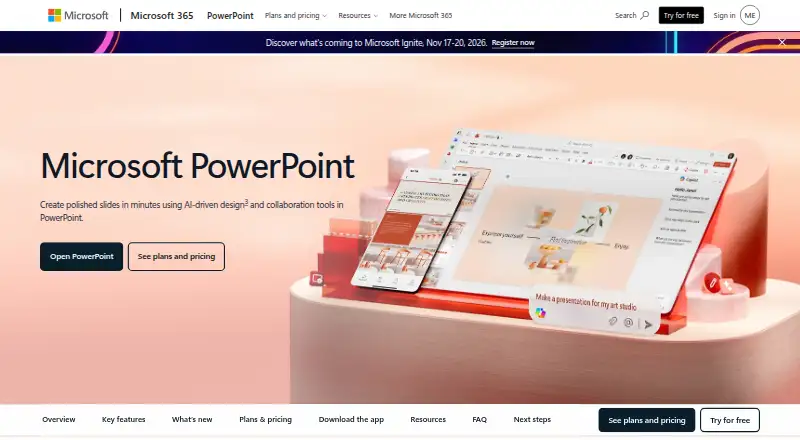
Microsoft PowerPoint helps users create, present, and share slide decks through web, desktop, and mobile versions for Windows, macOS, Android, and iOS. The free web tier includes sharing, real-time collaboration, basic tools, dictation, and 5 GB of storage. Customizable templates support slide design, and users can write or draw on presentations and convert input to text or shapes. Copilot can edit presentations by rewriting, reorganizing, or adding slides. Speaker Coach gives AI-driven feedback on delivery, while Accessibility Assistant recommends adjustments to format, color, and word choice. Cameo lets users present slides with prerecorded video. Microsoft 365 plans bundle PowerPoint with apps such as Word, Excel, Outlook, OneNote, OneDrive, and Teams. Microsoft 365 Personal costs $9.99 a month and includes 1 TB of storage; Family costs $12.99 a month and includes up to 6 TB. Fully installed Office apps can work offline, but after at least 31 days without internet they cannot edit or create documents. Subscriptions automatically renew unless canceled in the Microsoft account.
Who it suits
PowerPoint suits people creating presentations who want slide templates, collaboration, or tools for rehearsal and accessibility. It is available across web, desktop, and mobile platforms, with paid Microsoft 365 options for additional storage and bundled apps.
What it does well
- Free web tier includes sharing and real-time collaboration.
- Offers customizable templates and converted handwriting or drawings.
- Copilot can rewrite, reorganize, or add slides.
- Speaker Coach gives feedback on presentation delivery.
- Cameo supports prerecorded video alongside slides.
What to know first
- Free web storage is 5 GB.
- Offline editing stops after at least 31 days without internet.
- Subscriptions renew automatically unless canceled.
Limits
The free web tier includes 5 GB of storage and basic templates, fonts, icons, stickers, spelling and grammar, dictation, and voice commands. Fully installed Office apps enter reduced functionality mode after at least 31 days without internet, and cannot then edit or create documents.
Plans
| Plan | Billed and limits | Price |
|---|---|---|
| Microsoft PowerPoint | 1 person · PowerPoint for the web · Sharing and real-time collaboration · 5 GB cloud storage | Free |
| Microsoft 365 Family | Subscription automatically renews unless canceled in Microsoft account. · 1 to 6 people · Up to 5 devices per person · Up to 6 TB cloud storage | $12.99 a month |
| Microsoft 365 Family | Subscription automatically renews unless canceled in Microsoft account. · 1 to 6 people · Up to 5 devices per person · Up to 6 TB cloud storage | $129.99 a year |
| Microsoft 365 Premium | Subscription automatically renews unless canceled in Microsoft account. · Everything in Microsoft 365 Family · Advanced Copilot chat and AI features | $19.99 a month |
| Microsoft 365 Premium | Subscription automatically renews unless canceled in Microsoft account. · Everything in Microsoft 365 Family · Advanced Copilot chat and AI features | $199.99 a year |
| Microsoft 365 Business Standard with Copilot | user/month, paid yearly; annual subscription auto-renews · Up to 300 users · Desktop, web, and mobile Office apps · 1 TB cloud storage per user · Copilot | $23.50 |
| Microsoft 365 Business Premium with Copilot | user/month, paid yearly; annual subscription auto-renews · Up to 300 users · Desktop, web, and mobile Office apps · 1 TB cloud storage per user · Advanced device management and threat protection | $32 |
| Microsoft 365 Business Basic | user/month, paid yearly; annual subscription auto-renews · Up to 300 users · Web and mobile Office apps · 1 TB cloud storage per user · Teams | $7 |
The first 8 of 12 plans, as microsoft.com lists them, read 29 Sept 2026. The maker's own page has the final word. Every plan
Getting started
- Open the PowerPoint website.
- Use PowerPoint for the web for the free tier.
- Choose a Microsoft 365 plan if you want a paid subscription.
- Install Office apps on a computer for offline use.
- Share a presentation to collaborate in real time.
Microsoft PowerPoint is presentation software for creating, designing, and sharing slide decks. It suits individuals and teams who want presentation tools across web, desktop, and mobile, especially those already using Microsoft 365. Its breadth is useful, but the free web tier is basic and installed apps require periodic internet access to keep editing.
Overview
PowerPoint combines slide design with co-authoring and rehearsal tools. Thousands of customizable templates, illustration tools, and Microsoft Designer recommendations help shape text and graphics; users can also draw or write by hand and convert that input into text or shapes. That range makes it a versatile choice for building polished decks, though a large toolset may be more than someone needs for occasional, simple slides.
Shared presentations support real-time collaboration, comments, and @mentions, so colleagues can develop a deck together. Cameo adds prerecorded video to a presentation, while Speaker Coach gives feedback on pace, vocabulary, and other aspects of delivery. Accessibility Assistant suggests adjustments to format, color, and word choice. Copilot can rewrite or reorganize content and add slides, but AI assistance still calls for a human review of the result.
PowerPoint runs on the web and on Windows, Mac, Android, and iOS. Microsoft 365 plans bundle it with apps such as Word, Excel, Outlook, OneNote, OneDrive, and Teams. Documents users create belong to them and can be stored online or locally.
Key features
- Design and editing: Templates, illustration tools, Designer suggestions, and handwriting conversion offer several ways to build and refine slides. The free tier provides basic templates, fonts, icons, and stickers.
- Team collaboration: Sharing, live co-editing, comments, and @mentions support joint work without making a deck a solo task.
- Presentation practice: Speaker Coach provides immediate feedback on pace and vocabulary, making it useful for rehearsal as well as slide production.
- Video and accessibility: Cameo incorporates prerecorded video, and Accessibility Assistant recommends changes to formatting, color, and wording. These tools broaden the presentation workflow beyond arranging slides.
- AI assistance: Copilot can edit presentations by rewriting, reorganizing, or adding slides. Microsoft Designer also recommends ways to format text and graphics.
- Offline use: Fully installed Office apps can work without an internet connection, but after 31 days without internet access they enter reduced functionality mode and cannot create or edit documents. That condition matters for frequent travelers or anyone with unreliable connectivity.
Pricing
PowerPoint uses a freemium model. The free web version includes sharing, real-time collaboration, basic tools, dictation, voice commands, spelling and grammar support, and 5 GB of storage. It is suitable for basic online work, but its limited templates and fonts make it a narrower option than a paid Microsoft 365 subscription. The standalone PowerPoint plan is for one person with 5 GB of cloud storage and custom pricing.
| Plan | Price and terms | What it includes |
|---|---|---|
| Microsoft 365 Personal | $9.99 a month; automatically renews unless canceled | One person, use on 5 devices, and 1 TB of storage. A practical fit for an individual who also wants the wider Microsoft 365 bundle. |
| Microsoft 365 Family | $12.99 a month; automatically renews unless canceled | One to six people, 5 devices per person, and up to 6 TB of storage (1 TB per person). It extends the Personal offer to a household. |
| Microsoft 365 Premium | $19.99 a month; automatically renews unless canceled | Includes everything in Family and up to 6 TB of storage. It costs more than Family, so it suits readers who want the Premium tier rather than a single-user plan. |
| Microsoft 365 Business Basic | $7 a year, billed per user/month and paid yearly; annual subscription auto-renews | For up to 300 users, with web and mobile Office apps, 1 TB per user, and Teams. It provides core identity and access management, but not desktop Office apps. |
| Microsoft 365 Business Standard with Copilot | $23.50 a year, billed per user/month and paid yearly; annual subscription auto-renews | For up to 300 users, with desktop, web, and mobile Office apps, 1 TB per user, and Copilot. |
| Microsoft 365 Business Premium with Copilot | $32 a year, billed per user/month and paid yearly; annual subscription auto-renews | For up to 300 users, with desktop, web, and mobile Office apps, 1 TB per user, advanced device management, and threat protection. |
Microsoft 365 consumer plans offer a one-month free trial; business plans show a free-trial option. Subscriptions automatically renew at the regular price and selected term unless canceled through the Microsoft account. Business Basic is the lower-cost route for organizations needing web and mobile apps, while Standard adds desktop apps and Copilot; Premium adds device management and threat protection.
Platforms
PowerPoint is available for Windows, Mac, Android, and iOS, as well as in a web version. Desktop apps support offline work once installed, subject to the 31-day connectivity limit. The web tier avoids installation but is limited to basic tools.
Who it's for
PowerPoint is a strong fit for people who create presentations regularly, teams that need co-editing, and Microsoft 365 users who can make use of the bundled apps and storage. Its rehearsal, accessibility, and video tools also suit presenters who want support beyond slide formatting. Someone who needs only simple slides or must edit installed apps for long periods without internet may be better served by a more limited online workflow.
Pros and cons
- Pro: Design tools span templates, illustration, Designer recommendations, and handwriting conversion, giving users multiple ways to develop slides.
- Pro: Real-time collaboration, comments, and @mentions make shared deck creation part of the core offering.
- Pro: Speaker Coach, Cameo, and Accessibility Assistant address rehearsal, video, and accessibility alongside slide creation.
- Con: The free web plan is limited to basic tools and 5 GB of storage, so it may not suit users who need a fuller design workflow.
- Con: Installed apps lose document editing and creation after 31 days without internet access, a meaningful constraint for extended offline work.
- Con: Paid subscriptions auto-renew unless canceled, so readers should account for the recurring term when choosing a plan.
Alternatives
For a broader comparison of presentation options, browse Presentation software. Readers comparing storage or file-sharing products can also explore File Sharing Software and Cloud Storage Services; for visual design tools, see Graphic Design Software.
Google Drive is worth considering when a free cloud-storage plan with 15 GB is a priority. Koofr offers a freemium alternative with a 10 GB free plan and broad platform support. For file storage options with other platform combinations, consider FileCloud, Nextcloud Files, pCloud, Icedrive, Internxt Drive, or MASV.
Verdict
Choose PowerPoint if you want a full presentation workflow that combines slide design, collaboration, rehearsal, and Microsoft 365 apps across devices. Its main trade-offs are the basic free tier and the internet check required to keep installed apps fully functional; readers who need only lightweight online work or sustained offline editing should look elsewhere.
Verdict
PowerPoint combines slide creation and collaboration with presentation coaching, accessibility suggestions, and video options. The free web tier covers basic work, while Microsoft 365 plans add storage and bundled apps; note the renewal and offline-use conditions.
Questions
Does PowerPoint have a free plan?
Yes. PowerPoint for the web includes sharing, real-time collaboration, basic tools, dictation, and 5 GB of storage.
How much does Microsoft 365 Personal cost?
Microsoft 365 Personal costs $9.99 a month and includes 1 TB of storage for one person.
Which platforms can I use PowerPoint on?
PowerPoint has a web version and supports Windows, macOS, Android, and iOS.
Does PowerPoint offer a free trial?
Microsoft 365 consumer plans offer a free trial for one month. Business plans show a free-trial option.
Can I use PowerPoint offline?
Fully installed Office apps can be used without an internet connection. After at least 31 days without internet, they cannot edit or create documents.
Do subscriptions renew automatically?
Yes. Subscriptions automatically renew at the regular price and selected term unless canceled in the Microsoft account.
Facts from Microsoft PowerPoint's own pages
- Accessibility
- Accessibility Assistant offers AI-assisted recommendations on format, color, and word choice. · microsoft.com, 29 Sept 2026
- AI assistance
- Copilot can edit, rewrite, reorganize, and add slides; Speaker Coach provides AI-driven feedback. · microsoft.com, 27 Sept 2026
- Billing renewal
- Subscriptions automatically renew at the regular price and selected term unless cancelled in the Microsoft account. · microsoft.com, 27 Sept 2026
- Brand kit
- Yes · microsoft.com, 20 Sept 2026
- Business administration
- Business Basic provides core identity and access management for up to 300 users. · microsoft.com, 27 Sept 2026
- Business use
- Microsoft 365 business offerings include PowerPoint and describe plans for organizations of up to 300 users or employees. · microsoft.com, 29 Sept 2026
- Cameo
- Cameo lets users present slides with prerecorded video. · microsoft.com, 29 Sept 2026
- Cloud storage
- Personal includes 1 TB; Family includes up to 6 TB, or 1 TB per person. · microsoft.com, 27 Sept 2026
- Collaboration
- Users can share presentations and work together in real time, with comments and @mentions. · microsoft.com, 29 Sept 2026
- Copilot
- Copilot can make edits directly in presentations, including rewriting, reorganizing, and adding slides. · microsoft.com, 29 Sept 2026
- Designer
- Microsoft Designer provides AI recommendations and prebuilt templates to format text and graphics. · microsoft.com, 29 Sept 2026
- Desktop app
- Yes · microsoft.com, 20 Sept 2026
- Document ownership
- Documents created by users belong fully to them and can be stored online or locally. · microsoft.com, 27 Sept 2026
- Founded
- 1975 · microsoft.com, 23 Sept 2026
- Free plan
- Yes · microsoft.com, 20 Sept 2026
- Free tier
- PowerPoint for the web includes sharing, real-time collaboration, basic tools, dictation, and 5 GB storage. · microsoft.com, 27 Sept 2026
- Free tier limits
- The free plan provides basic templates, fonts, icons, stickers, spelling, grammar, dictation, and voice commands. · microsoft.com, 27 Sept 2026
- Free version
- PowerPoint for the web is free to use online with any email address. · microsoft.com, 29 Sept 2026
- Handwriting
- Users can write or draw on presentations and automatically convert input to text or shapes. · microsoft.com, 29 Sept 2026
- Headquarters
- Redmond, Washington, USA · microsoft.com, 23 Sept 2026
- Illustration tools
- Yes · microsoft.com, 20 Sept 2026
- Integrations
- Microsoft 365 plans bundle PowerPoint with apps including Word, Excel, Outlook, OneNote, OneDrive, and Teams. · microsoft.com, 29 Sept 2026
- Mobile app
- Yes · microsoft.com, 20 Sept 2026
- Offline access
- Office apps can be used without an internet connection when fully installed on a computer. · microsoft.com, 27 Sept 2026
Where Microsoft PowerPoint stands on Freedom251
- Presentation software#3 of 93
- Visionos App#4 of 16
- Graphic Design Software#50 of 150
- Design tools#49 of 146
- AI App Builders#14 of 39
- Drag and Drop App Builder Software#13 of 34
- No-code app builders#95 of 177
- Full Stack Generators#14 of 26
- Form builders#38 of 69
- Cloud storage#49 of 66