Freedom251 › File Sharing Software
Koofr
by Koofr
What Koofr is
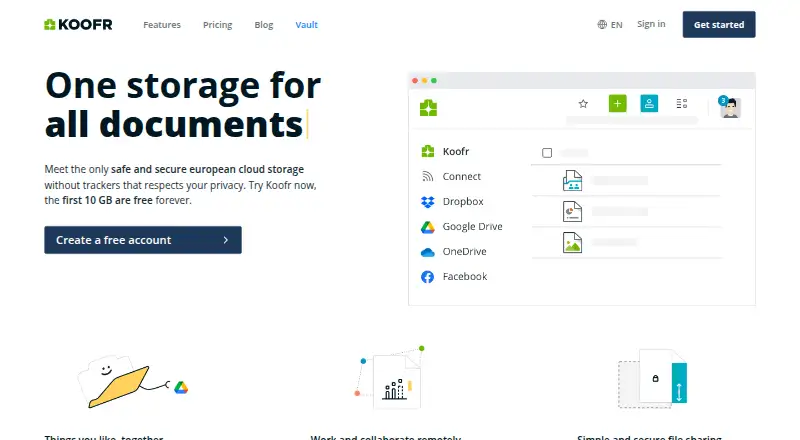
Koofr is a cloud storage service for storing, organizing, accessing, and managing files. It is available on the web, Windows, macOS, Linux, iOS, and Android, with browser extensions also listed. The free plan includes 10 GB; paid plans start at €0.50/mo (annual). Koofr says it has no individual file-size or file-type limits. Users can connect Dropbox, Google Drive, and OneDrive accounts, then search their contents through Koofr. The service can automatically back up mobile media and offers two-way computer synchronization through its desktop app. Users can share files with people who do not have Koofr accounts, and deleted files can be recovered for up to 30 days. Security features include TLS/SSL transfers, encryption on Koofr servers, TOTP authentication apps, and FIDO2 passkeys. Koofr Vault is a client-side, zero-knowledge encrypted storage application. The company is based in Ljubljana, Slovenia, and says its servers are in Germany in ISO 27001-certified data centers and that it complies with GDPR. Paid subscriptions are currently yearly only.
Who it suits
Koofr suits individuals who want cloud file storage across desktop and mobile devices, with links to other cloud accounts. It may also suit people who want file sharing and recovery options or client-side encrypted storage through Koofr Vault.
What it does well
- Connects Dropbox, Google Drive, and OneDrive accounts.
- No stated individual file-size or file-type limits.
- Deleted files can be recovered for up to 30 days.
- Supports TOTP apps and FIDO2 passkeys.
What to know first
- Paid subscriptions are currently yearly only.
- Free plan includes 10 GB of storage.
- Free plan retains deleted files for 7 days.
Limits
The free plan provides 10 GB, retains deleted files for 7 days, allows up to 10 public links and has a 50 GB daily public transfer limit. The S plan costs €0.50 a month billed yearly and provides 10 GB plus 10 GB free space, 200 GB daily public transfer and 9 external cloud connections.
Plans
| Plan | Billed and limits | Price |
|---|---|---|
| Free | Free forever · 10 GB · 7 days deleted-file retention · up to 10 public links · 50 GB daily public transfer | Free |
| S | Currently only yearly subscriptions are possible · 10 GB · plus 10 GB free space · 200 GB daily public transfer · 9 external cloud connections | €0.50 a month |
| M | Currently only yearly subscriptions are possible · 25 GB · plus 10 GB free space · 200 GB daily public transfer · 9 external cloud connections | €1 a month |
| L | Currently only yearly subscriptions are possible · 100 GB · plus 10 GB free space · 200 GB daily public transfer · 9 external cloud connections | €2 a month |
| XL | Currently only yearly subscriptions are possible · 250 GB · plus 10 GB free space · 1 TB daily public transfer · 18 external cloud connections | €4 a month |
| XL+ | Currently only yearly subscriptions are possible · 500 GB · plus 10 GB free space · 1 TB daily public transfer · 18 external cloud connections | €7 a month |
| XXL | Currently only yearly subscriptions are possible · 1 TB · plus 10 GB free space · 1 TB daily public transfer · 18 external cloud connections | €10 a month |
| XXXL | Currently only yearly subscriptions are possible · 2.5 TB · plus 10 GB free space · 4 TB daily public transfer · 30 external cloud connections | €20 a month |
The first 8 of 10 plans, as koofr.eu lists them, read 1 Oct 2026. The maker's own page has the final word. Every plan
Getting started
- Visit https://koofr.eu/.
- Choose the free plan or a paid storage plan.
- Use the web service or download a desktop app for Windows, macOS or Linux.
- Install the Android or iOS app for mobile access and media backup.
- Connect Dropbox, Google Drive or OneDrive if you want to search those accounts through Koofr.
Overview
Koofr is a file service that brings desktop synchronisation, mobile-media backup and connected cloud accounts together. It is a strong fit for people who want to search Dropbox, Google Drive and OneDrive alongside their own files. Its appeal is breadth rather than a single large free allowance: storage and sharing capacity rise across paid tiers, while even the entry plan starts at 10 GB.
Key features
Koofr connects Dropbox, Google Drive and OneDrive so users can search those accounts through Koofr, and it includes file versioning. The service says it imposes no individual file-size or file-type limits, which helps with varied file collections, but each plan still has a storage ceiling. Desktop apps offer unlimited two-way synchronisation, and mobile media is backed up automatically.
Sharing works with people who do not have Koofr accounts. The free plan caps public links at 10 and daily public transfer at 50 GB; paid tiers raise daily transfer to 200 GB, 1 TB or 4 TB. Deleted files can be recovered for up to 30 days without using storage space, though Free retains them for only seven days.
Security options include TLS/SSL transfers, server-side encryption and storage in at least three physical locations. Koofr says its servers are in Germany in ISO 27001-certified data centers and that it complies with GDPR. For client-side protection, Koofr Vault is an open-source, zero-knowledge encrypted storage application. TOTP authenticator apps and FIDO2 passkeys are supported as two-factor options. Microsoft Office integration supports creating, viewing and editing documents; Meta's transfer tool handles Facebook and Instagram media.
Pricing
Koofr is freemium, with Free forever at no cost. It gives 10 GB, seven-day deleted-file retention, up to 10 public links and 50 GB of daily public transfer. That is a useful starting allowance, but the link and transfer caps make it less suitable for frequent public distribution.
Paid subscriptions are currently available only yearly. S costs €0.50 a month and provides 10 GB plus 10 GB free space, 200 GB daily public transfer and 9 external cloud connections. M costs €1 a month for 25 GB plus 10 GB free space, with the same transfer and connection limits. L costs €2 a month for 100 GB plus 10 GB free space, again with 200 GB daily transfer and 9 connections. These lower tiers suit people who need modest storage and connected accounts more than high-volume sharing.
XL costs €4 a month for 250 GB plus 10 GB free space, 1 TB daily transfer and 18 external connections; XL+ costs €7 a month for 500 GB plus 10 GB free space with the same limits. XXL is €10 a month for 1 TB plus 10 GB free space, 1 TB daily transfer and 18 connections. These tiers add room for larger libraries, but XXL does not raise the daily transfer quota over XL+.
XXXL costs €20 a month and 5XXL costs €35 a month. They provide 2.5 TB and 5 TB respectively, each plus 10 GB free space, 4 TB daily public transfer and 30 external cloud connections. Crate, for 10 TB and up, has custom pricing and the same 4 TB daily transfer and 30-connection allowance. The added capacity makes these plans relevant for large collections, though the daily sharing cap remains fixed. Plan details do not state a seat allowance.
Platforms
Koofr supports Android, iOS, Linux, macOS, web and Windows, and offers an extension. Free desktop downloads are available for Windows, macOS and Linux, giving computer users a route to the unlimited two-way sync feature across the major desktop platforms.
Who it's for
Koofr fits individuals who want one place to manage their files, search connected cloud accounts, sync computers and back up mobile media. Its plan ladder also gives people with larger storage needs a path from 10 GB to 5 TB and beyond. It is less compelling for someone who needs only a small free archive or whose priority is public sharing beyond the plan's daily transfer allowance.
Pros and cons
- Pro: Search across Dropbox, Google Drive and OneDrive makes the service useful as a hub for existing cloud accounts.
- Pro: Unlimited two-way desktop sync, automatic mobile-media backup and file versioning cover several everyday file-management needs.
- Pro: Vault provides client-side, zero-knowledge encryption, alongside TOTP and FIDO2 two-factor options.
- Con: Paid plans require yearly subscriptions, despite their prices being expressed per month.
- Con: Free has only 10 GB, seven-day deleted-file retention, 10 public links and a 50 GB daily transfer cap.
- Con: Large-storage tiers still cap daily public transfer at 4 TB, so storage capacity alone does not determine sharing headroom.
Alternatives
For a broader comparison, browse Cloud Storage Services or File Sharing Software.
Choose IDrive instead if its 100 GB IDrive Mini plan at $0.25 a month suits your storage needs and you prefer monthly billing. Microsoft PowerPoint is the relevant alternative when creating and editing presentations is the priority; its free plan includes 5 GB cloud storage. Pick PhoneCopy instead for synchronising contacts, calendars, tasks and notes, with its Basic plan covering two devices and 1 GB of media.
Filen is an alternative if open-source apps under the AGPL v3 license matter most. Internxt Drive is another option for readers who value publicly available code and external audits. Consider Jottacloud if you want an unlimited-storage plan, or pCloud for a free plan with 10 GB. Yandex Disk is another cloud storage alternative.
Verdict
Koofr is a good choice for people who want cloud-account search, desktop sync and mobile backup in one service, with zero-knowledge storage available through Vault. Its strongest reason to choose it is that combination of connected-cloud access and cross-platform file handling; look elsewhere if you need monthly paid billing or daily public transfer beyond the caps of its largest tiers.
Verdict
Koofr combines file storage, synchronization, external cloud connections, and sharing across desktop and mobile platforms. Its free plan includes 10 GB, while paid plans begin at €0.50/mo (annual).
Questions
Is Koofr free?
Yes. Its Free plan costs nothing and is billed free forever, with 10 GB of storage.
What does the cheapest paid plan cost?
The S plan is €0.50 a month. Paid subscriptions are currently available yearly only.
Which platforms does Koofr support?
Koofr lists web, browser extension, Windows, macOS, Linux, iOS and Android.
Can Koofr connect to other cloud storage services?
Yes. Users can connect Dropbox, Google Drive and OneDrive accounts and search them through Koofr.
Does Koofr offer open-source or zero-knowledge encryption?
Koofr Vault is described as an open-source, client-side, zero-knowledge encrypted storage application.
Who makes Koofr?
Koofr is made by Koofr, a company founded in 2013 and headquartered in Ljubljana, Slovenia.
Facts from Koofr's own pages
- Authentication
- Koofr supports TOTP authentication apps and FIDO2 passkeys as two-factor options. · koofr.eu, 1 Oct 2026
- Backup and sync
- The service automatically backs up mobile media and offers unlimited two-way computer synchronisation through its desktop app. · koofr.eu, 1 Oct 2026
- Client-side encryption
- Koofr Vault is described as an open-source, client-side, zero-knowledge encrypted storage application. · koofr.eu, 1 Oct 2026
- Cloud connections
- Users can connect Dropbox, Google Drive and OneDrive accounts and search them through Koofr. · koofr.eu, 1 Oct 2026
- Cloud storage
- Koofr provides tools for accessing, storing, organising and managing files. · koofr.eu, 1 Oct 2026
- Company
- Koofr is a software company founded in 2013 with headquarters in Slovenia. · koofr.eu, 1 Oct 2026
- Desktop platforms
- Koofr offers free desktop downloads for Windows, macOS and Linux. · koofr.eu, 1 Oct 2026
- Device platforms
- Windows,macOS,Linux,iOS,Android · koofr.eu, 20 Sept 2026
- File limits
- Koofr states that it has no individual file-size limits and no file-type limits. · koofr.eu, 1 Oct 2026
- File versioning
- Yes · koofr.eu, 20 Sept 2026
- Founded
- 2013 · koofr.eu, 28 Sept 2026
- Free plan
- Yes · koofr.eu, 20 Sept 2026
- Headquarters
- Ljubljana, Slovenia · koofr.eu, 28 Sept 2026
- Integrations
- Koofr integrates Meta's transfer tool for Facebook and Instagram media and Microsoft Office for creating, viewing and editing Office documents. · koofr.eu, 1 Oct 2026
- Privacy and compliance
- Koofr says its servers are in Germany in ISO 27001-certified data centers and that it complies with GDPR. · koofr.eu, 1 Oct 2026
- Recovery
- Deleted files can be recovered for up to 30 days and do not use storage space during retention. · koofr.eu, 1 Oct 2026
- Security
- Files are transferred over TLS/SSL, encrypted on Koofr servers and stored in at least three separate physical locations. · koofr.eu, 1 Oct 2026
- Sharing
- Users can share with or receive files from anyone, including people who are not Koofr users. · koofr.eu, 1 Oct 2026
- Storage limit
- 10 · koofr.eu, 20 Sept 2026
- User focus
- Koofr says its products are used by individuals as well as offered under various names by ISPs and enterprises. · koofr.eu, 1 Oct 2026
- Zero-knowledge encryption
- Yes · koofr.eu, 20 Sept 2026
Where Koofr stands on Freedom251
- File Sharing Software#10 of 47
- Cloud Storage Services#22 of 64
- Cloud storage#23 of 66