Freedom251 › Infrastructure as a Service
Google Slides
What Google Slides is
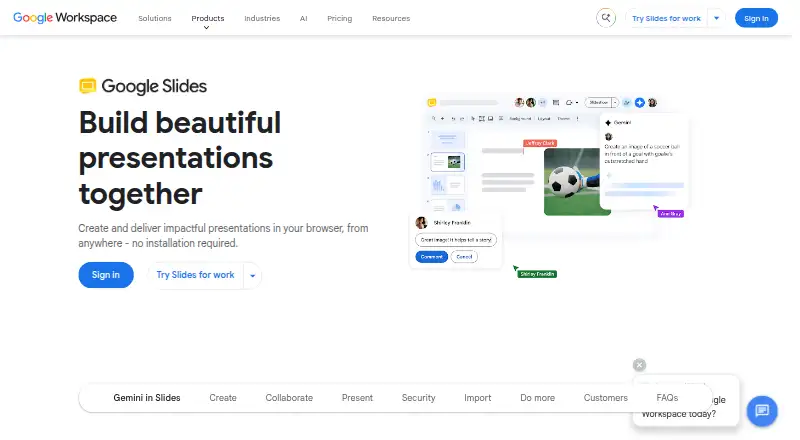
Google Slides is a browser-based presentation tool for creating and delivering slide decks without installing software. Anyone with a Google Account can create presentations on the web, Android, or iOS, and users can work offline. Templates, videos, animations, transitions, GIFs, and stickers are available for building presentations. Gemini in Slides can summarize content, create slides from prompts or Drive content, and generate images. Collaborators can edit live, comment, use live pointers, and set who may view, comment on, or edit a presentation. Slides can import or directly edit Microsoft PowerPoint presentations and import Canva presentations online. Users can present through Google Meet, add speaker spotlight, or record presentations on some Workspace plans. The free plan is available; paid plans start at $7/user/mo and include a 14-day trial. Some features require a Workspace plan or add-on: recording and speaker spotlight are plan-dependent, and Gemini visualization features require an add-on.
Who it suits
Google Slides suits people who want to create and collaborate on presentations in a browser or mobile app, including offline. It can also fit teams working with PowerPoint files or using Google Workspace plans for additional presenting features.
What it does well
- Anyone with a Google Account can create slides.
- Collaborators can edit and comment in real time.
- Can import or directly edit PowerPoint presentations.
- Offline access supports creating and editing.
- Templates, animations, videos, GIFs, and stickers are available.
What to know first
- Recording and speaker spotlight require some Workspace plans.
- Gemini visualization features require an add-on.
- Business Starter, Standard, and Plus cap at 300 users.
Limits
The free plan lets anyone with a Google Account create slides, but recording and speaker spotlight require Workspace plans, and Gemini visualization features require an add-on. Business Starter is limited to 300 users and includes 30 GB pooled storage per person.
Plans
| Plan | Billed and limits | Price |
|---|---|---|
| Google Slides | Anyone with a Google Account can create slides · recording and speaker spotlight require Workspace plans · Gemini visualization features require an add-on | Free |
| Business Standard | per user/month; monthly billing (annual commitment option also shown) · 2 TB pooled storage per user · maximum 300 users | $14 a month |
| Business Plus | per user/month; monthly billing (annual commitment option also shown) · 5 TB pooled storage per user · maximum 300 users | $22 a month |
| Business Starter | per user/month; monthly billing (annual commitment option also shown) · 30 GB pooled storage per user · maximum 300 users | $7 a month |
| Enterprise | Contact sales · 5 TB pooled storage or upgrade for more · no minimum or maximum user limit | On request |
As workspace.google.com lists them, read 11 Oct 2026. The maker's own page has the final word.
Getting started
- Open the Google Slides website or use its Android or iOS app.
- Create slides with a Google Account on the free plan, or choose a Workspace plan.
- Start a presentation with a pre-designed template or create your own.
- Invite collaborators to edit, comment, or view the presentation.
Overview
Google Slides is a browser-based presentation tool with Android and iOS apps, built for creating and delivering decks without installing desktop software. It suits individuals and teams who want free slide creation, live collaboration, and the option to work offline. Its main trade-off is that some presenting and AI capabilities depend on a Workspace plan or add-on.
Key features
Pre-designed templates, videos, animations, transitions, GIFs, and stickers give users several ways to shape a presentation. Gemini can summarize content, draft slides from prompts or Drive content, and generate images; Gemini visualization features require an add-on. That makes Slides useful for moving from a prompt or existing material to a draft, but users should account for the add-on requirement before relying on those capabilities.
Live editing, comments, live pointers, and controls over who can view, comment on, or edit a deck make shared work a core strength. Offline access also lets users create and edit without an internet connection. Slides can import or directly edit PowerPoint presentations and import Canva presentations online, which helps when collaborators use different tools. Add-ons and developer tools extend it through the Workspace Marketplace, including apps such as Nearpod and Lucidchart.
Users can present from Google Meet, add speaker spotlight, and record presentations on some Workspace plans. These options suit teams that present remotely, but they are not part of the free plan. Google says Slides data is encrypted by default and protected by advanced client-side encryption, anti-abuse measures, and privacy controls. Google Workspace reports independent security, privacy, and compliance audits, with certifications and assessments including ISO, HIPAA, and FedRAMP.
Pricing
Anyone with a Google Account can create slides on the free plan, which costs nothing. Recording and speaker spotlight require Workspace plans, while Gemini visualization features require an add-on. The free option is a strong starting point for personal work and basic collaboration, but those requirements matter if a team depends on advanced presenting or AI features.
Workspace business plans are billed monthly. Business Starter costs $7 a month and includes 30 GB pooled storage per person; Business Standard costs $14 a month and includes 2 TB pooled storage per person; Business Plus costs $22 a month and includes 5 TB pooled storage per person and 500 video participants. Each supports a maximum of 300 users. The higher tiers provide more storage and, for Plus, a stated video-participant limit, so the right fit depends on a team's storage and meeting needs rather than slide creation alone.
Enterprise has custom pricing, 5 TB or more storage, and 1,000 video participants, with no minimum or maximum user limit. The paid offering starts at $7/user/mo and includes a 14-day trial; check plan and add-on requirements for particular features before choosing a tier.
Platforms
Slides is available on the web, Android, and iOS. Its browser-based approach avoids installation, while offline access supports creating and editing when an internet connection is unavailable.
Who it's for
Google Slides is a good fit for Google Account holders who need a straightforward way to create decks, work on them together, and continue editing offline. It also suits organizations that need larger pooled storage, remote-presentation features, or Workspace customer support. People who require recording, speaker spotlight, or Gemini visualization should confirm the relevant Workspace plan or add-on first.
Pros and cons
- Pros: Free slide creation for anyone with a Google Account makes it accessible for individual users and teams starting out.
- Pros: Live editing, comments, live pointers, and granular view/comment/edit controls support collaborative deck work.
- Pros: Offline editing and PowerPoint import or direct editing make it more flexible across connectivity and file-format needs.
- Pros: Business plans scale from 30 GB to 5 TB pooled storage per person, with Enterprise offering 5 TB or more and no user-count cap.
- Cons: Recording and speaker spotlight are limited to some Workspace plans, so free users cannot assume those presenting tools are included.
- Cons: Gemini visualization features require an add-on, adding a separate requirement for users who want that capability.
Alternatives
For a broader set of presentation options, browse Presentation software; for tools centered on AI-assisted decks, see AI Presentation Software. If visual asset creation matters more than slide collaboration, compare Graphic Design Software.
Microsoft PowerPoint is another freemium option, with a free plan, mobile and desktop platforms, and a one-person plan with 5 GB cloud storage. Zoho Show offers a free plan with a 500 MB maximum upload size and is available on web, mobile, desktop, and as an extension. Apple Keynote is a free choice for iOS and macOS users, with presentation creation, editing, and real-time collaboration not requiring a subscription.
PowerPoint for the web is a freemium option available on Android, iOS, and web. Pitch has a free forever plan for up to 5 members, 2 external guests, and 10 GB total storage. LibreOffice Impress is free and open source for Windows, macOS, and Linux, with presentation creation, templates, master slides, animations, and transitions. Gamma offers a free plan with up to 10 slides per prompt and PDF and PPTX import. Slides has a free plan limited to public decks.
Verdict
Choose Google Slides if you want free, collaborative presentation creation with offline editing and practical PowerPoint compatibility. Its strengths are the combination of shared editing, accessible account-based use, and flexible access across web and mobile. Look elsewhere if your decision depends on recording or speaker spotlight being included free, or if you want Gemini visualization without an add-on.
Verdict
Google Slides combines presentation creation, live collaboration, and offline editing, with a free option for Google Account holders. Check plan and add-on requirements for particular features; paid plans start at $7/user/mo, with a 14-day trial.
Questions
Is Google Slides free?
Yes. Anyone with a Google Account can create slides on the free plan.
Which platforms can I use?
Google Slides is available on the web, Android, and iOS.
Can I use Slides offline or with PowerPoint files?
Yes. Slides can be accessed, created, and edited offline. It can import or directly edit Microsoft PowerPoint presentations.
Which features require a paid plan or add-on?
Presenting from Google Meet with speaker spotlight and recording are available on some Workspace plans. Gemini visualization features require an add-on.
What are the Business plan user limits?
Business Starter, Standard, and Plus each allow a maximum of 300 users. Enterprise has no minimum or maximum user limit.
Facts from Google Slides's own pages
- AI features
- Gemini in Slides can summarize content, generate slides from prompts and Drive content, and generate images. · workspace.google.com, 11 Oct 2026
- Business plan limits
- Business Starter, Standard, and Plus can each be purchased for a maximum of 300 users; Enterprise has no minimum or maximum user limit. · workspace.google.com, 11 Oct 2026
- Collaboration
- People can edit together live, comment, use live pointers, and control who can view, comment on, or edit a presentation. · workspace.google.com, 11 Oct 2026
- Compliance
- Google Workspace reports independent third-party security, privacy, and compliance audits and lists certifications and assessments including ISO, HIPAA, and FedRAMP. · workspace.google.com, 11 Oct 2026
- Design tools
- Slides offers pre-designed templates, videos, animations, transitions, GIFs and stickers. · workspace.google.com, 11 Oct 2026
- File compatibility
- Slides can import or directly edit Microsoft PowerPoint presentations, and can import Canva presentations online. · workspace.google.com, 11 Oct 2026
- Free plan
- Yes · workspace.google.com, 20 Sept 2026
- Headquarters
- Mountain View, California, United States · workspace.google.com, 23 Sept 2026
- Integrations
- Slides supports add-ons and developer tools, and the Workspace Marketplace lists apps that work directly with Slides, including Nearpod and Lucidchart. · workspace.google.com, 11 Oct 2026
- Mobile app
- Yes · workspace.google.com, 20 Sept 2026
- Offline access
- Users can access, create, and edit Slides without an internet connection. · workspace.google.com, 11 Oct 2026
- Presentation design
- Yes · workspace.google.com, 20 Sept 2026
- Presenting
- Users can present from Google Meet, add speaker spotlight, and record presentations; these features are available on some Workspace plans. · workspace.google.com, 11 Oct 2026
- Purpose
- Google Slides is a browser-based presentation tool for creating and delivering presentations without installation. · workspace.google.com, 11 Oct 2026
- Real-time collaboration
- Yes · workspace.google.com, 20 Sept 2026
- Security
- Google says Slides data is encrypted by default and protected by measures including advanced client-side encryption, anti-abuse measures, and privacy controls. · workspace.google.com, 11 Oct 2026
- Paid from
- 7 · workspace.google.com, 20 Sept 2026
- Support
- Google Workspace customers receive support for Google Slides as one of its web-based Drive and Docs editor services. · knowledge.workspace.google.com, 11 Oct 2026
- Template library
- Yes · workspace.google.com, 20 Sept 2026
- Who can use it
- Anyone with a Google Account can create in Slides, though some features require a Workspace plan or add-on. · workspace.google.com, 11 Oct 2026
Where Google Slides stands on Freedom251
- Infrastructure as a Service#2 of 21
- Presentation software#11 of 93
- Cloud Infrastructure as a Service (Cloud IaaS) Software#3 of 24
- Cloud Computing platform#3 of 22
- AI Presentation Software#16 of 84
- Google Workspace Office Tools#4 of 20
- Graphic Design Software#61 of 150
- Design tools#61 of 146