Freedom251 › Container Engines

Podman
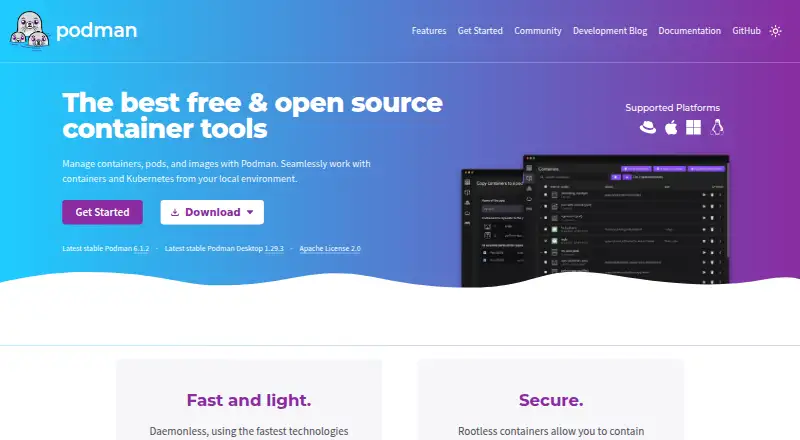
What Podman is
Podman manages containers, pods, and images, with tools for finding, running, building, and sharing container workloads. The container engine is daemonless, uses a command line comparable to Docker's CLI, and allows most commands to run as a regular user without extra privileges. Podman Desktop adds a graphical application for installing and working with Podman and other container engines on Windows, macOS, and Linux. It can build images from Dockerfiles or Containerfiles, pull images from remote repositories, and manage accounts for pushing them to registries. Podman supports Kubernetes workflows, including running YAML locally, generating YAML from pods, and deploying to existing Kubernetes environments. It can find and pull containers from Docker Hub, Quay.io, internal registries, or vendors. On macOS and Windows, Podman listens for Docker API clients. The project lists integrations with Visual Studio Code, Cirrus CLI, GitHub Actions, and kind. The homepage identifies Podman as Apache License 2.0 software. The project directs users to documentation, troubleshooting materials, issue tracking, and community support.
Who it suits
Podman suits developers and teams managing containers, pods, and images across Linux, macOS, or Windows. Its Kubernetes workflows and Desktop application may also suit users who want local container tooling with a graphical interface.
What it does well
- Free container, pod, and image management
- Most commands can run without extra privileges
- Podman Desktop supports Windows, macOS, and Linux
- Supports local Kubernetes YAML workflows
- Can build and pull container images
What to know first
- Windows containers are not supported
- Podman Desktop supports a subset of listed host platforms
- Some commands and workflows may require learning its tools
Limits
Windows containers are not supported.
Plans
| Plan | Billed and limits | Price |
|---|---|---|
| Free and open source | Container, pod, and image management · Podman Desktop | Free |
As podman.io lists them, read 30 Sept 2026. The maker's own page has the final word.
Getting started
- Visit the Podman website.
- Choose an installation route for Linux, macOS, or Windows.
- Install Podman Desktop for a graphical interface, if desired.
- Use the command line or Podman Desktop to find, run, build, or share containers.
Podman is a free container engine for managing containers, pods, and images across command-line and graphical workflows. It suits developers, operators, and teams that want rootless operation and a practical bridge from local containers to Kubernetes. Its strongest case is secure, daemonless administration; users requiring Windows containers should choose another tool.
Overview
Podman handles finding, running, building, and sharing containers while using a command line comparable to Docker’s CLI. Because it is daemonless, there is no central background daemon on which routine commands depend. Most commands can run as a regular user without additional privileges, making Podman a good fit for environments that limit elevated access.
The Apache License 2.0 project also includes Podman Desktop, a graphical application for installing and working with Podman and other container engines on Windows, macOS, and Linux. Together, the engine and desktop application cover local image work, container management, and Kubernetes-oriented tasks. Podman belongs in Container Engines, Container Runtime Software, and Container Management Software.
Key features
Daemonless, rootless security
Daemonless architecture reduces dependence on a continuously running privileged service, while rootless mode lets most commands run from an ordinary account. Podman Desktop describes additional security foundations including SELinux support, network policy enforcement, and immutable containers. These controls make Podman particularly suitable for developers and operators who need tighter privilege boundaries, although security still depends on how containers and hosts are configured.
Images, builds, and registries
Podman can find and pull images from Docker Hub, Quay.io, internal registries, or directly from vendors. Podman Desktop builds images from Dockerfiles or Containerfiles, pulls remote images, and manages accounts used to push images to registries. This gives teams a coherent acquire-build-publish workflow, with support for both image formats. It is a practical choice when registry flexibility matters more than a hosted image service bundled into the product.
Desktop engine management
Podman Desktop provides a visual way to install and operate Podman alongside Docker, Lima, kind, Red Hat OpenShift, and Red Hat OpenShift Developer Sandbox. That multi-engine view helps teams standardize local workflows while still working with different back ends. The desktop app runs on Windows, macOS, and Linux, but Windows containers themselves are not supported.
Kubernetes and developer integrations
Podman can play Kubernetes YAML locally, generate Kubernetes YAML from pods, and deploy to existing Kubernetes environments. Support in Visual Studio Code, Cirrus CLI, GitHub Actions, and kind extends those workflows into development and automation pipelines. This makes Podman more compelling for users who want local container work to map onto Kubernetes rather than remain an isolated desktop setup.
API access
On macOS and Windows, Podman listens for Docker API clients, and its installation guidance describes programmatic access from a language of the user’s choice. That compatibility can ease migration for tools built around Docker-style APIs, though Podman remains a distinct engine with its own runtime interface.
Pricing
Podman is free with no trial period or paid tier. The “Free and open source” plan costs nothing and includes container, pod, and image management plus Podman Desktop. The Apache License 2.0 terms make it suitable for individual use, teams, and self-hosted deployments without a subscription or seat charge. There are no published quotas, seat limits, renewal terms, or usage caps to weigh against a paid upgrade.
Platforms
The supported host operating systems are Linux, macOS, Windows, and FreeBSD. Platform listings also cover API and self-hosted deployments. Podman Desktop is available on Windows, macOS, and Linux, while the API listener for Docker API clients is specified for macOS and Windows. The important boundary is container type: Windows containers are not supported.
Who it's for
Choose Podman if you need a free engine with rootless operation, daemonless administration, broad registry access, and a route from pods to Kubernetes YAML. It is especially well suited to Linux-oriented operations, security-conscious teams, self-hosted environments, and developers who want both CLI and desktop options.
Look elsewhere when running Windows containers is a requirement, or when your priority is a commercial desktop subscription with clearly separated paid support features. Podman’s value comes from its open-source engine and integrations, not from a paid service layer.
Pros and cons
Pros
- Daemonless and rootless: most commands work without extra privileges or a central daemon.
- Strong security foundations: SELinux, network policy enforcement, and immutable-container support address operational risk.
- Broad workflows: image building, registry publishing, pod management, Kubernetes YAML, and API access fit together.
- Free Apache 2.0 software: there are no subscription fees, seat charges, or stated usage caps.
- Multi-engine desktop: Podman Desktop can work with Podman, Docker, Lima, kind, and OpenShift-related engines.
Cons
- No Windows containers: Windows hosts can use Podman, but Windows container workloads are unsupported.
- Engine distinction matters: Docker API compatibility on macOS and Windows does not make Podman identical to Docker’s runtime.
- Desktop scope is platform-limited: the graphical application targets Windows, macOS, and Linux, not FreeBSD.
Alternatives
Docker Desktop is the better choice for users who want a freemium desktop product with a Personal plan and a $9 a month Pro plan, plus Docker Engine, Kubernetes, Hub, Scout, and Debug. Apptainer is another free option for container work, with commercial support available through partners.
BuildKit suits users seeking a free Apache License 2.0 build-focused project. Incus offers free Apache 2 software for those comparing broader system-container tooling. containerd is a free Apache 2.0-licensed runtime for Linux, self-hosted deployments, and Windows. LXD provides free system containers and KVM-based virtual machines, with a free Ubuntu Pro Personal plan also listed. Apple container is a free Apache-2.0 project for Mac users whose hardware meets its requirements. Buildah is a free command-line tool focused on open-source image building without paid tiers or stated usage limits.
Verdict
Podman is an excellent default for users who want free, daemonless, rootless container management with image, desktop, API, and Kubernetes workflows in one project. Choose it for secure self-hosted and developer environments; look elsewhere if Windows container support or a commercial, subscription-backed desktop ecosystem is essential.
Verdict
Podman offers a daemonless container engine with image, Kubernetes, and Desktop workflows. It is free under Apache License 2.0, though Windows containers are not supported.
Questions
Is Podman free?
Yes. Podman is free and open source under the Apache License 2.0.
Which platforms does Podman support?
The listed platforms are Linux, macOS, Windows, and self-hosted use. Podman Desktop is available on Windows, macOS, and Linux.
Can Podman run without root privileges?
Yes. Most Podman commands can run as a regular user without additional privileges.
Does Podman support Kubernetes?
It can run Kubernetes YAML locally, generate YAML from pods, and deploy to existing Kubernetes environments.
Can I use Docker API clients with Podman?
Podman on macOS and Windows listens for Docker API clients.
Facts from Podman's own pages
- API
- Podman on macOS and Windows listens for Docker API clients, and its installation page describes programmatic access from a language of the user’s choice. · podman.io, 30 Sept 2026
- Container security
- Podman Desktop describes Podman’s security foundations as including daemonless and rootless containers, SELinux support, network policy enforcement, and immutable containers. · podman-desktop.io, 30 Sept 2026
- Daemonless
- Podman is a daemonless container engine with a command line comparable to Docker’s CLI. · docs.podman.io, 30 Sept 2026
- Desktop app
- Podman Desktop is a graphical application for installing and working with Podman and other container engines on Windows, macOS, and Linux. · podman.io, 30 Sept 2026
- Engine integrations
- Podman Desktop lists Podman, Docker, Lima, kind, Red Hat OpenShift, and Red Hat OpenShift Developer Sandbox as supported engines and orchestrators. · podman.io, 30 Sept 2026
- Image workflows
- Podman Desktop can build images from Dockerfiles or Containerfiles, pull images from remote repositories, and manage accounts for pushing images to registries. · podman.io, 30 Sept 2026
- Integrations
- The Podman site lists support in Visual Studio Code, Cirrus CLI, GitHub Actions, and kind. · podman.io, 30 Sept 2026
- Kubernetes
- Podman can play Kubernetes YAML locally, generate Kubernetes YAML from pods, and deploy to existing Kubernetes environments. · podman.io, 30 Sept 2026
- License
- The Podman homepage identifies the project as Apache License 2.0. · podman.io, 30 Sept 2026
- Platforms
- Podman runs on macOS and Windows using a guest Linux system managed as a Podman machine, and the installation page lists Linux distributions including Debian, Ubuntu, Fedora, and CentOS Stream. · podman.io, 30 Sept 2026
- Purpose
- Podman manages containers, pods, and images and supports finding, running, building, and sharing containers. · podman.io, 30 Sept 2026
- Registry compatibility
- Podman can find and pull containers from Docker Hub, Quay.io, internal registries, or directly from vendors. · podman.io, 30 Sept 2026
- Rootless use
- Most Podman commands can run as a regular user without additional privileges. · docs.podman.io, 30 Sept 2026
- Support
- The project points users to its troubleshooting guide, documentation, issue tracker, Matrix, Discord, IRC, mailing list, and community meetings. · podman.io, 30 Sept 2026
Where Podman stands on Freedom251
- Container Engines#14 of 31
- Container Runtime Software#15 of 28
- Container Management Software#16 of 28