Freedom251 › Container Engines
Apple container
What Apple container is
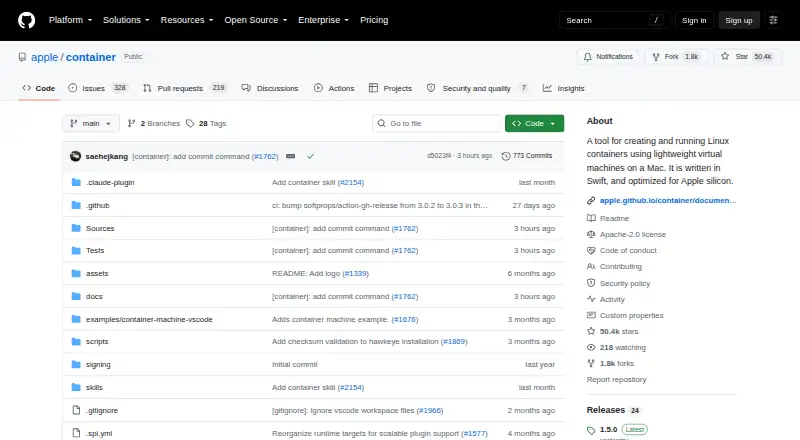
Apple container creates and runs Linux containers as lightweight virtual machines on a Mac. Written in Swift and optimized for Apple silicon, it gives each container its own lightweight VM with a minimal set of core utilities and libraries. Host data is shared by mounting only what the VM needs. The tool consumes and produces OCI-compatible images that can be pulled from and pushed to standard registries. Documented capabilities include CPU and memory limits, bind mounts, named volumes, tmpfs, DNS-based names, port forwarding, and isolated networks. It can run local single-node or multi-node Kubernetes clusters for development and testing, and supports building, running, and publishing images for Apple silicon and x86-64. The project integrates with macOS Virtualization, vmnet, XPC, launchd, Keychain services, and unified logging. It is free under the Apache-2.0 license, requires a Mac with Apple silicon, and is supported on macOS 26. The project is under active development, and experimental features may change without backward compatibility guarantees. Freed memory pages inside a container VM are not currently returned to macOS, so restarting containers may be needed after intensive use.
Who it suits
It may suit developers on Apple silicon Macs working on backend development, reproducible CI/CD builds, or local container orchestration testing. It requires macOS 26 and does not support Windows containers.
What it does well
- Runs each container in a lightweight virtual machine.
- Supports OCI-compatible images and image building.
- Includes local single-node and multi-node Kubernetes clusters.
- Supports CPU and memory limits, volumes, and port forwarding.
- Free under the Apache-2.0 license.
What to know first
- Requires a Mac with Apple silicon and macOS 26.
- Freed VM memory pages are not returned to macOS.
- Experimental features may change without backward compatibility guarantees.
Limits
The free plan has no listed usage quota. The project requires Apple silicon and macOS 26; memory freed inside a container VM is not currently returned to macOS, and experimental features may change without backward-compatibility guarantees.
Plans
| Plan | Billed and limits | Price |
|---|---|---|
| Free and open source | Apache-2.0 license · requires a Mac with Apple silicon · supported on macOS 26 | Free |
As github.com lists them, read 8 Oct 2026. The maker's own page has the final word.
Getting started
- Visit the Apple container GitHub repository.
- Confirm you have a Mac with Apple silicon running supported macOS 26.
- Use the free Apache-2.0 project for your container workflow.
Verdict
Apple container provides isolated Linux containers and OCI image workflows on supported Apple silicon Macs. Its macOS requirement, active development, and memory behavior are key constraints.
Questions
What does Apple container cost?
It is free: the listed plan is free under the Apache-2.0 license.
Which Macs and operating systems does it support?
It requires a Mac with Apple silicon and is supported on macOS 26.
Does Apple container support OCI images and image building?
Yes. It consumes and produces OCI-compatible images, and supports building images for Apple silicon and x86-64.
Can it run Kubernetes locally?
Yes. It can run local single-node or multi-node Kubernetes clusters for development and testing.
Is Apple container open source?
Yes. The repository identifies it as licensed under Apache-2.0.
Are there operational limitations?
Memory pages freed inside a container VM are not currently returned to macOS, so restarting containers may be needed after intensive use. Experimental features may change without backward-compatibility guarantees.
Facts from Apple container's own pages
- Container features
- Documented capabilities include CPU and memory limits, bind mounts, named volumes, tmpfs, DNS-based names, port forwarding, and isolated networks. · github.com, 8 Oct 2026
- Host data
- Host data is shared by mounting only the necessary data into each virtual machine. · github.com, 8 Oct 2026
- Implementation
- The tool is written in Swift and optimized for Apple silicon. · github.com, 8 Oct 2026
- Intended workflows
- The overview describes backend development, reproducible CI/CD builds, and local container orchestration testing as common containerization workflows. · github.com, 8 Oct 2026
- Kubernetes
- It can run local single-node or multi-node Kubernetes clusters for development and testing. · github.com, 8 Oct 2026
- macOS integrations
- The project integrates with Virtualization, vmnet, XPC, launchd, Keychain services, and macOS unified logging. · github.com, 8 Oct 2026
- Memory limitation
- The technical overview says memory pages freed inside a container VM are not currently returned to the macOS host, so restarting containers may be needed after intensive use. · github.com, 8 Oct 2026
- Multiplatform images
- The documentation describes building, running, and publishing images for Apple silicon and x86-64. · github.com, 8 Oct 2026
- OCI images
- It consumes and produces OCI-compatible images that can be pulled from and pushed to standard container registries. · github.com, 8 Oct 2026
- Open source
- The repository identifies the project as licensed under Apache-2.0. · github.com, 8 Oct 2026
- Per-container isolation
- It runs a lightweight virtual machine for each container, providing VM isolation with a minimal set of core utilities and libraries. · github.com, 8 Oct 2026
- Project status
- The project is under active development, and features marked experimental may change without backward compatibility guarantees. · github.com, 8 Oct 2026
- Purpose
- Apple container creates and runs Linux containers as lightweight virtual machines on a Mac. · github.com, 8 Oct 2026
- Requirements
- Running the tool requires a Mac with Apple silicon, and the project says it is supported on macOS 26. · github.com, 8 Oct 2026
Where Apple container stands on Freedom251
- Container Engines#3 of 31
- Container Runtime Software#3 of 28