Freedom251 › File Renaming Software
PBRenamer
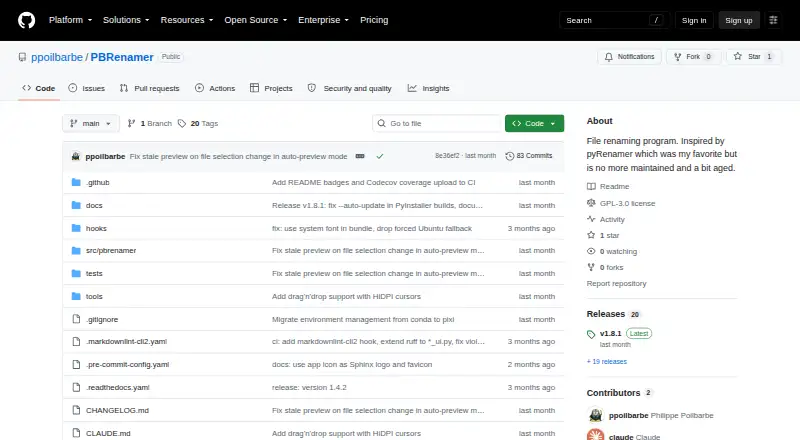
What PBRenamer is
PBRenamer is a free graphical utility for renaming batches of files, including hundreds at once. It shows proposed names as you work, flags collisions, and keeps the Rename action unavailable until conflicts are resolved. Rules can search and replace patterns, substitute text, add counters or dates, and use parent-folder names. Replacement patterns can draw on image EXIF/IPTC, audio tags, and video metadata. Other features include recursive traversal, extension handling, sidecar groups, drag and drop, saved presets, and undo for the last rename batch. For terminal workflows, headless mode can preview and confirm changes or print equivalent mv commands as a dry run. Standalone builds are listed for Linux x86-64, Windows x86-64, and Apple Silicon macOS. Source installation requires Python 3.12 or later and PySide6 6.6 or later. The GPL version 3 software includes English, German, Spanish, French, Italian, Russian, Vietnamese, and Chinese; more languages can be added through gettext files.
Who it suits
PBRenamer suits people who need to apply consistent rules across large file batches on Linux, macOS, or Windows. Its terminal mode may also suit users who want to preview rename operations or produce dry-run commands.
What it does well
- Live preview flags name collisions before renaming
- Rules can use dates, counters, and folder names
- Metadata patterns support image, audio, and video
- Undo is available for the last batch
What to know first
- Source installation requires Python 3.12 or later
- Source installation requires PySide6 6.6 or later
- Standalone macOS build listed for Apple Silicon
Plans
| Plan | Billed and limits | Price |
|---|---|---|
| PBRenamer | GPL-3.0 software · no paid tiers or usage limits stated | Free |
As github.com lists them, read 30 Sept 2026. The maker's own page has the final word.
Getting started
- Visit the PBRenamer GitHub project page.
- Download a standalone build for Linux x86-64, Windows x86-64 or Apple Silicon macOS from GitHub releases.
- Alternatively, install from PyPI or source, with Python 3.12 or later and PySide6 6.6 or later.
- Open the graphical utility and add files by drag and drop.
- Set renaming rules and review the live preview, resolving any highlighted collisions before renaming.
PBRenamer is a free, cross-platform batch-renaming utility for people who need repeatable rules across large file collections. It suits media organizers, photographers, and terminal users who want to inspect a batch before committing it, while occasional users may find its broader rule set unnecessary.
Overview
PBRenamer handles hundreds of files through a graphical interface and gives you a live view of every proposed name. Collision warnings are practical protection rather than cosmetic feedback: Rename stays unavailable until conflicting destinations are fixed. That makes it a sensible choice for valuable archives where an unnoticed duplicate could disrupt an entire batch.
The project is inspired by pyRenamer and is distributed as free software under the GNU General Public License version 3. For a wider comparison of tools, see our File Renaming Software list.
Key features
Rules cover pattern search and replacement, text substitutions, counters, dates, and parent-folder names. This range supports structured numbering, folder-based naming, and cleanup of inconsistent labels. Media-focused replacements can read image EXIF/IPTC fields, audio tags, and video metadata, so filenames can reflect embedded capture, track, or clip information. That flexibility is valuable for media libraries, but it is more machinery than a simple one-off rename requires.
Recursive traversal reaches nested folders, while extension handling and sidecar-group support help preserve relationships between primary files and companion data. Drag and drop speeds up selecting inputs, saved presets make recurring jobs reproducible, and undo can reverse the last rename batch. Undo is especially important for experimentation, although it covers the last batch rather than an unlimited history.
A headless mode extends the same workflow to terminals and scripts. You can preview and confirm a proposed operation or print equivalent mv commands as a dry run. That gives command-line users a reviewable path instead of forcing them into blind shell transformations.
Pricing
PBRenamer — free. The GPL-3.0 software has no paid tiers or stated usage limits, and there is no free trial because the product is free. This is the straightforward choice for individuals, teams, and open-source projects that want a desktop utility without subscriptions, seat counts, or batch quotas. Commercial support, hosted services, and service integrations are not part of the stated offer, so organizations needing those arrangements should evaluate alternatives.
Platforms
Standalone releases cover Linux x86-64, Windows x86-64, and Apple Silicon macOS through GitHub releases. Source installation requires Python 3.12 or later and PySide6 6.6 or later, with installation documented through PyPI or from source. The application includes English, German, Spanish, French, Italian, Russian, Vietnamese, and Chinese; further languages can be added with gettext files.
Who it's for
PBRenamer is well suited to photographers, audio and video archivists, and anyone maintaining deep folder trees or sidecar files. Its metadata rules, recursive processing, saved presets, and collision gate reward repeatable workflows. It also fits technically minded users who want previews or generated shell commands. Choose something else if you need a web-only workflow, built-in service connections, or a narrowly focused rename with less configuration.
Pros and cons
Pros
- Strong safeguards: live previews, collision highlighting, and a blocked Rename action reduce avoidable batch errors.
- Media-aware rules: EXIF/IPTC, audio-tag, and video-metadata fields enable informative filenames beyond basic text replacement.
- Flexible operation: recursive jobs, sidecar groups, presets, drag and drop, undo, and headless dry runs cover both desktop and scripted work.
- No purchase barrier: the free GPL-3.0 plan has no stated usage limits or paid tiers.
Cons
- Source setup has prerequisites: building from source means meeting the Python 3.12 and PySide6 6.6 requirements.
- Desktop-oriented distribution: releases target Linux, Windows, and Apple Silicon macOS rather than a browser workflow.
- Limited history: undo is provided for the last rename batch, not a broader revision history.
- No stated service integrations: users seeking connected storage or workflow services will need another tool.
Alternatives
Renamer.ai is the better fit when you want web and API access alongside Windows and macOS, with a free Starter allowance of 25 renames per month and a paid Pro tier at $9.95 a month.
reNamerX is another free Linux, macOS, and Windows desktop option, using the MIT license instead of GPL-3.0.
Advanced Renamer suits occasional personal Windows or macOS use when a free batch cap of 10,000 files and five methods per batch is acceptable; a Personal plan is also offered at custom pricing.
Bulk Renamer is worth considering for a free, open-source MIT tool with no account, watermark, or trial requirement.
Filera is a free MIT-licensed alternative for Linux, macOS, and Windows.
Nomina is another free cross-platform option with no stated paid plans or usage limits.
Ant Renamer is appropriate when you specifically need a free Windows program with source code available.
Batch File Renamer is the alternative for a browser-only process: it requires no installation or registration and exports renamed copies as ZIP files.
Verdict
Choose PBRenamer if you need careful, repeatable renaming across large or media-heavy collections and value a preview that blocks conflicts before execution. Its free GPL-3.0 distribution, metadata rules, recursive tools, and terminal dry runs make it unusually capable without a subscription. Look elsewhere if you require a web service, connected integrations, or a more extensive undo history.
Verdict
PBRenamer offers rule-based batch renaming with previews, conflict checks, and undo. Choose a standalone build or follow the stated requirements for source installation.
Questions
Is PBRenamer free?
Yes. It is distributed under the GNU General Public License version 3, with no paid tiers or usage limits stated.
Which operating systems have standalone builds?
The project lists standalone Linux x86-64, Windows x86-64 and Apple Silicon macOS builds.
Can it use file metadata in rename rules?
Yes. Replacement patterns can use image EXIF/IPTC data, audio tags and video metadata.
Can I rename files from the terminal?
Yes. Headless mode can preview and confirm a rename or print equivalent mv commands as a dry run.
What is required to install from source?
The README requires Python 3.12 or later and PySide6 6.6 or later, and documents installation from PyPI or source.
What file renaming safeguards does it provide?
It previews proposed names, highlights collisions and disables Rename until conflicts are resolved. It can also undo the last rename batch.
Facts from PBRenamer's own pages
- Audience
- The project describes itself as a cross-platform graphical batch file renamer inspired by pyRenamer. · github.com, 30 Sept 2026
- Batch tools
- It supports recursive traversal, extension handling, sidecar groups, drag and drop, saved presets, and undo for the last rename batch. · github.com, 30 Sept 2026
- Command line
- Headless mode can rename from the terminal, preview and confirm, or print equivalent mv commands with dry run. · github.com, 30 Sept 2026
- Downloads
- The README lists standalone Linux x86-64, Windows x86-64, and Apple Silicon macOS builds, available from GitHub releases. · github.com, 30 Sept 2026
- Integrations
- The README documents metadata support through Pillow, mutagen, and pymediainfo and drag and drop with external applications; it does not list service integrations. · github.com, 30 Sept 2026
- Languages
- The app includes English, German, Spanish, French, Italian, Russian, Vietnamese, and Chinese, with additional languages addable through gettext files. · github.com, 30 Sept 2026
- License
- PBRenamer is free software distributed under the GNU General Public License version 3. · github.com, 30 Sept 2026
- Metadata
- Replacement patterns can use image EXIF/IPTC, audio tags, and video metadata. · github.com, 30 Sept 2026
- Preview and conflicts
- It previews renamed entries live, highlights collisions, and disables Rename until conflicts are resolved. · github.com, 30 Sept 2026
- Purpose
- PBRenamer is a graphical utility for batch renaming files, including hundreds at once. · github.com, 30 Sept 2026
- Rename rules
- Rules include pattern search and replace, text substitutions, counters, dates, and parent-folder names. · github.com, 30 Sept 2026
- Security
- The opened project page does not state security certifications or compliance claims. · github.com, 30 Sept 2026
- Source installation
- The README gives Python 3.12 or later and PySide6 6.6 or later as requirements and documents installation from PyPI or source. · github.com, 30 Sept 2026
Where PBRenamer stands on Freedom251
- File Renaming Software#14 of 31