Freedom251 › File Renaming Software
Advanced Renamer
What Advanced Renamer is
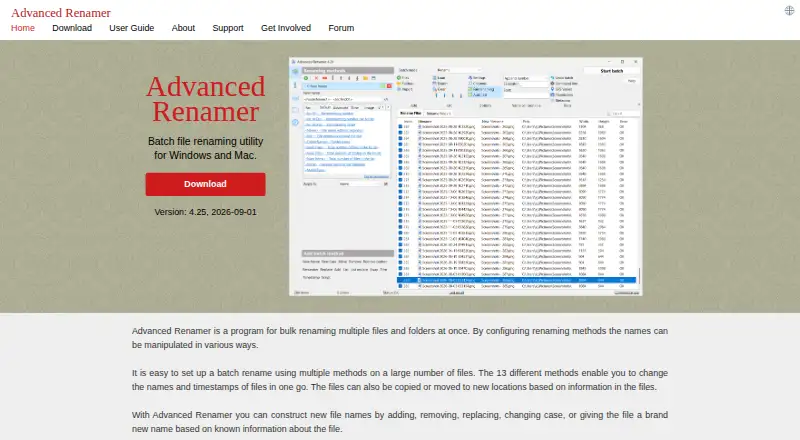
Advanced Renamer is a desktop app for renaming, copying, or moving files and folders in batches. Its 13 methods cover tasks such as replacing text, changing letter case, adding numbering or timestamps, and using JavaScript scripts. Before a batch runs, you can preview the resulting names; after it runs, you can undo the batch. Names can also draw on image, video, audio, and document metadata, including EXIF, XMP, IPTC, and ID3 data. When files contain GPS coordinates, the app can use them to add a city, country, or state to filenames. A command-line runner can automatically process saved batch configurations on Windows. Advanced Renamer offers Windows 10 or later 64-bit builds and macOS 11 or later builds for Apple silicon and Intel. It has a portable version and a free plan for occasional personal use, capped at 10,000 files and five methods per batch. Personal and Commercial plans allow unlimited files and methods per batch. Licenses are one-time purchases with no subscription or upgrade fees, and include updates within the same major-version branch. The maker describes use by individuals, professionals, and companies; work, business, teaching, NGO, and government use count as commercial.
Who it suits
Advanced Renamer suits people who need to rename or organize many files using rules, metadata, or GPS information. The free plan is for occasional personal use; its Personal and Commercial plans support unlimited files and methods per batch.
What it does well
- Offers 13 configurable batch-renaming methods.
- Preview names before a batch and undo completed batches.
- Uses image, video, audio, and document metadata in filenames.
- Batch modes can rename, copy, or move files and folders.
- Portable version available.
What to know first
- Free plan limits batches to 10,000 files and five methods.
- Free use is limited to occasional personal use.
- Command-line batch automation is available only on Windows.
Limits
The free plan is for occasional personal use and allows up to 10,000 files and five methods per batch. Personal and Commercial plans list unlimited files and methods per batch.
Plans
| Plan | Billed and limits | Price |
|---|---|---|
| Free | Occasional personal use · 10,000 files per batch · 5 methods per batch · nearly full functionality | Free |
| Commercial | one-time payment; VAT may apply · Work, business, education, government, NGO or nonprofit use · unlimited files per batch · unlimited methods · priority support · deployment tools | On request |
| Personal | one-time payment · Frequent personal use · unlimited files per batch · unlimited methods · perpetual 3.xx and 4.xx license | On request |
As advancedrenamer.com lists them, read 14 Oct 2026. The maker's own page has the final word.
Getting started
- Open the Advanced Renamer website.
- Choose the Windows or macOS download that matches your system.
- Install or run the portable version.
- Use the free plan for occasional personal batches within its file and method limits, or choose a paid license for unlimited files and methods.
- Create a batch configuration, preview the resulting names, and run it.
Advanced Renamer is a desktop app for building configurable file and folder batches. It best suits people who need repeatable naming rules, especially for media collections that benefit from metadata. Its preview, undo, and broad method set make it a capable choice, while the free plan’s personal-use, file-count, and method limits narrow its appeal for regular work.
Overview
Thirteen methods cover everyday changes such as replacing text, changing case, renumbering, and adding timestamps, along with JavaScript scripting. Combining methods lets users shape a batch around a particular naming job; previewing results before applying it and undoing a completed batch provide useful safeguards when a rule affects many files.
Batches can rename, copy, or move files and folders. A command-line runner can automate saved configurations on Windows, making the app more useful for repeatable workflows there. Mac users can use the desktop app, but should choose another tool if command-line batch automation is essential.
Key features
Metadata support is a particular strength for people organizing media and document archives. Filenames can draw on image, video, audio, and document data, including EXIF, XMP, IPTC, and ID3. For files with embedded GPS data, the app can add a city, country, or state to the name. Those options can make large collections easier to organize by capture details or location without limiting batches to simple text rules.
Preview and undo help contain mistakes, and a portable version is offered for users who want a version they can carry between systems. The command-line runner adds automation for saved batches, but its Windows-only availability leaves macOS workflows without that option.
Pricing
Advanced Renamer uses a freemium model and offers a free trial. Its Free plan costs nothing and permits occasional personal use, up to 10,000 files per batch, and up to five methods per batch. That is a substantial allowance for one-off household or personal cleanup, but the method cap can constrain elaborate rules and the personal-use term excludes work use.
Personal and Commercial licenses both allow unlimited files and methods per batch. Their prices are custom pricing. The Personal license fits non-commercial use that outgrows the free caps; the Commercial license is for work, business, teaching, NGO, or government use. Licenses are one-time purchases with no subscription or upgrade fees, and include updates within the same major-version branch. Commercial license holders receive priority support; support is also available by email and user forum.
The maker says the software may send version, license, and operating-system details, GPS coordinates when geo features are used, and anonymous error or feature statistics. It says filenames, paths, and file contents are excluded from error reports and feature statistics. Paddle handles purchases; the maker says payment details are used only for the order and are not stored or shared.
Platforms
Advanced Renamer is available for Windows and macOS. Downloads support Windows 10 or later on 64-bit systems, and macOS 11 or later on both Apple silicon and Intel. The Windows-only command-line runner is the main platform distinction for buyers choosing between desktop workflows.
Who it's for
Choose Advanced Renamer for large or recurring batches where configurable rules, metadata, or GPS-derived filename details matter. Photographers, media archivists, and people managing mixed file collections can draw on a wider range of data than a basic text-renaming workflow allows. Occasional personal users can start on Free; people using it for work or needing unlimited batch size and methods need a paid license.
It is a weaker fit for anyone who requires command-line automation on macOS, or whose work depends on the free plan: commercial use requires a commercial license.
Pros and cons
- Thirteen methods, including JavaScript: gives users room to handle both common cleanup and more tailored naming rules.
- Metadata and GPS fields: can make media and document collections easier to sort by embedded details and location.
- Preview and undo: let users inspect intended names and reverse a completed batch.
- Free plan caps both files and methods: the 10,000-file and five-method ceilings may be restrictive for complex or larger jobs.
- Automation is Windows-only: macOS users cannot run saved configurations through the command-line batch runner.
- Paid license prices are custom: prospective Personal and Commercial buyers cannot compare a stated price here.
Alternatives
Renamer.ai is worth considering for a desktop batch-renaming workflow that includes Magic Folders and a free allowance of 25 renames per month; its Starter plan also includes normal support, while Pro costs $9.95 a month (billed $9.95/mo).
reNamerX is a free MIT-licensed desktop batch renamer for readers looking for a no-cost alternative across Linux, macOS, and Windows.
Bulk Renamer is another free, open-source MIT option for readers who want no account, trial, or watermark.
Filera is a free MIT-licensed option for readers who want a downloadable alternative.
Nomina is a free option with no paid plans or usage limits stated.
PBRenamer is a free GPL-3.0 option with no paid tiers or usage limits stated.
Ant Renamer is a free Windows program with source code available.
Batch File Renamer suits readers who prefer a web app with no installation or registration and exports renamed copies in ZIP files.
For more options, browse File Renaming Software or File Manager Software.
Verdict
Advanced Renamer is a strong choice for people who need configurable, repeatable batches and value metadata, GPS details, preview, and undo. The free plan works for occasional personal jobs within its caps; unlimited batches and any commercial use call for a paid license. Look elsewhere if macOS command-line automation is a requirement.
Verdict
Choose Advanced Renamer for configurable batch work that benefits from previews, undo, metadata, or GPS details in filenames. The free plan is limited to occasional personal use and caps files and methods per batch; commercial use requires a commercial license. Look elsewhere if command-line automation is needed on macOS.
Questions
Is Advanced Renamer free?
Yes. Its free plan costs nothing and is for occasional personal use, with up to 10,000 files and five methods per batch.
Which platforms does it support?
It supports Windows and macOS. Downloads are offered for Windows 10 or later in 64-bit builds and macOS 11 or later for Apple silicon and Intel.
Can it use file metadata in names?
Yes. It can use image, video, audio, and document metadata, including EXIF, XMP, IPTC, and ID3 data. Embedded GPS coordinates can be used to add city, country, or state information.
Does it have a portable version?
Yes, a portable version is available.
How are licenses sold?
Licenses are one-time purchases without subscription or upgrade fees, and include updates within the same major-version branch. Work, business, teaching, NGO, and government use are defined as commercial.
What support is available?
Support is offered by email and a user forum. Commercial license holders receive priority support.
Facts from Advanced Renamer's own pages
- Automation
- A command-line batch runner can perform saved batch configurations automatically, and the guide says this feature is available only on Windows. · advancedrenamer.com, 11 Oct 2026
- Batch methods
- The program provides 13 renaming methods, including replacing text, changing case, renumbering, timestamps, and JavaScript scripting. · advancedrenamer.com, 11 Oct 2026
- Batch rename
- Yes · advancedrenamer.com, 22 Sept 2026
- Command-line automation
- Windows includes arenc.exe for executing saved .aren batches with verification, file or folder selection, recursion, sorting, logging, rename/copy/move modes, masks and regular expressions. · advancedrenamer.com, 14 Oct 2026
- Command-line limitation
- The documented command-line automation feature is Windows-only. · advancedrenamer.com, 14 Oct 2026
- Company founding
- Danish business directory Krak lists Hulubulu Software's registration date as February 12, 2017 and one employee. · krak.dk, 14 Oct 2026
- Company headquarters
- The LEI record gives Hulubulu Software's headquarters as Flintebjergvej 14, Hedehusene, 2640, Denmark. · lei.bloomberg.com, 14 Oct 2026
- Company legal name
- Bloomberg's LEI record lists Hulubulu Software as the legal entity and a Danish sole proprietorship. · lei.bloomberg.com, 14 Oct 2026
- Copy and move
- Batch modes can rename, copy, or move files and folders. · advancedrenamer.com, 11 Oct 2026
- Current release
- The download page identifies version 4.27, released October 4, 2026. · advancedrenamer.com, 14 Oct 2026
- Deployment
- IT administrators can use silent Inno Setup switches or a portable ZIP deployment and distribute license files per machine or user. · advancedrenamer.com, 14 Oct 2026
- Documentation
- The official guide covers renaming methods, tags, command line, ExifTool, file pairs, regular expressions, batch modes, undo, settings, import/export and collision rules. · advancedrenamer.com, 14 Oct 2026
- Downloads and requirements
- The download page offers Windows 10 or later, 64-bit-only builds and macOS 11 or later builds for Apple silicon and Intel. · advancedrenamer.com, 11 Oct 2026
- Founded
- 2001 · advancedrenamer.com, 23 Sept 2026
- Free plan
- Yes · advancedrenamer.com, 22 Sept 2026
- GPS naming
- Embedded image or video GPS coordinates can be matched against a database of more than 100,000 cities to add location names. · advancedrenamer.com, 14 Oct 2026
- GPS tagging
- For files with embedded GPS data, the program can use coordinates to add city, country, or state information to filenames. · advancedrenamer.com, 11 Oct 2026
- Independent pricing report
- Alphr reported in November 2025 that personal licensing was $25 and commercial licensing $45, while the current official checkout pages do not display fixed prices. · alphr.com, 14 Oct 2026
- Integration
- The application can use ExifTool metadata, Windows Explorer context-menu integration and Paddle for payment processing. · advancedrenamer.com, 14 Oct 2026
- Intended users
- The maker describes use by individuals, professionals, and companies, while its license comparison defines work, business, teaching, NGO, and government use as commercial. · advancedrenamer.com, 11 Oct 2026
- Licence type
- AlternativeTo categorizes Advanced Renamer as proprietary software with a free personal offering. · alternativeto.net, 14 Oct 2026
- License terms
- Licenses are one-time purchases with no subscription or upgrade fees and include updates within the same major-version branch. · advancedrenamer.com, 11 Oct 2026
- Limit: learning curve
- Softpedia reported that the interface can initially confuse inexperienced users even though online tutorials and examples are available. · softpedia.com, 14 Oct 2026
- Limit: missing script timestamp controls
- A September 2025 forum discussion requested setting folder or file timestamps from filename patterns; the developer said related scripting support would arrive in version 4.17. · advancedrenamer.com, 14 Oct 2026
Where Advanced Renamer stands on Freedom251
- File Renaming Software#3 of 31
- File Manager Software#29 of 100