Freedom251 › File Renaming Software

Bulk Renamer
What Bulk Renamer is
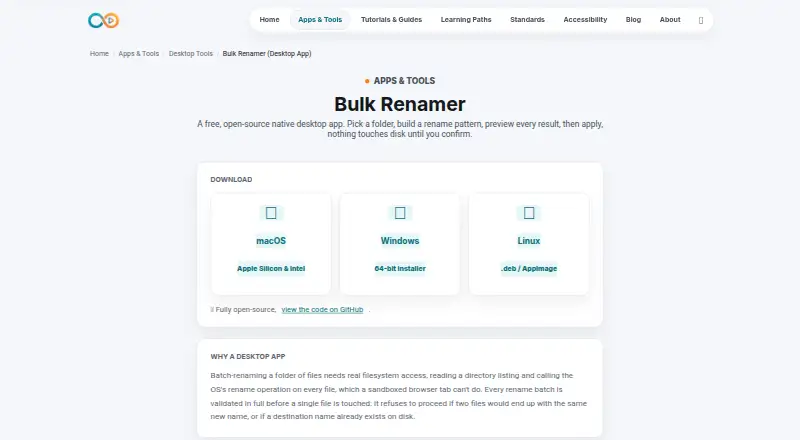
Bulk Renamer is a free, open-source desktop app for changing the names of batches of files in a selected folder. It runs on Linux, macOS, and Windows. Before applying a batch, it displays a live preview of each proposed filename. Rename patterns can use plain-text or regular-expression find and replace, prefixes or suffixes, sequential numbering, case conversion, and extension changes. The app loads files from the chosen folder only; it does not include subfolders. Before proceeding, it checks whether destination names would duplicate one another or collide with names already on disk. Any such conflict stops the batch. Undo is available for the latest successful batch, but its history is kept in memory and is lost when the app closes. The app is licensed under MIT. Its maker notes that unsigned apps may display standard Gatekeeper or SmartScreen warnings on first launch until code signing is set up. The maker describes its free tools as intended for people who create, validate, publish, and teach media.
Who it suits
Bulk Renamer suits people who need to rename files in batches on Linux, macOS, or Windows, including media creators and publishers. It is also suitable for users who want regular-expression patterns and a preview before applying changes.
What it does well
- Previews proposed names before changes are applied.
- Supports plain-text and regular-expression find and replace.
- Works on Linux, macOS, and Windows.
- Open-source under the MIT license.
What to know first
- Does not include files in subfolders.
- Undo history disappears when the app closes.
- Unsigned apps may show first-launch security warnings.
Limits
Bulk Renamer loads files from the selected folder but does not include subfolders. Undo only reverses the latest successful batch, and its history does not persist after the app closes.
Plans
| Plan | Billed and limits | Price |
|---|---|---|
| Free | No account · no trial · no watermark · open-source under MIT license | Free |
As infinitecreation.io lists them, read 2 Oct 2026. The maker's own page has the final word.
Getting started
- Visit the Bulk Renamer website.
- Choose the build for Linux, macOS or Windows.
- Launch the app; unsigned builds may show a standard operating system warning.
- Select a folder and build a rename pattern.
- Review the live preview, then apply the batch if there are no conflicts.
Overview
Bulk Renamer is a free, open-source desktop app for batch-renaming files in a selected folder. It suits people who need flexible filename changes without a paid plan, especially when their files are already grouped in one folder. Its live preview and conflict checks make it a considered choice for routine batches, but it cannot reach into subfolders.
Key features
Rename patterns can combine find-and-replace, prefixes or suffixes, sequential numbering, case conversion, and extension changes. Find-and-replace supports both plain text and regular expressions, giving users room to handle consistent naming schemes as well as more targeted transformations. A live preview shows each proposed filename before changes are applied, which helps catch an unwanted pattern before it affects a batch.
Before proceeding, Bulk Renamer checks whether destination names duplicate one another or already exist on disk. A conflict stops the batch rather than allowing potentially colliding names through. That safeguard is useful when renaming important files, though it also means conflicts must be resolved before any part of the batch can go ahead.
The app works only with files in the selected folder; subfolders are excluded. Undo reverses the most recent successful batch, but the undo record is held in memory and disappears when the app closes. This is adequate for correcting an immediate mistake, not for revisiting an earlier batch later.
Pricing
Free — free. The plan requires no account and has no trial or watermark; the app is open-source under the MIT license. There is no paid tier to unlock a broader feature set, so the folder-only scope and session-bound undo apply to the free app as well. It fits users who want a no-cost desktop renamer and can work within those limits.
Platforms
Bulk Renamer runs on Linux, macOS, and Windows. The maker says unsigned apps may trigger standard Gatekeeper or SmartScreen warnings on first launch until code-signing is set up, so users may encounter an operating-system warning during installation or launch.
Who it's for
This is a sensible fit for people who create, validate, publish, or teach media and need to rename groups of files within a single folder. Its mix of text replacement, numbering, case conversion, and extension changes covers varied batch patterns without requiring payment. Choose something else if the job depends on processing subfolders or retaining undo history after closing the app.
Pros and cons
- Pros: A live filename preview and checks for duplicate or existing destination names help users review a batch before it proceeds.
- Pros: Regex support and several combinable rename operations suit more than simple prefix or suffix changes.
- Pros: The free MIT-licensed app requires no account and runs on Linux, macOS, and Windows.
- Cons: It excludes subfolders, making it a poor fit for renaming a nested directory tree in one pass.
- Cons: Undo covers only the latest successful batch and is lost when the app closes.
- Cons: Unsigned builds may prompt Gatekeeper or SmartScreen warnings on first launch.
Alternatives
File Renaming Software is the broader category page for comparing options. Consider Renamer.ai if a 25-renames-per-month free allowance and its Magic Folders are a better fit; its Starter plan also includes a Windows and Mac desktop app, batch renaming, and normal support.
reNamerX, Filera, Nomina, and PBRenamer are other free options for readers comparing desktop renamers across Linux, macOS, and Windows. Advanced Renamer may suit macOS or Windows users who want a free allowance capped at 10,000 files and five methods per batch, with a Personal plan offering unlimited files and methods at custom pricing. Ant Renamer is a free Windows-only option. Bulk Rename Utility is another Windows option, with separate home/academic and commercial plans.
Verdict
Choose Bulk Renamer for free, cross-platform batch renaming when your files fit in one folder and you want to preview changes and block filename conflicts before they proceed. Its flexible patterns and MIT license make it a strong match for that focused job. Look elsewhere if you need subfolder coverage or undo that survives closing the app.
Verdict
Bulk Renamer offers flexible batch-renaming options and checks for filename conflicts before it proceeds. Its folder scope is limited to the selected folder, and undo covers only the latest successful batch during the current app session.
Questions
How much does Bulk Renamer cost?
The Free plan costs nothing.
Which operating systems does it support?
It runs on Linux, macOS and Windows.
Does Bulk Renamer support regular expressions?
Yes. Find and replace supports plain text or regular expressions.
Is Bulk Renamer open-source?
Yes. It is licensed under the MIT license.
Do I need an account or trial?
No account is required, and the plan has no trial.
What happens if filenames conflict?
The app checks for duplicate destination names and names already on disk. A conflict prevents the batch from proceeding.
Facts from Bulk Renamer's own pages
- Folder scope
- The app loads files in the selected folder but does not include subfolders. · infinitecreation.io, 2 Oct 2026
- Intended users
- The maker describes Infinite Creation’s free tools as being for people who create, validate, publish, and teach media. · infinitecreation.io, 2 Oct 2026
- Launch warning
- The maker says unsigned apps may show standard Gatekeeper or SmartScreen warnings on first launch until code-signing is set up. · infinitecreation.io, 2 Oct 2026
- License
- The app is open-source under the MIT license. · infinitecreation.io, 2 Oct 2026
- Platforms
- Downloads are listed for macOS Apple Silicon and Intel, Windows 64-bit, and Linux .deb or AppImage. · infinitecreation.io, 2 Oct 2026
- Preview
- It shows a live preview of each file’s new name before changes are applied. · infinitecreation.io, 2 Oct 2026
- Purpose
- Bulk Renamer is a native desktop app for batch-renaming files in a selected folder. · infinitecreation.io, 2 Oct 2026
- Regex
- Find and replace supports plain text or regular expressions. · infinitecreation.io, 2 Oct 2026
- Rename options
- Rename patterns can combine find and replace, prefixes or suffixes, sequential numbering, case conversion, and extension changes. · infinitecreation.io, 2 Oct 2026
- Undo limit
- Undo reverses only the most recent successful batch and is stored in memory, so it does not persist after the app closes. · infinitecreation.io, 2 Oct 2026
- Validation
- Before renaming, it checks for duplicate destination names and names that already exist on disk; a conflict prevents the batch from proceeding. · infinitecreation.io, 2 Oct 2026
Where Bulk Renamer stands on Freedom251
- File Renaming Software#4 of 31