Freedom251 › File Renaming Software

RenameKit
What RenameKit is
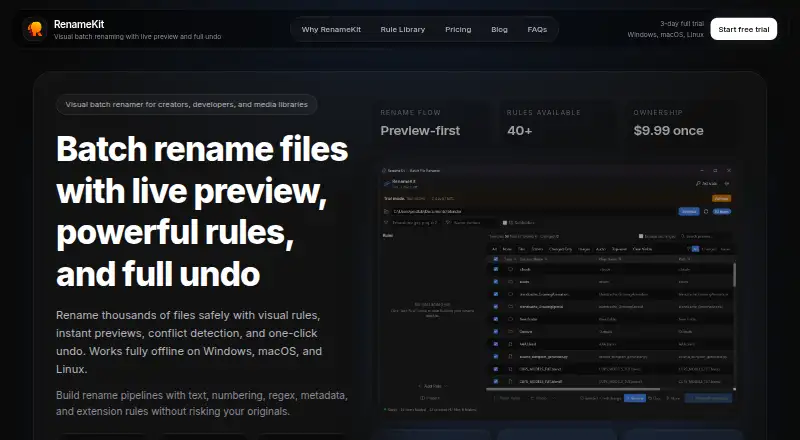
RenameKit is a visual batch renamer for people organizing creator projects, development files, or media libraries. It shows current and proposed filenames side by side before changes are applied, and detects filename conflicts in advance. Users can combine more than 40 rules for text, numbering, regular expressions, metadata, and extensions without writing scripts. The app can rename any file type; metadata rules work with JPEG and TIFF EXIF, MP3 and FLAC tags, and MP4 and MOV video metadata. RenameKit runs locally, and says files stay on the user's computer. A complete batch can be rolled back, even after restarting the app. Downloads are available for Windows x64, macOS Apple Silicon and Intel, Linux AppImage, and Debian/Ubuntu. The Lifetime License costs $9.99, paid once and includes presets and a CLI tool. Its three-day full-feature trial allows evaluation before purchase; after the trial, batches are limited to 20 items. A license is activated once in the app and can be deactivated and moved to another computer, though only one device can use it at a time. Customers can request a refund within 14 days of purchase.
Who it suits
RenameKit suits photographers, developers, media teams, and anyone cleaning up large or disorganized folders. It is useful for people who want to build repeatable rename rules, inspect changes before applying them, and work with metadata without writing scripts.
What it does well
- Previews original and proposed filenames side by side.
- Combines more than 40 rules without scripting.
- Detects filename conflicts before applying changes.
- Can undo a full batch, including after restarting.
- Runs locally and says files stay on the user's computer.
- Handles metadata from image, audio, and video formats.
What to know first
- After the three-day trial, batches are limited to 20 items without a license.
- The Lifetime License can be active on only one device at a time.
- The listed trial lasts three days.
Limits
The full-feature trial lasts three days. After the trial, batches are limited to 20 items without the Lifetime License; that license is for one device at a time.
Plans
| Plan | Billed and limits | Price |
|---|---|---|
| Lifetime License | $9.99 one-time payment · 3-day full-feature trial · 20 items per batch after trial · one device at a time, transferable | $9.99, paid once |
As renamekit.app lists them, read 30 Sept 2026. The maker's own page has the final word.
Getting started
- Download the installer for Windows, macOS, or Linux.
- Open RenameKit and arrange files for a batch rename.
- Stack rules and review the proposed filenames and conflict warnings.
- Use the three-day full-feature trial, or purchase and activate the Lifetime License in the app.
- Deactivate the license before moving it to another computer, if needed.
Verdict
Pick RenameKit if you need visual, rule-based batch renaming across Windows, macOS, or Linux, especially for media metadata or large folder cleanups. Consider the paid license if you need batches above 20 items after the three-day trial; it costs $9.99, paid once.
Questions
How much does RenameKit cost?
The Lifetime License costs $9.99, paid once. It includes presets and a CLI tool.
Is there a free plan or trial?
Yes. RenameKit has a three-day full-feature trial. After it ends, batches are limited to 20 items.
Which platforms can run RenameKit?
Downloads are available for Windows x64, macOS Apple Silicon and Intel, Linux AppImage, and Debian/Ubuntu.
Does RenameKit upload files?
RenameKit runs locally, and says files never leave the user's computer.
Can a license be moved to another computer?
Yes. A purchased license can be deactivated and moved to another computer, but it is limited to one device at a time.
Can customers request a refund?
Customers can request a refund within 14 days of purchase.
Facts from RenameKit's own pages
- Audience
- The product is designed for photographers, developers, media teams, and people cleaning up messy folders at scale. · renamekit.app, 30 Sept 2026
- CLI and presets
- The lifetime license includes presets and a CLI tool. · renamekit.app, 30 Sept 2026
- Conflict detection
- The workflow detects filename conflicts before changes are applied. · renamekit.app, 30 Sept 2026
- File support
- It can rename any file type, with metadata rules supporting JPEG and TIFF EXIF, MP3 and FLAC tags, and MP4 and MOV video metadata. · renamekit.app, 30 Sept 2026
- Installers
- Downloads are provided for Windows x64, macOS Apple Silicon, macOS Intel, Linux AppImage, and Debian/Ubuntu. · renamekit.app, 30 Sept 2026
- License activation
- A purchased license is activated once in the app and can be deactivated and moved to another computer. · renamekit.app, 30 Sept 2026
- Live preview
- It shows original and new filenames side by side before a batch is applied. · renamekit.app, 30 Sept 2026
- Offline operation
- RenameKit runs locally and says files never leave the user's computer. · renamekit.app, 30 Sept 2026
- Purpose
- RenameKit is a visual batch file renamer for creators, developers, and media libraries. · renamekit.app, 30 Sept 2026
- Refunds
- Customers can request a refund within 14 days of purchase. · renamekit.app, 30 Sept 2026
- Rule pipeline
- Users can stack more than 40 text, numbering, regex, metadata, and extension rules without writing scripts. · renamekit.app, 30 Sept 2026
- Technology
- The native desktop app is built with Tauri. · renamekit.app, 30 Sept 2026
- Undo
- A full rename batch can be rolled back instantly, including after restarting the app. · renamekit.app, 30 Sept 2026
Where RenameKit stands on Freedom251
- File Renaming Software#16 of 31