Freedom251 › File Renaming Software
NameChanger
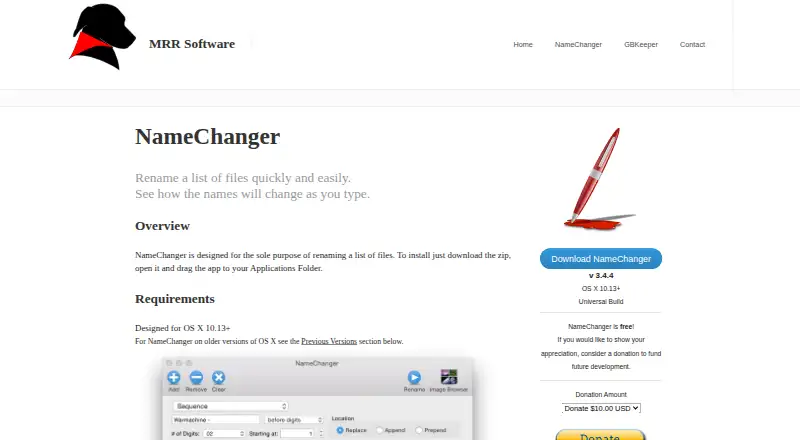
What NameChanger is
NameChanger is a macOS app for renaming groups of files, with a preview that updates as you adjust the proposed names. You can add files through the interface or drag them into the app, and it can recursively add files from a directory structure. Rename operations include replacing text, using wildcards, adding text before or after names, inserting dates or sequences, removing characters, applying regular expressions, and changing case. Options can hide file extensions, ignore case, or force resulting names to be unique. An automatically kept history records renames, while the Image Browser supports visual naming and reordering of pictures. You can also invoke NameChanger as a System Service by selecting files in Finder and choosing Services > Rename with NameChanger. The listed current version is 3.4.4, a Universal Build for OS X 10.13 and later; previous versions are listed for older OS X releases, including OS X 10.3. The Free plan costs nothing and covers personal, commercial, non-profit, and educational use, with unlimited installations and copies. The EULA provides the software as is without express or implied warranties.
Who it suits
NameChanger suits macOS users who need to rename batches of files with a choice of text, pattern, date, sequence, or case-based operations. It may also suit people organizing pictures visually or starting a rename from Finder.
What it does well
- Previews resulting names as you type.
- Supports regular expressions, wildcards, dates, and sequences.
- Can recursively add files from directory structures.
- Keeps a history of renames automatically.
- Image Browser supports visual naming and picture reordering.
- Free plan allows unlimited installations and copies.
What to know first
- Available only for macOS.
- The EULA provides the software without express or implied warranties.
Limits
The Free plan costs nothing and permits unlimited installations and copies for personal, commercial, non-profit, and educational use. The current version is listed for OS X 10.13 and later, with previous versions listed for older OS X releases.
Plans
| Plan | Billed and limits | Price |
|---|---|---|
| Free | Freeware for personal, commercial, non-profit, and educational use · unlimited installations and copies | Free |
As mrrsoftware.com lists them, read 9 Oct 2026. The maker's own page has the final word.
Getting started
- Visit https://mrrsoftware.com/namechanger/.
- Choose the listed version that matches your OS X version.
- Add files through the app or drag and drop them into it.
- Alternatively, select files in Finder and choose Services > Rename with NameChanger.
- Choose a rename operation and review the preview.
Verdict
Choose NameChanger if you need a free macOS tool with varied batch-renaming methods, previews, and Finder access. Look elsewhere if you need a platform other than macOS or require express or implied warranties.
Questions
How much does NameChanger cost?
Its Free plan costs nothing.
What platforms does NameChanger support?
NameChanger is for macOS. Version 3.4.4 is listed as a Universal Build for OS X 10.13 and later, with previous versions for older systems.
What can I use it to rename?
It renames files using options such as text replacement, wildcards, dates, sequences, character removal, regular expressions, and case changes.
Can I preview changes before applying them?
Yes. NameChanger previews the resulting names as you type.
Can it be used from Finder?
Yes. Select files in Finder and choose Services > Rename with NameChanger.
What does its license say about warranties?
The EULA says the software is provided as is without express or implied warranties.
Facts from NameChanger's own pages
- Advanced options
- Options include hiding file extensions, ignoring case, and forcing resulting names to be unique. · mrrsoftware.com, 9 Oct 2026
- Current version
- The page lists version 3.4.4 as a Universal Build for OS X 10.13+. · mrrsoftware.com, 9 Oct 2026
- File handling
- Files can be added through the GUI or by dragging and dropping them into the app. · mrrsoftware.com, 9 Oct 2026
- Finder integration
- NameChanger can be used as a System Service by selecting files in Finder and choosing Services > Rename with NameChanger. · mrrsoftware.com, 9 Oct 2026
- Folder scanning
- The app can recursively add all files in a directory structure. · mrrsoftware.com, 9 Oct 2026
- History
- NameChanger automatically keeps a history of renames performed. · mrrsoftware.com, 9 Oct 2026
- Image Browser
- The Image Browser supports visual naming and reordering of pictures. · mrrsoftware.com, 9 Oct 2026
- License and warranty
- The EULA says the software is provided as is without express or implied warranties. · mrrsoftware.com, 9 Oct 2026
- Older systems
- The page lists previous versions for OS X 10.7+, 10.6–10.9, 10.5, and 10.4, as well as version 1.0 for OS X 10.3. · mrrsoftware.com, 9 Oct 2026
- Purpose
- NameChanger is designed to rename a list of files and previews the resulting names as you type. · mrrsoftware.com, 9 Oct 2026
- Rename options
- Rename options include replacing text, wildcards, appending or prepending text, dates, sequences, character removal, regular expressions, and changing case. · mrrsoftware.com, 9 Oct 2026
- Support
- The maker's contact page provides a link to contact MRR Software via email. · mrrsoftware.com, 9 Oct 2026
Where NameChanger stands on Freedom251
- File Renaming Software#17 of 31