Freedom251 › Process Monitoring Software
OpenProcMon
What OpenProcMon is
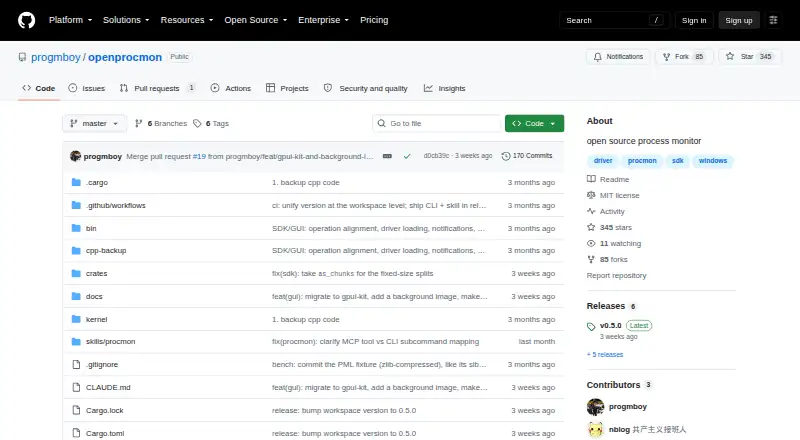
OpenProcMon is a free, open-source process monitor for 64-bit Windows. It tracks process, file system, registry, and network activity in real time, with filters for process name, PID, operation, path, result, or category. Its interface includes a process tree, activity summaries, and call-stack views that resolve modules for individual frames. It can read and write Sysinternals Process Monitor .PML logs, including logs created by the original Process Monitor. Developers can use its Rust SDK to connect to the driver, select monitored activity, set filters, and consume parsed events programmatically. The procmon-cli MCP server exposes capture and analysis over stdio for AI clients, with setup guidance for Claude Code, Claude Desktop, Codex, Cursor, and others. Capture tools can export filtered results as PML, CSV, or XML. The v0.5.0 release includes a Windows x64 ZIP with the GUI, CLI/MCP server, console example, skill, and guides. Live capture requires Administrator privileges to load the kernel driver; analyzing an existing .PML file does not. The MIT-licensed project does not support 32-bit Windows or 32-bit .PML files.
Who it suits
It suits Windows users who need to inspect system activity or work with Process Monitor logs. Developers can also use its Rust SDK and MCP tools for programmatic or AI-assisted capture and analysis.
What it does well
- Monitors process, file, registry, and network activity.
- Reads and writes Sysinternals .PML logs.
- Filters events by process, operation, path, and more.
- Exports filtered captures as PML, CSV, or XML.
- MIT-licensed and free.
What to know first
- Live capture requires Administrator privileges.
- Supports 64-bit Windows only.
- Does not support 32-bit .PML files.
Limits
OpenProcMon is limited to 64-bit Windows and cannot open 32-bit PML files. Live capture requires Administrator privileges; analyzing an existing PML file does not.
Plans
| Plan | Billed and limits | Price |
|---|---|---|
| OpenProcMon | MIT-licensed open source · 64-bit Windows only · live capture requires Administrator privileges | Free |
As github.com lists them, read 9 Oct 2026. The maker's own page has the final word.
Getting started
- Download the Windows x64 ZIP from the project’s v0.5.0 release.
- Use the included GUI, CLI/MCP server, or console example.
- Run as Administrator when performing live capture.
- Open an existing PML log for analysis without elevation.
- Follow the included MCP guide to configure a supported client.
OpenProcMon is a free, open-source Windows utility for capturing and examining low-level system activity. It best serves Windows developers, troubleshooters, and analysts who need detailed event traces, Process Monitor log compatibility, or programmable capture workflows. Its main trade-off is operational: live collection needs Administrator access on 64-bit Windows, while saved-log analysis is less demanding.
Overview
OpenProcMon combines real-time monitoring with inspection of existing Sysinternals Process Monitor logs. It covers process, file-system, registry, and network events, then lets you filter or highlight them by process name, PID, operation, path, result, or category. Those controls are valuable when a broad trace contains too much noise, especially during investigation of one process or operation.
The graphical interface adds a process tree, activity summaries, and call-stack views with module resolution for every frame. It reads and writes .PML files, including logs produced by the original Process Monitor, so a team can review or exchange captures without converting them first. The MIT license also makes the project suitable as a base for custom tooling, although its Rust rewrite remains under active development.
Key features
Capture and investigation
Live capture spans four major activity classes, giving analysts a broad view of what a process is doing across the system. Because collection loads a kernel driver, OpenProcMon must run as Administrator for that task. Opening and analyzing an existing .PML file requires no elevation, which is useful when you have a supplied trace but cannot obtain administrator rights on the review machine.
Developer and AI tooling
The Rust SDK can connect to the driver, choose which activity to monitor, apply filters, and consume parsed events in code. That makes it more than a standalone viewer: developers can build capture or analysis pipelines around its event stream. The procmon-cli MCP server exposes capture and analysis operations to AI agents over standard input/output, and MCP guides cover Claude Code, Claude Desktop, OpenAI Codex CLI, Cursor, Windsurf, Cline, and Continue. Capture tools can export filtered results as PML, CSV, or XML, giving automated workflows practical hand-off formats.
Pricing
| Plan | Price | Includes |
|---|---|---|
| OpenProcMon | free | MIT-licensed open source; 64-bit Windows only; live capture requires Administrator privileges |
There are no paid tiers, seat charges, trial terms, or renewal commitments. The cost advantage is straightforward, but the free plan does not remove the platform and privilege requirements: 32-bit Windows and 32-bit .PML files are outside its scope.
Platforms
OpenProcMon supports Windows, specifically 64-bit installations. The v0.5.0 Windows x64 ZIP bundles the GUI, CLI/MCP server, console example, skill, and MCP setup guides. It does not support 32-bit Windows or 32-bit .PML files.
Who it's for
Choose OpenProcMon if you need granular Windows event capture, call-stack-oriented investigation, or compatibility with existing Process Monitor logs. It is particularly well matched to developers building EDR-style tooling, analysts automating capture through an SDK, and teams adding AI-assisted investigation through MCP. It is a poor fit for 32-bit systems, and live collection is inconvenient where administrator elevation is unavailable.
Pros and cons
Pros
- Deep event coverage: process, file-system, registry, and network monitoring supports focused troubleshooting.
- Precise investigation tools: filters, highlighting, process trees, summaries, and resolved call stacks help turn noisy traces into usable evidence.
- Strong interoperability: reading and writing Sysinternals .PML files preserves existing capture workflows.
- Automation ready: the Rust SDK, MCP server, and PML/CSV/XML exports support scripted and AI-assisted analysis.
- No licensing bill: the MIT-licensed project is free to use.
Cons
- 64-bit Windows only: it cannot serve 32-bit Windows installations or 32-bit PML archives.
- Elevation for collection: live capture requires Administrator privileges and a kernel driver.
- Active rewrite: the Rust rewrite is still under active development, so buyers seeking a settled product may prefer a more established option.
Alternatives
Process Monitoring Software is the broader category to browse when you want to compare multiple monitoring tools. Glances is a free, open-source system monitor spanning Android, API, Linux, macOS, self-hosted, web, and Windows, with optional features needing extra dependencies. PM2 is the better choice for process management and a real-time web interface, with a free Runtime plan and a paid Plus tier at $79 a month.
bottom (btm) is a free resource monitor for Linux, macOS, and Windows. btop is a free resource monitor for Linux and macOS, while htop offers freely available binaries and source code on Linux and macOS. Monit suits Linux, macOS, and self-hosted monitoring under the AGPL. Process Lasso is a Windows freemium option with paid single-PC subscriptions when you want a commercial process-management product. runit is a free Linux, macOS, and self-hosted service supervisor without stated commercial limits.
Verdict
OpenProcMon is a strong choice for 64-bit Windows users who need detailed, filterable event traces, .PML interoperability, and developer or AI automation at no cost. Choose it when capture depth and programmable analysis matter more than a polished, platform-independent monitor. Look elsewhere if you need 32-bit support or cannot grant Administrator privileges for live collection.
Verdict
OpenProcMon offers real-time monitoring, .PML compatibility, and developer-facing tools at no cost. Check the 64-bit Windows requirement and elevated-privilege requirement for live capture before choosing it.
Questions
How much does OpenProcMon cost?
It is free, and the project is released under the MIT License.
Which Windows versions or architectures does it support?
It targets 64-bit Windows. It does not support 32-bit Windows.
Can it read logs made with the original Process Monitor?
Yes. It reads and writes Sysinternals Process Monitor PML logs, including those created by the original Process Monitor.
Does live capture require elevated privileges?
Yes. Live capture loads a kernel driver and requires Administrator privileges. Analyzing an existing PML file does not require elevation.
Can developers use OpenProcMon programmatically?
Yes. Its Rust SDK can connect to the driver, select monitored activity, set filters, and consume parsed events.
Which AI clients can connect to its MCP server?
Setup guidance covers Claude Code, Claude Desktop, Codex, and Cursor, among other clients.
Facts from OpenProcMon's own pages
- Activity monitoring
- It monitors process, file system, registry, and network activity in real time. · github.com, 9 Oct 2026
- AI integration
- The procmon-cli MCP server exposes capture and analysis operations to AI agents over stdio, and the project also provides a skill. · github.com, 9 Oct 2026
- AI integrations
- Its MCP server supports Claude Code, Claude Desktop, OpenAI Codex CLI, Cursor, Windsurf, Cline, and Continue through stdio configuration. · github.com, 9 Oct 2026
- Analysis
- Its interface includes a process tree, activity summaries, and call stack views with per-frame module resolution. · github.com, 9 Oct 2026
- Capture and analysis privileges
- Live capture requires Administrator privileges and the kernel driver, while analyzing an existing .PML file requires neither. · github.com, 9 Oct 2026
- Download
- The v0.5.0 release provides a Windows x64 ZIP containing the GUI, CLI/MCP server, console example, skill, and MCP guides. · github.com, 9 Oct 2026
- Exports
- The MCP capture tools can export filtered captures as PML, CSV, or XML. · github.com, 9 Oct 2026
- Filtering
- Users can filter and highlight events by process name, PID, operation, path, result, or category. · github.com, 9 Oct 2026
- Intended users
- The project describes its driver as a possible starting point for building EDR-style tooling and provides MCP tools for AI-assisted capture and analysis. · github.com, 9 Oct 2026
- License
- The project is released under the MIT License. · github.com, 9 Oct 2026
- License and development
- The project is released under the MIT License, and its Rust rewrite is described as under active development. · github.com, 9 Oct 2026
- Limitations
- OpenProcMon targets 64-bit Windows and does not support 32-bit Windows or 32-bit .PML files. · github.com, 9 Oct 2026
- Limits
- OpenProcMon targets 64-bit Windows only and does not support 32-bit .PML files. · github.com, 9 Oct 2026
- Permissions
- Live capture requires running as Administrator because it loads the kernel driver; analyzing an existing .PML file does not require elevation. · github.com, 9 Oct 2026
- PML compatibility
- OpenProcMon reads and writes Sysinternals Process Monitor .PML logs. · github.com, 9 Oct 2026
- PML support
- OpenProcMon reads and writes Sysinternals Process Monitor .PML logs, including logs created by the original Process Monitor. · github.com, 9 Oct 2026
- Process analysis
- The GUI includes a process tree, activity summaries, and call-stack views with per-frame module resolution. · github.com, 9 Oct 2026
- Purpose
- OpenProcMon is an open-source Process Monitor implementation for Windows. · github.com, 9 Oct 2026
- SDK
- Its Rust SDK can connect to the driver, select monitored activity, set filters, and consume parsed events programmatically. · github.com, 9 Oct 2026
- Supported MCP clients
- The MCP guide gives setup instructions for Claude Code, Claude Desktop, Codex, and Cursor. · github.com, 9 Oct 2026
Where OpenProcMon stands on Freedom251
- Process Monitoring Software#17 of 26