Freedom251 › Process Monitoring Software
Remote Process Explorer
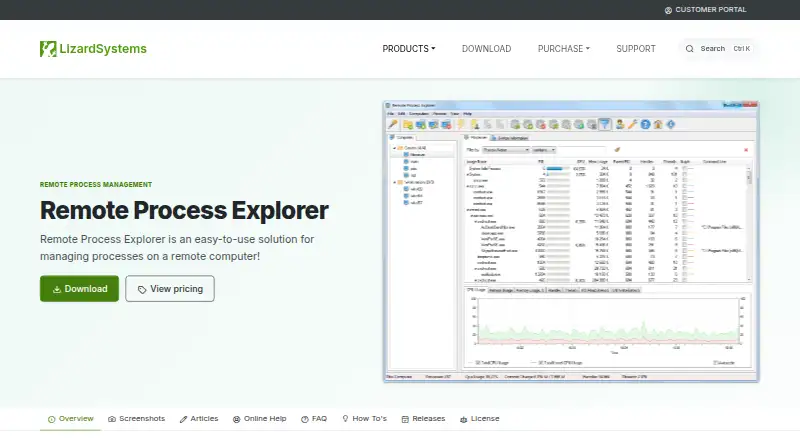
What Remote Process Explorer is
Remote Process Explorer is a Windows utility for managing and monitoring processes on local and remote computers in real time. It can stop processes, start new ones, change their priority, and shut down or restart a remote computer. Process details include process and parent IDs, CPU and memory use, priority, handles, and threads; a process tree organizes the running processes. Computer management features include groups, on/off status, automatic list refresh, an Add Computers Wizard, and separate accounts for each computer. The maker says the remote computer does not need extra software because the utility uses built-in operating system functions. The listed supported systems include Windows 10 and 11 and Windows Server 2012 R2, 2016, 2019, 2022, and 2025. A free Personal License is for non-commercial use on one computer and excludes support and maintenance. The Business License costs $149.95, paid once for one machine; the Corporate License costs $2,999.95, paid once and allows unlimited installations within one organization. Paid licenses are perpetual and include one year of updates and support, with optional renewal afterward.
Who it suits
It suits Windows users who need to view and control processes across local and remote computers. The free Personal License is for non-commercial use on one computer, while the paid licenses cover commercial use or organization-wide installations.
What it does well
- Monitors and manages processes on local and remote computers.
- Shows process IDs, resource use, handles, and threads.
- Organizes running processes in a process tree.
- Maker says remote computers need no additional software.
- Can run on a user's network without registration.
What to know first
- Free Personal License is non-commercial and limited to one computer.
- Free Personal License excludes support and maintenance.
- Business License costs $149.95, paid once.
- Corporate License costs $2,999.95, paid once.
Limits
The free Personal License covers non-commercial use on one computer and includes no support and maintenance. The Business License is for one machine; the Corporate License permits unlimited installations within one organization. Paid licenses include one year of updates and support, with renewal optional afterward.
Plans
| Plan | Billed and limits | Price |
|---|---|---|
| Personal License | Non-commercial use · one computer · no support and maintenance | Free |
| Business License | US$149.95/ license · Commercial use · per machine · perpetual license · one year of free updates · email and ticket support | $149.95, paid once |
| Corporate License | US$2,999.95/ license · Whole organization · unlimited installations · unlimited technicians · one year of free updates · email and ticket support · priority support | $2,999.95, paid once |
As lizardsystems.com lists them, read 7 Oct 2026. The maker's own page has the final word.
Getting started
- Download and run the program on your own network without registration.
- Use the Add Computers Wizard to add computers.
- Organize computers into groups and configure separate accounts as needed.
- Choose the Personal License for non-commercial use, or purchase a Business or Corporate License for commercial use.
Verdict
Remote Process Explorer provides process controls and detailed process information for local and remote Windows computers. Its free license is limited to non-commercial use on one computer, while commercial licenses have one-time costs.
Questions
Is Remote Process Explorer free?
Yes. The Personal License costs nothing and is for non-commercial use on one computer.
What do the paid licenses cost?
The Business License costs $149.95, paid once for commercial use per machine. The Corporate License costs $2,999.95, paid once for unlimited installations within one organization.
Which Windows versions are supported?
The listed platforms are Windows 10 and 11, plus Windows Server 2012 R2, 2016, 2019, 2022, and 2025.
Does it require software on remote computers?
The maker says no additional software needs to be installed on remote computers because the product uses built-in operating system functions.
Do paid licenses include updates and support?
Both paid licenses include one year of updates and support. Renewal after that year is optional.
Facts from Remote Process Explorer's own pages
- Computer management
- Features include computer groups, computer on/off status, automatic list refresh, an Add Computers Wizard, and separate accounts for each computer. · lizardsystems.com, 7 Oct 2026
- License limits
- A Business license covers one computer or server, while a Corporate license permits unlimited installations within one organization. · lizardsystems.com, 7 Oct 2026
- License terms
- Paid licenses are perpetual and include one year of updates and support; renewal after that year is optional. · lizardsystems.com, 7 Oct 2026
- Network use
- The maker says users can download and run the program on their own network without registration. · lizardsystems.com, 7 Oct 2026
- Personal license
- The Personal license is for non-commercial use, and the maker says free personal licenses do not include support and maintenance. · lizardsystems.com, 7 Oct 2026
- Process details
- It displays process information including process and parent IDs, CPU and memory use, priority, handles, and threads. · lizardsystems.com, 7 Oct 2026
- Process tree
- The product displays running processes as a process tree. · lizardsystems.com, 7 Oct 2026
- Purpose
- Remote Process Explorer manages and monitors processes on local and remote computers in real time. · lizardsystems.com, 7 Oct 2026
- Release
- The listed version is 25.05, released May 16, 2025; its noted changes include silent uninstall support and minor bug fixes. · lizardsystems.com, 7 Oct 2026
- Remote installation
- The maker says no additional software needs to be installed on the remote computer because the product uses built-in operating system functions. · lizardsystems.com, 7 Oct 2026
- Remote management
- It can kill processes, run new ones, change process priority, and shut down or restart a remote computer. · lizardsystems.com, 7 Oct 2026
- Supported platform
- The listed platform is Windows: 2012 R2, 10, 2016, 2019, 2022, 11, and 2025. · lizardsystems.com, 7 Oct 2026
- System requirements
- The stated minimum requirements are a 1 GHz processor, 512 MB RAM, and 50 MB free disk space. · lizardsystems.com, 7 Oct 2026
Where Remote Process Explorer stands on Freedom251
- Process Monitoring Software#19 of 26