Freedom251 › Point Cloud Software

Open3D
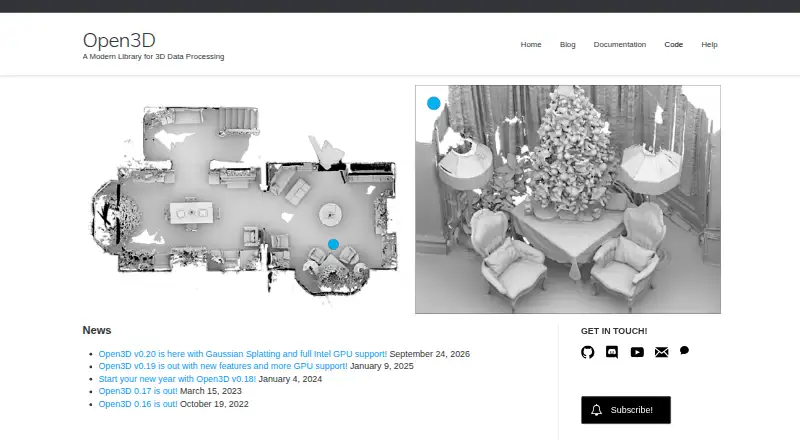
What Open3D is
Open3D is a free, open-source library for building software that works with 3D data. Its C++ and Python interfaces offer 3D data structures and processing algorithms, including scene reconstruction and surface alignment, alongside physically based visualization. GPU acceleration is listed for core operations. Open3D-ML adds tools for tasks such as semantic point-cloud segmentation, pretrained models, and training pipelines, with PyTorch and TensorFlow support. A standalone viewer is available for Debian/Ubuntu, macOS, and Windows; web visualization can run from C++ or Python and display in a browser through WebRTC. The web visualizer can also be embedded in Jupyter Notebook or JupyterLab. Supported inputs include Intel RealSense cameras, Azure Kinect, RGB-D sequences, point-cloud files, and mesh files, with export formats including PLY, STL, OBJ, GLTF, GLB, and FBX. Current Python packages support Python 3.10 through 3.14 on Ubuntu 22.04+, macOS 10.15+, and 64-bit Windows 10+.
Who it suits
Open3D suits developers and researchers building applications around 3D data, visualization, or point-cloud machine learning. Its C++ and Python interfaces and web viewer offer several ways to integrate 3D workflows.
What it does well
- C++ and Python interfaces
- GPU acceleration for core 3D operations
- Open3D-ML supports PyTorch and TensorFlow
- Web visualization supports browser viewing through WebRTC
- MIT license encourages research and commercial use
What to know first
- Remote sensitive visualization requires SSL configuration
- Linux PyPI wheel lacks native TensorFlow support from v0.18 onward
- Current Python packages require listed supported systems
Limits
Current Python packages support Python 3.10 through 3.14 on Ubuntu 22.04+, macOS 10.15+, and 64-bit Windows 10+. From v0.18 onward, the Linux PyPI wheel does not provide native TensorFlow support. The web visualizer uses HTTP by default; sensitive remote visualization requires suitable server configuration and SSL certificates.
Getting started
- Visit the Open3D website and installation guide
- Choose a standard, CPU-only, or Intel GPU Python wheel where supported
- Use a source build for systems outside the listed Python package support
- Use Open3D-Viewer or run the web visualizer from C++ or Python
Overview
Open3D is a free, open-source library for developers building software around 3D data. It suits teams that want programmable C++ or Python tools for processing, visualization, or machine-learning workflows; it is less suited to someone seeking a turnkey scanning app.
The core library covers point clouds, meshes, reconstruction, alignment, and physically based rendering. Its breadth is useful when building a 3D pipeline, while the library-first approach means it is not a substitute for a dedicated capture application. The MIT license permits research and commercial use with proper attribution.
Open3D accepts Intel RealSense and Azure Kinect inputs, RGB-D sequences, RealSense bag files, point-cloud files, and mesh files. Export formats include XYZ, XYZN, XYZRGB, PTS, PLY, PCD, STL, OBJ, OFF, GLTF, GLB, and FBX.
Key features
Processing and visualization
Data structures and algorithms support scene reconstruction and surface alignment, with GPU acceleration for core 3D operations; the v0.20 release announcement highlights full Intel GPU support. Open3D-Viewer provides a separate desktop viewer for Debian/Ubuntu, macOS, and Windows. These capabilities make the project a flexible foundation for 3D work, but using the library still calls for development skills.
Machine learning and browser viewing
Open3D-ML adds semantic point-cloud segmentation, pretrained models, and training pipelines. It works with PyTorch and TensorFlow and includes framework-independent visualization. One important constraint: from v0.18 onward, the PyPI Linux wheel does not provide native TensorFlow support because of build incompatibilities between TensorFlow and PyTorch. Linux users relying on TensorFlow should account for that before choosing this package route.
The web visualizer can run standalone C++ or Python servers and display content in a browser through WebRTC; it can also be embedded in Python Jupyter Notebook or JupyterLab cells. It uses HTTP by default, so sensitive remote visualization calls for appropriate server configuration and SSL certificates.
Pricing
Open3D is free, with no free trial. The project’s open-source library and viewer make it a cost-free option for individuals and teams that can work within its development-oriented model; there are no paid tiers to weigh against a smaller feature set.
Platforms
Open3D is available for Linux, macOS, and Windows, as well as through API, web, and self-hosted use. Current Python packages support Ubuntu 22.04+, macOS 10.15+, and 64-bit Windows 10+, with Python 3.10 through 3.14. Other systems can use a source build. Package choices include standard, CPU-only, and Intel GPU wheels, plus a preview Windows CUDA wheel.
The project also provides signed SLSA build-provenance attestations for development viewer packages, Python wheels, C++ archives, documentation tarballs, release Python wheels, and C++ binaries. Support includes GitHub Issues for bugs and feature requests, a usage forum, and Discord for discussion and collaboration.
Who it's for
Open3D is a strong fit for developers, research teams, and cloud deployments that need a reusable 3D processing library, programmable visualization, or point-cloud machine-learning tools. It is also suited to contributors interested in an open-source project. Readers who primarily want a ready-made scanning workflow should consider dedicated scanning software instead.
Pros and cons
- Broad development toolkit: C++ and Python interfaces combine processing, reconstruction, visualization, and machine-learning extensions.
- Useful input and export coverage: Support for common camera and file inputs, plus formats spanning point clouds and meshes, can fit varied 3D pipelines.
- Flexible deployment: Desktop, browser, notebook, and self-hosted options cover more than a single viewer workflow.
- Linux TensorFlow limitation: The PyPI Linux wheel lacks native TensorFlow support from v0.18 onward, which may complicate that stack.
- Remote security needs configuration: HTTP is the web visualizer default, so sensitive remote use requires SSL setup.
- Developer-oriented rather than turnkey: The library’s flexibility comes with a need to build workflows rather than simply operate a dedicated scanning app.
Alternatives
For a dedicated scanning choice, compare 3D Scanning Software and Point Cloud Software. JMStudio is a free option for 3DMakerpro scanners, with STL, OBJ, PLY, ASC, and RSCAN exports. MeshInspector has a free Community plan for mesh, point-cloud, voxel, and G-code viewing, plus basic editing and repair; it is a better fit when those direct editing tasks matter more than a programmable library. RealityScan offers a free plan for individuals and small businesses under $1 million USD in revenue in the past 12 months, as well as educational institutions and students.
Revo Scan 6 is free 3D scanning and post-processing software for Revopoint scanners. MeshLab is a free, open-source mesh processing and editing system, making it a direct alternative for mesh-focused work. Polycam has a free plan with limited space, object, and AI captures, GLTF exports, and public link sharing; choose it when that capture-and-sharing workflow is the priority. Polyga PointKit offers a Premium plan at $99 a month, billed 1 month, with XTract3D 2 and PointKit for a single active license. 3D Scanner App is another alternative.
Verdict
Choose Open3D if you need a free, extensible C++ or Python foundation for 3D processing and visualization, especially when point-cloud machine learning is part of the work. Look elsewhere if you want a ready-to-use scanning product, need native TensorFlow support from the Linux PyPI wheel, or cannot configure secure remote visualization.
Verdict
Open3D brings 3D processing, visualization, and machine-learning tools into an open-source library. Check the Linux TensorFlow and remote-visualization caveats if those apply to your workflow.
Questions
Is Open3D free and open source?
Yes. It is free and released under the MIT license. The project encourages research and commercial use with proper attribution.
Which programming languages does it support?
Open3D provides C++ and Python interfaces.
Which systems do the current Python packages support?
They support Ubuntu 22.04 or later, macOS 10.15 or later, and 64-bit Windows 10 or later, with Python 3.10 through 3.14. Other systems can use a source build.
Does Open3D support TensorFlow and PyTorch?
Open3D-ML supports both frameworks. From v0.18 onward, the Linux PyPI wheel does not provide native TensorFlow support.
Can I view 3D data in a browser?
Yes. The web visualizer supports C++ and Python servers, browser viewing through WebRTC, and embedding in Jupyter Notebook or JupyterLab. It uses HTTP by default.
Facts from Open3D's own pages
- 3D processing
- Core features include 3D data structures and processing algorithms, scene reconstruction, and surface alignment. · open3d.org, 30 Sept 2026
- Core capabilities
- Core features include 3D data structures, processing algorithms, scene reconstruction, surface alignment, physically based rendering, machine-learning support, and GPU acceleration. · open3d.org, 1 Oct 2026
- Founded
- 2018 · open3d.org, 23 Sept 2026
- GPU acceleration
- The project lists GPU acceleration for core 3D operations; its v0.20 release announcement highlights full Intel GPU support. · open3d.org, 30 Sept 2026
- Integrations
- Open3D-ML works with TensorFlow and PyTorch and provides framework-independent visualization functionality. · github.com, 1 Oct 2026
- Intended users
- The project describes use in published research projects and cloud deployments, and welcomes open-source contributions. · open3d.org, 30 Sept 2026
- Interfaces
- The frontend provides data structures and algorithms in C++ and Python. · open3d.org, 1 Oct 2026
- Languages
- The library provides C++ and Python interfaces and a 3D viewer app. · open3d.org, 30 Sept 2026
- License
- Open3D is released under the MIT license for research and commercial use with proper attribution. · open3d.org, 1 Oct 2026
- Linux TensorFlow limit
- From v0.18 onward, the PyPI Linux wheel does not provide native TensorFlow support because of PyTorch/TensorFlow build incompatibilities. · github.com, 1 Oct 2026
- Machine learning
- Open3D supports PyTorch and TensorFlow for 3D machine learning. · open3d.org, 1 Oct 2026
- Open3D-ML
- Open3D-ML adds tools for 3D machine-learning tasks, including semantic point-cloud segmentation, pretrained models, and training pipelines. · github.com, 1 Oct 2026
- Package options
- The installation guide lists standard, CPU-only, and Intel GPU Python wheels, plus a preview Windows CUDA wheel. · open3d.org, 30 Sept 2026
- Purpose
- Open3D is an open-source library for rapid development of software dealing with 3D data. · open3d.org, 1 Oct 2026
- Python versions
- The current Python packages list support for Python 3.10 through 3.14. · open3d.org, 30 Sept 2026
- Remote visualization caveat
- The web visualizer uses HTTP by default, and the documentation advises configuring SSL certificates for sensitive remote visualization. · open3d.org, 30 Sept 2026
- Security limitation
- The web visualizer uses HTTP by default, so remote visualization requires appropriate web-server configuration and SSL certificates for sensitive data. · open3d.org, 1 Oct 2026
- Security provenance
- The documentation says development viewer packages, Python wheels, C++ archives, and documentation tarballs have signed SLSA build provenance attestations. · open3d.org, 30 Sept 2026
- Supply-chain security
- Release Python wheels and C++ binaries include signed SLSA build-provenance attestations aligned with OpenSSF supply-chain guidance. · open3d.org, 1 Oct 2026
- Support
- Support channels include GitHub Issues, a usage forum, and Discord chat. · open3d.org, 1 Oct 2026
- Support channels
- The project points users to GitHub issues for bugs and feature requests, a forum for usage discussions, and Discord for chats and collaboration. · open3d.org, 30 Sept 2026
- Supported systems
- The current Python packages support Ubuntu 22.04+, macOS 10.15+, and 64-bit Windows 10+; other systems can use a source build. · open3d.org, 30 Sept 2026
- Viewer
- Open3D-Viewer is a standalone 3D viewer app available on Debian/Ubuntu, macOS, and Windows. · open3d.org, 1 Oct 2026
- Visualization
- Open3D supports 3D visualization with physically based rendering. · open3d.org, 30 Sept 2026
Where Open3D stands on Freedom251
- Point Cloud Software#4 of 24
- 3D Scanning Software#10 of 29