Freedom251 › 3D Scanning Software

JMStudio
What JMStudio is
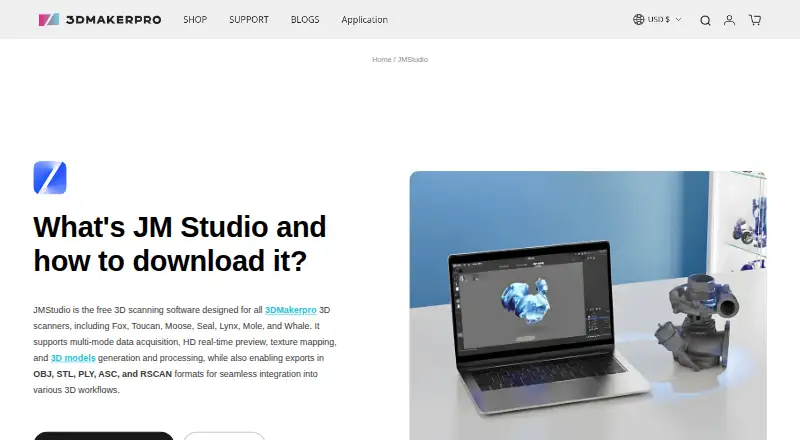
JMStudio is 3DMakerpro's software for capturing and processing scans from its Fox, Toucan, Moose, Seal, Mole, Lynx, and Whale scanners. During live capture it provides visual feedback, markerless AI tracking, and tracking on complex surfaces. Processing includes AI-assisted noise removal and geometry optimization, as well as tools to refine surfaces and smooth geometry. Exports include STL, OBJ, PLY, ASC, and RSCAN, and the software can create watertight STL files for slicing software such as Cura or Lychee. The maker lists compatibility with Autodesk CAD, Blender, Fusion 360, Cinema 4D, Maya, Rhino, SolidWorks, and ZBrush. JMStudio is free and available for Windows 10/11 64-bit, macOS 12, 13, and 14, Android, and iOS; the mobile app supports wireless scanning. Minimum desktop requirements are an Intel Core i5 8th generation CPU, 16 GB RAM, and an MX250 GPU with 2 GB VRAM. An NVIDIA 3060 with 4 GB VRAM is recommended. The maker provides manuals, tutorials, a forum, live chat, and email support.
Who it suits
JMStudio suits creators, engineers, and manufacturers using supported 3DMakerpro scanners. Its page also describes it as accessible to beginners, while the listed desktop requirements are relevant for users planning computer-based scanning.
What it does well
- Provides real-time visual feedback and markerless AI tracking.
- Includes noise removal and geometry optimization tools.
- Exports STL, OBJ, PLY, ASC, and RSCAN files.
- Can create watertight STL files for slicing software.
- Available on desktop and mobile platforms.
What to know first
- Works with listed 3DMakerpro scanner models.
- Desktop minimum includes 16 GB RAM and an MX250 GPU.
- The recommended GPU is an NVIDIA 3060 with 4 GB VRAM.
Plans
| Plan | Billed and limits | Price |
|---|---|---|
| JMStudio | For 3DMakerpro scanners · Exports STL, OBJ, PLY, ASC, and RSCAN | Free |
As store.3dmakerpro.com lists them, read 2 Oct 2026. The maker's own page has the final word.
Getting started
- Open the JMStudio page on the 3DMakerpro website.
- Download the version for Windows 10/11 64-bit or macOS 12, 13, or 14, or get the Android or iOS mobile app.
- Use it with a supported Fox, Toucan, Moose, Seal, Mole, Lynx, or Whale scanner.
- For mobile scanning, use the wireless scanning option.
- Capture a scan, refine its surface or geometry, and export it in a supported format.
JMStudio is 3DMakerpro’s scanning and mesh-processing software, built to work with the company’s scanners. It suits owners who want capture, cleanup and export in one workflow; its main trade-off is that scanner support and desktop requirements narrow the fit.
Overview
JMStudio combines real-time visual feedback during scanning with tools for reconstructing and refining meshes. Markerless AI visual tracking and tracking on complex surfaces are intended to help capture without relying on markers, while one-click AI optimization targets noise and geometry cleanup. That makes it a practical companion for compatible 3DMakerpro hardware, rather than a general-purpose scanner application.
Exports include STL, OBJ, PLY, ASC and RSCAN. The maker names Autodesk CAD, Blender, Fusion 360, Cinema 4D, Maya, Rhino, SolidWorks and ZBrush as compatible software ecosystems. JMStudio can also create watertight STL files for use in slicers such as Cura or Lychee, which gives a scan-to-print workflow a clear endpoint.
Key features
- Live capture: Real-time visual feedback, markerless AI visual tracking and tracking on complex surfaces support scanning as geometry is acquired. These capabilities are relevant to users who want to monitor capture rather than process only afterward.
- Mesh cleanup: One-click AI optimization removes noise and optimizes geometry; surface refinement and smoothing tools offer further control. This is useful for preparing scans for downstream modeling or printing, though it does not change the scanner-specific nature of the software.
- Point clouds and reconstruction: JMStudio includes point-cloud tools and mesh reconstruction, covering steps between captured scan data and a usable mesh.
- File handoff: STL, OBJ, PLY, ASC and RSCAN exports give users several routes into compatible design applications. Watertight STL output is especially pertinent to 3D printing.
Pricing
JMStudio is free: the JMStudio plan costs nothing and supports 3DMakerpro scanners, with exports to STL, OBJ, PLY, ASC and RSCAN. There are no paid tiers or published seat, quota, trial-length or renewal terms to weigh. The key limit is hardware compatibility: the plan is for 3DMakerpro scanners, not a stated universal scanner workflow.
The supported scanner families are Fox, Toucan, Moose, Seal, Mole, Lynx and Whale. Buyers considering a scanner should confirm it is among these models before treating the free software as part of their setup.
Platforms
JMStudio supports Windows 10/11 64-bit, macOS 12, 13 and 14, Android and iOS. The mobile app supports wireless scanning. Desktop use has a minimum requirement of an Intel Core i5 8th generation CPU, 16 GB RAM and an MX250 GPU with 2 GB VRAM; the recommended GPU is an NVIDIA 3060 with 4 GB VRAM. That desktop baseline matters for users planning to process scans on older or lower-powered machines.
Who it's for
JMStudio is aimed at creators, engineers and manufacturers, with an accessibility goal for beginners. It is a sensible fit for owners of supported 3DMakerpro scanners who need capture, mesh refinement and exports for CAD, creative software or 3D printing. It is a poor fit for someone whose scanner is outside the supported families or whose desktop cannot meet the minimum specification.
3DMakerpro offers manuals, software downloads, tutorials, a forum, live chat and email support. Its privacy policy says technical, administrative and physical measures are used to safeguard data and prevent unauthorized access; it also says products and services may collect device, IP address, operating system, browser, usage, diagnostic and location information.
Pros and cons
Pros
- Free capture-to-export workflow: Live scanning, reconstruction, mesh cleanup and five export formats are included for compatible scanners.
- Useful print handoff: Watertight STL generation can take a scan into slicing software such as Cura or Lychee.
- Mobile option: Android and iOS support plus wireless scanning offer an alternative to desktop capture.
Cons
- Restricted scanner compatibility: Support is centered on seven 3DMakerpro families, limiting its usefulness for other scanner owners.
- Substantial desktop baseline: The minimum calls for 16 GB RAM and a discrete MX250 GPU, so some computers may not qualify.
- No stated security certification: Safeguarding measures are described, but no JMStudio security certification is identified.
Alternatives
Structure is worth considering for readers seeking an SDK across Android, iOS, Linux, macOS, web and Windows; its developer license offers all SDK features for experimentation and prototyping through a 7-day free trial, but it is paid and has no free plan.
MeshInspector is a better candidate when the priority is broader mesh, point-cloud, voxel or G-code viewing and basic editing or repair, rather than a workflow tied to 3DMakerpro scanner families.
RealityScan offers a free plan for individuals and small businesses under $1 million USD in revenue in the past 12 months, educational institutions and students; consider it if that eligibility and its Android, iOS, Linux or Windows platform support better match your situation.
Revo Scan 6 is another free scanning and post-processing option, for Revopoint 3D scanners, across Android, iOS, macOS and Windows.
3D Scanner App is an alternative for readers looking at an iOS- or macOS-only app with a free Basic plan.
MeshLab is a free, open-source mesh processing and editing system for Linux, macOS and Windows; consider it when mesh processing matters more than integrated support for a 3DMakerpro scanner.
Polycam has a free plan with limited space, object and AI captures, GLTF exports and public link sharing, and supports Android, iOS and web. Its different limits and platforms may suit readers seeking that kind of capture and sharing workflow.
Polyga FlexScan3D is a free legacy Windows download for readers who specifically want that software.
Browse the 3D Scanning Software category for more options.
Verdict
Choose JMStudio if you own a supported 3DMakerpro scanner and want free live capture, mesh cleanup and practical exports in a single workflow. Its strongest reason to choose it is that no separate software fee stands between compatible hardware and scan processing. Look elsewhere if you need support for another scanner brand or cannot meet the desktop requirements.
Verdict
JMStudio combines live scanning support with mesh cleanup and several export formats for compatible 3DMakerpro scanners. Before choosing it, check the supported scanner list and the desktop hardware requirements.
Questions
How much does JMStudio cost?
JMStudio is free.
Which scanners work with JMStudio?
It supports 3DMakerpro Fox, Toucan, Moose, Seal, Mole, Lynx, and Whale scanners.
Which platforms does it support?
The listed platforms are Windows 10/11 64-bit, macOS 12, 13, and 14, Android, and iOS.
Which file formats can JMStudio export?
It exports STL, OBJ, PLY, ASC, and RSCAN files, and can generate watertight STL files for slicing software.
Which 3D software ecosystems are listed as compatible?
The maker lists Autodesk CAD, Blender, Fusion 360, Cinema 4D, Maya, Rhino, SolidWorks, and ZBrush.
Who makes JMStudio?
JMStudio is 3DMakerpro’s 3D scanning software.
Facts from JMStudio's own pages
- 3D printing
- The FAQ says JMStudio can generate watertight STL files for importing into slicing software such as Cura or Lychee. · store.3dmakerpro.com, 2 Oct 2026
- Data collection
- The privacy policy says its products and services may collect device, IP address, operating system, browser, usage, diagnostic, and location information. · store.3dmakerpro.com, 2 Oct 2026
- Desktop platforms
- The download section lists Windows 10/11 64-bit and macOS 12, 13, and 14 as compatible. · store.3dmakerpro.com, 2 Oct 2026
- Export formats
- JMStudio exports STL, OBJ, PLY, ASC, and RSCAN files. · store.3dmakerpro.com, 2 Oct 2026
- Founded
- 2015 · store.3dmakerpro.com, 28 Sept 2026
- Headquarters
- Shenzhen, China · store.3dmakerpro.com, 28 Sept 2026
- Intended users
- The JMStudio page describes the software as built for creators, engineers, and manufacturers, and says it is designed to be accessible to beginners. · store.3dmakerpro.com, 2 Oct 2026
- Live capture
- The software provides real-time visual feedback and lists markerless AI visual tracking and tracking on complex surfaces as features. · store.3dmakerpro.com, 2 Oct 2026
- Mobile platforms
- The page lists a mobile app for Android and iOS and describes wireless scanning. · store.3dmakerpro.com, 2 Oct 2026
- Privacy and security
- 3DMakerpro’s privacy policy says it uses technical, administrative, and physical measures designed to safeguard data and prevent unauthorized access; it does not specify a JMStudio security certification. · store.3dmakerpro.com, 2 Oct 2026
- Processing
- Its page describes one-click AI optimization that removes noise and optimizes geometry, plus tools to refine surfaces and smooth geometry. · store.3dmakerpro.com, 2 Oct 2026
- Purpose
- JMStudio is 3DMakerpro’s 3D scanning software for use with its scanners. · store.3dmakerpro.com, 2 Oct 2026
- Scanner compatibility
- The maker says JMStudio works with its Fox, Toucan, Moose, Seal, Mole, Lynx, and Whale scanners. · store.3dmakerpro.com, 2 Oct 2026
- Software compatibility
- The maker lists Autodesk CAD, Blender, Fusion 360, Cinema 4D, Maya, Rhino, SolidWorks, and ZBrush as compatible software ecosystems. · store.3dmakerpro.com, 2 Oct 2026
- Support
- The maker links to manuals, software, tutorials, a forum, live chat, and email support. · store.3dmakerpro.com, 2 Oct 2026
- System requirements
- The listed minimum is an Intel Core i5 8th generation CPU, 16 GB RAM, and MX250 GPU with 2 GB VRAM; the recommended GPU is an NVIDIA 3060 with 4 GB VRAM. · store.3dmakerpro.com, 2 Oct 2026
Where JMStudio stands on Freedom251
- 3D Scanning Software#4 of 29