Freedom251 › 3D Scanning Software

MeshInspector
What MeshInspector is
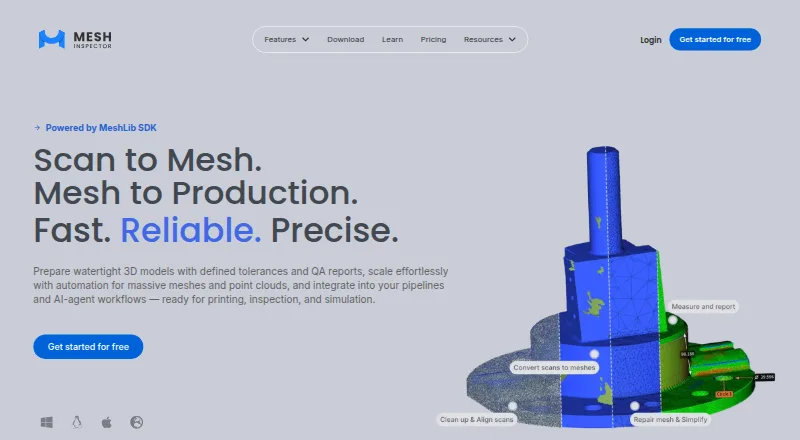
MeshInspector processes 3D data for mesh repair, scan transformation, and quality inspection in printing, simulation, and manufacturing workflows. It handles meshes, point clouds, volumetric data, lines, distance maps, and G-code, and imports and exports 3D models. Tools include STL editing and repair, mesh conversion, measurements, distance comparisons, segmentation, and CT/MRI scan inspection. The free Community plan includes viewing, basic editing and repair, and measurements. Makers costs $300 a year per user and adds one-click repair, advanced editing, basic inspection, and alignment tools. Professional costs $790 a year per user and adds batch repair, lattice generation, point-cloud and CT/MRI-to-mesh workflows, QC reports, advanced measurements, and Python automation. Its 30-day Professional trial requires no credit card; afterward, the account moves to Community. Web files are processed and stored in browser local memory, while desktop files are handled and stored locally. MeshInspector is available on web, Windows, macOS, and Linux, and describes workflows for engineers, service bureaus, dental labs, and scanning professionals.
Who it suits
MeshInspector suits engineers, service bureaus, dental labs, and scanning professionals working with 3D data. Its plan features also address workflows in additive manufacturing, reverse engineering, and digital dentistry.
What it does well
- Handles meshes, point clouds, volumetric data, and G-code
- Includes mesh repair, measurements, and scan inspection
- Professional adds Python automation
- Web and desktop files are stored locally
What to know first
- Professional costs $790 a year per user
- Makers costs $300 a year per user
Plans
| Plan | Billed and limits | Price |
|---|---|---|
| Community | Mesh, point-cloud, voxel and G-code viewer · Basic mesh and point-cloud editing · Basic mesh repair · Measurements | Free |
| Makers | per user billed yearly · Community features · One-click Mesh Healer · Advanced mesh editing · Basic inspection · Alignment tools | $300 a year |
| Professional | per user billed yearly · Makers features · Batch repair · Lattice generation · Point-cloud-to-mesh · CT/MRI-to-mesh · QC reports · Advanced measurements · Python automation | $790 a year |
| Enterprise | Custom volume, floating, perpetual or one-time licensing · On-premise/air-gapped deployment · SSO/SLA · MeshLib SDK/OEM/custom development | On request |
As meshinspector.com lists them, read 15 Oct 2026. The maker's own page has the final word.
MeshInspector is a cross-platform toolkit for preparing, repairing and inspecting 3D data, best suited to engineers, scanning professionals, service bureaus and dental labs. Its range of mesh, point-cloud and scan workflows is a strong fit for technical production; casual scanning is not its clearest use case.
Overview
Rather than centering on one scanner or file type, MeshInspector brings together mesh editing, repair, conversion and inspection with workflows for additive manufacturing, reverse engineering, simulation and digital dentistry. It handles meshes, point clouds, volumetric data, lines, distance maps and G-code. Inputs include LiDAR, laser and structured-light scans, photogrammetry, CT/MRI, voxels and polylines; exports include STL, OBJ, PLY, OFF, CTM, 3MF, E57, LAS and LAZ.
Mesh reconstruction, point-cloud tools and API access broaden its usefulness beyond basic model cleanup. MeshInspector is made by a company founded in 2007 and based in Bothell, Washington.
Key features
- Mesh editing and repair: Community includes basic mesh and point-cloud editing and basic mesh repair. Makers adds advanced mesh editing and one-click Mesh Healer repair, a practical upgrade for users who regularly receive imperfect models.
- Inspection and measurement: Measurements and distance comparisons support geometry checks. Makers adds basic inspection and alignment tools, while Professional adds advanced measurements and QC reports for more formal quality-control work.
- Scan and medical-data workflows: MeshInspector accepts data from several scanning methods and supports CT/MRI inspection. Professional adds point-cloud and CT/MRI-to-mesh workflows, making it the more relevant tier for teams turning scans into usable meshes.
- Batch work and automation: Professional includes batch mesh repair, lattice generation and Python automation. The product also says AI agents can operate it over MCP with assistants including Claude, Cursor, GitHub Copilot, Windsurf, Cline, OpenAI Codex and Gemini CLI. This makes the higher tier more compelling for repeatable or scripted processes than for occasional edits.
- Local handling and deployment: Web files are processed and stored in browser local memory, while desktop files remain on the computer. The privacy policy describes TLS 1.3 in transit, AES-256 at rest, least-privilege access and annual third-party penetration testing for website personal data; it also says the desktop software, SDK and cloud app operate without telemetry or user tracking. Enterprise adds on-premises and air-gapped deployment, SSO/SAML, SCIM, audit logs and data residency.
Pricing
The Community plan is free. It covers viewing meshes, point clouds, voxels and G-code, plus basic editing, basic mesh repair and measurements. That is a useful starting point for viewing and light cleanup, but it lacks the advanced repair, inspection and automation capabilities aimed at production workflows.
Makers costs $300 a year, billed per user yearly. It includes Community features, one-click Mesh Healer repair, advanced mesh editing, basic inspection and alignment tools. It suits individual users who need more capable repair and alignment but do not need batch processing or Python automation.
Professional costs $790 a year, billed per user yearly. It adds batch mesh repair, lattice generation, point-cloud and CT/MRI-to-mesh workflows, QC reports, advanced measurements and Python automation. A 30-day free trial does not require a credit card; after it ends, the account moves automatically to Community. The higher price is easiest to justify when these additional workflows are part of regular work.
Enterprise has custom pricing. It offers perpetual and one-time licenses, volume, floating and site licenses, on-premises and air-gapped deployment, SSO and SLA, plus MeshLib SDK, OEM and custom development options. Enterprise also lists a dedicated customer success manager, solutions engineer and priority SLA; premium support across the pricing page has priority response within approximately 12 hours. Organizations needing HIPAA/GDPR-aligned processes can request a DPA or BAA.
Platforms
MeshInspector runs on web, Windows, macOS and Linux. The Web Suite can integrate a viewer and tools into a customer platform and work with AWS and Azure servers. Local desktop file handling may suit users who want files kept on their own computer; browser-based access offers a different route for teams embedding tools into a platform.
Who it's for
MeshInspector is a strong candidate for engineers and scanning professionals who need more than capture: repair, measurement, scan transformation or inspection across varied 3D data. Service bureaus and dental labs may find the Professional tier's batch repair, CT/MRI workflows and QC reports especially relevant. Users focused mainly on scanner-specific capture or straightforward model viewing may not need its broader production toolkit.
Pros and cons
- Pros: Broad data support, including point clouds, volumetric data and G-code, means it can cover more of a technical workflow in one product.
- Pros: Professional combines batch repair, scan-to-mesh workflows, QC reports and Python automation, useful for repeatable inspection and processing.
- Pros: A free Community tier and a no-card 30-day Professional trial let users start with basic work or evaluate advanced workflows before paying.
- Cons: Community is limited to basic editing and repair, so users who need one-click healing, advanced editing or inspection tools must move to a paid plan.
- Cons: Professional costs $790 a year per user, a significant step above Makers for those who only need its repair and alignment tools.
- Cons: Enterprise pricing is custom, so organizations considering its deployment and licensing options will need a direct pricing discussion.
Alternatives
For scanner-centered or lighter-weight workflows, the choice depends on device support and platform needs. JMStudio is a free option for 3DMakerpro scanners, with STL, OBJ, PLY, ASC and RSCAN exports. Revo Scan 6 is free 3D scanning and post-processing software for Revopoint scanners. 3D Scanner App is a freemium iOS and macOS option.
If mesh processing is the priority, MeshLab is a free, open-source mesh processing and editing system for Linux, macOS and Windows. For photogrammetry-focused work, RealityScan offers a free tier for individuals and small businesses under $1 million USD in revenue in the past 12 months, educational institutions and students. Polycam has a free tier with limited space, object and AI captures, GLTF exports and public link sharing.
Structure is another alternative. Polyga FlexScan3D is a free download of legacy software. For broader browsing, see 3D Scanning Software and 3D modeling software.
Verdict
Choose MeshInspector if your work depends on repairing, transforming or inspecting varied 3D data, especially when batch processing, scan-to-mesh workflows or automation matter. Its free tier makes basic viewing and cleanup accessible, while Professional concentrates the more production-oriented tools. Look elsewhere if you mainly need scanner-specific capture or free mesh editing and do not need its broader inspection and automation capabilities.
Verdict
MeshInspector spans basic viewing and repair through advanced inspection and automation, with a free Community tier and paid plans. Check which plan includes the tools required for a particular workflow.
Facts from MeshInspector's own pages
- Automation
- Professional includes Python automation, and the site says AI agents can operate MeshInspector over MCP with assistants including Claude, Cursor, GitHub Copilot, Windsurf, Cline, OpenAI Codex and Gemini CLI. · meshinspector.com, 29 Sept 2026
- Cloud integrations
- The maker says Web Suite works with AWS and Azure infrastructure for moving files and cloud processing. · meshinspector.com, 15 Oct 2026
- Commercial licensing
- The pricing FAQ states that all MeshInspector plans, including Community, are licensed for commercial use. · meshinspector.com, 15 Oct 2026
- Company history
- The maker says two senior experts founded a dental-laboratory software company in 2007 and commercially launched MeshLib and MeshInspector in 2022. · meshinspector.com, 15 Oct 2026
- Company size
- LinkedIn lists MeshInspector App & SDK as privately held with 11–50 employees and headquarters in Bothell, Washington. · linkedin.com, 15 Oct 2026
- CT and MRI
- The product can open, slice, segment and reconstruct CT/MRI voxel data into meshes. · meshinspector.com, 15 Oct 2026
- Data handling
- Web files are processed in browser local memory, while desktop files are handled and stored locally on the computer. · meshinspector.com, 15 Oct 2026
- Documentation
- The knowledge base contains workspace, import/export, object, editing, repair, scan preparation, inspection, CT/MRI, scripting, settings and troubleshooting sections. · meshinspector.com, 15 Oct 2026
- Enterprise controls
- Enterprise lists on-premise and air-gapped deployment, SSO/SAML and SCIM, audit logs, data residency, HIPAA/GDPR-aligned processes, and DPA/BAA on request. · meshinspector.com, 29 Sept 2026
- Features
- Features include STL editing and repair, mesh conversion, inspection measurements, distance comparisons, segmentation and CT/MRI scan inspection. · meshinspector.com, 29 Sept 2026
- File formats
- Supported data includes STL, OBJ, PLY, 3MF, DICOM, E57, STEP, G-code and other mesh, volume and point-cloud formats. · github.com, 15 Oct 2026
- Free plan
- Yes · meshinspector.com, 20 Sept 2026
- Headquarters
- Bothell, Washington, USA · meshinspector.com, 28 Sept 2026
- Inspection tools
- Inspection features include distance, angle, thickness, collision and deviation analysis plus quality-control reporting. · meshinspector.com, 15 Oct 2026
- Integrations
- The MeshInspector Web Suite page says it can integrate a viewer and tools into a customer platform and work with AWS and Azure servers. · meshinspector.com, 29 Sept 2026
- Intended users
- The site describes workflows for engineers, service bureaus, dental labs and scanning professionals, and identifies additive manufacturing, reverse engineering and digital dentistry as use cases. · meshinspector.com, 29 Sept 2026
- Large-data hardware
- For roughly 20–50 million polygons or more, the maker recommends 32–64 GB RAM and 6–12 GB VRAM on Windows/Linux or an Apple M-series Pro/Max Mac. · meshinspector.com, 15 Oct 2026
- Legal maker and headquarters
- The site footer identifies AMV Consulting LLC at 19125 North Creek Parkway Suite 120, Bothell, Washington 98011, USA. · meshinspector.com, 15 Oct 2026
- Limit: automatic repair
- An independent review cautions that automatic rebuilding can alter or remove detail and may require manual cleanup. · 3dprinterworld.com, 15 Oct 2026
- Limit: CAD history
- An independent review notes that STEP import produces a mesh and does not recreate editable CAD sketches or design history. · 3dprinterworld.com, 15 Oct 2026
- Limit: price
- The reviewer considered the monthly cost high for small companies. · softwareadvice.com, 15 Oct 2026
- Limit: sectioning
- The reviewer identified sectioning capabilities as an area still needing improvement. · softwareadvice.com, 15 Oct 2026
- MCP and AI agents
- MeshInspector can be controlled through MCP by Claude Code, Claude Desktop, Cursor and other MCP-compatible assistants. · github.com, 15 Oct 2026
- MeshLib SDK
- MeshLib is the underlying native C++ engine with C, C#, Python and JavaScript/WebAssembly interfaces and packages for pip, NuGet and npm. · meshinspector.com, 15 Oct 2026
Where MeshInspector stands on Freedom251
- 3D Scanning Software#5 of 29
- 3D modeling software#28 of 147