Freedom251 › Help desk software
Odoo Helpdesk
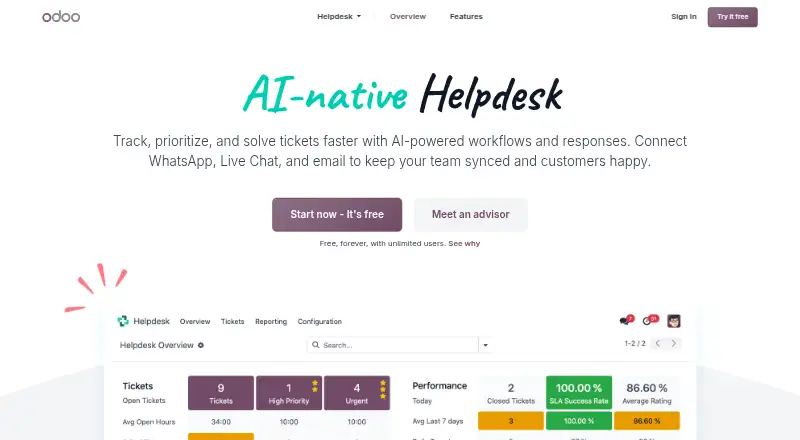
What Odoo Helpdesk is
Odoo Helpdesk organizes customer support tickets so teams can prioritize and resolve requests arriving through email, customizable website forms, and live chat. Teams can define ticket stages, automate assignment, set SLA rules, and send customer updates automatically. Agents can use dynamic email templates, saved live chat responses, or escalate a ticket to a manager with one click. The tool includes a shared inbox, customer portal, help center, ticket automation, SLA management, and API access.
The Help Center can bring together eLearning courses, community forums, and Knowledge articles for customer self-service. Helpdesk connects with Odoo apps including Live Chat, Knowledge, Accounting, Field Service, and Repair. Teams can track time spent on tickets and invoice that time through Sales, Timesheets, Project, and Accounting integrations. Reports include ticket analysis, SLA status analysis, and customer ratings.
The One App Free plan includes one app with unlimited users on Odoo Online. Adding apps can start a 15-day trial; afterward, the database becomes inaccessible without a paid subscription. Standard includes all apps on Odoo Online for $31.10 a month, billed monthly per user. Custom costs $61 a month, billed monthly per user, and supports Odoo Online, Odoo.sh, or on-premise hosting, with Studio, Agentic AI, multi-company, and external API. Odoo.sh hosting costs are not included.
Who it suits
Odoo Helpdesk suits support teams handling requests from email, web forms, and live chat that need ticket routing, SLAs, and customer updates. It also fits teams that want self-service content, ticket time billing, or helpdesk links to other Odoo apps.
What it does well
- Accepts tickets from email, website forms, and live chat.
- Supports custom stages, automated assignment, and SLA rules.
- Includes a customer portal and help center.
- Tracks ticket time for invoicing through connected Odoo apps.
- Reports on tickets, SLA status, and customer ratings.
What to know first
- The free plan is limited to one app.
- Adding apps to the free plan starts a 15-day trial.
- Odoo.sh hosting costs are not included in the Custom plan.
Limits
The One App Free plan covers one app with unlimited users on Odoo Online. Installing additional apps can trigger a 15-day trial; after it ends, the database becomes inaccessible without a paid subscription. Odoo.sh hosting costs are not included in the Custom plan.
Plans
| Plan | Billed and limits | Price |
|---|---|---|
| One App Free | One app · unlimited users · Odoo Online | Free |
| Standard | Monthly · All apps · Odoo Online · per user / month | $31.10 a month |
| Custom | Monthly · All apps · Odoo Online / Odoo.sh / On-premise · Studio · Agentic AI · Multi-Company · External API · per user / month | $61 a month |
| Standard | Yearly · All apps · Odoo Online · per user / month | $24.90 a year |
| Custom | Yearly · All apps · Odoo Online / Odoo.sh / On-premise · Studio · Agentic AI · Multi-Company · External API · per user / month | $49 a year |
As odoo.com lists them, read 9 Oct 2026. The maker's own page has the final word.
Getting started
- Open the Odoo Helpdesk website.
- Choose the One App Free plan for one app with unlimited users on Odoo Online, or select a paid plan.
- Use the 15-day trial if you add apps to the free plan.
- Receive tickets through email, website forms, or live chat.
- Set ticket stages, assignment, SLA rules, and customer updates.
- Choose Odoo Online, Odoo.sh, or on-premise hosting with the Custom plan.
Odoo Helpdesk is a customer-support app for managing tickets and connecting service work to other business operations. It is best suited to teams already using Odoo, especially when support can lead to field service, repairs, or billable work. Its workflow and self-service tools cover more than a shared inbox, while the per-user cost of all-app plans makes the wider Odoo suite central to the decision.
Overview
Requests can arrive by email, customizable website forms, and live chat, then move through custom stages with automated assignment, SLA rules, and customer updates. Agents can use email templates and saved live-chat responses for common replies, or escalate a case to a manager in one click. These tools make Odoo a fit for teams that need a defined support process; the value depends on having workflows and service commitments worth configuring.
Helpdesk’s strongest advantage is its connection to other Odoo apps, including Live Chat, Knowledge, Accounting, Field Service, and Repair. Teams can track time spent on a ticket and invoice it through Sales, Timesheets, Project, and Accounting. That can suit service organizations where a support request leads to paid work or operational follow-up. A team that only needs a standalone ticket queue may have little use for this breadth.
Key features
Ticket workflow and service levels
Custom stages, automated assignment, SLAs, and automatic customer updates help teams route work consistently and manage response commitments. Ticket analysis and SLA status analysis give managers a way to review workload and service performance, while customer ratings add a feedback measure. These capabilities support a more structured operation, but they ask more of teams than simply sharing an inbox.
Self-service and responses
The Help Center can bring together eLearning courses, community forums, and Knowledge articles, giving customers ways to look for answers themselves. Dynamic email templates and canned chat replies help agents answer recurring questions consistently. The one-click manager escalation also gives agents a direct route for cases that need additional attention.
Connected service work
Connections with Live Chat, Knowledge, Accounting, Field Service, Repair, and other Odoo apps tie support into broader operations. Ticket time can feed invoicing through Sales, Timesheets, Project, and Accounting. This is most useful when service teams handle work beyond answering questions; organizations without related Odoo workflows may not benefit enough to justify an all-app subscription.
Pricing
Odoo uses a freemium model. The One App Free plan costs nothing and includes one app, unlimited users, and Odoo Online. The unlimited-user allowance is appealing for a small team, but it applies within a strict one-app limit. Installing another app can start a 15-day trial, after which the database becomes inaccessible without a paid subscription, so teams should account for the suite boundary before building their operation on the free plan.
Standard costs $31.10 a month, billed monthly, per user / month. It includes all apps on Odoo Online, making it the entry point for teams that need Helpdesk alongside other Odoo tools. The per-user charge means costs rise with the team, and this plan does not include the Custom plan’s listed hosting choices or external API access.
Custom costs $61 a month, billed monthly, per user / month. It includes all apps, Odoo Online, Odoo.sh or on-premise hosting, Studio, Agentic AI, Multi-Company, and External API. It is the relevant tier for organizations that need those deployment or API options, though Odoo.sh hosting costs are not included. Plans include hosting, maintenance, upgrades, and unlimited email support Monday to Friday, 24/5, in English, French, Spanish, or Dutch. Odoo states a 99.9% monthly uptime target for its cloud platform, excluding planned maintenance; Odoo Cloud uses HTTPS and keeps 14 full database backups for at least three months across at least three data centers.
Platforms
Odoo Helpdesk is available on Android, iOS, Linux, Windows, and the web, with API access and self-hosted deployment also listed. The Custom plan supports Odoo Online, Odoo.sh, and on-premise hosting; its Odoo.sh hosting costs are separate.
Who it's for
Odoo Helpdesk is a strong fit for teams that already run Odoo or want customer support connected to accounting, field service, repairs, knowledge resources, or billable time. Its SLAs, ticket routing, and self-service center also suit organizations that need a managed support process. Teams looking only for a basic inbox, or those unwilling to pay per user for all-app access, should compare narrower alternatives.
Pros and cons
- Connected support work: Links to Odoo service and finance apps can carry a ticket into field work, repair, or invoicing.
- Structured ticket handling: Custom stages, automated assignment, SLA rules, and escalation support repeatable service workflows.
- Customer self-service: Courses, forums, and Knowledge articles give customers several ways to find help.
- Free plan has a narrow boundary: One app is included; adding another starts a 15-day trial, after which the database requires a paid subscription.
- All-app access is per user: Standard and Custom charge monthly per user, which can make wider team access costly as headcount grows.
- Odoo.sh has an extra cost: Custom supports it, but hosting fees are not included.
Alternatives
Consider Chatwoot if open-source software or self-hosting matters; its free Hacker plan covers up to 2 agents and 500 conversations/month, with 30-day data retention. Freshdesk is another option, with a free program for 1–2 agents for 6 months and a Growth plan at $19 a month, billed annually. Vtiger Help Desk offers a forever-free One Pilot account capped at 10 users and 3,000 records.
Zoho Desk offers a free plan for 3 users and paid plans priced in INR. Help Scout may suit a small team wanting a free plan with 5 users, 1 inbox, and 1 Docs site. Znuny is a free, open-source option with self-hosted and Linux platforms. FreeScout offers unlimited agents, tickets, and mailboxes as free self-hosted software. Desk365 has a free tier capped at 50 tickets per month. Browse more options in Help desk software.
Verdict
Choose Odoo Helpdesk if your team needs ticket handling across several channels, SLA workflows, and customer self-service within Odoo. The free plan is useful for a one-app start, but adding apps can interrupt access after a 15-day trial unless you move to a paid subscription. Standard suits teams needing the Odoo app suite online; Custom is the fit when Odoo.sh, on-premise hosting, Studio, Multi-Company, or external API access matters. Look elsewhere if you need a standalone helpdesk without per-user all-app pricing.
Verdict
Choose Odoo Helpdesk if your team needs ticket handling across several channels, SLA workflows, and customer self-service within Odoo. The free plan is limited to one app, while all-app access starts with paid plans; consider the Custom plan if you need Odoo.sh, on-premise hosting, or external API access.
Questions
How much does Odoo Helpdesk cost?
One App Free costs nothing. Standard costs $31.10 a month, billed monthly per user. Custom costs $61 a month, billed monthly per user.
Does Odoo Helpdesk have a free plan or trial?
Yes. One App Free includes one app and unlimited users on Odoo Online. A 15-day trial can begin when additional apps are installed.
Which channels can create tickets?
Tickets can arrive through email, customizable website forms, and live chat.
Can I host Odoo Helpdesk myself?
The Custom plan supports Odoo Online, Odoo.sh, and on-premise hosting. Odoo.sh hosting costs are not included.
What customer self-service options are included?
The Help Center includes eLearning courses, community forums, and Knowledge articles. Helpdesk also includes a customer portal.
What support and hosting come with Odoo plans?
Odoo plans include hosting, maintenance, upgrades, and unlimited email support Monday to Friday, 24/5, in English, French, Spanish, or Dutch.
Facts from Odoo Helpdesk's own pages
- API access
- Yes · odoo.com, 25 Sept 2026
- Cloud uptime
- Odoo states a 99.9% monthly uptime target for its cloud platform, excluding planned maintenance. · odoo.com, 9 Oct 2026
- Connected apps
- Helpdesk features include integrations with Live Chat, Knowledge, Accounting, Field Service, Repair, and other Odoo apps. · odoo.com, 9 Oct 2026
- Customer portal
- Yes · odoo.com, 25 Sept 2026
- Deployment
- The Custom plan supports Odoo Online, Odoo.sh, and on-premise hosting; Odoo says Odoo.sh hosting costs are not included. · odoo.com, 9 Oct 2026
- Free plan
- Yes · odoo.com, 25 Sept 2026
- Free plan condition
- The One App Free plan offers one app with unlimited users; installing additional apps can trigger a 15-day trial, after which the database becomes inaccessible without a paid subscription. · odoo.com, 9 Oct 2026
- Help center
- Yes · odoo.com, 25 Sept 2026
- Hosting and support
- Odoo plans include hosting, maintenance, upgrades, and unlimited email support Monday to Friday, 24/5, in English, French, Spanish, or Dutch. · odoo.com, 9 Oct 2026
- Purpose
- Odoo Helpdesk organizes, prioritizes, and resolves customer support tickets. · odoo.com, 9 Oct 2026
- Ratings and reporting
- Helpdesk reporting includes ticket analysis, SLA status analysis, and customer ratings. · odoo.com, 9 Oct 2026
- Responses
- Helpdesk supports dynamic email templates, canned live chat responses, and one-click escalation to a manager. · odoo.com, 9 Oct 2026
- Security
- Odoo Cloud enforces HTTPS and maintains 14 full database backups for at least three months, replicated across at least three data centers. · odoo.com, 9 Oct 2026
- Self-service
- Help Center features include eLearning courses, community forums, and Knowledge articles. · odoo.com, 9 Oct 2026
- Shared inbox
- Yes · odoo.com, 25 Sept 2026
- SLA management
- Yes · odoo.com, 25 Sept 2026
- Ticket automation
- Yes · odoo.com, 25 Sept 2026
- Ticket channels
- Tickets can arrive through email, customizable website forms, and live chat. · odoo.com, 9 Oct 2026
- Time billing
- Helpdesk can track time spent on tickets and invoice that time through integrations with Sales, Timesheets, Project, and Accounting. · odoo.com, 9 Oct 2026
- Workflow
- Teams can use custom ticket stages, automated assignment, SLA rules, and automated customer updates. · odoo.com, 9 Oct 2026
Where Odoo Helpdesk stands on Freedom251
- Help desk software#3 of 101