Freedom251 › AI Noise Cancellation Software
Noise Suppression for Voice
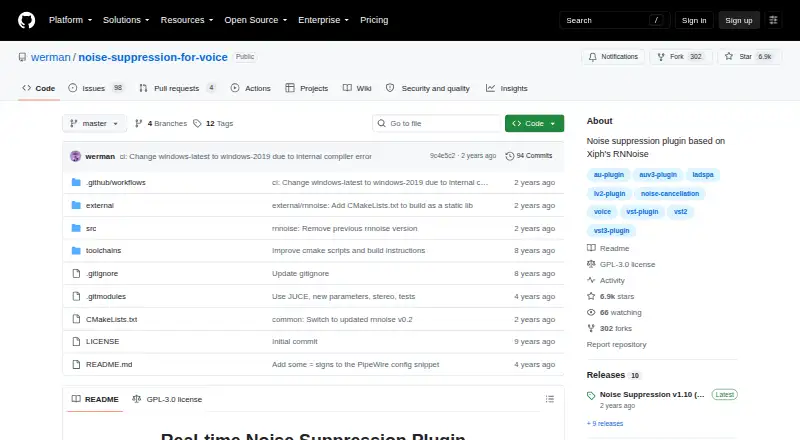
What Noise Suppression for Voice is
Noise Suppression for Voice is a free real-time voice noise-suppression plugin based on Xiph's RNNoise. It is designed to reduce sounds such as computer fans, office and crowd noise, aircraft, cars, trains, and construction. It supports VST2, VST3, LV2, LADSPA, AU, and AUv3 formats, with parameters and diagnostic statistics in its interface. Voice Activity Detection settings can silence audio below a chosen voice-probability threshold; grace periods are available to help avoid cutting off the beginnings or endings of words. The plugin requires 16-bit audio at 48000 Hz and supports one or more channels. Setup documentation covers Equalizer APO on Windows and PipeWire and PulseAudio on Linux. The maker reports testing with Equalizer APO, PipeWire, Carla, and Audacity. The macOS section invites contributions, but setup instructions are still marked TODO. The project is licensed under GPL-3.0. The maker cautions that poor microphone quality may not improve and that the plugin can mistake voice for noise.
Who it suits
It suits people who want real-time microphone noise reduction in a supported plugin host on Windows or Linux. macOS users should note that setup instructions are unfinished.
What it does well
- Free under GPL-3.0.
- Supports six plugin formats.
- Targets common environmental and machine noise.
- Includes configurable voice detection settings.
- Linux setup documentation covers PipeWire and PulseAudio.
What to know first
- Requires 16-bit audio at 48000 Hz.
- Can misclassify voice as noise.
- macOS setup instructions are unfinished.
- Echo cancellation is not supported.
Limits
The plugin requires 16-bit audio at 48000 Hz. The maker cautions that poor microphone quality may not improve and that voice can be mistaken for noise; echo cancellation is not supported.
Getting started
- Visit the project website on GitHub.
- Choose a supported plugin format for your audio setup.
- On Windows, follow the README instructions to enable the VST2 plugin in Equalizer APO.
- On Linux, follow the documented PipeWire or PulseAudio setup instructions.
- Use 16-bit audio at 48000 Hz with one or more channels.
Overview
Noise Suppression for Voice is a free, real-time microphone noise-reduction plugin built on Xiph’s RNNoise. It suits people who can route their microphone through compatible audio software, especially on Linux or Windows; its broad plugin-format support is useful, but the strict audio requirements and incomplete macOS setup narrow its appeal.
It targets background sounds including fans, office and crowd noise, transport, and construction. It supports recording and voice isolation, but not echo cancellation, so it is not a complete audio cleanup suite.
Key features
Noise reduction and voice detection
Voice Activity Detection can silence audio below a configurable voice-probability threshold. The grace-period control is intended to reduce clipped word beginnings and endings. These controls offer some adjustment over when speech is retained, but the maker warns that the plugin can still mistake voice for noise. Poor microphone quality may also limit improvement.
Formats and compatibility
VST2, VST3, LV2, LADSPA, AU, and AUv3 support gives the plugin several possible routes into compatible audio software. It requires 16-bit audio at 48000 Hz and supports one or more channels, so setups that cannot meet that format requirement are a poor fit. The maker reports testing with Equalizer APO v1.2 x64, PipeWire on Arch Linux, Carla on Linux, and Audacity on Linux.
The latest release, version 1.21, lists an updated RNNoise model, wet/dry controls, and runtime CPU detection for AVX2, SSE, and default paths. On Windows, the README describes enabling the VST2 plugin in Equalizer APO. Linux setup instructions cover PipeWire and PulseAudio, including creating a noise-reduced microphone source.
Pricing
The plugin is free, with no free trial or paid tier to weigh against its capabilities. That makes it suitable for users who want microphone noise reduction without a subscription or purchase. Its free price does not remove the practical costs of configuring a compatible audio chain or working within the required 16-bit, 48000 Hz format.
Platforms
Noise Suppression for Voice supports Linux, macOS, and Windows, but setup coverage is uneven. Linux has documented PipeWire and PulseAudio instructions, and Windows guidance covers Equalizer APO. The macOS section invites contributions and leaves setup instructions as TODO, so Mac users should expect a less guided setup.
The project uses the GNU General Public License v3.0. The maker welcomes improvements and asks contributors planning sizeable changes to open an issue first.
Who it's for
This is a strong fit for technically comfortable users who already use compatible audio software and want a free, real-time microphone filter for calls or recording. Linux users have documented setup paths, while Windows users can follow the Equalizer APO guidance. It is less suitable for people seeking a standalone, guided setup, dependable speech preservation in every situation, or echo cancellation. Mac users in particular may prefer software with completed setup instructions.
Pros and cons
- Pro: Six plugin formats provide several ways to incorporate noise reduction into an existing audio workflow.
- Pro: It is free and supports real-time microphone processing as well as recording workflows.
- Pro: VAD threshold and grace-period controls let users adjust how quiet speech and word edges are handled.
- Con: The 16-bit, 48000 Hz requirement can rule out incompatible audio setups.
- Con: Voice may be classified as noise, and poor microphone quality may blunt the benefit.
- Con: macOS setup instructions are unfinished, and echo cancellation is not included.
Alternatives
AI Noise Cancellation Software is the broader category to browse if this plugin's setup or limitations do not fit.
- Kleervox is worth considering if you want a web option or acoustic echo cancellation; its free plan includes one hour of cleaning per day.
- DeskBroadcast is a macOS alternative with a free plan and a Pro option at $79, paid once for 3 Macs.
- NoiseTorch-ng is a free Linux option for PulseAudio or PipeWire users.
- NoNoise Mac is a free, open-source alternative for macOS.
- NVIDIA ShadowPlay is a free Windows option requiring Windows 10 or 11, GeForce driver 551.52 or later, and a supported GPU.
- Noise Gator is another free option for Windows and macOS.
- Utterly is a freemium option for Windows and macOS.
- NVIDIA Broadcast offers free AI audio and video effects for RTX PCs and workstations.
Verdict
Choose Noise Suppression for Voice if you want free, real-time microphone noise reduction, already have compatible audio software, and can meet its 16-bit, 48000 Hz requirement. The multiple plugin formats and documented Linux and Windows routes are its clearest strengths. Look elsewhere if echo cancellation, a finished macOS setup guide, or stronger assurance that speech will not be suppressed matters more.
Verdict
Noise Suppression for Voice offers a free, format-flexible option for reducing microphone noise. Its audio requirements, possible speech misclassification, and unfinished macOS setup may affect whether it fits your setup.
Questions
Is Noise Suppression for Voice free?
Yes. The project is free and licensed under GNU GPL version 3.0.
Which platforms does it support?
The listed platforms are Linux, macOS, and Windows. The macOS setup section says instructions are TODO.
Which plugin formats are supported?
It supports VST2, VST3, LV2, LADSPA, AU, and AUv3.
What audio does it require?
It requires 16-bit audio at 48000 Hz and supports one or more channels.
Does it cancel echo?
No. Echo cancellation is not supported.
What integrations are documented?
The maker reports testing with Equalizer APO on Windows and PipeWire, Carla, and Audacity on Linux. The README also documents Linux setup with PipeWire and PulseAudio.
Facts from Noise Suppression for Voice's own pages
- Audio requirements
- The plugin requires 16-bit audio at 48,000 Hz and supports one or more channels. · github.com, 3 Oct 2026
- Compatibility
- The maker reports testing with Equalizer APO v1.2 x64, PipeWire on Arch Linux, Carla on Linux, and Audacity on Linux. · github.com, 2 Oct 2026
- Controls
- Release v1.21 lists Wet/Dry controls, an updated RNNoise model, and runtime CPU detection for AVX2, SSE, or default paths. · github.com, 3 Oct 2026
- Integrations
- The README says the plugin was tested with Equalizer APO on Windows and PipeWire, Carla, and Audacity on Linux. · github.com, 3 Oct 2026
- Latest release note
- Version 1.21 lists an updated RNNoise model, wet/dry controls, and runtime CPU detection for AVX2, SSE, and default paths. · github.com, 2 Oct 2026
- License
- The project is licensed under GNU General Public License v3.0. · github.com, 2 Oct 2026
- License and contributions
- The project is licensed under GPL-3.0, and the README welcomes improvements and asks contributors to open an issue before sizeable contributions. · github.com, 3 Oct 2026
- Limit
- The maker cautions that the plugin may not improve poor microphone audio and could misclassify voice as noise. · github.com, 3 Oct 2026
- Linux integration
- The README documents setup with PipeWire and PulseAudio. · github.com, 2 Oct 2026
- Linux setup
- The README provides setup instructions for PipeWire and PulseAudio, including creating a noise-reduced microphone source. · github.com, 3 Oct 2026
- macOS status
- The README’s macOS section says contributions are welcome and setup instructions are TODO. · github.com, 3 Oct 2026
- Noise types
- The project says it is meant to suppress noise such as computer fans, office and crowd noise, and sounds from airplanes, cars, trains, and construction. · github.com, 3 Oct 2026
- Plugin formats
- The README lists VST2, VST3, LV2, LADSPA, AU, and AUv3 formats. · github.com, 3 Oct 2026
- Purpose
- It is a real-time voice noise suppression plugin based on Xiph’s RNNoise. · github.com, 3 Oct 2026
- Security
- The repository's Security and quality tab shows 0 security items. · github.com, 2 Oct 2026
- Support
- The maker welcomes improvements and asks contributors planning sizeable changes to open an issue first. · github.com, 2 Oct 2026
- Voice detection
- Voice Activity Detection settings can silence audio below a configurable voice probability threshold, with grace periods to help avoid cutting off word endings or beginnings. · github.com, 3 Oct 2026
- Windows integration
- On Windows, the README describes enabling the VST2 plugin in Equalizer APO. · github.com, 2 Oct 2026
Where Noise Suppression for Voice stands on Freedom251
- AI Noise Cancellation Software#8 of 24