Freedom251 › Digital Signage Software

Newline Engage Cloud
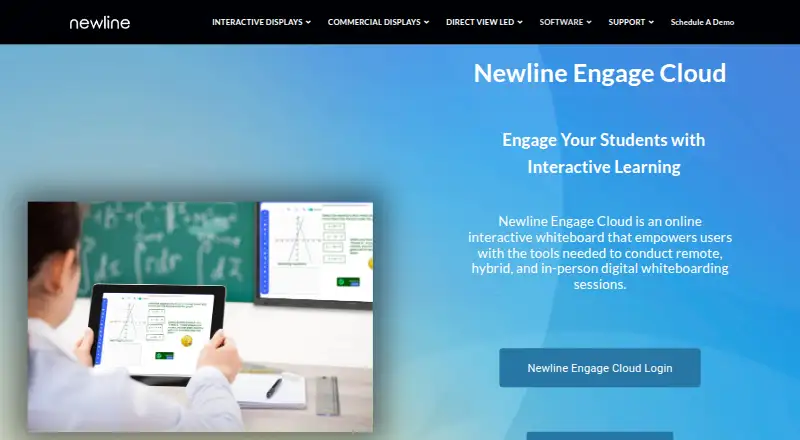
What Newline Engage Cloud is
Newline Engage Cloud is a web-based interactive whiteboard for teachers and students in remote, hybrid, and in-person classes. Teachers can invite up to 100 students and use Teacher Mode to assign boards, manage sessions, and see students’ individual boards in real time. Accessibility features can read board content aloud, translate it into hundreds of languages, and transcribe speech. The whiteboard includes hundreds of digitized visual aids and supports PDF uploads, annotations, and multipage workbooks. It integrates with Google Classroom, Google Drive, Microsoft Teams, and Microsoft OneNote. Students can join without an account when login is not required, or sign in using Google or Microsoft single sign-on. Newline says it works on its displays, tablets, Chromebooks, and mobile phones. The Free plan costs nothing. It supports diagramming, guest collaboration, and voting, but does not offer an infinite canvas. Boards tied to signed-in accounts have no expiration date. Newline says login records are encrypted at rest and in transit, and that it does not collect or store personal information for unregistered students and teachers.
Who it suits
It suits teachers who need a shared board for classes across remote, hybrid, or in-person settings. Its classroom controls, accessibility tools, and listed integrations may also suit students and educators working with varied devices and learning materials.
What it does well
- Teacher Mode shows individual student boards in real time.
- Accessibility tools read aloud, translate, and transcribe.
- Includes hundreds of digitized visual aids.
- Supports PDF annotation and multipage workbooks.
- Free plan is listed as free.
What to know first
- Does not offer an infinite canvas.
- Students may need sign-in when login is required.
Limits
The Free plan is listed as free. The whiteboard does not have an infinite canvas; the listed class invitation limit is 100 students.
Plans
| Plan | Billed and limits | Price |
|---|---|---|
| Free | Free interactive online whiteboard | Free |
As newline-interactive.com lists them, read 11 Oct 2026. The maker's own page has the final word.
Getting started
- Open the Newline Engage Cloud website.
- Use the web-based whiteboard on a supported Newline display, tablet, Chromebook, or mobile phone.
- Choose whether students must log in.
- Have students join without accounts when login is not required, or use Google or Microsoft single sign-on.
- Use the Free plan, listed as free.
Newline Engage Cloud is a web-based interactive whiteboard for remote, hybrid, and classroom teaching. It fits educators who want to direct activities, inspect student work as it happens, and bring accessibility features into the lesson. The free offering is unusually classroom-focused, although its lack of an infinite canvas limits open-ended work.
Overview
Engage Cloud is organized around teacher-led sessions. A teacher can invite up to 100 students, assign boards, manage the session, and see each student’s board in real time. That is a strong setup for guided exercises, formative checks, and lessons where participation needs monitoring; it is less convincing for sprawling collaborative projects that require one continuously expanding workspace.
Students can enter without an account when login is optional, or use Google or Microsoft single sign-on. Boards connected to signed-in accounts do not expire, so students can return to ongoing work. Newline says login records are encrypted in transit and at rest, and that it does not collect or retain personal information from unregistered students and teachers.
Key features
Teaching controls and accessibility
Teacher Mode combines board assignment, session administration, and live individual-board views. Teachers get oversight without having to ask every student to share separately, making it better suited to structured instruction than a generic brainstorming board. The trade-off is the finite canvas: diagramming tools, voting, and guest collaboration are present, but there is no infinite canvas for limitless mapping.
Materials and inclusive participation
The board can read content aloud, translate it into hundreds of languages, and transcribe speech. Those functions can reduce language and communication barriers in mixed-ability classes. Hundreds of digitized visual aids are included, while PDF upload, annotation, and multipage workbooks let teachers bring existing lesson material into the same session rather than recreate it.
Connections and access
Integrations are named for Google Classroom, Google Drive, Microsoft Teams, and Microsoft OneNote. Newline says the cloud whiteboard works on its own displays, tablets, Chromebooks, and mobile phones, so it can span classroom hardware and students’ personal devices. Help is handled by email at [email protected].
Pricing
There is one published plan:
| Plan | Price | What it includes |
|---|---|---|
| Free | free | Free interactive online whiteboard |
The free plan is the whole product rather than a limited trial, and the feature set covers classroom management, accessibility, collaboration, materials, and integrations. The stated class invitation limit is 100 students. There is no separate paid tier or published quota to compare, so schools seeking different capacity or commercial terms would need to contact Newline.
Platforms
Engage Cloud runs on the web. Newline describes support for its displays, tablets, Chromebooks, and mobile phones, which makes it practical for classrooms that mix dedicated interactive hardware with browser-based student access.
Who it's for
Teachers and schools running remote, hybrid, or in-person lessons are the natural audience, especially when a teacher must assign work and watch individual boards live. It also suits classes that benefit from read-aloud, translation, transcription, visual aids, and PDF workbooks. Choose another tool for an unbounded visual workspace or for a product whose primary purpose is screen broadcasting rather than teaching.
Pros and cons
- Pro: Live views of up to 100 students’ boards support close supervision during guided activities.
- Pro: Read-aloud, translation into hundreds of languages, and speech transcription broaden participation.
- Pro: PDF annotation, multipage workbooks, and digitized visual aids reduce preparation and switching between tools.
- Pro: Guest entry and Google or Microsoft sign-in offer flexible access, while signed-in boards do not expire.
- Con: No infinite canvas makes it a poor fit for expansive concept maps and large, continuous collaborative spaces.
- Con: Only a free plan is published, so organizations needing a different commercial structure have no documented tier to select.
Alternatives
For broader category browsing, see Online Whiteboard Tools. If the priority is presenting or sharing screens rather than managing whiteboard lessons, compare Screen Sharing Software.
CrankWheel is a freemium web and multi-platform screen-sharing service; pick it when meeting limits and viewer counts matter more than classroom boards. AirDroid Cast is for same-WLAN or remote casting across major desktop and mobile platforms. Extron ShareLink Pro is a free iPhone and iPad app that requires an Extron ShareLink Pro presentation system. Screenleap offers browser-based sharing with a free daily-time and viewer allowance. Deskreen provides an open-source desktop-to-device option. LetsView focuses on free screen mirroring with one connection. ViewSonic AirSync and Crestron AirMedia are paid options for device and presentation sharing.
Verdict
Choose Newline Engage Cloud if you want a free teaching whiteboard that combines teacher oversight, inclusive communication tools, and ready-to-use materials across common classroom devices. Look elsewhere when an infinite canvas or dedicated screen-sharing workflow is central to your lessons.
Verdict
Newline Engage Cloud combines class management, accessible board tools, and support for common teaching materials in a free web whiteboard. Its lack of an infinite canvas is worth noting for users who need one continuous workspace.
Questions
How much does Newline Engage Cloud cost?
The Free plan is listed as free.
Which platforms does it support?
It is web-based. Newline says it works on its displays, tablets, Chromebooks, and mobile phones.
Do students need accounts?
They can join without an account when login is not required, or sign in through Google or Microsoft single sign-on.
What integrations are named?
The product page names Google Classroom, Google Drive, Microsoft Teams, and Microsoft OneNote.
Can signed-in students keep their boards?
Boards associated with a signed-in account have no expiration date.
Facts from Newline Engage Cloud's own pages
- Accessibility tools
- The whiteboard can read aloud board content, translate into hundreds of languages, and transcribe speech. · newline-interactive.com, 11 Oct 2026
- Board retention
- The student guide says boards associated with a signed-in account have no expiration date. · newline-interactive.com, 11 Oct 2026
- Classroom controls
- Teacher Mode lets teachers assign boards, manage sessions, and view students’ individual boards in real time. · newline-interactive.com, 11 Oct 2026
- Class size
- The feature list says teachers can invite up to 100 students. · newline-interactive.com, 11 Oct 2026
- Device access
- Newline says the cloud whiteboard works on its displays, tablets, Chromebooks, and mobile phones. · newline-interactive.com, 11 Oct 2026
- Founded
- 2012 · newline-interactive.com, 28 Sept 2026
- Free plan
- Yes · newline-interactive.com, 19 Sept 2026
- Headquarters
- Plano, Texas, USA · newline-interactive.com, 28 Sept 2026
- Integrations
- The product page names Google Classroom, Google Drive, Microsoft Teams, and Microsoft OneNote integrations. · newline-interactive.com, 11 Oct 2026
- Intended users
- Newline describes Engage Cloud as a whiteboard designed for teachers and students. · newline-interactive.com, 11 Oct 2026
- Learning materials
- It includes hundreds of digitized visual aids and supports PDF upload, annotation, and multipage workbooks. · newline-interactive.com, 11 Oct 2026
- Privacy
- The Engage privacy notice says Newline does not collect or store personal information for unregistered students and teachers. · newline-interactive.com, 11 Oct 2026
- Purpose
- Newline Engage Cloud is an online interactive whiteboard for remote, hybrid, and in-person teaching sessions. · newline-interactive.com, 11 Oct 2026
- Security
- The Engage privacy notice says student login records are encrypted at rest and in transit, with access limited to employees who need it to run the service. · newline-interactive.com, 11 Oct 2026
- Sign-in
- Students may join without an account when login is not required, or sign in through Google or Microsoft single sign-on. · newline-interactive.com, 11 Oct 2026
- Support
- Newline directs users who need help to email [email protected]. · newline-interactive.com, 11 Oct 2026
Where Newline Engage Cloud stands on Freedom251
- Digital Signage Software#68 of 207
- Screen Sharing Software#11 of 30
- Online Whiteboard Tools#40 of 56
- Online whiteboards#42 of 58