Freedom251 › AI Video Caption Generators
Moonshot
by Moonshot
What Moonshot is
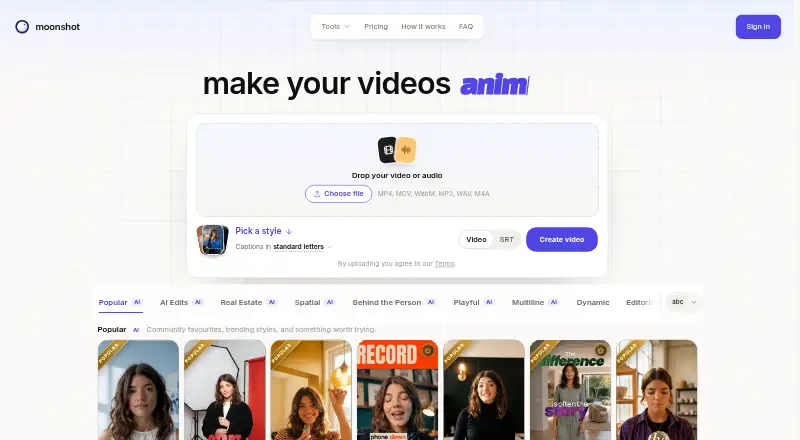
Moonshot is a web tool for creating videos with captions and subtitles. It supports transcription in 109 languages, caption styling, and burned-in captions; subtitle export is available in SRT format only. The Free plan is billed at $0 forever, requires no card, and covers one video up to two minutes with 109 transcription languages. Creator costs $9 a month, billed monthly, and can be canceled anytime. It includes 45 shared minutes per week, 50 AI credits per month, 1080p output at 30 fps, and 109 transcription languages. Pro costs $18 a month, also billed monthly with cancellation anytime, and includes 60 shared minutes per week, 130 AI credits per month, and 1080p output at 30 fps. Enterprise offers custom weekly export and transcription minutes, Creator or Pro features, optional 4K exports, and a custom billing cycle. Moonshot is made by Moonshot, headquartered in Bengaluru, Karnataka, India.
Who it suits
Moonshot suits people making captioned videos who need transcription in a wide range of languages. The free option is for a single short video, while paid plans specify weekly minutes and monthly AI credits.
What it does well
- Transcription supports 109 languages.
- Captions can be styled and burned in.
- Free plan needs no card.
- Creator and Pro allow monthly cancellation.
What to know first
- Subtitle export is SRT only.
- Free plan is limited to one video.
- Free videos are limited to two minutes.
Limits
Free includes five total minutes for upload and preview, with videos up to five minutes each, and has no video export. Creator provides 45 shared minutes per week and 50 AI credits per month; Pro provides 60 shared minutes per week and 130 AI credits per month. Creator and Pro exports include 1080p at 30 fps; 4K and up to 60 fps are optional upgrades.
Plans
| Plan | Billed and limits | Price |
|---|---|---|
| Free | 5 minutes to upload and preview ever · 15 AI credits · 109 transcription languages · no video export | Free |
| Creator | Billed monthly · cancel anytime · 45 shared minutes/week · 50 AI credits/month · 1080p · 30 fps exports · 109 transcription languages · post and schedule to YouTube, Instagram, Facebook, Threads | $9 a month |
| Pro | Billed monthly · cancel anytime · 60 shared minutes/week · 130 AI credits/month · every template · custom B-roll exports · Behind the Person and Inception effects · post and schedule to YouTube, Instagram, Facebook, Threads | $18 a month |
| 150 AI credits | One-time payment · tax calculated at checkout · 150 credits · credits never expire | $12, paid once |
| 400 AI credits | One-time payment · tax calculated at checkout · 400 credits · credits never expire | $29, paid once |
| 1000 AI credits | One-time payment · tax calculated at checkout · 1000 credits · credits never expire | $65, paid once |
| Enterprise | A billing cycle agreed with you · Custom weekly export and transcription minutes · Creator or Pro features · optional 4K exports | On request |
As makemoonshot.co lists them, read 8 Oct 2026. The maker's own page has the final word.
Getting started
- Open https://makemoonshot.co/ in a web browser.
- Choose the Free plan or a paid plan; Creator is $9 a month and Pro is $18 a month, both billed monthly and cancellable anytime.
- Upload a talking-head clip, choose a caption style, and edit the transcript.
- Use the editor's available effects and create a vertical short.
- With Creator or Pro, export the video or post and schedule it to a supported social platform.
Moonshot is a web-based AI video editor for turning talking-head recordings into vertical social shorts. It is best suited to creators who teach, sell, or explain and want captions, editing assistance, and publishing in one workflow. The paid tiers are capable for recurring production, while the free tier is mainly a limited way to preview the editor.
Overview
Moonshot starts with an uploaded talking-head clip. You select a caption style, edit the generated transcript, and receive a vertical short. This approach fits presenters who already have source footage and want to turn it into social-ready clips without assembling every cut manually. It is less suitable if your primary need is a general-purpose timeline editor or broad subtitle-file compatibility.
Key features
Its editing assistance goes beyond transcription. Word-timed captions, B-roll cutaways, automatic zooms, sound effects, music, and audio cleanup are built into the workflow, helping a spoken clip feel more like a finished short. Caption styling and burned-in captions are supported. Subtitle-file export is limited to SRT, so workflows built around VTT or another format will need a different tool.
Paid plans transcribe in 109 languages, including Hinglish, which is useful for multilingual audiences and Indian-English speech. Creator and Pro export at 1080p and 30 fps; 4K and frame rates up to 60 fps are optional upgrades rather than standard inclusions. Moonshot says its built-in typefaces are cleared for commercial use in exported videos, removing the need for an additional font licence from Moonshot or the font foundries.
Creator and Pro can post to YouTube, Instagram, Facebook, and Threads, and schedule publication up to 30 days ahead. That makes Moonshot more practical for a planned content calendar, although the shared weekly processing allowance determines how much footage you can prepare.
Pricing
Free — free. You get five total minutes for upload and preview, with each video limited to five minutes, 109 transcription languages, and 15 AI credits per verified email. The allocation lasts 90 days, and export requires a paid plan. This is enough to inspect the workflow, not to run a continuing publishing operation.
Creator — $9 a month, billed monthly; cancel anytime. It provides 45 shared minutes per week, 50 AI credits per month, 1080p/30 fps exports, 109-language transcription, and posting or scheduling to the four supported networks. It is the sensible entry tier for an individual creator who produces a moderate stream of shorts. The weekly quota and standard-resolution ceiling are the main constraints.
Pro — $18 a month, billed monthly; cancel anytime. Pro raises capacity to 60 shared minutes per week and 130 AI credits per month. It includes every template, custom B-roll exports, and the Behind the Person and Inception effects, while retaining 1080p/30 fps output and social scheduling. Choose it when those effects, templates, or higher monthly AI allowance justify the doubled Creator price; it still does not include 4K as standard.
Enterprise — custom pricing. This plan offers custom weekly export and transcription minutes, Creator or Pro features, optional 4K exports, and a custom billing cycle. It is aimed at teams whose volume or purchasing terms do not fit the fixed subscriptions.
AI credits can also be purchased separately: 150 credits cost $12.00 USD once, 400 cost $29.00 USD once, and 1,000 cost $65.00 USD once. These credits never expire, and tax is calculated at checkout. Export and transcription minutes are separate from AI credits. Refunds are issued at Moonshot's discretion, with no automatic money-back period.
Platforms
Moonshot runs on the web, so it suits browser-based production rather than a desktop-only or mobile-native editing setup.
Who it's for
Choose Moonshot if you regularly record explanations, lessons, or sales content and want automated short-form editing, styled burned-in captions, and scheduled distribution. Creator fits a solo publisher with predictable weekly volume; Pro is for heavier use or access to its complete template and effects set. Look elsewhere if you need generous free exports, more than SRT subtitle files, or routinely process beyond the weekly minute quotas.
Pros and cons
- Pro: A single workflow combines transcript editing, timed captions, visual cutaways, audio treatment, and social scheduling.
- Pro: 109 transcription languages, including Hinglish, broaden its usefulness for multilingual publishing.
- Pro: Commercial clearance for built-in typefaces avoids a separate font-licensing step.
- Con: The free tier cannot export and ends after five total upload-and-preview minutes, so it is not a lasting free editor.
- Con: SRT is the only subtitle export format, limiting handoff to systems that require other files.
- Con: Creator and Pro quotas are shared weekly minutes, and 4K or up-to-60-fps output costs extra.
Alternatives
Whisper is the better choice for users who want free, MIT-licensed transcription software they can install locally on Linux, macOS, Windows, or a self-hosted system, rather than an online short-video studio.
SmartSub suits users needing local transcription, translation, text-to-speech, and subtitle rendering without local usage limits.
VideoCaptioner is a free, MIT-licensed open-source option for users who prefer a local captioning tool.
Captions is worth considering when you want mobile apps, API access, or web use and are prepared for a higher-priced Max plan with 500 monthly credits and AI video features.
SRTGen is an alternative for browser or API-based localization with SRT, VTT, and TXT export.
CaptionRoom fits users seeking a free editor with manual captions, 1080p export, and no watermark across desktop and web platforms.
GetCaptions is an alternative for a free starter allowance with 60 transcription minutes per month and 720p exports.
Fluen AI Subtitle Generator is another choice for users wanting a free trial and support across web, desktop, API, and extension platforms.
For a broader comparison, see AI Video Caption Generators.
Verdict
Moonshot is a strong fit for creators who turn spoken footage into scheduled vertical content and value automated editing alongside captions. Creator is the practical starting point at $9.00 per month, while Pro earns its price for higher allowances and its expanded creative toolkit. Look elsewhere if you need a genuinely usable free export tier, non-SRT subtitle files, or predictable high-volume processing without weekly limits.
Verdict
Moonshot offers a free short-video option and paid plans with stated weekly minutes and monthly AI credits. Check the export format and plan limits against the videos you need to produce.
Questions
How much does Moonshot cost?
Moonshot has a Free plan. Creator costs $9 a month and Pro costs $18 a month, both billed monthly with cancellation anytime. One-time AI credit packs cost $12.00 USD for 150 credits, $29.00 USD for 400, or $65.00 USD for 1000.
What does the Free plan include?
It includes five total minutes for upload and preview, supports videos up to five minutes each, and provides 15 AI credits per verified email, valid for 90 days. Video export requires a paid plan.
Which platforms can I use Moonshot on?
Moonshot is available on the web.
What languages does transcription support?
Paid plans include transcription in 109 languages, including Hinglish.
Can Moonshot publish or schedule videos to social platforms?
Creator and Pro can post and schedule to YouTube, Instagram, Facebook, and Threads up to 30 days ahead.
Who makes Moonshot?
Moonshot is operated by Kaizynn, based in Bengaluru, Karnataka, India.
Facts from Moonshot's own pages
- AI credit limits
- The free welcome allocation is 15 AI credits per verified email and is valid for 90 days; export and transcription minutes are separate from AI credits. · makemoonshot.co, 8 Oct 2026
- Burn-in captions
- Yes · makemoonshot.co, 22 Sept 2026
- Caption languages
- 109 · makemoonshot.co, 22 Sept 2026
- Caption styling
- Yes · makemoonshot.co, 22 Sept 2026
- Commercial font use
- The maker says its built-in typefaces are cleared for commercial use in exported videos and require no further font licence from Moonshot or the foundries. · makemoonshot.co, 8 Oct 2026
- Company
- Moonshot is operated by Kaizynn, based in Bengaluru, Karnataka, India. · makemoonshot.co, 8 Oct 2026
- Editing features
- The editor offers word-timed captions, B-roll cutaways, automatic zooms, sound effects, music, and audio cleanup. · makemoonshot.co, 8 Oct 2026
- Editing workflow
- Users upload a talking-head clip, choose a caption style, edit the transcript, and receive a vertical short. · makemoonshot.co, 8 Oct 2026
- Exports
- Creator and Pro include 1080p at 30 fps exports, with 4K and up to 60 fps available as an optional upgrade. · makemoonshot.co, 8 Oct 2026
- Free limits
- Free includes five total minutes for upload and preview, supports videos up to five minutes each, and requires a paid plan to export. · makemoonshot.co, 8 Oct 2026
- Free plan
- Yes · makemoonshot.co, 22 Sept 2026
- Headquarters
- Bengaluru, Karnataka, India · makemoonshot.co, 28 Sept 2026
- Integrations
- Creator and Pro can post to YouTube, Instagram, Facebook, and Threads, with scheduling up to 30 days ahead. · makemoonshot.co, 8 Oct 2026
- Refunds
- Refunds are issued at the company's discretion, with no automatic money-back window. · makemoonshot.co, 8 Oct 2026
- Paid from
- 9 · makemoonshot.co, 22 Sept 2026
- Subtitle export
- srt only · makemoonshot.co, 22 Sept 2026
- Support
- The company lists [email protected] as its contact address and directs users to its Terms of Service and Privacy Policy for service and data information. · makemoonshot.co, 8 Oct 2026
- Templates
- The pricing page lists 167 Creator templates and says Pro includes 71 additional Pro templates. · makemoonshot.co, 8 Oct 2026
- Transcription
- Paid plans include transcription in 109 languages, including Hinglish. · makemoonshot.co, 8 Oct 2026
- What it does
- Moonshot is an AI video editor and short-form studio for creators who teach, sell, and explain. · makemoonshot.co, 8 Oct 2026
Where Moonshot stands on Freedom251
- AI Video Caption Generators#19 of 99