Freedom251 › AI Video Caption Generators
SmartSub
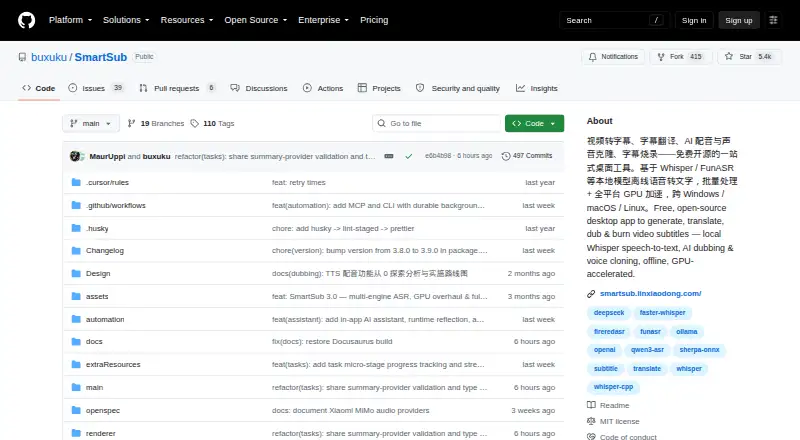
What SmartSub is
SmartSub is a desktop app for transcription, subtitle translation, proofreading, AI dubbing, and video subtitle rendering. Its free plan supports local transcription, translation, text-to-speech, and subtitle rendering without local usage limits; optional cloud services may cost extra. The maker says local models process files on your computer, so they stay on the device during that processing. For transcription, SmartSub includes whisper.cpp and offers faster-whisper, FunASR, Qwen3-ASR, and FireRedASR as selectable engines. Translation includes 20 services, among them built-in free translation and integrations such as DeepSeek, Gemini, and Ollama. The proofreading workspace provides video-synced editing, undo and redo, search and replace, and AI proofreading. It can synthesize speech from subtitle lines, align it to the timeline, and clone voices with ZipVoice, Volcengine, or ElevenLabs. For output, users can burn subtitles into video or package soft subtitles, preview styles, and add a dubbed audio track. SmartSub runs on Windows, macOS, and Linux.
Who it suits
SmartSub suits people who want a desktop workflow for transcribing, translating, editing, dubbing, and rendering subtitles. Local processing may suit users who want files to remain on their device during those tasks.
What it does well
- Free local processing has no usage limits.
- Offers five selectable transcription engines.
- Provides 20 translation services.
- Can render subtitles with dubbed audio.
- Supports Windows, macOS, and Linux.
What to know first
- Cloud transcription uploads audio to the configured provider.
- Cloud services may incur separate charges.
Limits
The Free plan has no local usage limits for transcription, translation, text-to-speech, and subtitle rendering. Cloud services are optional and may be paid; cloud transcription sends audio to the configured provider endpoint.
Plans
| Plan | Billed and limits | Price |
|---|---|---|
| Free | free · local transcription, translation, TTS and FFmpeg workflow · no API key or usage limit for local steps · optional paid cloud providers | Free |
As github.com lists them, read 15 Oct 2026. The maker's own page has the final word.
Getting started
- Open the SmartSub project website on GitHub.
- Choose the desktop build for Windows x64, macOS arm64 or x64, or Linux x64.
- Install or launch the desktop app for your system.
- Select a local transcription or translation option to process files on your computer.
- Choose cloud services only when their provider upload model suits your workflow.
Overview
SmartSub is a free, open-source desktop app for turning video speech into edited, translated, and rendered subtitles, with optional dubbing. It is best suited to people who want a broad media workflow on their own computer, rather than a browser-based caption editor. Its strongest case is the combination of local processing and unlimited local use; cloud transcription is a poor fit for sensitive audio.
Key features
SmartSub includes whisper.cpp and lets users select faster-whisper, FunASR, Qwen3-ASR, or FireRedASR for transcription. That choice is useful for workflows that need different engines, while local models keep files on-device during processing. Cloud transcription instead uploads audio to the configured provider endpoint, so the maker advises against it for sensitive content.
Translation spans 20 services, including a built-in free option and integrations such as DeepSeek, Gemini, and Ollama. In the proofreading workspace, video-synced editing, undo and redo, search and replace, and AI proofreading help users revise text in context rather than treating the transcript as a separate document.
For dubbed output, SmartSub can synthesize speech from subtitle lines, align it to the timeline, and clone voices using ZipVoice, Volcengine, or ElevenLabs. Rendering supports burned-in captions or soft-subtitle packaging, style previews, and a dubbed audio track. Caption styling, brand presets, and speaker identification add control over presentation, though the app’s broad feature set will matter most to users who need more than basic transcription and export.
SmartSub also downloads videos from links including Bilibili and YouTube through yt-dlp and lux, supporting more than 1,800 sites. The repository README describes MCP and CLI automation with 111 tools and commands for media workflows, which may suit repeatable or integrated production tasks. GPU acceleration options include CUDA for NVIDIA and Vulkan for AMD or Intel on Windows and Linux, and Core ML or Metal on Apple-silicon Macs.
Pricing
Free: free. The plan includes local transcription, translation, text-to-speech, and subtitle rendering, with no local usage limits. That makes it a strong fit for individual creators who can run the desktop app and keep processing local. Optional cloud services are paid, so using them changes the cost equation; local use is the way to retain the no-cost advantage. There is no free trial because the plan itself is free.
The project is MIT-licensed. Help and participation are directed through documentation, FAQs, community groups, GitHub issues, and pull requests.
Platforms
SmartSub has desktop builds for Windows, macOS, and Linux. Packages cover Windows x64, macOS arm64 and x64, and Linux x64. That is a good fit for desktop workflows across those systems, but not for someone seeking an Android, iOS, or web app.
Who it's for
Choose SmartSub if you want one desktop workflow for transcription, translation, subtitle correction, dubbing, and rendering, especially when local processing and uncapped local use matter. It is less compelling for simple captioning needs, cloud-first editing, or work that must happen in a browser or on mobile. Anyone handling sensitive audio should keep transcription local rather than use a cloud provider.
Pros and cons
- Pros: No local usage limits on the free plan, making repeated subtitle work possible without a local quota.
- Pros: Local models keep files on the computer during local processing, a useful privacy distinction from cloud transcription.
- Pros: Transcription, translation, proofreading, dubbing, and rendering in one app can reduce handoffs between tools.
- Cons: Cloud transcription uploads audio to the configured provider, making it unsuitable for sensitive content.
- Cons: It is a desktop-only choice, with no mobile or web platform in the supported builds.
- Cons: Cloud services are optional paid services, so cloud-dependent use is not covered by the free local plan.
Alternatives
For a broader shortlist, browse AI Video Caption Generators.
- Whisper is a simpler choice if you want MIT-licensed code and model weights installed locally with Python and ffmpeg, rather than SmartSub’s integrated subtitle editing, dubbing, and rendering workflow.
- VideoCaptioner is another free, open-source option if you want an MIT-licensed alternative for captioning.
- Captions may suit users who need Android, iOS, or web access and AI video creation; its Max plan is $24.99 a month and includes 500 credits per month, AI Edit styles, AI video creation, and digital twins or custom AI actors.
- SRTGen is a web or API option for a limited free localization test drive, with SRT, VTT, and TXT export, a 5-minute screen-recording limit, and 2 GB storage.
- CaptionRoom is worth considering for a web-accessible editor with a free tier that includes manual captions in two styles, exports up to 1080p plus .srt, and no watermark.
- Moonshot offers a web-based free tier with 5 minutes to upload and preview ever, 15 AI credits, 109 transcription languages, and no video export.
- GetCaptions is a web or API alternative whose free Starter plan allows 60 minutes of transcription per month, videos up to 5 minutes, 720p export, and three projects.
- Fluen AI Subtitle Generator is another option to compare for its free allowance of three files up to 90 minutes each.
Verdict
SmartSub is a strong choice for creators who want a free desktop suite for the full subtitle workflow and can keep processing local. Its breadth, uncapped local use, and rendering options are the reasons to choose it; look elsewhere if you need browser or mobile access, or if your workflow depends on cloud transcription for sensitive content.
Verdict
SmartSub combines subtitle creation, editing, dubbing, and rendering in a free desktop app. Use local processing for files you want to keep on-device; the maker advises against cloud transcription for sensitive content.
Questions
How much does SmartSub cost?
The Free plan costs nothing. Optional cloud services may be paid.
Which platforms does it support?
Desktop builds are provided for Windows, macOS, and Linux. Listed packages include Windows x64, macOS arm64 and x64, and Linux x64.
Does SmartSub have local processing?
Yes. The maker says local models process files on the user's computer, so files stay on the device during local processing.
Does cloud transcription keep audio on my device?
No. For cloud transcription, audio is uploaded to the configured provider endpoint.
Is SmartSub open source?
Yes. It uses the MIT license.
Does SmartSub offer a free trial?
No. A free trial is not offered; the app has a Free plan.
Facts from SmartSub's own pages
- AI assistant
- The in-app copilot provides workspace context, conversational editing, screenshot diagnostics, file chat and tool execution. · github.com, 15 Oct 2026
- AI-client integrations
- The settings workflow can connect Cursor, OpenAI Codex and Claude Code through generated MCP configuration. · github.com, 15 Oct 2026
- Automation
- The repository README describes MCP and CLI automation with 111 tools and commands for media processing workflows. · github.com, 11 Oct 2026
- Brand caption presets
- Yes · github.com, 19 Sept 2026
- Burn-in captions
- Yes · github.com, 19 Sept 2026
- Caption styling
- Yes · github.com, 19 Sept 2026
- Cloud transcription privacy
- For cloud transcription, audio is uploaded to the configured provider endpoint, and the README advises against using it for sensitive content. · github.com, 11 Oct 2026
- Cloud voice services
- Cloud dubbing options include Edge TTS, OpenAI-compatible endpoints, Azure Speech, Volcengine, ElevenLabs and Xiaomi MiMo. · github.com, 15 Oct 2026
- Core workflow
- Each stage can be run separately or chained into batch pipelines. · smartsub.linxiaodong.com, 15 Oct 2026
- Developer build
- Contributors clone the repository, run yarn install and yarn dev, with yarn native:fetch available when native downloads fail. · github.com, 15 Oct 2026
- Documentation and support
- The project publishes a Docusaurus documentation site with usage guides and FAQ pages and directs support to GitHub issues and community chat. · smartsub.linxiaodong.com, 15 Oct 2026
- Dubbing
- Local Kokoro and VITS engines provide 103 and 174 voices respectively, while ZipVoice supports zero-shot cloning from a reference clip. · github.com, 15 Oct 2026
- Free plan
- Yes · github.com, 19 Sept 2026
- GPU acceleration
- The download guide lists CUDA for NVIDIA and Vulkan for AMD or Intel on Windows and Linux, and Core ML or Metal on Apple-silicon Macs. · github.com, 11 Oct 2026
- Hardware acceleration
- Acceleration paths include NVIDIA CUDA, AMD/Intel Vulkan and Apple Core ML/Metal, with CPU fallback when acceleration fails. · github.com, 15 Oct 2026
- Installation
- macOS users can install through Homebrew using the buxuku tap and smartsub cask. · smartsub.linxiaodong.com, 15 Oct 2026
- Intel Mac limitation
- The Intel macOS build runs CPU-only and does not support GPU acceleration. · smartsub.linxiaodong.com, 15 Oct 2026
- Licence
- The repository is released under the MIT licence, with copyright attributed to Lin Xiaodong in 2024. · github.com, 15 Oct 2026
- License and support
- The project uses the MIT license and directs users to documentation, FAQs, community groups, GitHub issues, and pull requests for help or participation. · github.com, 11 Oct 2026
- Limit: crashes
- A GitHub issue reports tasks crashing around 20 percent completion even in CPU-only mode on older hardware. · github.com, 15 Oct 2026
- Limit: external translation dependency
- Hysen Labs noted that free Bing and Google translation endpoints are subject to rate limits and network reachability outside the project’s control. · hysenlabs.com, 15 Oct 2026
- Limit: hardware dependence
- The same review found CPU transcription slow, long videos more practical with a GPU and AMD/Intel Vulkan slower than NVIDIA CUDA. · swjsj.com, 15 Oct 2026
- Limit: live captions
- The independent review said SmartSub is unsuitable for real-time live-caption streams. · swjsj.com, 15 Oct 2026
- Limit: manual dubbing review
- Hysen Labs reported that over-long dubbed lines are placed in a manual review list rather than handled fully automatically. · hysenlabs.com, 15 Oct 2026
Where SmartSub stands on Freedom251
- AI Video Caption Generators#2 of 99