Freedom251 › AI Video Caption Generators

CaptionRoom
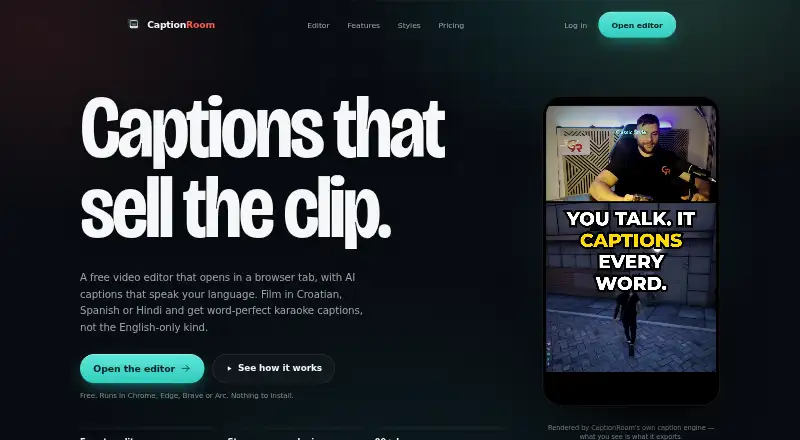
What CaptionRoom is
CaptionRoom is a video-editing and captioning tool available on the web, Windows, macOS and Linux. Its free plan provides timeline editing with cuts, layers, text, images, colour and audio, along with manual captions in two styles. Free users can export video at 1080p with SRT subtitles and no watermark. Captions can also be burned into video, and brand caption presets are available. The Pro plan adds AI auto-captions in 99+ languages, AI Clips, caption translation, caption styles, AI-generated titles, descriptions and hashtags, and a brand kit. Pro costs $12 a month when billed annually. Pro Monthly costs $20 a month with monthly billing. A Lifetime licence is listed at $99 a month. Subtitle export is limited to SRT, so users looking for other subtitle file formats should take note. The free plan includes manual captioning; AI auto-captions are part of the paid Pro feature set.
Who it suits
CaptionRoom suits video creators who want timeline editing and caption tools across desktop and web platforms. Its free plan may fit people who need manual captions, while Pro adds AI captioning and brand features.
What it does well
- Free plan includes 1080p export with no watermark.
- Timeline supports cuts, layers, text, images, colour and audio.
- Pro includes AI auto-captions in 99+ languages.
- Available on web, Windows, macOS and Linux.
What to know first
- Subtitle export is SRT only.
- AI auto-captions are listed under Pro.
- Pro Monthly costs $20 a month.
Limits
The free plan exports up to 1080p and SRT files, and provides manual captions in two styles. Free AI jobs use credits earned by watching short ads; Pro adds unlimited AI tools and exports up to 4K.
Plans
| Plan | Billed and limits | Price |
|---|---|---|
| Free | forever · Full editor · manual captions with 2 styles · exports up to 1080p + .srt · no watermark · AI credits earned by watching ads | Free |
| Pro | billed annually · AI auto-captions in 99+ languages · AI Clips · Caption translation · Caption styles · AI title, description and hashtag generation · Brand kit | $12 a month |
| Pro Monthly | billed monthly · Pro feature set · Monthly billing | $20 a month |
| Lifetime | Lifetime licence | $99 a month |
| Pro (annual) | annually — $144/year · Unlimited AI tools · all 7 caption styles · exports up to 4K · priority support | $12 a month |
| Pro (monthly) | monthly · Unlimited AI tools · all 7 caption styles · exports up to 4K · priority support | $20 a month |
| Pro lifetime | once · Lifetime licence · Pro toolkit | $99, paid once |
As captionroom.app lists them, read 8 Oct 2026. The maker's own page has the final word.
Getting started
- Open the CaptionRoom website in Chrome, Edge, Brave, or Arc on Windows, Mac, or Linux.
- Sign in with a Caption Room account.
- Use the editor in the browser without installing software.
- Use the free plan for manual captions and exports up to 1080p, or select a Pro plan for AI tools and exports up to 4K.
- Reframe an export to 9:16, 1:1, 4:5, or 16:9 if needed.
Overview
CaptionRoom is a browser-based video editor that combines timeline editing, caption styling and caption export. It is best for creators who want to make straightforward edits and captioned social videos in one workflow. Its free tier is useful for manual captioning, but regular AI use and the full set of styles require Pro.
Key features
The timeline includes cuts, picture-in-picture layers, text and image overlays, audio tracks and colour effects. That makes CaptionRoom a practical choice when a video needs basic assembly as well as captions; creators seeking a tool focused on a single advanced editing task may find this combination less compelling.
Free users can add captions manually in two styles, burn them into video and export an SRT file, with video exports up to 1080p and no watermark. Pro adds automatic transcription and word timing in more than 99 languages, an editable transcript, karaoke-style captions and all seven caption styles. Brand presets and a brand kit support a consistent look across videos. AI Clips, translation, filler-word cleanup and generated titles, descriptions and hashtags extend the paid plan beyond captioning.
Free accounts can earn AI credits by watching short ads, and each AI job spends credits. That can support occasional experiments, but it is a poor foundation for a regular production schedule. Pro includes unlimited AI tools, replacing the credit constraint with a predictable paid toolkit.
Exports can be reframed to 9:16, 1:1, 4:5 or 16:9, with TikTok, Reels and Shorts named as target platforms. Pro raises video export resolution to 4K. Files, projects, edits and exports remain on the user's device. Auto-captioning sends extracted audio for transcription, which CaptionRoom says is not retained afterward; Pro's translation, cleanup and text-generation tools send caption text to its servers, not video or audio.
Pricing
Free costs nothing, billed forever. It includes the full editor, manual captions in two styles, exports up to 1080p plus SRT, no watermark and AI credits earned by watching ads. This is the right starting point for occasional manual captioning, but not for a dependable supply of AI work.
Pro (annual) costs $12 a month, billed annually at $144/year. It includes unlimited AI tools, all seven caption styles, exports up to 4K and priority support, alongside the Pro AI features. This is the strongest fit for creators who publish regularly and can commit to annual billing. Pro (monthly) costs $20 a month, billed monthly, with the same Pro toolkit; it suits users who want those features without an annual commitment, at a higher monthly price.
Pro lifetime costs $99, paid once, billed once, and includes a lifetime licence and Pro toolkit. It avoids recurring billing, though the published plan does not describe a separate support or export allowance beyond that toolkit. The plan table also labels a Lifetime option at $99 a month with a lifetime licence; that conflicts with the one-time Pro lifetime term, so buyers should confirm the billing basis before choosing it.
Pro payments are handled through Stripe, and CaptionRoom says it stores no card details. Users need a Caption Room account to sign in.
Platforms
CaptionRoom is listed for Linux, macOS, web and Windows. The web editor runs in Chrome, Edge, Brave or Arc on Windows, Mac and Linux without installation. The contact page says the team usually replies within a couple of business days; Pro includes priority support.
Who it's for
CaptionRoom fits creators who want one browser-based workflow for basic timeline edits, styled captions and social-format exports, especially if they value keeping project files and exports on their own device. The free plan works for manual captions and occasional AI trials. A regular publisher who needs automatic captions, the full style set or 4K exports should budget for Pro. It is less suitable for someone who only needs a standalone transcription workflow or who wants to avoid sending extracted audio or caption text to a service for AI processing.
Pros and cons
- Pro: Timeline editing, caption styling, burn-in and SRT export sit in the same editor, reducing the need to move a clip between separate caption and editing tools.
- Pro: Free exports have no watermark and reach 1080p, making the free plan more useful than a limited preview for manual-caption work.
- Pro: Local project and export handling, plus stated non-retention of audio sent for transcription, gives users a clear distinction between editing files and AI processing.
- Con: Free AI depends on ad-earned credits spent per job, so it is not a reliable option for recurring automated caption work.
- Con: The annual Pro rate requires a $144/year commitment; monthly billing costs more per month.
- Con: AI processing is not fully local: transcription sends extracted audio, while several Pro text tools send caption text to CaptionRoom's servers.
Alternatives
AI Video Caption Generators is the broader category to browse if CaptionRoom's blend of editing and captions is not the right fit.
Choose Whisper instead if you want free, locally installed transcription software: its open-source code and model weights are MIT-licensed and run with Python and ffmpeg on Linux, macOS or Windows. Choose Captions if you want its Max plan's AI video creation, AI Edit styles and digital twins or custom AI actors, at $24.99 a month for 500 credits.
SRTGen is another freemium option. Moonshot is another web-based freemium option. GetCaptions is another freemium option. Fluen AI Subtitle Generator is a paid option with a free plan and trial. SubtitleGenerator is another freemium web option. EasyCaptions is a freemium web option with a free plan and trial.
Verdict
CaptionRoom is a good fit for creators who want basic timeline editing, caption styling and social-ready exports together, with a genuinely usable manual-caption tier. Choose it if that combined workflow matters and Pro's annual price fits your publishing cadence. Look elsewhere if you need predictable AI captioning without a subscription, or prefer to keep audio and caption text entirely out of cloud AI processing.
Verdict
CaptionRoom combines basic timeline editing with caption styling, burning captions into video and SRT export. The free plan covers manual captions, while AI features and brand tools require a paid plan.
Questions
Is CaptionRoom free?
Yes. The Free plan is available forever and includes the full editor, manual captions with two styles, exports up to 1080p with SRT, and no watermark. AI credits can be earned by watching short ads.
How much does CaptionRoom Pro cost?
Pro costs $12 per month when billed annually, or $20 per month when billed monthly. The annual plan is billed at $144 per year.
Is there a lifetime plan?
Yes. CaptionRoom lists a Pro lifetime licence for $99 once.
Which platforms and browsers does CaptionRoom support?
The browser editor runs in Chrome, Edge, Brave, or Arc on Windows, Mac, and Linux, without an installation.
What subtitle formats can I export?
Subtitle export is SRT only. CaptionRoom can also burn captions into video.
How does CaptionRoom handle video and transcription data?
Video files, projects, edits, and exports stay on the user’s device. Auto-captioning sends extracted audio for transcription, which CaptionRoom says is not retained afterward; Pro text tools send caption text to its servers, not video or audio.
Facts from CaptionRoom's own pages
- Account and payments
- Users sign in with a Caption Room account, and Pro payments are handled through Stripe; Caption Room says it stores no card details. · captionroom.app, 8 Oct 2026
- AI captions
- Pro AI captions transcribe and time words in 99+ languages, with an editable transcript and karaoke-style captions. · captionroom.app, 8 Oct 2026
- AI text data
- Pro translation, cleanup, and title or hashtag tools send caption text to Caption Room’s servers, not the video or audio. · captionroom.app, 8 Oct 2026
- AI tools
- Pro includes AI Clips, caption translation, filler-word cleanup, and AI-generated titles, descriptions, and hashtags. · captionroom.app, 8 Oct 2026
- Brand caption presets
- Yes · captionroom.app, 19 Sept 2026
- Browser support
- The web editor runs in Chrome, Edge, Brave, or Arc on Windows, Mac, and Linux without an installation. · captionroom.app, 8 Oct 2026
- Burn-in captions
- Yes · captionroom.app, 19 Sept 2026
- Caption styling
- Yes · captionroom.app, 19 Sept 2026
- Exports
- The free plan exports up to 1080p and .srt files, while Pro exports up to 4K. · captionroom.app, 8 Oct 2026
- Free AI credits
- Free accounts can earn AI credits by watching short ads, and individual AI jobs spend credits. · captionroom.app, 8 Oct 2026
- Free plan
- Yes · captionroom.app, 19 Sept 2026
- Privacy
- Video files, projects, edits, and exports stay on the user’s device; auto-captioning sends extracted audio for transcription and the page says it is not retained afterward. · captionroom.app, 8 Oct 2026
- Product
- Caption Room is a browser-based video editor with AI captions and a timeline editor. · captionroom.app, 8 Oct 2026
- Social formats
- The editor can reframe exports to 9:16, 1:1, 4:5, or 16:9 and names TikTok, Reels, and Shorts as target platforms. · captionroom.app, 8 Oct 2026
- Paid from
- 12 · captionroom.app, 19 Sept 2026
- Subtitle export
- srt only · captionroom.app, 19 Sept 2026
- Support
- The contact page says the team usually replies within a couple of business days, and Pro includes priority support. · captionroom.app, 8 Oct 2026
- Video editing
- The editor supports cuts, picture-in-picture layers, text and image overlays, audio tracks, and colour effects. · captionroom.app, 8 Oct 2026
Where CaptionRoom stands on Freedom251
- AI Video Caption Generators#5 of 99