Freedom251 › AI Video Caption Generators
VideoCaptioner
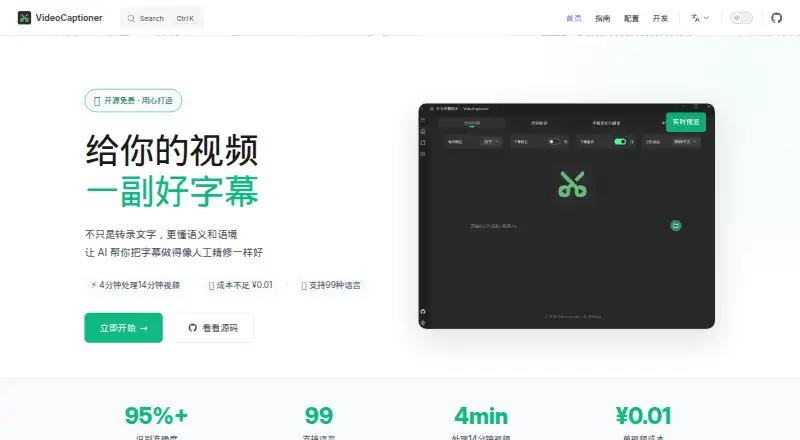
What VideoCaptioner is
VideoCaptioner is a free, open-source tool for working with video subtitles. It handles speech transcription, subtitle segmentation and correction, translation, and video synthesis. The homepage says it recognizes 99 languages and translates into 37. Users can choose recognition options including FasterWhisper, WhisperCpp, and Whisper API, and translation options such as LLM translation, Bing Translate, Google Translate, and DeepLX. Listed LLM integrations include OpenAI, DeepSeek, SiliconCloud, Gemini, Ollama, LM Studio, and ChatGLM. It accepts video files or YouTube and Bilibili links, and a batch workflow lets users queue multiple videos. Subtitle formats include SRT, ASS, and VTT; output can be burned into the video or embedded as a separate track. Processing can be local or cloud-based. The homepage says local processing keeps user data local, can run on CPU, and has optional GPU acceleration. Platforms listed are Linux, macOS, Windows, and self-hosted. Docker deployment is marked experimental and basic. The free plan is listed as free under the MIT license.
Who it suits
VideoCaptioner suits people who need to transcribe, translate, edit, or add subtitles to video, including those working with multiple files. Its local-processing option may suit users who want data to stay on their own device.
What it does well
- Recognizes 99 languages and translates into 37.
- Supports SRT, ASS, and VTT subtitle formats.
- Offers local or cloud processing options.
- Batch workflow queues multiple videos.
- Free and open source under the MIT license.
What to know first
- Docker deployment is experimental and basic.
- Local CPU processing may use optional GPU acceleration.
Limits
The free plan is listed as free. Docker deployment is experimental and currently basic.
Plans
| Plan | Billed and limits | Price |
|---|---|---|
| VideoCaptioner | Free and open source · MIT license | Free |
As videocaptioner.cn lists them, read 11 Oct 2026. The maker's own page has the final word.
Getting started
- Visit the VideoCaptioner website.
- Choose a platform that meets the documented Windows, macOS, or Linux requirements.
- Provide a video file or a YouTube or Bilibili link.
- Choose a speech recognition option and, if needed, a translation option.
- Queue additional videos for batch processing if needed.
- Create burned-in captions or an embedded subtitle track, then export in a supported subtitle format.
Overview
VideoCaptioner is a subtitle and video workflow for people who want to transcribe, correct, translate, and render captions in one place. It suits individual creators and teams comfortable choosing between local tools and cloud services. Its breadth is a strength; Docker users should expect an experimental, basic deployment.
The MIT-licensed application is free and can run locally on a CPU, with optional GPU acceleration, or use cloud processing. Local operation gives users control over where their data stays, while the range of recognition and translation integrations supports different workflows. Community help is directed through GitHub issues.
Key features
The workflow spans speech recognition, semantic segmentation, subtitle correction, translation, and video synthesis. It supports SRT, ASS, and VTT, plus styled captions rendered either directly into the video or as a separate embedded subtitle track. That makes it useful for creators who need finished video output as well as subtitle files.
Recognition options include FasterWhisper, WhisperCpp, and Whisper API. Translation can use LLMs, Bing Translate, Google Translate, or DeepLX; supported LLM services include OpenAI, DeepSeek, SiliconCloud, Gemini, Ollama, LM Studio, and ChatGLM. Users can choose local or cloud processing, but the variety means they need to select and configure a suitable route.
The homepage reports recognition in 99 languages and translation into 37. Users can queue multiple files for batch processing and provide either video files or YouTube and Bilibili links. The local CPU option avoids requiring GPU acceleration, while GPU support is available to speed processing where suitable hardware is present.
Pricing
VideoCaptioner costs nothing. The free and open-source plan is MIT-licensed, with no paid tier or usage cap stated in the plan. It is a strong fit for users seeking a no-subscription desktop workflow. The plan does not establish that optional cloud services are free, so users choosing those integrations should account for the service they use.
Platforms
VideoCaptioner supports Linux, macOS, Windows, and self-hosted use. The guide specifies Windows 10/11 64-bit, macOS 10.15 or later, and Ubuntu 20.04+, Debian 11+, or Fedora 35+ for Linux. Docker deployment is labeled experimental and basic, making it a less established route for self-hosting than the desktop platforms.
Who it's for
VideoCaptioner fits video creators who need multilingual subtitles, batch processing, and the option to burn captions into finished video. It is especially suitable for people who prefer local processing or want to choose among multiple recognition and translation services. Those who need dependable Docker deployment or a support channel beyond community GitHub issues may prefer a different workflow.
Pros and cons
- Pros: Free, MIT-licensed software with local CPU processing and optional GPU acceleration, giving users a no-subscription route to caption work.
- Pros: Multiple recognition and translation integrations, plus 99 recognition languages and 37 translation languages, provide flexibility for multilingual workflows.
- Pros: Batch queues, web video links, styled captions, and both hard and soft subtitle output cover more than transcription alone.
- Cons: Docker is experimental and basic, limiting its appeal for users who depend on a polished container deployment.
- Cons: Questions are routed to community GitHub issues, which may not suit users who need dedicated support.
- Cons: The choice of local and cloud engines and translation services requires users to configure their own processing setup.
Alternatives
Whisper is a better fit for users who want open-source speech recognition code and model weights to install locally with Python and ffmpeg, without VideoCaptioner's broader subtitle translation and video-rendering workflow.
SmartSub suits users who want local transcription, translation, text-to-speech, and subtitle rendering with no local usage limits; its cloud services are optional and paid.
Captions is an option for users on Android, iOS, or the web who want AI video creation and digital twins, with its Max plan at $24.99 a month for 500 credits and its Frontier plan at $69.99 a month.
SRTGen suits users who prefer an API or web tool for localization, with free SRT, VTT, and TXT export, 2 GB storage, and a five-minute screen-recording limit.
CaptionRoom fits users who want a free editor with manual captioning in two styles, exports up to 1080p, and AI credits earned by watching ads.
Moonshot is a web option.
GetCaptions suits users who want a web or API starter tier with 60 transcription minutes per month, a five-minute per-video limit, and 720p export; its Pro plan costs $15 a month.
Fluen AI Subtitle Generator suits users looking for a paid service with a free trial and support across web, desktop, extension, and API platforms.
For more options, browse AI Video Caption Generators.
Verdict
Choose VideoCaptioner if you want a free, open-source workflow that can take video from transcription through translation and styled subtitle output, with local processing available. Its broad integrations and batch workflow make it versatile for multilingual creators. Look elsewhere if experimental Docker support or community-only help would make it difficult to rely on.
Verdict
VideoCaptioner brings transcription, subtitle editing, translation, and video output into one workflow, with local and cloud processing options. Its Docker deployment is still labeled experimental and basic.
Questions
How much does VideoCaptioner cost?
The listed VideoCaptioner plan is free, and the pricing model is free.
Is VideoCaptioner open source?
Yes. It is listed as free and open source under the MIT license.
Which platforms does it support?
Linux, macOS, Windows, and self-hosted use are listed. The guide specifies Windows 10/11 64-bit, macOS 10.15 or later, and Ubuntu 20.04+, Debian 11+, or Fedora 35+ for Linux.
Which subtitle formats can it use?
It supports SRT, ASS, and VTT subtitle formats.
Can it process videos locally?
Yes. It can run locally on a CPU, with optional GPU acceleration; cloud processing is also offered.
Which translation and LLM integrations are listed?
Translation options include LLM translation, Bing Translate, Google Translate, and DeepLX. Listed LLM integrations include OpenAI, DeepSeek, SiliconCloud, Gemini, Ollama, LM Studio, and ChatGLM.
Facts from VideoCaptioner's own pages
- Batch processing
- The getting started guide describes a batch processing workflow for adding multiple video files to a queue. · videocaptioner.cn, 11 Oct 2026
- Burn-in captions
- Yes · videocaptioner.cn, 22 Sept 2026
- Caption styling
- Yes · videocaptioner.cn, 22 Sept 2026
- Deployment limitation
- The guide labels Docker deployment experimental and says that version is currently basic. · videocaptioner.cn, 11 Oct 2026
- Free plan
- Yes · videocaptioner.cn, 22 Sept 2026
- Languages
- The homepage says it recognizes 99 languages and translates into 37 languages. · videocaptioner.cn, 11 Oct 2026
- LLM integrations
- The LLM guide lists OpenAI, DeepSeek, SiliconCloud, Gemini, Ollama, LM Studio, and ChatGLM. · videocaptioner.cn, 11 Oct 2026
- Local processing
- The homepage says the application can run locally on CPU, with optional GPU acceleration, and offers cloud or local processing. · videocaptioner.cn, 11 Oct 2026
- Privacy
- The homepage says user data stays local and describes local use as keeping privacy under the user's control. · videocaptioner.cn, 11 Oct 2026
- Purpose
- VideoCaptioner processes video subtitles with speech transcription, semantic segmentation, correction, translation, and video synthesis. · videocaptioner.cn, 11 Oct 2026
- Recognition engines
- The getting started guide lists FasterWhisper, WhisperCpp, and Whisper API among its speech recognition options. · videocaptioner.cn, 11 Oct 2026
- Subtitle export
- other formats · videocaptioner.cn, 22 Sept 2026
- Subtitle formats
- It supports SRT, ASS, and VTT subtitle formats. · videocaptioner.cn, 11 Oct 2026
- Subtitle output
- The guide says users can create hard subtitles burned into video or soft subtitles embedded as a track. · videocaptioner.cn, 11 Oct 2026
- Support
- The homepage directs users with questions to submit GitHub issues, where the community can help. · videocaptioner.cn, 11 Oct 2026
- System requirements
- The guide specifies Windows 10/11 64-bit, macOS 10.15 or later, and Ubuntu 20.04+, Debian 11+, or Fedora 35+ for Linux. · videocaptioner.cn, 11 Oct 2026
- Translation integrations
- The guide lists LLM translation, Bing Translate, Google Translate, and DeepLX as translation options. · videocaptioner.cn, 11 Oct 2026
- Video input
- The guide says users can provide video files or links from YouTube and Bilibili. · videocaptioner.cn, 11 Oct 2026
Where VideoCaptioner stands on Freedom251
- AI Video Caption Generators#3 of 99