Freedom251 › Screenshot Annotation Software

Monosnap
by Monosnap
What Monosnap is
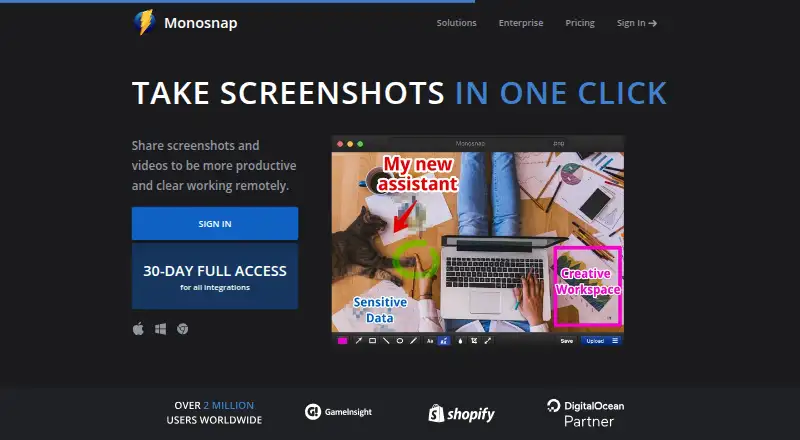
Monosnap captures screenshots and videos, lets users edit them, and supports uploading and sharing. It can capture a full screen, a selected area, or a window, with hotkeys, and its editor offers highlighting, blur for sensitive information, drag-and-drop editing, and export to an external editor. Users can record videos and GIFs and share content through links. The Chrome extension can record desktop, window, or browser content in WebM or GIF and add audio to videos. Monosnap is available on the web, Windows, macOS, Linux, and as a Chrome extension. The Free plan includes 2 GB of storage, a 100 MB single-file upload limit, five-minute video recordings, and 1,000 monthly uploads. Non-Commercial, Commercial, and Enterprise plans are also listed, but their prices are not provided. Commercial plans provide team accounts and private links; commercial or public use is paid and may require an additional agreement.
Who it suits
Monosnap suits people who need screenshot and video capture, annotation, and link sharing across desktop platforms or a browser extension. The free option may fit limited personal use; commercial or public use is paid.
What it does well
- Captures full-screen, area, and window images.
- Editor can blur sensitive information.
- Records video and GIFs.
- Chrome extension can add audio to videos.
- Free plan includes 2 GB storage.
What to know first
- Free recordings are limited to five minutes.
- Free plan has a 100 MB file limit.
- Commercial or public use is paid.
- Prices for listed plans are not provided.
Limits
The Free plan is for one user and includes 2 GB of storage, a 100 MB single-file upload limit, five-minute video recordings and 1,000 monthly uploads. The listed Non-Commercial plan includes 10+ GB of storage, a 2 GB per-file limit and 10 GB monthly bandwidth; Commercial starts at 10+ GB per member and 20+ GB monthly bandwidth.
Plans
| Plan | Billed and limits | Price |
|---|---|---|
| Non-Commercial | yearly · 10+ GB storage · Unlimited video recording · 2 GB single-file upload · External cloud integrations | $2.50 a month |
| Commercial | yearly · Commercial use · Team account · Unlimited apps · Private links · 10+ GB/member storage · 2+ GB single-file upload | $5 a month |
| Free | Personal & family use only · 2 GB Monosnap storage · 5-minute video recording · 100 MB single-file upload | On request |
| Enterprise | Commercial use · SSO · Tailored support & SLA · Advanced security options · Custom contracts and invoicing | On request |
As monosnap.ai lists them, read 28 Sept 2026. The maker's own page has the final word.
Getting started
- Open the Monosnap website or install the app for Windows, macOS or Linux.
- Alternatively, use the Chrome extension for browser-based capture and recording.
- Choose the Free plan or review the Non-Commercial, Commercial and Enterprise plans.
- Use the free plan's 30-day trial if you want to evaluate the listed trial option.
- Capture a screen, area or window, or record a video or GIF.
Overview
Monosnap is a screen-capture tool that brings screenshots, recordings, editing and cloud sharing together. It is best suited to people who need to explain something on screen and send it on, rather than simply save a local image. Its range of capture and annotation tools is balanced by tight free-tier limits and a paid requirement for commercial or public use.
Key features
Capture and edit
Fullscreen, window and area capture cover routine screenshot work, and hotkeys help with repeated captures. Scrolling capture and OCR text extraction extend its usefulness for longer pages and image-based text. Highlighting and blur make the editor practical for calling attention to details or obscuring sensitive material; drag-and-drop and export to an external editor leave room for a separate editing workflow.
Record and share
Video and GIF recording can communicate a sequence more clearly than a still image. The Chrome extension records desktop, window or browser content in WebM or GIF and can add audio to video, a useful option when a browser extension fits the task better than a desktop app. Export formats include PNG, JPG, MP4, GIF, WEBM, WEBP, SVG and MOV. Cloud storage and shareable links complete a capture-to-delivery workflow, but the free plan’s upload and recording caps can interrupt frequent use.
Pricing
Monosnap has a free plan and a 30-day trial. The Free plan costs nothing for one user and includes 2 GB of storage, a 100 MB single-file upload limit, five-minute video recordings and 1,000 monthly uploads. That is enough to try the capture-and-share workflow, but the short recording cap and finite upload allowance make it less suitable for regular, high-volume work.
The Non-Commercial plan has custom pricing and is for one user. It raises storage to 10+ GB, the single-file upload limit to 2 GB and monthly bandwidth to 10 GB, with unlimited monthly uploads. It suits a solo user who needs more room but does not need commercial use; commercial or public use requires a paid plan and may be governed by an additional agreement.
The Commercial plan also has custom pricing and supports 1+ users. It provides 10+ GB of storage per member, a 2+ GB single-file upload limit and 20+ GB monthly bandwidth, alongside unlimited monthly uploads. It is the relevant step for paid or public-facing work and teams, with team accounts, unlimited apps and private links. Enterprise has custom pricing, with single sign-on, tailored support and SLA, advanced security options and custom features; its advanced ACL, settings control and zero-trust integrations make it the fit for organizations with stricter security and support needs.
The pricing page directs support requests to [email protected].
Platforms
Monosnap supports Windows, macOS, Linux, the web and a Chrome extension. That breadth gives users a choice between desktop capture and browser-based access; the extension also records desktop, window or browser content. The listed export formats cover still images, video and GIF.
Who it's for
Monosnap is a good fit for people who regularly explain on-screen issues, create visual instructions or share annotated captures, especially when screenshots and short recordings belong in the same workflow. Its free tier is a reasonable starting point for light, non-commercial use. Anyone who records longer videos, uploads frequently, needs larger storage, or uses captures commercially should weigh the paid plans instead.
Pros and cons
- Pros: Fullscreen, window, area and scrolling capture, OCR, annotations and recording put several common screen-documentation tasks in one tool.
- Pros: Blur helps conceal sensitive details before sharing, while shareable links and cloud storage support delivery without a separate sharing step.
- Pros: Windows, macOS, Linux, web and Chrome extension support offer several ways to access the workflow.
- Cons: Free users are limited to 2 GB storage, 100 MB per file and five-minute recordings, constraints that matter for larger or sustained workloads.
- Cons: Commercial or public use is paid, and the paid plan prices are custom rather than stated as fixed amounts.
Alternatives
If you want a free, open-source Windows tool and do not need Monosnap’s wider platform coverage, consider ShareX. For a freemium option spanning desktop, mobile, web and extension platforms, Gyazo has a free plan limited to 10 latest images and seven-second video and replay recordings; its Gyazo Pro plan is $6.99 per m.
Microsoft Edge is a free browser available across desktop, mobile and Linux platforms. Awesome Screenshot is worth considering if its free allowance of up to 100 screenshots, 20 recordings and six hours per recording at up to 720p better matches your needs. For free, open-source screenshot software on Linux, macOS or Windows, Flameshot is another option; Lightshot offers free selected-area screenshots, online sharing, editing and local image saving.
Markup Hero may suit users who want a free tier focused on annotation, sharing and export, with a 25-screenshot history. PixelCopy is an option for web and Windows users seeking local capture, recording and annotation features on a free plan with no expiry. For broader category browsing, see Screen Capture Software, Screenshot Software and Screenshot Annotation Software.
Verdict
Choose Monosnap if you want one cross-platform workflow for capturing, annotating, recording and sharing what is on screen, with a free tier to get started. Its strongest case is that combination of tools and shareable links; its main drawback is that light free use comes with strict storage, file and recording caps, while commercial use requires payment. Look elsewhere if those limits or custom-priced paid plans do not fit your needs.
Verdict
Monosnap combines capture, editing, recording, and sharing, with a browser extension as well as desktop options. Check the free plan's recording and upload limits, and note that commercial or public use is paid.
Questions
Does Monosnap have a free plan or trial?
Yes. Monosnap lists a Free plan and a 30-day trial.
What does the Free plan include?
It includes one user, 2 GB of storage, 100 MB maximum per file, recordings up to five minutes and 1,000 monthly uploads.
Which platforms can I use Monosnap on?
Monosnap supports the web, Windows, macOS, Linux and a Chrome extension.
Can Monosnap capture text from images?
Yes. OCR text extraction is listed as a feature.
What does the Commercial plan add?
It includes commercial use, team accounts, unlimited apps and private links. Commercial or public use is paid and may be governed by an additional agreement.
What does Enterprise include?
Enterprise lists single sign-on, advanced access controls, settings control, tailored support and service-level agreements, along with custom features.
Facts from Monosnap's own pages
- Browser extension
- The Chrome extension can record desktop, window or browser content in WebM and GIF and add audio to videos. · chromewebstore.google.com, 28 Sept 2026
- Export formats
- PNG,JPG,MP4,GIF,WEBM,WEBP,SVG,MOV · monosnap.ai, 20 Sept 2026
- Cloud storage
- Monosnap offers its own cloud storage and integrations with DigitalOcean Spaces, Amazon S3, S3-compatible storage, Google Drive, Dropbox, Box, FTP, SFTP and FTPS. · monosnap.ai, 28 Sept 2026
- Commercial plan
- The Commercial plan provides commercial use, team accounts, unlimited apps and private links. · monosnap.com, 28 Sept 2026
- Commercial-use rule
- Commercial or public use is paid and may be governed by an additional agreement. · monosnap.zendesk.com, 28 Sept 2026
- Editing
- The editor supports highlighting, blur for sensitive data, drag and drop, and export to an external editor. · monosnap.ai, 28 Sept 2026
- Enterprise security
- Enterprise includes advanced ACL, settings control, single sign-on, enterprise SLAs and support, and zero-trust integrations. · monosnap.com, 28 Sept 2026
- Free plan
- Yes · monosnap.ai, 20 Sept 2026
- Free recording limit
- The Free plan limits video recording to 5 minutes. · monosnap.com, 28 Sept 2026
- Free storage
- The Free plan includes 2 GB of Monosnap storage. · monosnap.com, 28 Sept 2026
- Headquarters
- 2035 Sunset Lake Rd B2, Newark, Delaware 19702-2600, United States · monosnap.ai, 28 Sept 2026
- Shareable links
- Yes · monosnap.ai, 20 Sept 2026
- OCR text extraction
- Yes · monosnap.ai, 20 Sept 2026
- Supported platforms
- web,windows,macos,linux,chrome_extension · monosnap.ai, 20 Sept 2026
- Purpose
- Monosnap lets users capture, edit, upload and share screenshots and videos. · monosnap.ai, 28 Sept 2026
- Recording
- It records videos and GIFs. · monosnap.ai, 28 Sept 2026
- Screenshot capture
- It captures fullscreen, area or window screenshots and supports hotkeys. · monosnap.ai, 28 Sept 2026
- Scrolling capture
- Yes · monosnap.ai, 20 Sept 2026
- Support
- The pricing page directs users to [email protected] for support. · monosnap.com, 28 Sept 2026
- Windows availability
- Monosnap provides a Windows app. · support.monosnap.com, 28 Sept 2026
Where Monosnap stands on Freedom251
- Screenshot Annotation Software#4 of 76
- Screenshot tools#7 of 40
- Screen Capture Software#12 of 61
- Screenshot Software#11 of 39