Freedom251 › Screenshot Annotation Software

Screenpresso
by Screenpresso
What Screenpresso is
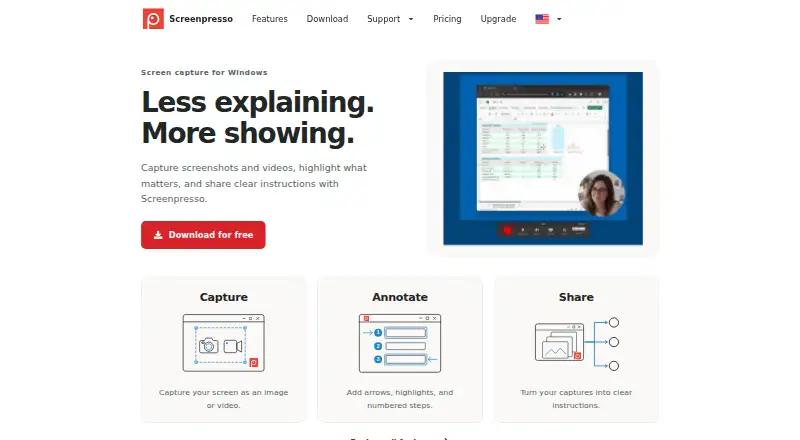
Screenpresso is software for capturing screenshots and videos, annotating them, and turning captures into shareable instructions. It can capture a full screen, a selected region, or a window, and join scrolling windows into one image. Video recording supports MP4, sound, webcam, automatic subtitles, and editing. Its image editor includes cropping, effects, numbered steps, annotations, and AI image modification. Users can create PDF, DOCX, or HTML documents from images and comments, and export in formats including PNG, JPEG, GIF, TIFF, BMP, WebP, JPEG XL, MP4, and WMV. Sharing destinations include cloud storage, email clients, video services, and tools such as Google Drive, Dropbox, OneNote, Linear, SFTP, and Amazon S3. The free plan costs nothing and offers image capture and HD video capture with branding. PRO adds OCR, a full editor, document generation, multiple workspaces, sharing features, and priority support. The listed desktop platform is Windows; the download page lists Windows 11 and says macOS, iOS, and Android are unsupported.
Who it suits
Screenpresso suits Windows users who need to capture, annotate, and share screenshots or screen videos. Its MSI deployment option may also suit organizations distributing software through Intune, SCCM, or equivalent systems.
What it does well
- Captures full screens, regions, windows, and scrolling windows.
- Records MP4 video with sound and webcam support.
- Creates PDF, DOCX, and HTML documents from captures.
- Free plan includes image and HD video capture.
What to know first
- Free video captures carry branding.
- macOS, iOS, and Android are unsupported.
- PRO license applies to one person and cannot be transferred.
Limits
The Free plan includes image capture, HD video with branding, a limited image editor, and sharing with branding. OCR, the full image editor, and document generation are listed under PRO.
Plans
| Plan | Billed and limits | Price |
|---|---|---|
| FREE | Image capture · HD video capture with branding · Limited image editor · Sharing with branding · Work use allowed | Free |
| ENTERPRISE | One time purchase; unlimited users · Required for Citrix, RDS, VMWare VDI, or large deployments · No internet connection required | On request |
| PRO | One time purchase; per user · One license per person, usable on up to 5 computers · Includes one year of upgrades and maintenance | On request |
As screenpresso.com lists them, read 4 Oct 2026. The maker's own page has the final word.
Getting started
- Visit the Screenpresso website.
- Use a Windows 11 computer, the version listed on the download page.
- Choose the Free plan for image capture and HD video with branding.
- Choose PRO for OCR, the full image editor, document generation, or multiple workspaces.
- For enterprise deployment, use the MSI package with Intune, SCCM, or an equivalent system.
Screenpresso combines screen capture, editing, and sharing in a Windows-focused tool. The free plan covers basic capture, while OCR and document generation are among the PRO features.
Overview
Screenpresso brings still images, screen video, annotation, and sharing into one workflow. It captures a full screen, window, or selected region, and can stitch scrolling content into a single image. That is useful for documenting long pages and processes that do not fit in one frame.
It can also record video with sound and webcam support, automatic subtitles, and editing features. Users can mark up images and combine them with comments in PDF, DOCX, or HTML documents. This breadth is most valuable when captures need to become instructions, rather than simply be saved as images.
Key features
- Capture and recording: Full-screen, region, and window capture cover everyday screenshots; scrolling capture handles longer content. Video adds sound, webcam, subtitles, and editing, although free-plan recordings are HD and branded.
- Annotation and editing: The editor offers cropping, effects, numbered steps, and AI image modification. Numbered steps support procedural guidance, but the free editor is limited and the full-featured editor is a PRO benefit.
- OCR and documents: OCR can extract text, and the document generator turns images and comments into PDF, DOCX, or HTML. These are meaningful upgrades for documentation work, but both are reserved for PRO.
- Sharing: Destinations include Screenpresso Cloud, email clients, Google Drive, YouTube, OneDrive, OneNote, Dropbox, Linear, Imgur, Cloudinary, SFTP, and Amazon S3. The range helps teams fit captures into existing delivery routes; free-plan sharing carries branding.
- Deployment and controls: An MSI package works with Microsoft Intune, SCCM, and equivalent distribution systems. Newer Windows APIs request permissions feature by feature for capture, file access, microphone, and webcam, while administrators can disable features with policies.
Pricing
Screenpresso uses a freemium model. The Free plan costs nothing and includes image capture, HD video capture with branding, a limited image editor, sharing with branding, and commercial use. It is a practical starting point for basic capture, but branding and restricted editing make it less suitable for polished documentation.
PRO has custom pricing and adds OCR, the full-featured image editor, document generation, multiple workspaces, unbranded sharing features, and priority support. It suits people who regularly extract text or produce finished instructions; the free tier omits several of the tools that distinguish this workflow.
A PRO license covers one person on up to five computers. Once applied, it cannot be uncommitted or transferred, so it is a poor fit for rotating users or shared machines. ENTERPRISE has custom pricing, includes PRO features, supports unlimited users, is required for Citrix, RDS, VMware VDI, or large deployments, and requires no internet connection. That tier is aimed at organizations with deployment or connectivity requirements beyond an individual license.
Platforms
Screenpresso supports Windows and offers a browser extension. The download page specifies Windows 11; macOS, iOS, and Android are not supported. That makes it unsuitable for readers who need a native workflow across those systems.
Who it's for
Screenpresso is a strong fit for Windows users who routinely create tutorials, process documentation, or annotated guidance and want capture, editing, OCR, and document output in one place. Its deployment options and administrator controls also suit organizations distributing the tool across managed Windows environments. People who only need occasional, unbranded screenshots may find the free plan's branding and limited editor restrictive, while users outside Windows should look elsewhere.
Pros and cons
- Pro: Full, region, window, and scrolling capture cover both quick grabs and long-page documentation.
- Pro: Screenshots, video, annotations, OCR, and document generation can serve a complete instruction-making workflow.
- Pro: Broad sharing destinations and MSI deployment support individual workflows as well as managed rollouts.
- Con: Free video and sharing carry branding, and the free editor is limited; polished output may require PRO.
- Con: PRO licensing is tied to one person and cannot be transferred after application, despite allowing use on five computers.
- Con: Windows-only support excludes macOS, iOS, and Android users.
Alternatives
ShareX is the better fit for readers who want a free, open-source Windows tool with no account requirement. Awesome Screenshot may suit those who need coverage across browser extensions, iOS, macOS, web, and Windows, with a free tier capped at 100 screenshots and 20 recordings, up to six hours per recording at 720p, and three-day trash recovery.
Greenshot is an alternative for Windows users focused on screenshots, annotation, and exporting to files, clipboard, printer, or email. Flameshot is worth considering for free, open-source screenshot software on Linux, macOS, or Windows.
PicPick offers screen capture, an image editor, and design tools; its Home plan is for personal, non-commercial use and has manual updates and no technical support. Monosnap may fit users looking for a cross-platform service, though its free plan limits recording to five minutes and single-file uploads to 100 MB, with 2 GB storage.
Markup Hero is an option for annotation and sharing across its extension, macOS, and Windows platforms, with its Forever Free tier capped at 25 screenshots and history. ScreenAI may be preferable for readers seeking Linux support and free OCR, redaction, color picking, and 10 AI requests per day.
Browse more options in Screenshot Annotation Software, Screenshot Software, or Screen Capture Software.
Verdict
Choose Screenpresso if you work on Windows and need a connected workflow for capturing, marking up, and turning screen material into shareable instructions. Its strongest reason to choose it is that breadth, from scrolling screenshots to OCR and document generation; its strongest reason to look elsewhere is the Windows restriction, compounded by branding and editing limits on the free plan.
Verdict
Screenpresso combines screen capture, editing, and sharing in a Windows-focused tool. The free plan covers basic capture, while OCR and document generation are among the PRO features.
Questions
Is there a free plan?
Yes. Free costs nothing and includes image capture and HD video capture with branding.
Which platforms does Screenpresso support?
The listed platforms are Windows and an extension. The download page lists Windows 11 and says macOS, iOS, and Android are unsupported.
What does PRO add?
PRO lists OCR, the full-featured image editor, document generation, multiple workspaces, sharing features, and priority support.
What can Screenpresso export?
Formats include PNG, JPEG, GIF, TIFF, BMP, WebP, JPEG XL, PDF, DOCX, HTML, MP4, and WMV.
Can it capture scrolling content?
Yes. It can stitch scrolling windows into one image.
Who makes Screenpresso?
Screenpresso is made by Screenpresso, headquartered in Toulouse, France, and founded in 2012.
Facts from Screenpresso's own pages
- Browser extension
- Its Chrome extension captures scrolling pages and opens the captured image directory in the Screenpresso desktop app. · screenpresso.com, 4 Oct 2026
- Documents
- Screenpresso can generate PDF, DOCX, or HTML documents from images and comments. · screenpresso.com, 4 Oct 2026
- Editor
- The built-in image editor supports annotations, cropping, effects, numbered steps, and AI image modification. · screenpresso.com, 4 Oct 2026
- Enterprise deployment
- The maker offers an MSI package compatible with Microsoft Intune, SCCM, and equivalent software distribution systems. · screenpresso.com, 4 Oct 2026
- Export formats
- PNG, JPEG, GIF, TIFF, BMP, WebP, JPEG XL, PDF, DOCX, HTML, GIF, MP4, WMV · screenpresso.com, 19 Sept 2026
- Free plan
- Yes · screenpresso.com, 19 Sept 2026
- Headquarters
- Toulouse, France · screenpresso.com, 23 Sept 2026
- License limit
- A PRO license is for one person, can be used on up to five computers, and cannot be uncommitted or transferred once applied. · screenpresso.com, 4 Oct 2026
- OCR text extraction
- Yes · screenpresso.com, 19 Sept 2026
- Platform requirement
- The download page lists Windows 11 and states that macOS, iOS, and Android are not supported. · screenpresso.com, 4 Oct 2026
- Purpose
- Screenpresso captures screenshots and videos, lets users annotate captures, and helps them share instructions. · screenpresso.com, 4 Oct 2026
- Screenshot capture
- It captures a full screen, a region, or a window, and can stitch scrolling windows into one image. · screenpresso.com, 4 Oct 2026
- Scrolling capture
- Yes · screenpresso.com, 19 Sept 2026
- Security and privacy
- The maker says newer Windows APIs request feature-by-feature permissions for screen capture, file access, microphone, and webcam access, and administrators can disable features with policies. · screenpresso.com, 4 Oct 2026
- Sharing integrations
- Listed sharing destinations include Screenpresso Cloud, email clients, Google Drive, YouTube, OneDrive, OneNote, Dropbox, Linear, Imgur, Cloudinary, SFTP, and Amazon S3. · screenpresso.com, 4 Oct 2026
- Support
- PRO pricing includes priority support, and the company lists [email protected] for assistance and support. · screenpresso.com, 4 Oct 2026
- Video capture
- It records screen video as MP4 and supports sound, webcam, automatic subtitles, and video editing features. · screenpresso.com, 4 Oct 2026
Where Screenpresso stands on Freedom251
- Screenshot Annotation Software#5 of 76
- Screenshot tools#5 of 40
- Screen Capture Software#24 of 61
- Screenshot Software#18 of 39