Freedom251 › Screenshot Annotation Software

Greenshot
What Greenshot is
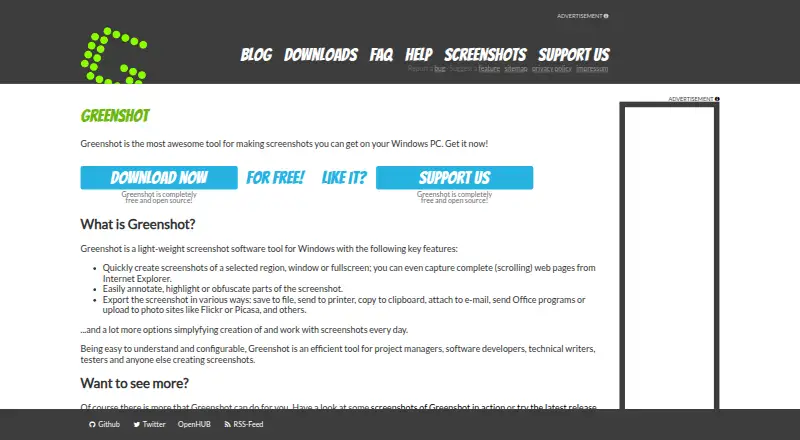
Greenshot is free, open-source screenshot software for Windows. It captures a selected region, a window, or the full screen, and can capture scrolling web pages from Internet Explorer. After capture, you can annotate or highlight the image and obscure parts of it. Screenshots can be saved, printed, copied, emailed, sent to Office, or uploaded to photo sites such as Flickr or Picasa. Greenshot also extracts text with OCR and exports images as PNG or JPEG. The free plan costs nothing; an optional cost contribution is $1.99, paid once. The software is intended for people who create screenshots, including project managers, developers, technical writers, and testers. Its latest stable Windows release is version 1.3.315, dated 20 Mar 2026. Source code is available in Git repositories. Windows 8 users may be prompted to install .NET 3.5, but can skip that prompt.
Who it suits
Greenshot suits Windows users who need to capture and mark up screenshots, including project managers, developers, technical writers, and testers. It also fits people who want OCR or multiple ways to export screenshots.
What it does well
- Captures regions, windows, and full screens
- Can capture scrolling pages from Internet Explorer
- Includes annotation, highlighting, and obfuscation tools
- Extracts text with OCR
- Free and open source for Windows
What to know first
- Scrolling web capture is specified for Internet Explorer
- The listed platforms are Windows only
- Windows 8 users may see a .NET 3.5 prompt
Limits
The free plans are listed as free. Scrolling web-page capture is supported for Internet Explorer.
Plans
| Plan | Billed and limits | Price |
|---|---|---|
| Free | Screenshot capture · Image annotation and editing · Export to files, clipboard, printer, and email | Free |
| Greenshot for Windows | — | Free |
| Cost contribution | — | $1.99, paid once |
As getgreenshot.org lists them, read 20 Sept 2026. The maker's own page has the final word.
Getting started
- Open the Greenshot website.
- Download the Windows software from the project site.
- Install and launch Greenshot on a Windows PC.
- Capture a region, window, or full screen; use Internet Explorer for scrolling web-page capture.
- Annotate or obscure the image, then export it as PNG or JPEG or send it to a listed destination.
Greenshot is a free, open-source screenshot utility for Windows. It suits people who regularly capture and explain visual details in project work, development, technical writing, or testing. Its appeal is a straightforward capture-to-sharing workflow without a software charge; its clearest limitation is the Windows-only platform.
Overview
Region, window, and fullscreen capture cover the usual needs, from isolating a control to preserving the whole screen. Annotation and highlighting help make images useful in bug reports or instructions, while obfuscation can conceal portions before an image is shared. OCR text extraction adds another practical option when a screenshot contains text someone needs to retrieve.
For long pages, Greenshot can capture scrolling web pages in Internet Explorer. That browser-specific scope makes it a poor fit if scrolling capture is central to work in another browser. Captures can be saved as PNG or JPEG, or sent to the clipboard, printer, email, Office, and photo sites including Flickr and Picasa.
Key features
- Three capture modes: Region, window, and fullscreen capture give users useful control over how much context an image includes, without requiring separate capture tools for these common cases.
- Markup and obfuscation: Annotation and highlighting make a capture easier to interpret; obfuscation is valuable when a screenshot includes details that should not be exposed.
- OCR: Text extraction broadens the tool beyond image sharing, especially for users who need to work with words visible in a capture.
- Multiple destinations: File, clipboard, printer, email, Office, and photo-site output support different handoff habits. PNG and JPEG are the stated export formats, so readers who require other formats should look elsewhere.
Pricing
Greenshot is free and open source. The Free plan costs nothing and includes screenshot capture, image annotation and editing, and export to files, the clipboard, printer, and email. Greenshot for Windows is also free and is described as free and open source for Windows. There is no paid feature tier to weigh against a restricted free plan.
A $1.99 as a one-time cost contribution is offered to help cover the project's own costs. It is a contribution rather than a separate feature plan; the software remains free.
Platforms
Greenshot is for Windows PCs. That focus suits Windows users who want a desktop capture and annotation workflow, but rules it out for people who need a native tool on another operating system. The latest stable Windows release is version 1.3.315, dated 20 Mar 2026.
Who it's for
Project managers, developers, technical writers, and testers are the natural audience: each can use a quick capture, add explanation or concealment, then pass the result along through familiar destinations. It is also a sensible choice for anyone who wants open-source screenshot software at no charge. Users who depend on scrolling capture outside Internet Explorer, or need a non-Windows platform, should choose another tool.
Pros and cons
- Pro: Capture, annotation, highlighting, and obfuscation sit in one workflow, which is useful when screenshots need to explain a problem or process before they are shared.
- Pro: The free, open-source offering includes core capture and editing rather than placing those basics behind a paid plan.
- Pro: OCR and several export destinations cover more than simple image saving.
- Con: Scrolling web capture is scoped to Internet Explorer, limiting its relevance for other browser workflows.
- Con: Windows is the sole supported platform, so it cannot serve cross-platform teams as a shared native tool.
- Con: PNG and JPEG are the stated export formats, a constraint for workflows that require a different image format.
Alternatives
ShareX is another free, open-source Windows option; choose it if you want an alternative with no account required.
Awesome Screenshot is worth considering if you need browser-extension, iOS, macOS, web, or Windows access, and can work within its free allowance of 100 screenshots, 20 recordings, up to six hours per recording, 720p, and three-day trash recovery.
Screenpresso may fit better if HD video capture matters alongside images; its free plan includes branding on video and sharing, plus a limited image editor.
Flameshot is a free, open-source option for Windows, macOS, and Linux.
PicPick is an alternative to consider if you want screen capture alongside image editing and design tools.
Monosnap is another freemium option, with a free tier that includes one user, 2 GB of storage, a 100 MB single-file upload limit, and five minutes of video recording.
Markup Hero is a fit for users who want screenshot annotation with sharing and export, but its Forever Free plan is capped at 25 screenshots and history.
ScreenAI is an alternative for readers seeking a free tier that combines capture, annotation, OCR, and PNG/JPEG/PDF export across Windows, macOS, and Linux.
For a broader comparison, browse Screenshot Annotation Software, Screenshot Software, or Screen Capture Software.
Verdict
Choose Greenshot if you use Windows and want a no-cost, open-source tool that can capture, mark up, obscure, and distribute screenshots in one workflow. Its strongest reason to choose it is that breadth at no charge; look elsewhere if you need another platform or scrolling capture beyond Internet Explorer.
Verdict
Greenshot covers common screenshot capture, markup, OCR, and export needs at no charge. Note that its listed scrolling capture is for Internet Explorer, and the software is for Windows.
Questions
How much does Greenshot cost?
Its free plans are listed as free. An optional cost contribution is $1.99, paid once.
Which platforms does Greenshot support?
Greenshot is screenshot software for Windows PCs.
Is Greenshot open source?
Yes. Greenshot is free and open source, with source code available through GitHub or BitBucket repositories.
Can it capture scrolling pages?
Yes. It can capture complete scrolling web pages from Internet Explorer.
What formats can I export?
The listed formats are PNG and JPEG.
Who is Greenshot intended for?
It is intended for people who create screenshots, including project managers, developers, technical writers, and testers.
Facts from Greenshot's own pages
- Annotation Tools
- Screenshots can be annotated and highlighted. · getgreenshot.org, 28 Sept 2026
- Export formats
- PNG,JPEG · getgreenshot.org, 20 Sept 2026
- Community Tested
- The latest stable version has been thoroughly tested by the community. · getgreenshot.org, 28 Sept 2026
- Configurable Tool
- Greenshot is easy to understand and configurable. · getgreenshot.org, 28 Sept 2026
- Export Destinations
- Screenshots can be saved, printed, copied, emailed, sent to Office, or uploaded to photo sites. · getgreenshot.org, 28 Sept 2026
- Free Open Source
- Greenshot is completely free and open source. · getgreenshot.org, 28 Sept 2026
- Free plan
- Yes · getgreenshot.org, 20 Sept 2026
- Fullscreen Capture
- Users can quickly capture the fullscreen. · getgreenshot.org, 28 Sept 2026
- Worldwide Usage
- The stable version is used by many people around the world. · getgreenshot.org, 28 Sept 2026
- Latest Release
- The latest stable Windows release is version 1.3.315. · getgreenshot.org, 28 Sept 2026
- Obfuscation Tool
- Parts of screenshots can be obfuscated. · getgreenshot.org, 28 Sept 2026
- OCR text extraction
- Yes · getgreenshot.org, 20 Sept 2026
- Photo Site Uploads
- Uploads are supported to photo sites such as Flickr or Picasa. · getgreenshot.org, 28 Sept 2026
- Supported platforms
- Windows · getgreenshot.org, 20 Sept 2026
- Region Capture
- Users can quickly capture a selected region. · getgreenshot.org, 28 Sept 2026
- Release Date
- The latest stable release is dated 20 Mar 2026. · getgreenshot.org, 28 Sept 2026
- Scrolling capture
- Yes · getgreenshot.org, 20 Sept 2026
- Scrolling Web Capture
- Complete scrolling web pages can be captured from Internet Explorer. · getgreenshot.org, 28 Sept 2026
- Source Repositories
- Source code is available in Greenshot's Git repositories at GitHub or BitBucket. · getgreenshot.org, 28 Sept 2026
- Target Users
- Greenshot is intended for project managers, developers, technical writers, testers, and others creating screenshots. · getgreenshot.org, 28 Sept 2026
- Window Capture
- Users can quickly capture a window. · getgreenshot.org, 28 Sept 2026
- Windows 8 Note
- Windows 8 users may be asked to install .NET 3.5, but can skip it. · getgreenshot.org, 28 Sept 2026
- Windows Support
- Greenshot is screenshot software for Windows PCs. · getgreenshot.org, 28 Sept 2026
Where Greenshot stands on Freedom251
- Screenshot Annotation Software#12 of 76
- Screenshot tools#9 of 40
- Screen Capture Software#17 of 61
- Screenshot Software#16 of 39