Freedom251 › Screenshot Annotation Software
ShareX
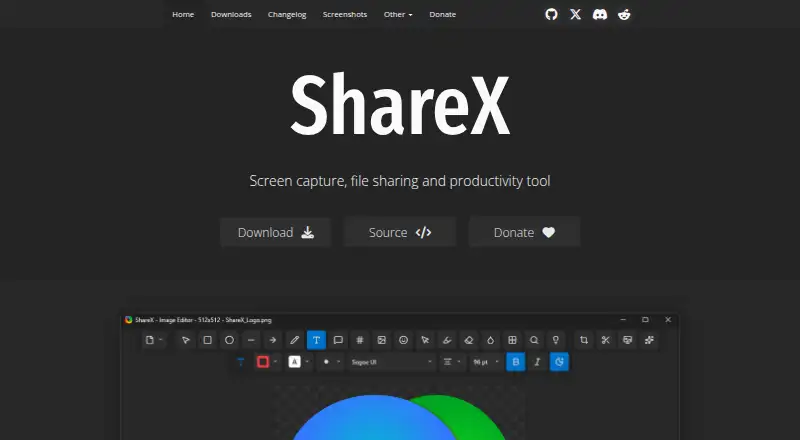
What ShareX is
ShareX is a free, open-source screenshot and screen-recording tool for Windows. It captures a full screen, selected region, active window, scrolling page, or monitor, and can also record video and GIFs. Its image editor includes annotation and redaction tools, and OCR can recognize text in images. ShareX supports many upload destinations and custom uploaders; after a capture, it can copy, open, shorten, or share the resulting link. The software requires no account and has no advertisements. ShareX describes its approach as privacy first. It supports many languages, including English, Hindi, and Spanish, and its listed features include browser extension support. The software is maintained by the ShareX Team, and its site provides documentation guides and links to related projects on GitHub. ShareX is available for Windows only. Its development history spans more than 18 years, and it has more than 33 million downloads worldwide.
Who it suits
ShareX suits Windows users who want screenshot and recording features, OCR, and options for sharing captured results. Its listed annotation and redaction tools may also suit people who need to mark up images or obscure sensitive information.
What it does well
- Captures full screen, regions, windows, pages, and monitors.
- Records both video and GIFs.
- Image editor includes annotation and redaction tools.
- OCR can recognize text in images.
- Free, open-source, and requires no account.
What to know first
- Available for Windows only.
Limits
ShareX is available for Windows only. The software is free forever, with no account requirement.
Plans
| Plan | Billed and limits | Price |
|---|---|---|
| Free | — | On request |
As getsharex.com lists them, read 27 Sept 2026. The maker's own page has the final word.
Getting started
- Visit the ShareX website.
- Download ShareX for Windows.
- Install and open the application; an account is not required.
- Choose a capture option such as full screen, region, active window, scrolling page or monitor.
- Use the editor to annotate or redact, or use OCR to recognize image text.
- Select an upload destination or configure a custom uploader to share resulting links.
Overview
ShareX is a Windows screenshot and screen-recording app for people who want to capture, edit, and share from one place. Its mix of scrolling capture, OCR, redaction, and configurable upload options suits users with varied capture workflows. It is a particularly strong fit if you want a free, open-source tool without an account or ads.
Key features
Capture for more than the visible screen
ShareX captures a full screen, region, active window, or monitor, as well as scrolling pages. That range makes it useful for quick grabs and for documenting content that does not fit in one screen. Screen and GIF recording extend it to motion, so it can cover more than a still-image workflow.
Prepare captures before sharing
Annotation tools and redaction let you mark up an image or conceal sensitive information before sending it. OCR can recognize text in captured images, which is useful when you need the words themselves rather than only a picture of them.
Flexible upload workflow
ShareX supports many upload destinations and custom uploaders, then can automatically copy, open, shorten, or share resulting links. That flexibility favors users who want to shape how captures move from their computer to a destination. It may be more choice than someone seeking only a basic screenshot tool needs.
Pricing
ShareX is free forever. The Free plan requires no account and has no advertisements; it includes the capture, recording, editing, OCR, and sharing capabilities described above. There is no paid tier to weigh against it, making ShareX a straightforward choice for users who want these tools without a subscription. The trade-off is platform scope: it is available for Windows only.
Platforms
ShareX runs on Windows. That focus is a strength for Windows users seeking a capable capture workflow, but it rules it out for anyone who needs the same app on macOS, Linux, mobile, or the web.
Who it's for
Choose ShareX if you use Windows and want a free, open-source tool that can capture scrolling content, record screens or GIFs, extract text, redact images, and share through configurable upload options. Its no-account, ad-free model also suits people who prefer not to sign up for a capture tool. Look elsewhere if cross-platform availability is essential or if you want a simpler tool without the breadth of capture and upload choices.
Pros and cons
- Pros: Free forever, open source, no account required, and no advertisements make it accessible without recurring cost or signup.
- Pros: Scrolling capture, screen and GIF recording, OCR, annotation, and redaction cover a broad range of capture and preparation tasks.
- Pros: Many upload destinations, custom uploader support, and automatic link actions can suit established sharing workflows.
- Cons: Windows-only availability excludes readers who need the same tool on another platform.
Alternatives
Awesome Screenshot is worth considering if you need broader platform coverage, including extension, iOS, macOS, web, and Windows, and can work within a free plan capped at 100 screenshots and 20 recordings, with recordings up to 6 hours and 720p.
Screenpresso is another Windows option; its free plan includes image capture, HD video capture with branding, a limited image editor, and branded sharing.
Greenshot is a Windows alternative with free screenshot capture, annotation and editing, and export to files, clipboard, printer, and email.
Monosnap may suit users wanting a tool that also supports Linux, macOS, web, and extensions; its free plan allows one user, 2 GB storage, 100 MB single-file uploads, five-minute video recordings, and 1,000 monthly uploads.
Markup Hero is an option for macOS and Windows users who want annotation, sharing, and export features, with its free plan capped at 25 screenshots and history.
Shottr is a macOS-only alternative with most features available free indefinitely, though it begins asking users to consider upgrading after 30 days and commercial use requires a license.
ApexShot is a Linux alternative whose free plan includes 2 GB cloud storage, 20 uploads per month, seven-day retention, and public share links.
OpenScreenShot is a browser-extension alternative.
For more options, browse screenshot annotation software, screenshot software, or screen capture software.
Verdict
ShareX is an excellent choice for Windows users who want capture, recording, OCR, editing, and configurable link-sharing without paying or creating an account. Its breadth and free, open-source model are the main reasons to choose it; its Windows-only reach is the reason to look elsewhere.
Verdict
ShareX brings capture, recording, OCR, editing, and link-sharing options together in a free Windows tool. Its platform limitation is clear: it is available for Windows only.
Questions
How much does ShareX cost?
ShareX is free forever. No account is required.
Is ShareX open source?
Yes. ShareX is open source and is maintained by the ShareX Team.
Which platforms does ShareX support?
ShareX is available for Windows.
Can ShareX capture scrolling pages or record video?
Yes. It supports scrolling-page capture and screen recording, including GIF recording.
Can ShareX recognize text or hide sensitive details?
Yes. OCR can recognize text in images, and the image editor can redact sensitive information.
How does ShareX share captures?
It supports a wide range of upload destinations and custom uploaders. It can copy, open, shorten or share resulting links.
Facts from ShareX's own pages
- Account requirement
- No account is required. · getsharex.com, 27 Sept 2026
- Advertisements
- ShareX has no advertisements. · getsharex.com, 27 Sept 2026
- Browser extension
- Yes · getsharex.com, 19 Sept 2026
- Capture features
- It supports full-screen, region, active-window, scrolling-page, and monitor capture. · getsharex.com, 27 Sept 2026
- Company identity
- ShareX is maintained by the ShareX Team. · getsharex.com, 27 Sept 2026
- Development history
- ShareX has over 18 years of active development. · getsharex.com, 27 Sept 2026
- Download count
- ShareX has more than 33 million downloads worldwide. · getsharex.com, 27 Sept 2026
- Founded
- 2007 · getsharex.com, 24 Oct 2026
- Free plan
- Yes · getsharex.com, 19 Sept 2026
- Free tier
- ShareX is free forever. · getsharex.com, 27 Sept 2026
- Supported languages
- ShareX supports many languages, including English, Hindi, Spanish, and others. · getsharex.com, 27 Sept 2026
- OCR support
- ShareX can recognize text using OCR. · getsharex.com, 27 Sept 2026
- Open source
- ShareX is open source. · getsharex.com, 27 Sept 2026
- Operating system
- ShareX is a screenshot tool for Windows. · getsharex.com, 27 Sept 2026
- Pricing page
- The provided pricing page is not available. · getsharex.com, 27 Sept 2026
- Privacy positioning
- ShareX describes itself as privacy first. · getsharex.com, 27 Sept 2026
- Redaction tools
- The image editor can redact sensitive information. · getsharex.com, 27 Sept 2026
- Screen recording
- ShareX supports screen recording and GIF recording. · getsharex.com, 27 Sept 2026
- Scrolling capture
- Yes · getsharex.com, 19 Sept 2026
- Sharing features
- ShareX can automatically copy, open, shorten, or share resulting links. · getsharex.com, 27 Sept 2026
- Support information
- The page provides links to documentation guides and related projects on GitHub. · getsharex.com, 27 Sept 2026
- Upload destinations
- It supports a wide range of upload destinations and custom uploader support. · getsharex.com, 27 Sept 2026
Where ShareX stands on Freedom251
- Screenshot Annotation Software#1 of 76
- Screen Capture Software#1 of 61
- Screenshot tools#1 of 40
- Screenshot Software#1 of 39