Freedom251 › Minecraft World Editors
Minecraft World Trimmer
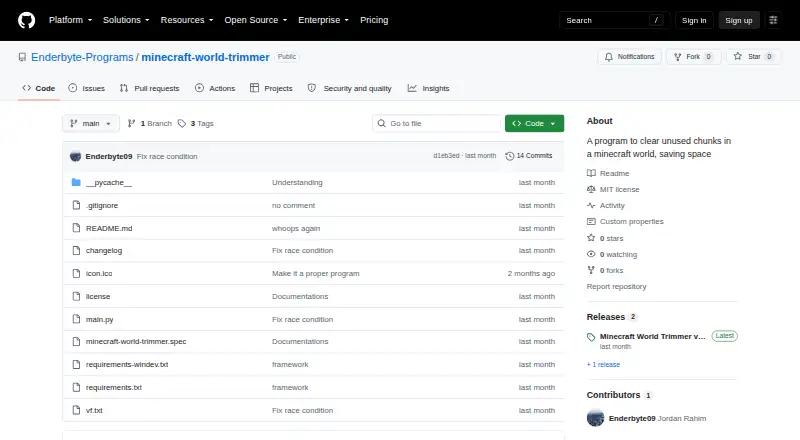
What Minecraft World Trimmer is
Minecraft World Trimmer is a free tool for reclaiming storage by removing low-usage regions from Minecraft Java worlds. Its default threshold is 10 minutes, or 600 seconds, of player time per region; the `-t` option changes the threshold in seconds. It uses all available CPU cores by default, while `-c` sets a custom core count. A live progress counter and `-q`, `-u`, and `-v` options provide output controls. Running the program without command-line arguments opens an interactive terminal interface that can locate dimensions and world folders or use a Minecraft saves folder. Interactive mode supports 2011–2025 and 2026 world formats. The program supports `.mca` region files and batch operations on Windows, macOS, and Linux. Windows users can download an executable ZIP from the GitHub release tab; other operating systems require Python and source dependencies, including `cursesplus` and `anvil-parser2`. The README warns that using the trimmer on a new world could destroy chunks containing player data. It is released under the MIT License, free of charge and provided as-is without warranty.
Who it suits
It suits Minecraft Java world owners who want to remove low-usage regions using command-line controls or an interactive terminal interface. Non-Windows users need to be prepared to install Python and the source dependencies.
What it does well
- Adjustable player-time threshold with `-t`.
- Uses all available CPU cores by default.
- Interactive terminal mode can locate world folders.
- Windows executable ZIP is available.
- MIT-licensed and free of charge.
What to know first
- Running it on a new world may destroy player-data chunks.
- Non-Windows users must install Python and source dependencies.
- The software is provided without warranty.
Limits
The tool is free of charge under the MIT License and is provided as-is with no warranty. On macOS and Linux, there is no binary, so setup requires Python and source dependencies; Windows interactive mode also requires `windows-curses`.
Plans
| Plan | Billed and limits | Price |
|---|---|---|
| MIT License | Free of charge · provided as-is · no warranty | Free |
As github.com lists them, read 1 Oct 2026. The maker's own page has the final word.
Getting started
- Open the project's GitHub repository.
- On Windows, download the executable ZIP from the GitHub release tab.
- On macOS or Linux, install Python and the source dependencies, including `cursesplus` and `anvil-parser2`.
- For Windows interactive mode, install `windows-curses` as well.
- Run without command-line arguments to use the interactive terminal interface, or set options such as `-t` and `-c`.
Minecraft World Trimmer removes low-usage regions from Minecraft Java worlds to reclaim storage. It suits players comfortable with command-line tools or a terminal interface who want focused region cleanup. Its configurable threshold gives control, but the risk of deleting chunks with player data makes careful selection essential.
Overview
The program identifies regions with little player time and deletes them, rather than editing terrain or entities. Its default threshold is 10 minutes (600 seconds) per region, adjustable with the -t option in seconds. That makes it a narrow cleanup tool, not a general-purpose world editor.
Trimming is inherently destructive: the README warns against running it on a new world because chunks containing player data may be removed. Treat it as a deliberate operation on a world you have considered carefully, not as a routine background optimization.
Key features
Threshold and processing controls
Changing the threshold lets users decide how much player time a region must have to avoid deletion. The program uses all available CPU cores by default, while -c sets a custom core count. This offers useful control over processing, though faster execution does not reduce the need to review what may be removed.
Terminal interaction and progress
Run the program without command-line arguments to open its interactive terminal interface. It can discover dimensions, world folders, or a Minecraft saves folder, and supports 2011–2025 and 2026 world formats in that mode. A live progress counter and the -q, -u, and -v output options provide ways to manage progress and output. Version 1.1 introduced interactive mode and a Windows executable.
Editing scope
Batch operations and region editing are supported, but terrain and entity editing are not. The supported world data is .mca region files, so players seeking broader editing controls should look elsewhere.
Pricing
Minecraft World Trimmer is free under the MIT License: the plan costs free, is provided as-is, and comes with no warranty. The license permits use, copying, modification, publication, distribution, sublicensing, and sale subject to its terms. There is no paid tier to add support or a warranty.
Platforms
It supports Windows, macOS, and Linux. Windows users can download a ZIP containing the executable from the GitHub release tab. On macOS and Linux there is no binary; users must install Python and the source dependencies, including cursesplus and anvil-parser2. Windows interactive mode also requires windows-curses. The extra setup makes the non-Windows path less convenient for users who want a ready-to-run app.
Who it's for
This is a fit for Minecraft Java players who need to reclaim storage by removing little-used regions and are willing to choose a threshold and work carefully. It is less suitable for anyone who wants terrain or entity editing, a graphical editor, or a low-risk one-click cleanup. Python setup is also a meaningful barrier for non-Windows users unfamiliar with source-based installation.
Pros and cons
- Pros: The free MIT-licensed tool offers adjustable deletion thresholds, batch operations, and configurable CPU use, making targeted cleanup possible without a paid plan.
- Pros: Windows has a downloadable executable, and the interactive terminal mode can locate world folders and dimensions.
- Cons: Deletion can remove chunks containing player data, and the maker warns against use on new worlds.
- Cons: macOS and Linux users must install Python and dependencies rather than download a binary.
- Cons: Its scope is limited to region removal; it does not edit terrain or entities.
Alternatives
For a broader comparison, see Minecraft World Editors. Choose Chunker instead if an open-source, free option with Linux, macOS, web, and Windows support better fits your platform needs. MCA Selector is another free option for Windows, macOS, and Linux. Consider MCBE Inventory Editor if its free offering and web or self-hosted availability suit your setup, or Bedrock Toolchest for a free option on Linux or Windows. biomed is a free MIT-licensed alternative for Linux, macOS, and Windows. LiveNBTEditor is free and supports Windows and Linux, but its stated scope is Minecraft Java 26.3 and it requires a Windows editor. Minecraft Region Fixer is a free, GPL-3.0-licensed option for Windows, macOS, and Linux that requires Python 3.x. NBTExplorer is another free option for Windows, macOS, and Linux.
Verdict
Choose Minecraft World Trimmer if you want a free, focused way to remove low-usage regions from a Java world and are prepared to manage the deletion risk. Its adjustable threshold and interactive terminal mode are useful strengths, but players who need broader editing or a safer, less technical workflow should choose another tool.
Verdict
Minecraft World Trimmer offers configurable region removal and an interactive terminal mode across three desktop platforms. Its warning about new worlds matters: use care to avoid deleting chunks containing player data.
Questions
How much does Minecraft World Trimmer cost?
The MIT License plan is free. It is free of charge, provided as-is, and has no warranty.
Which platforms does it support?
It supports Windows, macOS, and Linux. Windows users can download an executable ZIP; macOS and Linux users need Python and the source dependencies.
Which Minecraft edition and world files does it handle?
It supports Java edition worlds and `.mca` region files.
How does trimming work?
It finds low-usage regions and deletes them. The default threshold is 10 minutes, or 600 seconds, of player time per region, and `-t` changes the threshold in seconds.
Can I use an interactive interface?
Yes. Running without command-line arguments starts an interactive terminal interface that can discover dimensions and world folders or use a Minecraft saves folder.
What should I know before running it on a new world?
The README warns that running the trimmer on a new world may destroy chunks containing player data.
Facts from Minecraft World Trimmer's own pages
- Default threshold
- The default deletion threshold is 10 minutes, or 600 seconds, of player time per region. · github.com, 1 Oct 2026
- Dependencies
- The required libraries include cursesplus and anvil-parser2, with windows-curses additionally required for Windows interactive mode. · github.com, 1 Oct 2026
- Interactive mode
- Running without command-line arguments starts an interactive terminal UI for trimming worlds. · github.com, 1 Oct 2026
- License
- The software is released under the MIT License with permission to use, copy, modify, publish, distribute, sublicense, and sell it. · github.com, 1 Oct 2026
- Multiprocessing
- The program uses all available CPU cores by default and supports a custom core count with -c. · github.com, 1 Oct 2026
- Non-Windows installation
- There is no binary for non-Windows operating systems, so users must install Python and the source dependencies. · github.com, 1 Oct 2026
- Progress controls
- It provides a live progress counter and supports -q, -u, and -v output options. · github.com, 1 Oct 2026
- Purpose
- Minecraft World Trimmer clears unused chunks from Minecraft worlds to save storage space. · github.com, 1 Oct 2026
- Release features
- Version 1.1 added interactive mode and a Windows EXE. · github.com, 1 Oct 2026
- Safety limitation
- The README warns never to run the trimmer on a new world because it may destroy chunks containing player data. · github.com, 1 Oct 2026
- Support contact
- The maker's GitHub profile lists [email protected] as a contact address. · github.com, 1 Oct 2026
- Threshold control
- Users can change the threshold with the -t option in seconds. · github.com, 1 Oct 2026
- Trimming method
- It finds low-usage regions and deletes them. · github.com, 1 Oct 2026
- Windows download
- Windows users can download a ZIP containing a Minecraft World Trimmer executable from the GitHub release tab. · github.com, 1 Oct 2026
- World formats
- Interactive mode supports 2011–2025 and 2026 world formats and can discover dimensions, world folders, or a Minecraft saves folder. · github.com, 1 Oct 2026
Where Minecraft World Trimmer stands on Freedom251
- Minecraft World Editors#18 of 35