Freedom251 › Minecraft Map Art Generators
Minecraft Map Art Generator
What Minecraft Map Art Generator is
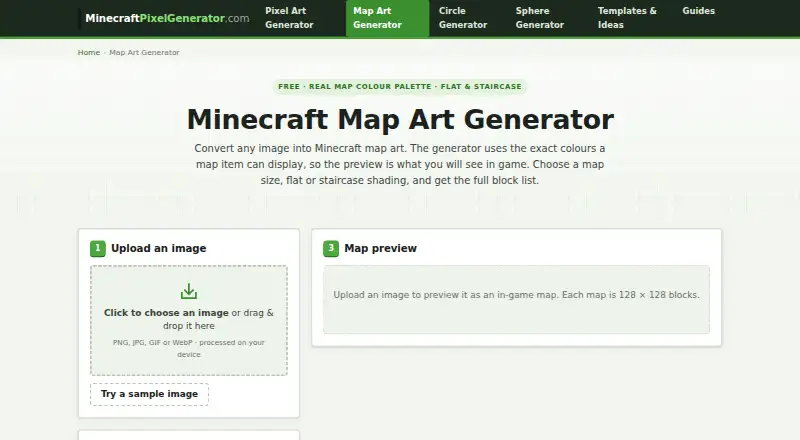
Minecraft Map Art Generator is a free web tool that converts PNG, JPG, GIF and WebP images into Minecraft map art. It uses the colours available to map items and offers flat or staircase shading. Each map covers 128 × 128 blocks, and the site describes projects of up to 4 × 4 maps. Settings include map width and height, image fit, build mode, dithering, brightness, contrast and selectable colour groups. Exports include a preview PNG, a block-list CSV and a height-map TXT file. The generator reports block counts and stacks; one map needs 16,384 surface blocks. Staircase shading uses height to create three usable shades per colour and exports relative column heights. The palette and staircase shading work with Java and Bedrock editions, but maps have about 60 base colours with shades, so images are simplified to the fixed palette. Processing happens in the browser: the device reads uploaded images, which are not sent to servers or stored. No account is required, and the site states there are no watermarks or usage limits.
Who it suits
It suits Minecraft players who want to turn an image into a buildable map-art plan, with block counts and placement-related exports. It supports Java and Bedrock, though the fixed map palette simplifies the source image.
What it does well
- Accepts PNG, JPG, GIF and WebP
- Exports block lists and height maps
- Supports Java and Bedrock editions
- Processes images in the browser
- No account or watermark is stated
What to know first
- Map colours are limited to a fixed palette
- One map requires 16,384 surface blocks
Limits
The Free plan costs nothing, with no sign-up, watermark, or usage limits. Map colours are limited to about 60 base colours with shades, and the site describes support for projects up to 4 × 4 maps.
Plans
| Plan | Billed and limits | Price |
|---|---|---|
| Free | browser-based · no sign-up · no watermark · no limits | Free |
As minecraftpixelgenerator.com lists them, read 30 Sept 2026. The maker's own page has the final word.
Getting started
- Open https://minecraftpixelgenerator.com/map-art-generator/.
- Use it in a web browser; the site states that no account is required.
- Provide a PNG, JPG, GIF, or WebP image.
- Set map dimensions, image fit, build mode, and image controls.
- Choose colour groups and generate the map art.
- Export a preview PNG, block-list CSV, or height-map TXT file.
Overview
Minecraft Map Art Generator is a free web utility for turning ordinary image files into Minecraft map-art plans. It suits builders who want material calculations, placement guidance and exportable build data without creating an account. The main reason to choose it is the combination of image controls and practical construction files; the main compromise is that every result must fit Minecraft’s relatively small map palette.
Key features
The tool accepts PNG, JPG, GIF and WebP images and converts them using the colours a Minecraft map can actually display. You can set map width and height, choose how the image fits, adjust brightness and contrast, apply dithering, and select colour groups. These controls are useful when a source image needs to be made more legible at map scale, although they cannot preserve colours outside roughly 60 base map colours and their shades.
Each generated map covers 128 × 128 blocks, meaning 16,384 surface blocks for one map. The site describes projects of up to 4 × 4 maps, and the entry supports as many as 16 maps per image. That capacity makes it a practical planner for murals and other multi-map designs, but large builds still involve substantial block placement.
Flat and staircase modes give builders a meaningful structural choice. Flat mode keeps the design on one level and is the better fit when straightforward placement matters. Staircase mode uses height-based shading to provide three usable shades per colour and exports relative column heights, making it worthwhile when vertical variation can improve the image and the builder is prepared to construct changing elevations.
Exports include a preview PNG, a block-list CSV and a height-map TXT file. Exact block counts and stack totals help with gathering materials before construction, while placement guidance turns the conversion into a build plan rather than just a colour preview.
The palette and staircase shading work in both Java and Bedrock editions. Processing happens in the browser through HTML5 canvas: the device reads the uploaded image, and the image is not sent to or stored on a server. There are no accounts, watermarks or usage limits, which removes sign-up friction for occasional and repeat projects. The site asks users to report incorrect colours or missing blocks so those issues can be addressed. MinecraftPixelGenerator.com is an independent fan project and is not affiliated with Mojang or Microsoft.
Pricing
The Free plan costs nothing and runs in the browser with no sign-up, watermark or usage limit. It is a strong fit for anyone from a one-off map maker to a creator planning repeated builds, since there are no stated quotas or seat restrictions to outgrow. There is no paid tier to unlock larger exports or additional controls; the practical limit is the generator’s stated support for projects up to 4 × 4 maps and the game’s palette itself.
Platforms
This is a web application, so it runs in a browser rather than as a separate desktop or mobile installation. Java and Bedrock map colours and staircase shading are supported.
Who it's for
Choose it if you want a no-account workflow that converts your own image, calculates exact materials and supplies CSV and height-map files for construction. It is especially well suited to builders planning multi-map murals, or to players who need staircase shading and relative heights. Look elsewhere if you require the original image’s full colour range or a workflow built around an editor outside the browser.
Pros and cons
- Pros: Free with no sign-up, watermarks or usage limits, so repeated projects incur no stated access cost.
- Pros: PNG, JPG, GIF and WebP input plus brightness, contrast, dithering, fit and colour-group controls provide useful ways to adapt an image before conversion.
- Pros: Preview PNG, block-list CSV and height-map TXT exports, with exact block and stack counts, make material planning and placement more concrete.
- Pros: Browser-side processing keeps uploaded images on the device instead of sending or storing them on a server.
- Cons: Minecraft’s roughly 60 base colours and shades force simplification, so images with subtle or broad colour ranges will lose nuance.
- Cons: Staircase shading adds construction complexity because its relative column heights require a variable-height build.
- Cons: A single map already requires 16,384 surface blocks, so even the stated 4 × 4 capacity represents a large building commitment.
Alternatives
Browse Minecraft Map Art Generators if you want a wider directory comparison. BlocksItems Map Art Generator is another free web option with no account requirement. Pick ImageToMapMC instead when a MIT-licensed Windows or Linux desktop application is preferable. MakeBead Minecraft Map Art Generator suits users who want browser conversion with map_N.dat and build-file exports. Choose mc-api Map Art Converter for an API or web service; each conversion uses one credit and there is no availability or response-time guarantee. MCCircle Minecraft Map Art Generator is a free web alternative without account or subscription requirements. SchemForge Map Art Generator offers one free build each day, a 3D voxel preview and private build history, with a 48-hour unlimited option for 0.99 USD once. MC Map Item Tool is a free self-hosted or web option with no limits stated. Minecraft Map Art Generator by Joshua Dobson is another completely free web choice.
Verdict
Minecraft Map Art Generator is the right pick for builders who want free, private, no-sign-up conversion with exact material lists and height-aware exports for Java or Bedrock. Choose it for planning and executing map art, especially multi-map work; look elsewhere when preserving detailed colour is more important than fitting the image to Minecraft’s fixed palette, or when you need a desktop, API or 3D-preview workflow.
Verdict
The generator pairs image conversion with block and height-map exports, making it useful for planning map-art builds. Expect the result to be simplified by Minecraft’s limited map palette.
Questions
How much does Minecraft Map Art Generator cost?
The Free plan costs nothing. The site states there are no usage limits.
Do I need an account?
No. The site states that no account is required and there are no watermarks.
Which image formats can I use?
It accepts PNG, JPG, GIF, and WebP images.
Does it support Java and Bedrock?
Yes. Its map-colour palette and staircase shading work on both editions.
What files can I export?
You can export a preview PNG, block-list CSV, and height-map TXT file.
Are uploaded images stored or sent to servers?
Processing runs in the browser, and uploaded images are read by your device rather than sent to servers or stored.
Facts from Minecraft Map Art Generator's own pages
- Account requirements
- The site states there are no accounts, watermarks or usage limits. · minecraftpixelgenerator.com, 30 Sept 2026
- Affiliation
- MinecraftPixelGenerator.com says it is an independent fan project unaffiliated with Mojang or Microsoft. · minecraftpixelgenerator.com, 30 Sept 2026
- Build modes
- Supports flat and staircase map-art shading modes. · minecraftpixelgenerator.com, 30 Sept 2026
- Controls
- Map settings include map width and height, image fit, build mode, dithering, brightness, contrast and selectable colour groups. · minecraftpixelgenerator.com, 30 Sept 2026
- Edition support
- The map-colour palette and staircase shading work on both Java and Bedrock editions. · minecraftpixelgenerator.com, 30 Sept 2026
- Exports
- Exports a preview PNG, block-list CSV and height-map TXT file. · minecraftpixelgenerator.com, 30 Sept 2026
- Image conversion
- Converts PNG, JPG, GIF or WebP images into Minecraft map art using the exact colours a map item can display. · minecraftpixelgenerator.com, 30 Sept 2026
- Large projects
- The site describes the map-art generator as supporting up to 4 × 4 maps. · minecraftpixelgenerator.com, 30 Sept 2026
- Map dimensions
- Each generated map covers 128 × 128 blocks. · minecraftpixelgenerator.com, 30 Sept 2026
- Material counts
- The generator lists exact block counts and stacks, with one map requiring 16,384 surface blocks. · minecraftpixelgenerator.com, 30 Sept 2026
- Palette limitation
- Maps display about 60 base colours with shades, so generated images are simplified to that fixed palette. · minecraftpixelgenerator.com, 30 Sept 2026
- Privacy
- Processing runs in the browser with HTML5 canvas; uploaded images are read by the device, not sent to servers or stored. · minecraftpixelgenerator.com, 30 Sept 2026
- Staircase shading
- Staircase mode uses height-based map shading to provide three usable shades per colour and exports relative column heights. · minecraftpixelgenerator.com, 30 Sept 2026
- Support
- The site asks users to report incorrect colours or missing blocks so they can be fixed. · minecraftpixelgenerator.com, 30 Sept 2026
Where Minecraft Map Art Generator stands on Freedom251
- Minecraft Map Art Generators#11 of 20