Freedom251 › Minecraft Map Art Generators
MapartCraft
What MapartCraft is
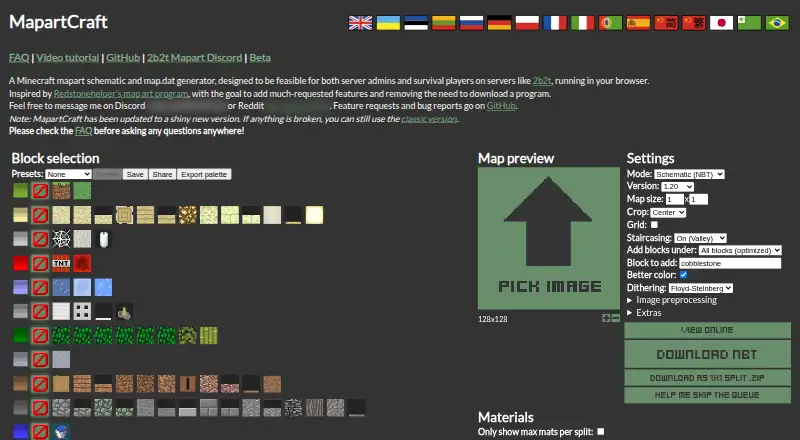
MapartCraft is a free browser-based tool for converting images into Minecraft map art and generating schematics and map.dat files. It is designed for server admins and survival players, including those on servers such as 2b2t, and runs in a browser rather than requiring a program download. A 128×128 source image is recommended. Image controls include preprocessing, color accuracy, dithering, brightness, contrast, saturation, and background options for transparent images. Staircasing can make the result 3D and is described as providing three times the colors; additional modes include full-dark, full-light, and full-unobtainable. Users can select blocks, save or delete presets, share selections by link, and configure custom blocks. Generated schematics can be previewed online and downloaded as NBT files or ZIPs split into 1×1 chunks. A materials section lists the blocks and quantities needed, with an option to show maximum materials per split. The site also offers a color palette export for Paint.NET, an FAQ, and a video tutorial.
Who it suits
MapartCraft suits Minecraft server admins and survival players who want to turn images into map art. It also provides block selection, materials lists, and downloadable schematics for the resulting builds.
What it does well
- Runs in a browser without a program download
- Provides online schematic previews
- Exports NBT files and chunked ZIPs
- Lists required blocks and quantities
- Supports custom blocks and palette sharing
What to know first
- A 128×128 source image is recommended
- The page notes a newer version is available
Getting started
- Open the MapartCraft website in a browser.
- Choose a source image for conversion.
- Adjust image and color settings, and select or configure blocks.
- Preview the generated schematic online.
- Download the NBT file or a ZIP split into 1×1 chunks.
Verdict
MapartCraft brings image conversion, block controls, previews, exports, and material counts into a browser-based workflow. Its image settings and custom block controls offer ways to adjust map art before downloading.
Questions
How much does MapartCraft cost?
MapartCraft is free, with a free plan.
Which platforms does it support?
It runs on the web in a browser.
What files can it generate?
It generates Minecraft mapart schematics and map.dat files, with NBT and chunked ZIP download options.
Can I control the blocks and colors?
Yes. Users can select blocks, save or delete presets, share selections by link, and set custom blocks. Image controls include color accuracy and palette-related settings.
Does it provide placement or material guidance?
It includes a materials section showing the blocks and quantities needed, with an option to show maximum materials per split.
Is MapartCraft open source?
The maker's GitHub repository describes it as a static React website and lists the project under the GPL-3.0 license.
Facts from MapartCraft's own pages
- Block selection
- Users can select blocks, save or delete presets, and share their selected blocks as a link. · mapartcraft.maximpixel.dev, 30 Sept 2026
- Browser-based
- The maker describes MapartCraft as running in a browser and says it was designed to avoid downloading a program. · mapartcraft.maximpixel.dev, 30 Sept 2026
- Color controls
- Settings include better color accuracy, dithering, image preprocessing, brightness, contrast, saturation, and transparent-image background options. · mapartcraft.maximpixel.dev, 30 Sept 2026
- Custom blocks
- The interface includes controls to add custom blocks, including a block name, NBT tags, color set, support and flammability options, and Minecraft versions. · mapartcraft.maximpixel.dev, 30 Sept 2026
- Exports
- The page offers NBT downloads and ZIP downloads split into 1×1 chunks. · mapartcraft.maximpixel.dev, 30 Sept 2026
- Help
- The maker links to an FAQ and video tutorial and asks users to check the FAQ before asking questions. · mapartcraft.maximpixel.dev, 30 Sept 2026
- Image conversion
- It converts source images into Minecraft map art, with a 128×128 source image recommended for best results. · mapartcraft.maximpixel.dev, 30 Sept 2026
- Inspiration
- The maker says MapartCraft was inspired by Redstonehelper’s map art program. · mapartcraft.maximpixel.dev, 30 Sept 2026
- Intended users
- It is designed for server admins and survival players on servers such as 2b2t. · mapartcraft.maximpixel.dev, 30 Sept 2026
- License
- The GitHub repository lists the project under the GPL-3.0 license. · github.com, 30 Sept 2026
- Materials
- A materials section lists the blocks and quantities needed for the generated map art, with an option to show maximum materials per split. · mapartcraft.maximpixel.dev, 30 Sept 2026
- Minecraft versions
- The custom block controls list versions from 1.12.2 through 1.20. · mapartcraft.maximpixel.dev, 30 Sept 2026
- Open-source project
- The maker’s GitHub repository describes MapartCraft as a static React website and provides instructions to build it with npm and Node. · github.com, 30 Sept 2026
- Palette export
- The site offers a color palette export for use in Paint.NET. · mapartcraft.maximpixel.dev, 30 Sept 2026
- Preview
- The generated schematic can be viewed online without downloading it. · mapartcraft.maximpixel.dev, 30 Sept 2026
- Purpose
- MapartCraft generates Minecraft mapart schematics and map.dat files. · mapartcraft.maximpixel.dev, 30 Sept 2026
- Staircasing
- Staircasing makes the map 3D and is described as providing three times the colors; extra modes include full-dark, full-light, and full-unobtainable. · mapartcraft.maximpixel.dev, 30 Sept 2026
- Support
- The maker directs feature requests and bug reports to GitHub and provides Discord and Reddit contact details. · mapartcraft.maximpixel.dev, 30 Sept 2026
- Updates
- The page says a new version is available and that the classic version remains usable if something is broken. · mapartcraft.maximpixel.dev, 30 Sept 2026
Where MapartCraft stands on Freedom251
- Minecraft Map Art Generators#9 of 20