Freedom251 › Minecraft Map Art Generators
MCCircle Minecraft Map Art Generator
Visit MCCircle Minecraft Map Art Generator Alternatives Pricing
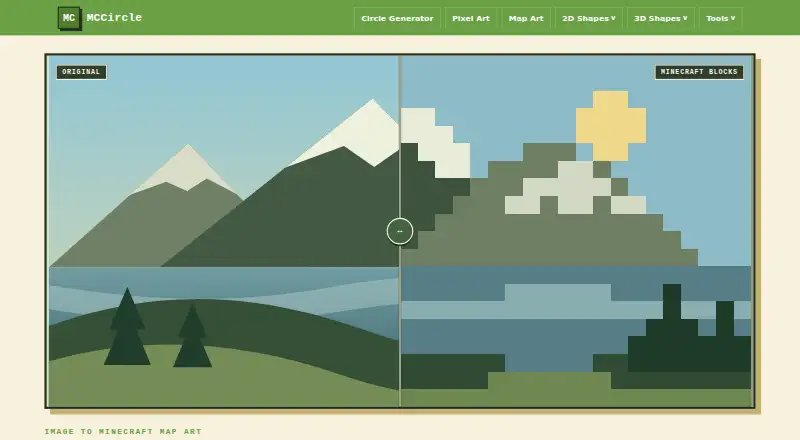
What MCCircle Minecraft Map Art Generator is
MCCircle Minecraft Map Art Generator turns an uploaded image into a Minecraft map-art blueprint with a tiled grid, block colors, material quantities, and a downloadable PNG guide. It accepts PNG, JPG, WebP, GIF, and BMP images, and the page says processing stays in the user’s browser. Choose a single 128×128 map, a two-map-wide 256×128 layout, a two-map-tall 128×256 layout, or a four-map 256×256 wall. Each section corresponds to one map item and stays aligned to the standard 128×128 map area. Palette choices include wool, concrete, terracotta, and natural blocks, with dithering controls. Each grid pixel represents one block, and the material list indicates how many blocks to gather. The instructions recommend concrete for clean colors, wool for easier gathering, and terracotta for softer art. MCCircle suggests the generator for map walls, logos, posters, skin faces, and survival-friendly planning. Simple art, icons, and high-contrast photos are recommended for conversion. The tool is free and requires no account or subscription; future monetization through lightweight ads is planned.
Who it suits
The generator suits Minecraft players planning map walls, logos, posters, skin faces, or survival-friendly builds. It is especially suited to simple art, icons, and high-contrast photos.
What it does well
- Processes images in the user's browser
- Offers layouts from one map to a four-map wall
- Shows block quantities in a material list
- Requires no account or subscription
What to know first
- Does not offer schematic export
- Palette choices are fixed to listed block types
Limits
The free plan does not include schematic export.
Plans
| Plan | Billed and limits | Price |
|---|---|---|
| Free | No account or subscription required | Free |
As mccircle.org lists them, read 5 Oct 2026. The maker's own page has the final word.
Getting started
- Open the Minecraft Map Art Generator webpage.
- Upload a PNG, JPG, WebP, GIF, or BMP image.
- Choose a one-map, two-map-wide, two-map-tall, or four-map layout.
- Select a wool, concrete, terracotta, or natural block palette and adjust dithering.
- Review the grid and material list, then download the PNG guide.
MCCircle Minecraft Map Art Generator turns an uploaded picture into a block-by-block Minecraft map plan. It is best for builders planning logos, posters, skin faces, or map walls who want material counts and a visual guide in a browser. Its fixed palette and absence of schematic export make it a weaker fit for creators who need editable files or highly customized block selection.
Overview
The generator translates image pixels into Minecraft blocks, with one map covering a 128×128-block area. You can choose a single map, a 256×128 two-map-wide layout, a 128×256 two-map-tall layout, or a 256×256 four-map wall. Every tile remains aligned to a standard 128×128 map item, giving large designs a predictable structure rather than an arbitrary canvas.
Simple artwork, icons, and high-contrast photographs produce the clearest results. The same approach is useful for map walls, logos, posters, and skin faces, but fine photographic shading is likely to lose definition when reduced to one block per grid pixel.
Key features
- Broad image input: PNG, JPG, WebP, GIF, and BMP files are accepted, so most common image libraries are covered.
- Palette choices: Flat-map palettes include wool, concrete, terracotta, and natural blocks. Dithering controls can blend available colors, while the palette itself remains fixed. The guidance favors concrete for crisp color fields, wool when gathering is easier, and terracotta for gentler-looking art.
- Build planning: The output combines a tiled grid preview with a material list that totals the blocks required. That turns a picture into a gathering checklist rather than leaving builders to estimate quantities.
- PNG guide: After conversion, you can download a PNG containing the block grid and material list for reference while building.
- Browser privacy: Image processing stays in the browser, which suits users who prefer not to send personal artwork to a remote service.
- Placement model: Each grid pixel corresponds to one Minecraft block, and each section represents one map item. This makes placement straightforward, but it also fixes the output to the selected map dimensions.
Pricing
MCCircle is free forever at no cost plan. There is no account or subscription requirement, and no free trial because the entire offering is free. The service says future monetization will use lightweight ads. There are no stated seat quotas or conversion caps, but the free plan does not add schematic export, and palette control is fixed.
This pricing suits occasional builders and survival players who need a plan without committing to software or an account. It gives up the editable build-file workflow that schematic-based tools provide, so large projects requiring import into construction tools may need another option.
Platforms
The generator runs on the web. No desktop installation is part of the offering, making it convenient on any device with a compatible browser but less suitable for users who require an offline desktop application.
Who it's for
Choose MCCircle for a no-cost map-art blueprint, especially when your source is a simple icon, logo, poster, or high-contrast image and you want block totals before gathering materials. Its map-aligned layouts also fit builders planning one to four connected map displays.
Look elsewhere if you need custom palettes, arbitrary canvas sizes, or schematic files for automated or assisted placement. The fixed palette and PNG-only guide keep the workflow visual and manual.
Pros and cons
Pros
- Free without an account: There is no subscription barrier or sign-up step.
- Useful scale options: Four layouts cover single-map designs through a 256×256 four-map wall.
- Practical material planning: The grid and block totals help organize survival-mode gathering.
- Private in-browser processing: Images stay on the user's device during conversion.
- Flexible file input: Five common image formats are supported.
Cons
- Fixed palette: You can choose among provided block families but cannot define a custom palette.
- No schematic export: The downloadable PNG is a reference guide, not an importable build file.
- Pixel-level limits: Subtle images and detail-heavy photographs are a poor match for one-block-per-pixel output.
Alternatives
For another free browser generator, BlocksItems Map Art Generator requires no account. Choose ImageToMapMC instead when a Windows or Linux desktop application and MIT licensing matter more than a web-only workflow.
MakeBead Minecraft Map Art Generator is another no-sign-up browser option that accepts JPEG, PNG, and WebP and exports map_N.dat and build files. For API access, mc-api Map Art Converter is free with one credit per conversion, but it offers no availability or response-time guarantee.
Minecraft Map Art Generator is a free browser tool with no sign-up, watermark, or stated limits. SchemForge Map Art Generator suits users wanting an interactive 3D voxel preview and private history, with one free build each day or a $0.99 USD 48-hour unlimited plan.
MC Map Item Tool is a free self-hosted or web alternative with no stated limits. Minecraft Map Art Generator by Joshua Dobson is another completely free web option. Browse Minecraft Map Art Generators for the wider category.
Verdict
MCCircle is a strong choice for builders who want a free, accountless way to turn suitable artwork into a map-aligned plan with block counts and a printable PNG guide. Choose it for straightforward survival planning and small-to-four-map displays; choose another tool when schematic export, custom materials, desktop use, or richer automation is the priority.
Verdict
MCCircle turns an image into a map-art plan with layout choices, material counts, and a PNG guide. It is free to use without an account, and the page says image processing stays in the browser.
Questions
Is MCCircle Minecraft Map Art Generator free?
Yes. It is described as free forever.
Do I need an account or subscription?
No. MCCircle says the generator requires neither an account nor a subscription.
Which image formats can I upload?
It accepts PNG, JPG, WebP, GIF, and BMP images.
What layouts can I create?
Options range from one 128×128 map to a 256×256 four-map wall, with two-map-wide and two-map-tall layouts in between.
What does the generator provide?
It provides a tiled grid preview, a material list with block quantities, and a downloadable PNG guide.
Does it export schematics?
No. Schematic export is not available.
Facts from MCCircle Minecraft Map Art Generator's own pages
- Block palettes
- The flat map palette offers wool, concrete, terracotta, and natural blocks, with dithering controls. · mccircle.org, 4 Oct 2026
- Blueprint alignment
- The page says each section becomes one Minecraft map item and each tile stays aligned to the standard 128×128 map area. · mccircle.org, 4 Oct 2026
- Blueprint output
- The generator provides a tiled grid preview and lets users download a PNG guide. · mccircle.org, 5 Oct 2026
- Browser processing
- The page states that image processing stays in the user's browser. · mccircle.org, 4 Oct 2026
- Build guide
- The generated plan includes a block grid and material list showing how many blocks to gather. · mccircle.org, 4 Oct 2026
- Build method
- The instructions map each grid pixel to one Minecraft block and recommend concrete for clean colors, wool for easier gathering, and terracotta for softer art. · mccircle.org, 5 Oct 2026
- Download
- After conversion, users can download a PNG guide with the block grid and material list. · mccircle.org, 4 Oct 2026
- Image formats
- The upload accepts PNG, JPG, WebP, GIF, and BMP files. · mccircle.org, 5 Oct 2026
- Intended uses
- The page suggests using the tool for map walls, logos, posters, skin faces, and survival-friendly block planning. · mccircle.org, 4 Oct 2026
- Map layouts
- Layouts include one map at 128×128, two maps wide at 256×128, two maps tall at 128×256, and a four-map wall at 256×256. · mccircle.org, 4 Oct 2026
- Map size
- The default single-map blueprint is 128×128 blocks, and layouts can combine up to four maps in a 256×256 wall. · mccircle.org, 5 Oct 2026
- Material counts
- The material list shows how many Minecraft blocks to gather for the plan. · mccircle.org, 5 Oct 2026
- Palettes
- Users can choose wool, concrete, terracotta, and natural block palettes, with dithering available. · mccircle.org, 5 Oct 2026
- Pricing and accounts
- MCCircle says it is free forever and does not require accounts or subscriptions; it says future monetization is planned through lightweight ads. · mccircle.org, 5 Oct 2026
- Privacy
- The page says image processing stays in the user's browser. · mccircle.org, 5 Oct 2026
- Purpose
- Turns an uploaded picture into a Minecraft map art blueprint. · mccircle.org, 5 Oct 2026
- Recommended images
- The instructions say simple art, icons, and high-contrast photos convert best. · mccircle.org, 5 Oct 2026
- Supported uses
- The page suggests it for map walls, logos, posters, and survival-friendly block planning. · mccircle.org, 5 Oct 2026
Where MCCircle Minecraft Map Art Generator stands on Freedom251
- Minecraft Map Art Generators#10 of 20