Freedom251 › Minecraft Map Art Generators

SchemForge Map Art Generator
What SchemForge Map Art Generator is
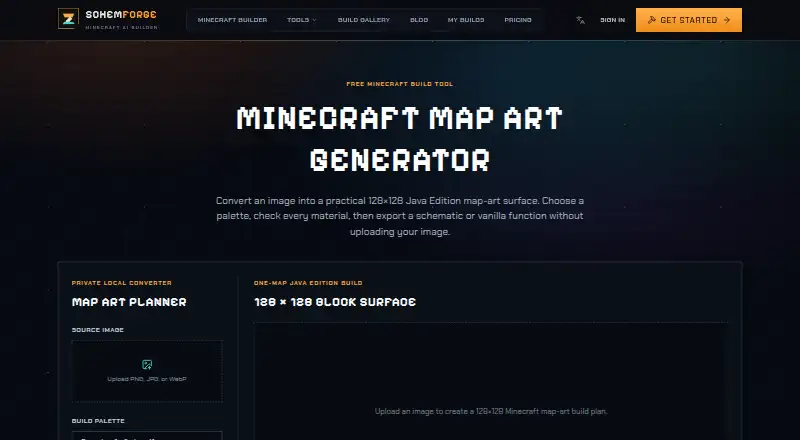
SchemForge Map Art Generator turns PNG, JPG, or WebP images into a 128×128 Minecraft map-art surface for Java Edition. You can choose survival-friendly wool and natural blocks or a brighter concrete palette, then export the result as a Sponge schematic v3 .schem file or a .mcfunction file for a data pack. Conversion, material counting, and downloads happen in your browser without uploading the image. Each build covers one map surface; the generator does not create Bedrock Edition files. To use an export, the site’s workflow is to import the schematic with a Java schematic tool or install the function in a data pack, then scan the finished surface with an in-game map. The free plan includes one build each day, an interactive 3D voxel preview, private build history, and no card requirement. A 48-hour unlimited option costs $0.99, paid once, and Creator costs $3.99 a month, billed $47.88 yearly. Paid unlimited access is subject to fair-use and technical rate limits.
Who it suits
It suits Java Edition players who want to turn an image into a buildable map surface and use schematic or data-pack workflows. It is not for players seeking Bedrock Edition exports.
What it does well
- Converts PNG, JPG, and WebP images.
- Offers wool, natural-block, and concrete palettes.
- Exports .schem and .mcfunction files.
- Processes images and downloads in the browser.
- Free plan includes one build each day.
What to know first
- Each build covers one 128×128 map surface.
- Does not create Bedrock Edition files.
- Paid unlimited access has fair-use and rate limits.
Limits
The free plan includes one build every day. Each conversion creates one 128×128 Java Edition map surface; the paid unlimited options remain subject to reasonable technical rate limits and fair use.
Plans
| Plan | Billed and limits | Price |
|---|---|---|
| Free | 1 free build every day · interactive 3D voxel preview · private build history · no card required | Free |
| 48h Unlimited | 48 hours · unlimited generations for 48 hours · verified .schem & .mcfunction · unlimited exports · no auto-renewal | $0.99, paid once |
| Creator | $47.88 yearly · unlimited builds while subscribed · verified .schem & .mcfunction · unlimited exports · private build history · cancel renewal anytime | $3.99 a month |
As schemforge.com lists them, read 1 Oct 2026. The maker's own page has the final word.
Getting started
- Open https://schemforge.com/minecraft-map-art-generator.
- Choose the Free plan for one build per day, or select a paid option.
- Convert a PNG, JPG, or WebP image and choose a palette.
- Download the .schem or .mcfunction export.
- Import the schematic with a Java schematic tool or install the function in a data pack.
- Scan the completed surface with an in-game map.
SchemForge Map Art Generator turns ordinary images into buildable Minecraft map surfaces through a browser workflow. It is aimed at Java Edition builders who need schematic or data-pack files, material counts, and placement guidance rather than a general image editor. The free tier makes occasional projects accessible, while the single-surface format and Java-only output make it a specialized choice.
Overview
Upload a PNG, JPG, or WebP image and the generator produces one 128×128 Minecraft map-art surface. That fixed size suits a single in-game map and keeps the workflow straightforward, but it is not designed for murals spanning multiple map tiles. Java Edition support is central: Bedrock players cannot use the generated files.
Image conversion, material counting, and both downloads happen in the browser without uploading the source image. SchemForge says builds are private by default and that it does not sell personal information. Application records are stored in Turso, while generated files and previews are stored in Cloudflare R2. Access controls and encrypted connections are cited as safeguards, alongside the usual warning that no online service can promise absolute security.
Key features
Two palette choices address different building priorities. A survival-friendly selection uses wool and natural blocks, making the result more practical for resource-conscious projects; a brighter concrete palette favors stronger color. Palette control is fixed beyond those choices, so users seeking custom block-by-block palettes will find the tool restrictive.
Exports include Sponge schematic v3 .schem files and .mcfunction files for data packs. The recommended process is to import the schematic with a Java schematic tool or install the function in a data pack, build the surface, and scan it with an in-game map. Material lists and placement guidance make the output more actionable than an image alone, especially for survival builders, but the workflow assumes familiarity with Java construction tools and data packs.
Pricing
The Free plan costs nothing and includes one free build every day, an interactive 3D voxel preview, private build history, and no card requirement. It is a sensible fit for occasional projects, though the daily build cap limits repeated iteration.
48h Unlimited costs 0.99 USD once, billed for 48 hours. It removes generation limits during that window and includes verified .schem and .mcfunction files plus unlimited exports, with no auto-renewal. This is the practical choice for a short, intensive build session rather than an ongoing library of projects.
Creator costs $3.99 a month, billed at $47.88 yearly. Subscribers receive unlimited builds while subscribed, verified exports in both formats, unlimited exports, and private build history, with renewal cancellable at any time. Paid unlimited use remains subject to reasonable technical rate limits and fair use; automated bulk generation, account sharing, and resale are prohibited.
Platforms
SchemForge runs on the web and exports for Java Edition. It provides schematic and data-pack files, but no Bedrock Edition files, so Bedrock-only players need another converter.
Who it's for
Choose it for Java builders converting personal images into one map surface and wanting a guided route from conversion to placement. The daily free build suits occasional creators, while the 48-hour pass fits a concentrated project and Creator suits regular users who need unlimited subscribed builds. Look elsewhere if you need Bedrock output, multi-map compositions, or freely configurable palettes.
Pros and cons
Pros
- Useful Java exports: Sponge v3 schematics and .mcfunction files support established Java build and data-pack workflows.
- Practical build information: Material counting and placement guidance help turn an image into a construction plan.
- Local image handling: Conversion and downloads run in the browser without sending the source image to the service.
- Flexible short-term pricing: The non-renewing 48-hour unlimited option avoids a continuing subscription for one-off projects.
Cons
- One surface only: Every conversion is limited to a single 128×128 map, preventing larger tiled designs in one operation.
- No Bedrock support: The exports are unusable for Bedrock Edition workflows.
- Fixed palette control: Builders cannot define their own block palette beyond the wool/natural or concrete choices.
- Free-plan ceiling: One build per day may be insufficient for extensive revisions.
Alternatives
Minecraft Map Art Generators is the broader directory for comparing tools in this category.
- BlocksItems Map Art Generator is a completely free web option with no account required.
- ImageToMapMC is the better fit when you want a MIT-licensed Windows or Linux desktop application.
- MakeBead Minecraft Map Art Generator runs without sign-up in a browser and adds map_N.dat and build-file exports.
- mc-api Map Art Converter suits API users; its free service uses one credit per conversion and offers no availability or response-time guarantee.
- MCCircle Minecraft Map Art Generator is a free web tool requiring no account or subscription.
- Minecraft Map Art Generator is free in the browser, with no sign-up, watermark, or limits.
- MC Map Item Tool is a self-hosted or web alternative with no limits stated.
- Minecraft Map Art Generator by Joshua Dobson is completely free to use.
Verdict
SchemForge is a strong match for Java Edition players who want a private, browser-based path from an image to schematic or data-pack files, with material guidance and an inexpensive burst option. Choose it for focused single-map projects and Java workflows. Look elsewhere for Bedrock exports, custom palettes, multi-surface artwork, or a free plan without a daily build limit.
Verdict
SchemForge gives Java Edition players a browser-based route from image to map-art exports, with a daily free build. Check the one-surface scope and Java-only exports before choosing it.
Questions
Is SchemForge Map Art Generator free?
Yes. The Free plan costs nothing and includes one build every day, an interactive 3D voxel preview, and private build history, with no card required.
What do the paid plans cost?
48h Unlimited costs $0.99, paid once, billed for 48 hours. Creator costs $3.99 a month, billed $47.88 yearly.
Which Minecraft editions does it support?
It supports Java Edition exports and does not create Bedrock Edition files.
What file formats can it export?
It exports Sponge schematic v3 .schem files and .mcfunction files for data packs.
Does the image get uploaded for conversion?
Conversion, material counting, and both downloads run in the browser without uploading the image.
How many maps does each conversion cover?
Each conversion is sized for one 128×128 Minecraft map surface.
Facts from SchemForge Map Art Generator's own pages
- Build workflow
- The site instructs users to import the schematic with a Java schematic tool or install the downloaded function in a data pack, then scan the completed surface with an in-game map. · schemforge.com, 1 Oct 2026
- Edition limit
- The map-art generator supports Java Edition exports and does not create Bedrock Edition files. · schemforge.com, 1 Oct 2026
- Exports
- The tool exports Sponge schematic v3 .schem files and .mcfunction files for data packs. · schemforge.com, 1 Oct 2026
- Fair-use limit
- Paid unlimited access is subject to reasonable technical rate limits and fair use, and automated bulk generation, account sharing, and resale are not permitted. · schemforge.com, 1 Oct 2026
- Image conversion
- The generator converts PNG, JPG, or WebP images into a 128×128 Java Edition Minecraft map-art surface. · schemforge.com, 1 Oct 2026
- Intended users
- The tool is for users who want to turn images into buildable Minecraft map surfaces and export them for Java schematic or data-pack workflows. · schemforge.com, 1 Oct 2026
- Local processing
- Image conversion, material counting, and both downloads run in the browser without uploading the image. · schemforge.com, 1 Oct 2026
- Map scope
- Every conversion is sized for one 128×128 Minecraft map surface. · schemforge.com, 1 Oct 2026
- Palette choices
- Users can choose survival-friendly wool and natural blocks or a brighter concrete palette. · schemforge.com, 1 Oct 2026
- Privacy and storage
- SchemForge says builds are private by default, does not sell personal information, and stores application records in Turso and generated files and previews in Cloudflare R2. · schemforge.com, 1 Oct 2026
- Security safeguards
- SchemForge says it uses access controls, encrypted network connections, and other reasonable safeguards, while noting that no online service can guarantee absolute security. · schemforge.com, 1 Oct 2026
- Support
- Privacy questions and requests can be sent to [email protected]. · schemforge.com, 1 Oct 2026
Where SchemForge Map Art Generator stands on Freedom251
- Minecraft Map Art Generators#14 of 20