Freedom251 › Minecraft Map Art Generators
BlocksItems Map Art Generator
What BlocksItems Map Art Generator is
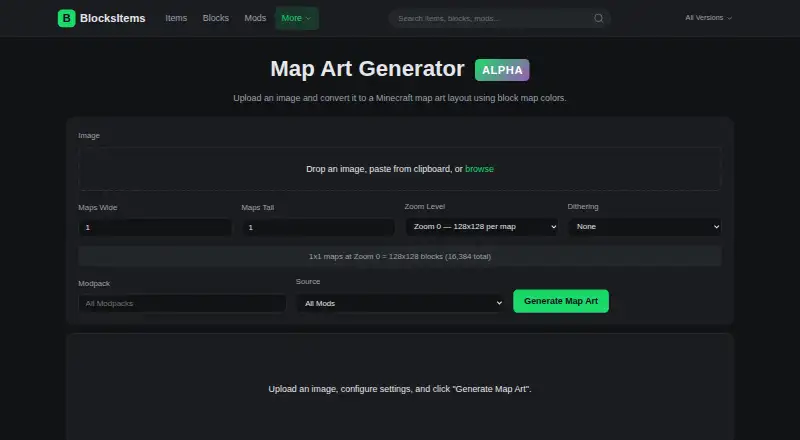
BlocksItems Map Art Generator converts an uploaded image into a Minecraft map art layout by matching each pixel to a block. You can provide an image by dragging and dropping it, pasting it from the clipboard, or browsing for a file. The blog describes map dimensions from 1×1 to 4×4 and zoom levels from 0 to 4; a single map at zoom 0 measures 128×128 blocks. Choose vanilla Minecraft blocks or blocks from more than 500 supported mods and modpacks. Pixel matching uses perceptual OKLAB color distance, and optional Floyd-Steinberg dithering can smooth gradients in photographic images. Once generated, the layout comes with a live preview, a material list, and a shareable link. The list shows each block’s icon, color swatch, full block ID, total count, and stack count. Exports include .schem, .litematic, and .nbt formats. The free web tool requires no account and offers custom palette control. The site says it is not an official Minecraft service or associated with Mojang or Microsoft.
Who it suits
It suits Minecraft players who want to turn an image into a block layout and export it for supported tools or formats. It may also suit developers interested in the documented generation and export API endpoints.
What it does well
- Free to use without an account.
- Supports vanilla blocks and blocks from 500+ mods and modpacks.
- Provides a preview, materials list, and shareable link.
- Exports .schem, .litematic, and .nbt files.
What to know first
- The site is not an official Minecraft service.
- The privacy policy says API usage logs are typically retained for 90 days.
- The site collects IP addresses and API usage data.
Plans
| Plan | Billed and limits | Price |
|---|---|---|
| Free | No account required · map-art generation · previews · materials · exports | Free |
As blocksitems.com lists them, read 15 Oct 2026. The maker's own page has the final word.
Getting started
- Open the Map Art Generator website.
- Add an image by dragging and dropping it, pasting it from the clipboard, or browsing for a file.
- Choose map dimensions, zoom, and a block palette.
- Optionally enable Floyd-Steinberg dithering.
- Generate the layout, then review the preview and materials list.
- Export as .schem, .litematic, or .nbt, or share the link.
Overview
BlocksItems Map Art Generator converts an image into a Minecraft map-art layout by matching pixels to blocks. It suits builders who want to work with modded palettes and take a generated layout into editing or structure tools. Its breadth of block choices and export formats is useful at no charge, but the web-only workflow and the site’s collection of IP addresses and API usage data may not suit everyone.
Key features
Images can be dragged in, pasted from the clipboard, or selected as a file. The blog describes layouts from 1×1 to 4×4 maps and zoom levels 0–4; one map at zoom 0 is 128×128 blocks. This gives builders room to scale a design, though the result is still shaped by Minecraft’s map grid.
Block selection spans vanilla Minecraft and more than 500 supported mods and modpacks. The generator matches pixels using perceptual OKLAB color distance, with optional Floyd-Steinberg dithering to smooth photographic gradients. That combination offers more palette flexibility than a vanilla-only approach, while dithering is an option rather than a guarantee that every image will translate cleanly.
A live preview lets builders inspect the generated composition. The materials list includes a block icon, color swatch, full block ID, total count, and stack count for each block, useful for planning a build or sourcing materials. A shareable link provides a way to pass a layout along.
Exports include .schem for WorldEdit, .litematic for Litematica, and .nbt for vanilla structures, Create, and data packs. The API documentation also covers generation and export endpoints, so the tool can suit API-oriented workflows as well as manual use.
Pricing
The Free plan costs nothing and is completely free to use, with no account required. It includes schematic export and a materials list; the service also offers the described image inputs, palette options, previews, and export formats. There is no free trial because the plan itself is free. No seat or usage quota is stated for the plan.
Platforms
BlocksItems Map Art Generator runs on the web. It is not a desktop application, and its output is intended for Minecraft-related building tools and formats. The site says it is not an official Minecraft service and is not approved by or associated with Mojang or Microsoft.
Who it's for
This is a strong fit for Minecraft builders who want to turn images into layouts, especially those using modded blocks or needing material counts and files for WorldEdit, Litematica, or structure workflows. The documented API endpoints may also suit developers building around map-art generation. It is a weaker fit for people who need a native desktop app or prefer not to use a service whose policy describes IP and API usage logging.
Pros and cons
- Pro: Vanilla blocks and 500+ supported mods and modpacks widen palette choices for builds beyond the base game.
- Pro: Multiple export formats and block-level material details make it easier to move from image layout to construction planning.
- Pro: No account is required for the free plan, lowering friction for occasional use.
- Con: It is web-only, so it does not serve builders seeking a Linux, Windows, or other desktop application.
- Con: The privacy policy says the service collects IP addresses and API usage data, uses essential and Google Analytics cookies, and typically retains API usage logs for 90 days.
Alternatives
Minecraft Map Art Generators is a useful place to compare more tools. Pick ImageToMapMC instead if you want a free MIT-licensed Windows or Linux desktop application. MakeBead Minecraft Map Art Generator is another free browser option, with JPEG, PNG, and WebP input and map_N.dat plus build-file exports.
Choose mc-api Map Art Converter if an API/web service is a better fit; its API charges one credit per conversion and has no availability or response-time guarantee. Minecraft Map Art Generator is a free browser-based option with no sign-up, watermark, or limits. SchemForge Map Art Generator offers one free build each day, an interactive 3D voxel preview, and private build history, with a 48-hour unlimited plan for $0.99, paid once.
Schemalook is a free online viewer and browser-tools option, with viewer uploads capped at 7 MB. Map Art Maker for Minecraft is an alternative available on Android, iOS, web, and Windows, with source under the MIT License. wWaypoints is another free option for Linux, macOS, and Windows.
Verdict
Choose BlocksItems Map Art Generator if you want a free, account-free way to create map-art layouts with mod-aware palettes, detailed material counts, and several useful export formats. Its main advantage is the range of blocks and downstream formats in one web tool; look elsewhere if you need a desktop workflow or want to avoid the stated IP and API-usage data collection.
Verdict
BlocksItems offers several image-input options, block sources, and export formats for map-art layouts. Note that the service is not affiliated with Mojang or Microsoft.
Questions
Is BlocksItems Map Art Generator free?
Yes. The Free plan costs nothing, and the tool requires no account.
Which platforms does it support?
It is available on the web.
What export formats are available?
It offers .schem for WorldEdit, .litematic for Litematica, and .nbt for vanilla structures, Create, and data packs.
Can I use modded blocks?
Yes. You can include blocks from more than 500 supported mods and modpacks, or choose vanilla Minecraft blocks.
Does it have an API?
Yes. Its API documentation includes generation and export endpoints, including schematic, Litematica, and structure NBT exports.
Is it an official Minecraft service?
No. BlocksItems says it is not an official Minecraft service and is not approved by or associated with Mojang or Microsoft.
Facts from BlocksItems Map Art Generator's own pages
- Analytics
- The site uses essential cookies and Google Analytics cookies, with a cookie-banner opt-out. · blocksitems.com, 15 Oct 2026
- API
- The API documentation includes map-art generation and export endpoints, including schematic, Litematica, and structure NBT exports. · blocksitems.com, 4 Oct 2026
- API authentication
- Basic API usage requires no key; optional API keys provide higher limits. · blocksitems.com, 15 Oct 2026
- API availability
- BlocksItems publishes a REST API with OpenAPI documentation and a /api/v1 base path. · blocksitems.com, 15 Oct 2026
- API exports
- API endpoints provide schematic, Litematica, and structure-NBT downloads for saved map art. · blocksitems.com, 15 Oct 2026
- API map-art limits
- The map-art API requires maps_wide and maps_tall values from 1 to 4 and zoom_level values from 0 to 4. · blocksitems.com, 15 Oct 2026
- API rate limit
- The documented free API tier allows 6,000 requests per minute without a key. · blocksitems.com, 15 Oct 2026
- API SDKs
- The documentation includes cURL, JavaScript, and Python request examples but does not identify an official SDK package. · blocksitems.com, 15 Oct 2026
- Block capacity
- At zoom level 0, one map is 128×128 blocks, or 16,384 blocks. · blocksitems.com, 15 Oct 2026
- Block sources
- Users can select vanilla blocks or include blocks from supported mods and modpacks. · blocksitems.com, 15 Oct 2026
- Color matching
- Pixel matching uses perceptual OKLAB color distance. · blocksitems.com, 15 Oct 2026
- Data security
- The privacy policy says BlocksItems uses technical and organizational measures to protect information and notes that internet transmission is not 100% secure. · blocksitems.com, 4 Oct 2026
- Dithering
- Floyd-Steinberg dithering is available for smoothing image gradients. · blocksitems.com, 15 Oct 2026
- Exports
- The generator offers .schem for WorldEdit, .litematic for Litematica, and .nbt for vanilla structures, Create, and data packs. · blocksitems.com, 4 Oct 2026
- Image input
- Images can be added by drag and drop, clipboard paste, or file browsing. · blocksitems.com, 15 Oct 2026
- Independent alternative
- The open-source Arachne project describes itself as a browser-based Minecraft map-art generator that outputs palette-optimized schematics. · github.com, 15 Oct 2026
- Independent alternative licence
- Arachne's repository is licensed GPL-3.0-only. · github.com, 15 Oct 2026
- Independent alternative privacy
- Arachne says its image processing stays in the browser and that it has no backend analytics or tracking. · github.com, 15 Oct 2026
- Independent alternative scope
- Arachne documents support for grids from one map up to 16×16 maps, exceeding BlocksItems' documented 4×4 range. · github.com, 15 Oct 2026
- Independent map-art constraint
- A Reddit commenter notes that block height changes the color displayed on a Minecraft map, so builders need to account for elevation. · reddit.com, 15 Oct 2026
- Independent workflow context
- A Reddit commenter recommends generating a schematic, testing it in a creative world with Litematica, and then using Litematica's material list for survival construction. · reddit.com, 15 Oct 2026
- Launch news
- BlocksItems announced the Map Art Generator on February 23, 2025. · blocksitems.com, 15 Oct 2026
- Licence
- The terms say the website design, API structure, and original documentation are BlocksItems property; no open-source licence is stated. · blocksitems.com, 15 Oct 2026
- Litematica export
- The generator exports .litematic files for Litematica. · blocksitems.com, 15 Oct 2026
Where BlocksItems Map Art Generator stands on Freedom251
- Minecraft Map Art Generators#2 of 20