Freedom251 › Minecraft Map Art Generators
Map Art Maker for Minecraft
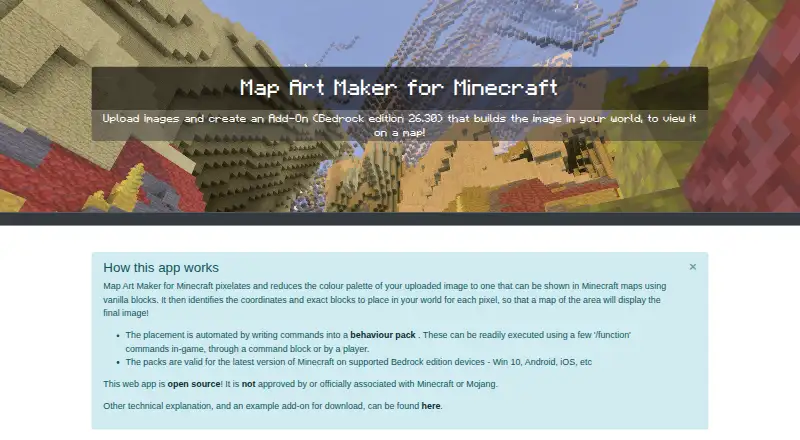
What Map Art Maker for Minecraft is
Map Art Maker for Minecraft converts an uploaded image into Minecraft map art by reducing it to pixels and matching its colors to vanilla blocks. It can create a Bedrock behavior pack with commands that build the image in a Minecraft world, or provide a Survival Guide showing where to place blocks manually. Generated commands can run through in-game functions, a command block or a player. Options include replacing only air blocks, moving the nearest player between zones, or using structures instead of setblock commands. The maker describes generated packs as valid for the latest Minecraft Bedrock version on supported Windows 10, Android and iOS devices. The browser app can cache about 3 MB of resources for offline use through its PWA feature. Image processing occurs in the browser, and the project says processing data is not sent to its server. Using generated functions requires cheats and operator permissions; manual placement is an alternative for players who want cheats off or to earn achievements. The source code is available under the MIT License.
Who it suits
It suits Minecraft Bedrock players who want to turn an image into map art, either with a generated pack or manual placement guidance. The maker recommends desktop or laptop use and requires JavaScript.
What it does well
- Creates Bedrock behavior packs from uploaded images
- Survival Guide supports block-by-block manual placement
- Can cache about 3 MB for offline use
- Image processing runs in the browser
- Source code is available under the MIT License
What to know first
- Generated functions require cheats and operator permissions
- Large areas or more maps may lower image quality
- Height limits can produce noise or stripy artifacts
- The author warns of possible inaccuracies and glitches
Limits
Using generated functions requires cheats and operator permissions. Expanding the build area or map count can reduce image quality, while a restrictive 3D height limit can create noise or stripy artifacts.
Getting started
- Open the app in a browser at https://gd-codes.github.io/mc-pixelart-maker/.
- The maker recommends using a desktop or laptop; JavaScript must be enabled.
- Upload an image and set the desired pixelation and color palette.
- Generate a Bedrock behavior pack or use the Survival Guide for manual placement.
- For offline use, allow the app to cache about 3 MB of resources through its PWA feature.
Map Art Maker for Minecraft converts images into block-based map art in a browser. It suits Bedrock players who want either generated placement commands or a manual building guide. Its range of placement options is useful, but image constraints and the permissions needed for automation can narrow its appeal.
Overview
The tool pixelates an uploaded image and matches its colors to vanilla blocks, producing a design for Minecraft maps. For Bedrock worlds, it can generate a behaviour pack that builds the design; a Survival Guide provides block-by-block instructions for players who would rather place the blocks themselves.
The project dates to 2020, and its source is available under the MIT License. It is not affiliated with Minecraft, Mojang Studios, or Microsoft. The author invites feedback through GitHub issues and pull requests, while cautioning that the tool may contain glitches and updates may lag behind Minecraft changes.
Key features
Conversion and placement
Color reduction to a map-compatible palette turns an image into a build plan, and palette control is supported. The generator can produce schematic exports as well as placement guidance. For Bedrock, generated commands can be run through in-game functions, a command block, or a player.
Pack options include replacing only air blocks, teleporting the nearest player between zones, and using structures instead of setblock commands. That gives builders choices about how an image is placed, though using generated functions requires cheats and operator permissions. Players who want to keep cheats off or retain achievements can follow the manual guide instead.
Image constraints and privacy
Increasing the build area or number of maps may reduce image quality. A restrictive 3D height limit can also introduce noise or stripe-like artifacts, so the tool is a weaker fit when a design depends on fine detail or a constrained build height.
Image processing runs in the browser, with no image data sent to the server for processing. The app can cache about 3 MB of resources for offline use through its PWA feature, and may be installable as a PWA where supported. JavaScript must be enabled; desktop or laptop use is recommended, and Internet Explorer is not fully compatible.
Pricing
Map Art Maker is free, with a free plan. There are no paid tiers or renewal terms to weigh. The trade-off is that the tool's practical limits come from image size, height constraints, and Bedrock permissions rather than a paid upgrade.
Platforms
The app runs in a browser and is listed for Android, iOS, web, and Windows. Generated packs are described as valid for the latest Minecraft Bedrock version on supported devices, including Windows 10, Android, and iOS. Java support is not available, so Java Edition players should choose another tool.
Who it's for
This is a good fit for Bedrock players who want to convert an image into map art and choose between command-assisted placement and a manual guide. It is less suitable for Java players, builders who need dependable fine detail at larger sizes, or anyone who wants automated placement without enabling cheats and operator permissions.
Pros and cons
- Two building routes: a generated Bedrock pack and block-by-block guidance accommodate both command users and manual builders.
- Flexible pack options: air-only replacement, player teleporting, and structures give builders alternatives to straightforward setblock commands.
- Browser-side image processing: image data is not sent to the server for processing, and cached resources can support offline use.
- Quality can suffer at scale: larger areas, more maps, and restrictive height limits can undermine the image.
- Automation has a permissions cost: generated functions require cheats and operator permissions; Java Edition is unsupported.
Alternatives
Minecraft Map Art Generators is a useful starting point for comparing tools across the category.
- wWaypoints is another free option for Linux, macOS, and Windows users; its maker identifies themself as the creator and as someone who makes Minecraft mods, videos, and tools.
- Choose ImageToMapMC if you want free MIT-licensed desktop software for Windows or Linux.
- MakeBead Minecraft Map Art Generator is a free browser option with no sign-up, JPEG, PNG, and WebP input, and exports that include map_N.dat and build files.
- MapartCraft is another free web-based option.
- Minecraft Map Art Generator is a free browser tool with no sign-up, watermark, or limits.
- SchemForge Map Art Generator offers a free daily build, an interactive 3D voxel preview, and private build history; a 48-hour unlimited option costs $0.99, paid once, billed for 48 hours.
- CraftMC Minecraft Map Art Generator is another free web-based choice.
- Image to Minecraft Map is another free web-based choice.
Verdict
Choose Map Art Maker if you play Bedrock and want a free image-to-map workflow with both generated placement and a manual fallback. Look elsewhere if you play Java, need to preserve cheats-free play while automating construction, or require consistent detail in large or height-constrained designs.
Verdict
Map Art Maker offers both command-based construction and manual placement guidance for Bedrock map art. Image size and height limits can affect results, and generated functions require cheats and operator permissions.
Questions
Is Map Art Maker for Minecraft free?
Yes. It is free and has a free plan.
Which platforms does it support?
Generated packs are described as valid for the latest Minecraft Bedrock version on supported devices including Windows 10, Android, and iOS.
Does it support Java Edition?
No. Bedrock support is listed; Java support is not.
Is the project open source?
Yes. Its source code is available on GitHub under the MIT License.
Does using the generated pack require cheats?
Using generated functions requires cheats and operator permissions. The Survival Guide provides block-by-block placement without commands.
Can it work offline?
It can cache about 3 MB of resources for offline use through its PWA feature.
Facts from Map Art Maker for Minecraft's own pages
- Add-on generation
- It creates a Bedrock behavior pack with commands to build the image in a Minecraft world. · gd-codes.github.io, 3 Oct 2026
- Bedrock add-on
- It generates a Minecraft Bedrock behaviour pack that places the blocks using in-game functions. · gd-codes.github.io, 2 Oct 2026
- Browser and offline use
- The app runs in the browser, can work offline after caching about 3 MB of resources, and may be installable as a PWA where supported. · gd-codes.github.io, 2 Oct 2026
- Compatibility caveat
- The author says functionality may be inaccurate or contain glitches and that updates may take time to catch up with Minecraft changes. · gd-codes.github.io, 3 Oct 2026
- Cookies
- The maker says the site does not use cookies. · gd-codes.github.io, 3 Oct 2026
- Founded
- 2020 · gd-codes.github.io, 28 Sept 2026
- Image limits
- Expanding the area or number of maps may reduce image quality, and a restrictive 3D height limit may cause noise or stripy artifacts. · gd-codes.github.io, 2 Oct 2026
- Image privacy
- The manual says image processing runs entirely in the browser and no data is sent to the server for processing. · gd-codes.github.io, 2 Oct 2026
- Image processing
- It pixelates images and reduces their colors to a palette that can appear on Minecraft maps. · gd-codes.github.io, 3 Oct 2026
- License and affiliation
- The source code is available on GitHub under the MIT License, and the project says it is not associated with Minecraft, Mojang Studios, or Microsoft. · gd-codes.github.io, 2 Oct 2026
- Maintenance caveat
- The author says the app is maintained with occasional modifications and does not guarantee that its functionality is always correct or accurate. · gd-codes.github.io, 2 Oct 2026
- Manual building
- A Survival Guide can show block-by-block placement for users who want to build the art without commands. · gd-codes.github.io, 3 Oct 2026
- Minecraft permissions
- Using generated functions requires cheats and Operator permissions; the maker suggests manual placement for worlds where users want achievements or cheats off. · gd-codes.github.io, 3 Oct 2026
- Offline use
- The app can cache about 3 MB of resources for offline use through its PWA feature. · gd-codes.github.io, 3 Oct 2026
- Open source
- The project source is available on GitHub under the MIT License. · gd-codes.github.io, 3 Oct 2026
- Pack options
- The generator offers options to replace only air blocks, teleport the nearest player between zones, or use structures instead of setblock commands. · gd-codes.github.io, 2 Oct 2026
- Placement options
- Generated commands can run through in-game functions, a command block, or a player. · gd-codes.github.io, 3 Oct 2026
- Privacy
- The app runs entirely in the browser and says no data is sent to the server for processing. · gd-codes.github.io, 3 Oct 2026
- Purpose
- The app converts an uploaded image into Minecraft map art using vanilla blocks. · gd-codes.github.io, 3 Oct 2026
- Requirements
- JavaScript must be enabled, and the maker recommends using a desktop or laptop with a recent Chrome or Edge browser. · gd-codes.github.io, 3 Oct 2026
- Support
- The author invites feedback and suggestions through GitHub issues or pull requests. · gd-codes.github.io, 3 Oct 2026
- Supported devices
- The maker says its packs are valid for the latest Minecraft Bedrock version on supported devices including Windows 10, Android, and iOS. · gd-codes.github.io, 3 Oct 2026
- Supported game devices
- The generated packs are described as valid for the latest Minecraft version on supported Bedrock devices, including Windows 10, Android, and iOS. · gd-codes.github.io, 2 Oct 2026
Where Map Art Maker for Minecraft stands on Freedom251
- Minecraft Map Art Generators#4 of 20