Freedom251 › Minecraft Map Art Generators
mc-api Map Art Converter
What mc-api Map Art Converter is
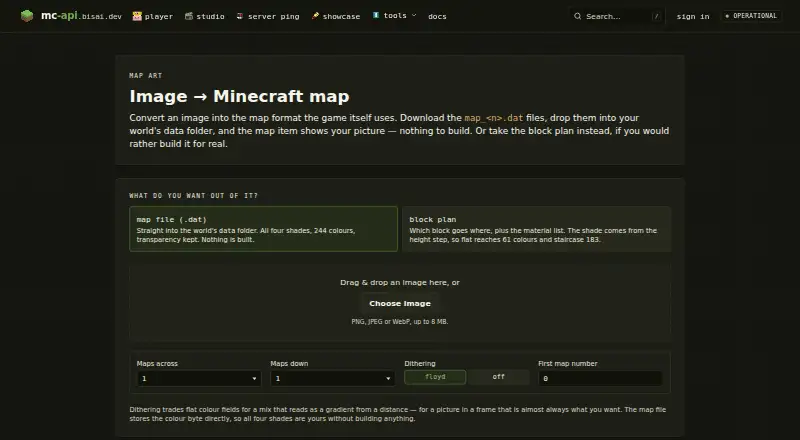
mc-api Map Art Converter turns an image into a Minecraft map file or a block plan for building the picture in-game. The web tool accepts PNG, JPEG, and WebP images up to 8 MB. Map-file output preserves transparency and supports four shades across 244 colours. Block plans show where each block goes and include a materials list; flat plans reach 61 colours and staircase plans 183. Users can choose Floyd–Steinberg dithering or no dithering, though palette control is fixed. The API accepts raw image bytes and can return a .dat map file, a PNG preview, or a JSON block plan. A conversion returns one map file, or a ZIP if the map grid is larger than one map. Downloaded map_<n>.dat files go in a world's data folder for the map item to display the picture. The service is free of charge, and each API conversion uses one credit. Its provider says availability, response times, and data retention are not guaranteed; the site is not affiliated with Mojang or Microsoft.
Who it suits
This tool suits Minecraft players who want to convert an image into a map or a build plan with a materials list. Its API also suits developers who can work with raw image bytes and the listed output formats.
What it does well
- Accepts PNG, JPEG, and WebP images up to 8 MB.
- Map output preserves transparency and supports 244 colours.
- Block plans include placement details and a materials list.
- API can return map files, previews, or JSON plans.
What to know first
- Palette control is fixed.
- Each API conversion uses one credit.
- The provider does not guarantee availability or response times.
- Images are limited to 8 MB.
Limits
The free service charges no fee, and each API conversion uses one credit. No availability, response-time, feature, or data-retention guarantees are provided.
Plans
| Plan | Billed and limits | Price |
|---|---|---|
| Free service | Service is free of charge · map art API: one credit per conversion · no availability or response-time guarantee | Free |
As mc-api.bisai.dev lists them, read 4 Oct 2026. The maker's own page has the final word.
Getting started
- Open https://mc-api.bisai.dev/mapart.
- Upload a PNG, JPEG, or WebP image up to 8 MB.
- Choose map-file or block-plan output and select dithering or no dithering.
- For API use, send raw image bytes and request a .dat file, PNG preview, or JSON block plan.
- Place downloaded map_<n>.dat files in a world's data folder to display the picture.
mc-api Map Art Converter turns images into Minecraft map files or construction plans, and suits players who want either output or need to automate conversion through an API. Its range of output formats makes it useful for both map-item creators and builders, but the fixed palette and lack of service guarantees are meaningful constraints.
Overview
Upload a PNG, JPEG, or WebP image up to 8 MB and choose a map file or a building plan. Map files preserve transparency and use all four shades across 244 colours. Flat plans reach 61 colours, while staircase plans reach 183; those lower ranges make the plans useful for construction, but they do not match the map-file colour coverage. Palette control is fixed, so users cannot tailor colours to a particular collection of blocks.
For in-game use, place downloaded map_<n>.dat files in a world's data folder so the map item displays the picture. The service states that it is not affiliated with Mojang or Microsoft.
Key features
- Map and build outputs: Choose a map file or a block plan with placement guidance and a materials list. Schematic export adds a route for moving a design into a construction workflow.
- Two dithering options: Floyd–Steinberg dithering or no dithering gives users a choice about how image colours are rendered.
- API conversion: The API accepts raw image bytes and can return a .dat map file, PNG preview, or JSON block plan. A conversion returns one map file, or a ZIP when the map grid exceeds one map, which is useful for automated workflows involving larger images.
- Hosting and privacy: The provider says the application, database, and caches run on its own server infrastructure, with Cloudflare handling delivery and attack absorption. The privacy policy describes TLS/HTTPS connections and short-lived Redis-cached IP addresses for quotas and abuse protection.
Pricing
The Free service costs nothing. It has no trial period because the service is free of charge; API conversions consume one credit each. That makes it a practical option for occasional use or testing an API workflow without a subscription, but the service offers no availability or response-time guarantee.
Platforms
The converter is available on the web and through an API. That covers manual uploads as well as integrations that submit raw image bytes. The service does not promise data retention, so users who need guaranteed storage or dependable processing windows should choose a service with terms that meet those needs.
Who it's for
This is a good fit for Minecraft players who want map files with transparency, builders who need a placement guide and materials list, and developers who want to request conversions through an API. It is less suited to users who need palette customization or assured uptime and response times. The imprint names Leon Janz as the provider and gives an address in Appenweier, Germany; it invites users to contact the provider about issues.
Pros and cons
Pros
- Map files preserve transparency and cover four shades across 244 colours, giving map creators a broad output palette.
- Block plans include placement guidance and a materials list, with flat and staircase options for different building approaches.
- The API returns map files, previews, or JSON plans, and packages outputs as a ZIP when the grid spans multiple maps.
Cons
- Images are capped at 8 MB, limiting use with larger source files.
- The palette is fixed, and plan outputs top out at 61 colours for flat layouts or 183 for staircase layouts.
- Availability, response times, features, and data retention are not guaranteed, which makes the service a weaker choice for workflows that depend on continuity.
Alternatives
Minecraft Map Art Generators is a useful starting point for comparing options across the category.
- Choose BlocksItems Map Art Generator if a free web tool is a better fit; it requires no account.
- Choose ImageToMapMC if you prefer a free desktop application for Windows or Linux; it is MIT-licensed.
- MakeBead Minecraft Map Art Generator is a free browser option with no sign-up, support for JPEG, PNG, and WebP, and exports that include map_N.dat and build files.
- MCCircle Minecraft Map Art Generator is a free web alternative with no account or subscription required.
- Minecraft Map Art Generator is a free browser-based alternative with no sign-up, watermark, or limits.
- Choose SchemForge Map Art Generator if one free build per day and an interactive 3D voxel preview suit your needs; its 48-hour unlimited option costs $0.99, paid once.
- MC Map Item Tool is a free web and self-hosted alternative.
- Minecraft Map Art Generator by Joshua Dobson is another free web alternative.
Verdict
Choose mc-api Map Art Converter if you want map-file and construction-plan outputs from one free service, especially if API access or materials and placement guidance matter. Look elsewhere if your project needs a custom palette, inputs over 8 MB, or dependable availability and response times.
Verdict
mc-api Map Art Converter offers both map-file and construction-plan outputs, with a free service and API. Readers should note the image limit, fixed palette, and lack of availability or response-time guarantees.
Questions
Is mc-api Map Art Converter free?
Yes. The service is free of charge, and there is no free trial.
Which image formats and sizes does it accept?
It accepts PNG, JPEG, and WebP images up to 8 MB.
What can the converter produce?
It can produce a Minecraft map file or block plan. The API can return a .dat map file, a PNG preview, or a JSON block plan.
Does it work through an API?
Yes. The map art API accepts raw image bytes, and each conversion uses one credit.
Who provides the service?
The imprint identifies Leon Janz in Appenweier, Germany, as the provider.
Is it affiliated with Mojang or Microsoft?
No. The site says it is not affiliated with Mojang or Microsoft.
Facts from mc-api Map Art Converter's own pages
- API formats
- The map art API accepts raw image bytes and can return a .dat map file, a PNG preview, or a JSON block plan. · mc-api.bisai.dev, 4 Oct 2026
- API output limit
- A conversion returns one map file or a ZIP when the map grid is larger than one map. · mc-api.bisai.dev, 4 Oct 2026
- Block plan output
- The block plan includes which block goes where and a material list; the page says flat plans reach 61 colours and staircase plans 183. · mc-api.bisai.dev, 4 Oct 2026
- Dithering
- Offers Floyd–Steinberg dithering or no dithering. · mc-api.bisai.dev, 4 Oct 2026
- Headquarters
- Appenweier, Germany · mc-api.bisai.dev, 28 Sept 2026
- Hosting
- The maker says the application, database, and caches run on its own server infrastructure, with Cloudflare in front for delivery and attack absorption. · mc-api.bisai.dev, 4 Oct 2026
- Image input
- Accepts PNG, JPEG, or WebP images up to 8 MB. · mc-api.bisai.dev, 4 Oct 2026
- Integrations
- The page instructs users to put downloaded map_<n>.dat files in a world's data folder so the map item displays the picture. · mc-api.bisai.dev, 4 Oct 2026
- Map output
- The map file option preserves transparency and supports all four shades across 244 colours. · mc-api.bisai.dev, 4 Oct 2026
- Not affiliated
- The site states it is not affiliated with Mojang or Microsoft. · mc-api.bisai.dev, 4 Oct 2026
- Provider
- The imprint identifies Leon Janz as the service provider and gives an address in Appenweier, Germany. · mc-api.bisai.dev, 4 Oct 2026
- Purpose
- Converts an image into a Minecraft map file or a block plan for building it in-game. · mc-api.bisai.dev, 4 Oct 2026
- Security and privacy
- The privacy policy says the site connection uses TLS/HTTPS and the service uses short-lived Redis-cached IP addresses for quotas and abuse protection. · mc-api.bisai.dev, 4 Oct 2026
- Support and availability
- The terms say the service has no guaranteed availability, features, response times, or data retention; the imprint invites users to contact the provider about issues. · mc-api.bisai.dev, 4 Oct 2026
Where mc-api Map Art Converter stands on Freedom251
- Minecraft Map Art Generators#5 of 20