Freedom251 › File Conversion Software
MConverter
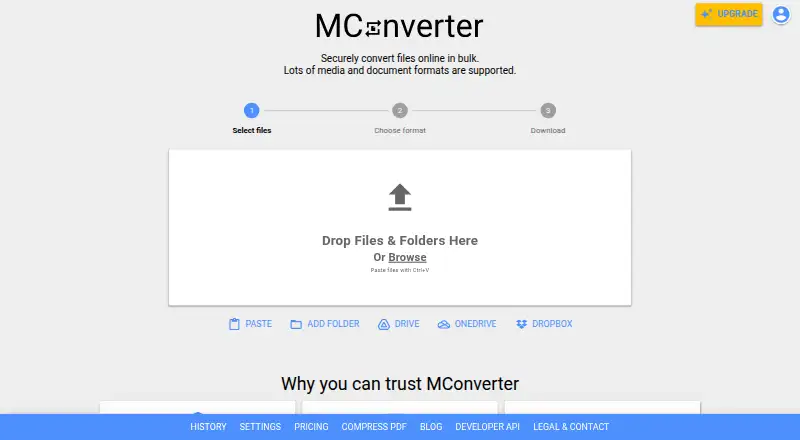
What MConverter is
MConverter is an online service for converting video, audio, image, e-book, document, subtitle and archive files. It can process multiple files together, including files in different formats that are all converted to one target format. Users can add folders, including compatible files in subfolders, or choose files from Google Drive, Microsoft OneDrive and Dropbox. A Google Workspace Marketplace app supports conversion within Google Drive. For automated conversion and PDF compression, MConverter offers an API that can connect with Make.com and similar platforms. The service has a free plan at no cost, limited to 15 files a day, 8 files at once and 100 MB per file. Paid monthly plans are Plus at $12.99 a month, Pro at $25.99 a month and Max at $33.99 a month, with larger file and concurrency limits. MConverter says each conversion runs in an isolated environment and uploaded files are deleted after four hours, with immediate deletion available. It lists TLS 1.3 and HSTS for file transfers.
Who it suits
MConverter suits people who need to convert several file types or batches, including files held in cloud storage. Its API may suit teams automating conversions or PDF compression.
What it does well
- Handles video, audio, image, document and archive formats.
- Converts mixed input formats to one target format.
- Accepts folders and compatible files in subfolders.
- Connects to Google Drive, OneDrive and Dropbox.
- Offers an API for conversion automation.
What to know first
- Free plan allows 15 files per day.
- Free plan allows 8 files at once.
- Free plan limits files to 100 MB each.
- Uploaded files remain on servers up to four hours unless deleted sooner.
Limits
The Free plan allows 15 files per day, 8 files at once, and 100 MB per file. Plus allows 250 files at once and 1 GB per file for $12.99 a month; Pro allows 750 files at once and 2 GB per file for $25.99 a month; Max allows 1,000 files at once and 10 GB per file for $33.99 a month. Paid plans include unlimited daily conversions.
Plans
| Plan | Billed and limits | Price |
|---|---|---|
| Free | 15 files/day · 8 files at once · 100 MB/file | Free |
| Free Plan | 15 conversions per 24 hours · 8 files per batch · 100 MB per file · daily limit may fall to 3 with ad blocking | Free |
| Plus | yearly · 250 files at once · 1 GB per file · unlimited daily conversions · no ads · no branding · conversion history · human support · File Explorer/Finder integration | $116.99 a year |
| Plus | monthly · 250 files at once · 1 GB per file · unlimited daily conversions · no ads · no branding · conversion history · human support · File Explorer/Finder integration | $12.99 a month |
| Pro | yearly · 750 files at once · 2 GB per file · unlimited daily conversions · no ads · no branding · conversion history · priority human support · File Explorer/Finder integration | $186.99 a year |
| Max | yearly · 1000 files at once · 10 GB per file · unlimited daily conversions · no ads · no branding · conversion history · priority human support · File Explorer/Finder integration | $249.99 a year |
| Pro | monthly · 750 files at once · 2 GB per file · unlimited daily conversions · no ads · no branding · conversion history · priority human support · File Explorer/Finder integration | $25.99 a month |
| Max | monthly · 1000 files at once · 10 GB per file · unlimited daily conversions · no ads · no branding · conversion history · priority human support · File Explorer/Finder integration | $33.99 a month |
The first 8 of 9 plans, as mconverter.eu lists them, read 30 Sept 2026. The maker's own page has the final word. Every plan
Getting started
- Open https://mconverter.eu/.
- Choose the Free plan or a paid plan based on its listed limits.
- Select files or folders, or choose files from Google Drive, OneDrive, or Dropbox.
- Set the target format and start the conversion.
- For automated workflows, use the API; the service also offers a Google Workspace Marketplace app for Drive.
MConverter is an online converter for media, documents, e-books, subtitles and archives. It is best suited to people who regularly process mixed batches, work from cloud storage or automate conversions; the free plan is a useful starting point, but its file and daily caps are restrictive for heavier use.
Overview
MConverter brings video, audio, image, e-book, document, subtitle and archive conversion into one service. It can convert multiple files together, including different source formats to a single target format, and folder input reaches compatible files in subfolders. That makes it a practical fit for varied collections and repeat jobs, rather than just isolated, single-file conversions.
Files can be selected from Google Drive, Microsoft OneDrive and Dropbox. A Google Workspace Marketplace app supports conversion in Drive, while an API enables automated file conversion and PDF compression, including integrations with Make.com and similar platforms. These options are most useful when conversion is part of a recurring workflow; they matter less to someone who only needs an occasional file converted.
Key features
Batch and folder input reduce the work of assembling mixed queues. The free plan, however, allows only eight files at once and 15 files per day, with a 100 MB limit per file. That is enough to try the service or handle modest workloads, but not a good fit for frequent high-volume use or files beyond that size.
MConverter says each file is converted in a separate isolated environment, limiting interference between users' jobs. It says transfers use TLS 1.3 and HSTS, uploaded files are deleted from its servers four hours after conversion, and users can delete them immediately. The company also says it processes files in-house, does not share files with third parties for advertising or marketing, and uses cloud providers with ISO/IEC 27001 and SOC 2 certifications. Those are meaningful safeguards for an online converter, though they do not change the practical consideration that files are uploaded to a service.
Pricing
The free plan costs nothing and permits 15 files per day, eight files at once and 100 MB per file. It is the sensible option for light use, but the daily quota and size ceiling can quickly rule it out for regular queues.
Plus costs $12.99 a month, billed monthly. It raises simultaneous processing to 250 files, permits files up to 1 GB and removes the daily conversion limit; it also removes ads and includes human customer support. This is the entry paid tier for people whose main needs are more throughput and larger files.
Pro costs $25.99 a month, billed monthly, and raises the limits to 750 files at once and 2 GB per file, with unlimited daily conversions and priority human support. Max costs $33.99 a month, billed monthly, and allows 1,000 files at once and 10 GB per file, also with unlimited daily conversions and priority support. Pro suits larger queues than Plus can accommodate; Max is the relevant step up when the 2 GB file ceiling is the blocker. A One-Day Pass offers full access for 24 hours, all Plus features and no subscription, with custom pricing; it fits a short burst of work better than an ongoing monthly plan. The paid plans are billed monthly, so their higher limits come with a recurring cost rather than a one-off purchase.
Platforms
MConverter supports web, Android, iOS, Linux, macOS and Windows, as well as an extension and API. That range accommodates both browser-based use and automated workflows across platforms.
Who it's for
MConverter is a strong match for people converting mixed file types in batches, working with folders or cloud-stored files, and teams or individuals automating conversion through an API. Occasional users can start on the free plan. Anyone with sustained high volume or files larger than 100 MB will need a paid tier, while users who do not need cloud access, folder handling or automation may have little reason to pay for those capabilities.
Pros and cons
- Pro: Batch conversion accepts different source formats for one target, and folder input can include compatible files in subfolders, reducing manual queue preparation.
- Pro: Drive, OneDrive and Dropbox selection, a Drive app and an API support cloud-based and automated workflows.
- Pro: Paid plans scale from 1 GB to 10 GB per file and remove the daily conversion cap, with support included at each paid level.
- Con: The free plan's 15-file daily quota, eight-file batch limit and 100 MB ceiling make it unsuitable for steady or large-file work.
- Con: Pro and Max cost $25.99 a month and $33.99 a month respectively; their larger limits only make sense when the lower tiers' caps are genuinely restrictive.
Alternatives
For a broader list of file conversion software, consider how much batch capacity, platform support and workflow automation matter before choosing a service.
- AnyConv is a free alternative with no registration, up to 60 files per hour and a 100 MB maximum upload; choose it when an hourly allowance and no-account use matter more than MConverter's cloud selection or API.
- Freemake Video Converter offers core conversion features free with no expiration and a Mega Pack lifetime license; it is an option for those who prefer a free, non-expiring core offering.
- HandBrake is free software for Linux, macOS and Windows; choose it if those desktop platforms and a free tool are the priority.
- Pandoc is free software released under the GPL and supports Linux, macOS, self-hosted, web and Windows use; it is an alternative for readers seeking that free-software option.
- XnConvert is freeware for private, educational and non-profit use, with a company license priced at 6.50 EUR for 100+ licenses; it is worth considering when that licensing structure fits.
- Any Video Converter offers a free download with basic features for macOS and Windows; choose it if a desktop-oriented alternative with a free basic tier is a better fit.
- Converseen is free software released under the GNU GPL version 3 for Linux, macOS and Windows; consider it if those platforms and that license suit your needs.
- Doxillion Document Converter has a free version limited to non-commercial use and fewer formats for home use; it is an alternative when document conversion and those restrictions fit.
Verdict
Choose MConverter if you need broad format coverage alongside batch and folder handling, cloud file selection or API-based automation. The free plan makes it accessible for light use, and paid tiers offer a clear route to larger files and uncapped daily conversions. Look elsewhere if you need frequent large-file conversions but cannot justify a monthly plan, or if a simple desktop converter would cover your needs without an online workflow.
Verdict
MConverter covers a broad range of file conversions, with folder input, cloud file selection and an API for automated workflows. Check the file-size and daily limits on the free plan against your needs.
Questions
Is MConverter free?
Yes. Its Free plan costs nothing and allows 15 files per day, 8 files at once, and 100 MB per file.
What do the paid plans cost?
Plus costs $12.99 a month, Pro costs $25.99 a month, and Max costs $33.99 a month, each billed monthly.
Which file sources does it support?
Files can be selected from Google Drive, Microsoft OneDrive, and Dropbox. MConverter also offers a Google Workspace Marketplace app for conversion in Google Drive.
Can MConverter automate conversions?
Yes. It provides an API for automated file conversion and PDF compression, with integration options including Make.com and similar platforms.
How does MConverter handle uploaded files?
MConverter says files are processed in separate isolated environments and automatically deleted from its servers four hours after conversion. Immediate deletion is also available.
Which platforms are listed?
Android, iOS, Linux, macOS, web, and Windows are listed, along with an extension and API.
Facts from MConverter's own pages
- API
- The maker advertises a public MConverter API for automated conversions and PDF compression, with Make.com integration support. · mconverter.eu, 15 Oct 2026
- API documentation depth
- The developer dashboard page states that JavaScript is required and exposes only a loading screen in the fetched HTML. · dev.mconverter.eu, 15 Oct 2026
- Automation
- MConverter provides an API for automated file conversion and PDF compression that can integrate with Make.com and similar platforms. · mconverter.eu, 30 Sept 2026
- Batch conversion
- The service can process multiple files together, including compatible files with different source formats targeting one output format. · mconverter.eu, 15 Oct 2026
- Browser extension
- The Chrome extension supports right-click extraction from images, video and audio players, address-bar format commands and PDF compression. · chromewebstore.google.com, 15 Oct 2026
- Bug bounty
- MConverter says it pays independent researchers who responsibly report security vulnerabilities. · mconverter.eu, 15 Oct 2026
- Clipboard input
- Files can be pasted from the clipboard with Ctrl+V or Command+V, while mobile users can use a Paste button. · mconverter.eu, 15 Oct 2026
- Cloud integrations
- The picker supports Google Drive, Microsoft OneDrive and Dropbox, and a Google Workspace Marketplace app can convert files directly in Drive. · mconverter.eu, 15 Oct 2026
- Company history
- MConverter's journey began in 2017 as a personal hobby project by software engineer Martin Minchev. · mconverter.eu, 30 Sept 2026
- Company legal name
- The official company information identifies the operator as MCONVERTER OOD, registration number 207553144. · mconverter.eu, 15 Oct 2026
- Company location
- MCONVERTER OOD lists its address in the Lozenets District of Sofia, Bulgaria. · mconverter.eu, 30 Sept 2026
- Company size
- LinkedIn lists MConverter as a partnership with 2–10 employees. · linkedin.com, 15 Oct 2026
- Data-center certifications
- The company says its cloud providers hold ISO/IEC 27001 and SOC 2 certifications. · mconverter.eu, 15 Oct 2026
- File retention
- Uploaded and converted files are automatically deleted from MConverter servers within four hours, with immediate deletion available. · mconverter.eu, 15 Oct 2026
- Folder input
- Users can drag folders and MConverter selects compatible files in the folder and its subfolders. · mconverter.eu, 15 Oct 2026
- Founded
- 2017 · mconverter.eu, 28 Sept 2026
- Founded story
- MConverter says Martin Minchev began the project as a personal hobby in 2017 while he was a high-school student. · mconverter.eu, 15 Oct 2026
- Headquarters
- The company lists Kozyak Street, Lozenets District, Sofia 1407, Bulgaria. · mconverter.eu, 15 Oct 2026
- Infrastructure certifications
- MConverter says it uses cloud providers with ISO/IEC 27001 and SOC 2 certifications. · mconverter.eu, 30 Sept 2026
- Limit: advertising and free restrictions
- Trustpilot complaints include needing to watch advertisements for larger files or objecting that the service is not completely free. · trustpilot.com, 15 Oct 2026
- Limit: occasional errors
- A user testimonial reproduced on the official site mentions occasional errors, although the developer responded quickly to feedback. · mconverter.eu, 15 Oct 2026
- Notable news: conversion engine
- A May 22, 2026 product update announced animated JPEG XL creation, animated AVIF frame export, animated WebP-to-AVIF conversion and improved metadata retention. · peerpush.com, 15 Oct 2026
- Notable news: free plan
- On February 20, 2026, MConverter announced raising the free batch limit from 2 to 8 files and the daily limit from 10 to 15 conversions. · mconverter.eu, 15 Oct 2026
- PDF compression
- Basic, strong and extreme compression modes are offered, with reductions of up to 90% depending on the file. · apps.apple.com, 15 Oct 2026
Where MConverter stands on Freedom251
- File Conversion Software#16 of 69
- File Converter Software#14 of 29