Freedom251 › Image Converter Software
FreeConvert GIF Maker
What FreeConvert GIF Maker is
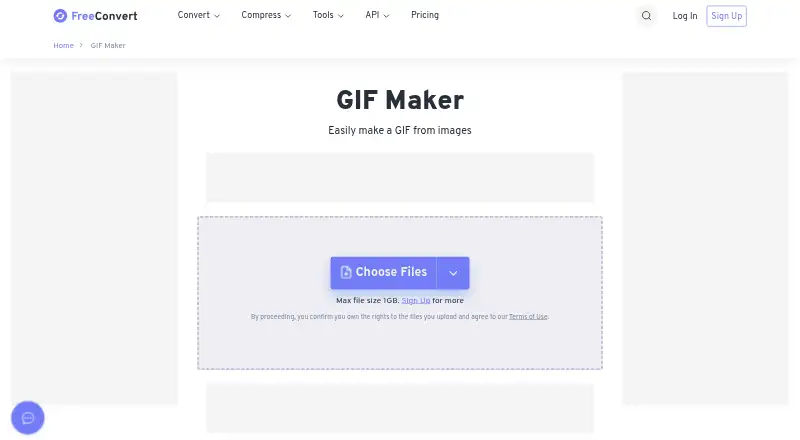
FreeConvert GIF Maker turns uploaded images into animated GIFs in a web browser. It accepts JPG, PNG, WebP and HEIC files, which users can select from a device, Dropbox, Google Drive or OneDrive, or provide by URL. The editor lets users arrange frames, set delays and loop count, choose a GIF width and add crossfades. Per-image controls include margins, skipping and duplication; output controls include alignment, trimming, fill color, frame stacking and compression. Finished GIFs can be downloaded or saved to Google Drive, OneDrive or Dropbox, with a QR code option for downloading to a mobile device. The maker page displays a 1 GB maximum file size and prompts users to upgrade for more. The free plan includes 20 conversion minutes per day, up to 20 files per day and a five-minute-per-file limit. Paid plans start at $12.99/mo. FreeConvert says uploads use SSL encryption and files are automatically deleted after eight hours. It works in modern Windows, Mac, iOS and Android browsers; no desktop application is listed.
Who it suits
It suits people who want to assemble animated GIFs from images in a browser and adjust frame timing or output settings. Users working with files above the displayed size limit should consider the upgrade prompt.
What it does well
- Supports JPG, PNG, WebP and HEIC images.
- Accepts files from cloud storage and URLs.
- Provides frame ordering, delay and loop controls.
- Free plan allows up to 20 files per day.
- Finished GIFs can be saved to cloud drives.
What to know first
- Free plan limits each file to five conversion minutes.
- Maker page displays a 1 GB maximum file size.
- No desktop application is listed.
Limits
The free plan includes 20 conversion minutes per day, a five-minute-per-file limit, and up to 20 files per day. The maker page displays a 1 GB maximum file size and prompts users to upgrade for more.
Plans
| Plan | Billed and limits | Price |
|---|---|---|
| Free | 20 conversion minutes per day · 5 conversion minutes per file · up to 20 files per day | Free |
| Basic | monthly · 1,500 conversion minutes/month · unlimited operations/day · 1.5 GB maximum file size · high priority · CPU-based video encoding · 100% money-back guarantee | $12.99 a month |
| Standard | monthly · 2,000 conversion minutes/month · unlimited operations/day · 2 GB maximum file size · highest priority · CPU-based video encoding · 100% money-back guarantee | $24.99 a month |
| Pro | / Month (cancel any time) · 4,000 conversion minutes /month · Unlimited Operations /Day · 5 GB maximum file size · Highest priority | $29.99 a month |
| Pro Popular | monthly · 4,000 conversion minutes/month · unlimited operations/day · 5 GB maximum file size · highest priority · GPU/CPU-based video encoding · 100% money-back guarantee | $29.99 a month |
| Scale | on-demand · up to 1M conversion minutes/month · unlimited operations/day · up to 20 GB maximum file size · highest priority · GPU/CPU-based video encoding · 100% money-back guarantee | On request |
As freeconvert.com lists them, read 7 Oct 2026. The maker's own page has the final word.
Getting started
- Open https://www.freeconvert.com/gif-maker in a web browser.
- Choose image files from your device, Dropbox, Google Drive, or OneDrive, or provide a URL.
- Arrange frames and set delays, loop count, GIF width, or crossfades.
- Adjust per-image and output settings as needed.
- Create the GIF and download it, save it to a cloud account, or use the QR code on a mobile device.
FreeConvert GIF Maker creates animated GIFs from still images in a browser. It suits people who want to shape frame timing and output without installing software. Its detailed controls are useful for occasional projects, while frequent conversions or larger files can push users beyond the free allowance.
Overview
Build a GIF from JPG, PNG, WebP, or HEIC images, selected from a device, Dropbox, Google Drive, OneDrive, or a URL. You can reorder frames, set their delays and the loop count, choose a GIF width, and add crossfades. Per-image settings for margins, skipping, and duplication let you adjust a sequence without editing the original images.
Output controls include alignment, trimming, fill color, frame stacking, and compression. That is a broad set of adjustments for a focused image-to-GIF maker; it does not replace a general image editor. The maker runs in a modern browser on Windows, Mac, iOS, and Android. Uploads use SSL encryption, and created files are automatically deleted after eight hours. Finished GIFs can be saved to Google Drive, OneDrive, or Dropbox, or downloaded to a mobile device by QR code.
Key features
- Animation controls: Frame order, timing, loop count, width, and crossfades give users control over how a GIF plays.
- Frame-level adjustments: Margins, skipping, and duplication help refine individual frames within the sequence.
- Output tuning: Alignment, trimming, fill color, stacking, and compression help adapt the finished GIF to its intended use.
- Batch conversion: Batch conversion and image resizing are supported, though free usage is constrained by daily, per-file, and file-count limits.
The maker page sets a 1 GB maximum file size and prompts users to upgrade for more. FreeConvert also offers API access, with the free allowance covering Web and API use together.
Pricing
FreeConvert is freemium. The Free plan costs nothing and provides 20 conversion minutes per day, a five-minute limit per file, and up to 20 files per day. That is suitable for occasional, modest jobs, but the shared Web and API quota and per-file cap can restrict longer or regular workloads.
Basic costs $12.99 a month, billed monthly with cancellation any time. It includes 1,500 conversion minutes per month, unlimited operations per day, a 1.5 GB maximum file size, and high priority. This is the lowest-cost paid option and raises the file ceiling above the maker's 1 GB free limit.
Standard costs $24.99 a month, billed monthly with cancellation any time. It includes 2,000 conversion minutes per month, unlimited daily operations, a 2 GB maximum file size, and highest priority. Pro costs $29.99 a month on the same billing and cancellation terms, with 4,000 monthly minutes, unlimited daily operations, a 5 GB maximum file size, and highest priority. Pro is the stronger fit for higher monthly volume or larger files; Standard offers fewer minutes and a lower file ceiling for a lower monthly price.
Scale uses on-demand billing with custom pricing. It provides up to 1 million conversion minutes per month, unlimited daily operations, file sizes up to 20 GB, and highest priority, for workloads beyond the fixed monthly plans.
Platforms
The maker is a web application, accessible through modern browsers on Windows, Mac, iOS, and Android. FreeConvert also names Android, iOS, macOS, and Windows among its supported platforms. There is no desktop application.
Who it's for
FreeConvert GIF Maker fits people assembling animations from still images who value frame-by-frame adjustments and browser access. Cloud imports and exports are handy for users who keep files in Dropbox, Google Drive, or OneDrive. The free plan is a reasonable starting point for short, infrequent jobs within its daily and per-file caps. Users who regularly process longer conversions or files over 1 GB need a paid plan; anyone seeking installed desktop software should choose another tool.
Pros and cons
- Pro: Frame ordering, delays, loop count, crossfades, and per-image controls allow substantial control over a still-image animation.
- Pro: Multiple cloud sources, URL input, cloud destinations, and QR downloads give users several ways to move files through the browser workflow.
- Pro: SSL uploads and automatic deletion of created files after eight hours provide clear handling terms.
- Con: Free use is limited to 20 conversion minutes daily, five minutes per file, and 20 files per day, which can constrain repeated or longer work.
- Con: The free maker's 1 GB maximum file size may be too low for large source files.
- Con: No desktop application is offered, so users who require installed software need another option.
Alternatives
For a browser-based conversion alternative with a free plan and trial, consider Aspose.Imaging; its free browser app permits up to 10 files per operation, with uploaded files deleted afterward. Zamzar API is worth considering when an API is the priority: its free Test plan includes 100 conversion credits, a 1 MB maximum file size, one-day file storage, and a three-day support response time.
For desktop image conversion on Linux, macOS, or Windows, XnConvert has a free plan for private, educational, and nonprofit use, with a company license available at 6.50 EUR. Converseen is a free option for Linux, macOS, and Windows, released under GNU GPL version 3. GraphicsMagick is a free image-processing option for desktop, API, and self-hosted use. ImageMagick is another free option for desktop, API, and self-hosted environments, with commercial use permitted and attribution required. libvips is free software under LGPL-2.1-or-later for Linux, macOS, and self-hosted use. Pillow is a free option for Linux, macOS, and Windows, with optional commercial support and maintenance through Sonar Subscription.
Browse more options in Image Converter Software and File Conversion Software.
Verdict
Choose FreeConvert GIF Maker if you want browser-based GIF creation with fine control over frames and output, and your jobs fit within its free or paid conversion limits. Its strongest case is the combination of animation adjustments, cloud file handling, and access across modern devices. Look elsewhere if you need a desktop app or want to avoid quotas for frequent or large conversions.
Verdict
FreeConvert GIF Maker provides frame and output controls for creating GIFs through a browser. The free tier has daily and per-file limits, and the maker page sets a 1 GB maximum file size.
Questions
Is FreeConvert GIF Maker free?
Yes. The free plan is listed as free. Paid plans start at $12.99 a month.
What are the free plan limits?
Free use includes 20 conversion minutes per day, up to 20 files per day, and a five-minute-per-file limit.
Which platforms can I use it on?
It works in web browsers on Android, iOS, macOS, and Windows, as well as modern browsers generally. No desktop application is listed.
Which image formats does it accept?
The maker lists JPG, PNG, WebP, and HEIC.
How can I save a finished GIF?
You can download it, save it to Google Drive, OneDrive, or Dropbox, or use a QR code to download it to a mobile device.
What does FreeConvert say about upload security and file retention?
FreeConvert says uploads use SSL encryption and created files are automatically deleted after eight hours.
Facts from FreeConvert GIF Maker's own pages
- Animation controls
- Common controls include overall frame speed, loop count from 0 to 10,000, GIF width, trimming, fill color, merging, alignment, crossfade, and prevention of frame stacking. · freeconvert.com, 15 Oct 2026
- API access
- FreeConvert pricing says free users receive 20 conversion minutes per day for Web and API use, with a 5-minute-per-file limit for free usage. · freeconvert.com, 7 Oct 2026
- API authentication
- FreeConvert API v1 uses bearer API keys managed from the user dashboard, and keys remain valid until deleted. · dev.freeconvert.com, 15 Oct 2026
- API capabilities
- The API documentation covers importing, converting, compressing, merging, exporting, jobs, advanced options, webhooks, WebSockets, errors, and an API reference. · dev.freeconvert.com, 15 Oct 2026
- API endpoint
- The documented API base URL is https://api.freeconvert.com/v1/. · dev.freeconvert.com, 15 Oct 2026
- Automatic deletion
- The maker states that created files are automatically deleted after 8 hours. · freeconvert.com, 15 Oct 2026
- Availability claim
- The security page claims monitored service availability of 99.8%. · freeconvert.com, 15 Oct 2026
- Broader conversion coverage
- The main site says FreeConvert supports more than 1,500 conversions across video, image, audio, and ebook formats. · freeconvert.com, 15 Oct 2026
- Browser access
- The maker is free and works in any web browser, and its FAQ says it is compatible with modern Windows, Mac, iOS, and Android devices. · freeconvert.com, 7 Oct 2026
- Browser compatibility
- The GIF maker is described as free, browser-based, SSL-encrypted for uploads, and compatible with Windows, Mac, iPhone/iOS, and Android. · freeconvert.com, 15 Oct 2026
- Cloud export
- Created GIFs can be saved to Google Drive, OneDrive, or Dropbox, or downloaded to a phone using a QR code. · freeconvert.com, 15 Oct 2026
- Cloud sources
- Users can select files from Dropbox, Google Drive, or OneDrive, or provide a URL. · freeconvert.com, 7 Oct 2026
- Company
- FreeConvert says it is owned and operated by TRMedia Inc., a Canadian software company, and launched in 2018. · freeconvert.com, 7 Oct 2026
- Company headquarters and size
- Crunchbase lists Toronto, Ontario, Canada as headquarters and an employee range of 11–50. · crunchbase.com, 15 Oct 2026
- Company launch
- The About page says FreeConvert launched in 2018 after the company's ImageResizer.com work. · freeconvert.com, 15 Oct 2026
- Company legal name
- Crunchbase lists the legal name as TransMedia Inc., operating as an active private for-profit company. · crunchbase.com, 15 Oct 2026
- Company ownership
- FreeConvert's About page says the service is owned and operated by TRMedia Inc., a Canadian software company. · freeconvert.com, 15 Oct 2026
- Compression
- The maker applies lossy LZW compression with a 1–200 control and identifies 75 as its default balance between size and quality. · freeconvert.com, 15 Oct 2026
- Download destinations
- Created GIFs can be saved to Google Drive, OneDrive, or Dropbox, or downloaded to a mobile device using a QR code. · freeconvert.com, 7 Oct 2026
- Founded
- 2018 · freeconvert.com, 28 Sept 2026
- Frame alignment
- Frames can be aligned from top-left through bottom-right when source images have different sizes. · freeconvert.com, 15 Oct 2026
- Frame editing
- Individual images can be skipped, duplicated, reordered by drag and drop, and given custom left and top margins. · freeconvert.com, 15 Oct 2026
- Frame timing
- Per-frame delay can be set from 1 to 600 hundredths of a second. · freeconvert.com, 15 Oct 2026
- Free allowance
- The pricing FAQ states that free users receive 20 conversion minutes per day for web and API use, with a five-minute maximum per file. · freeconvert.com, 15 Oct 2026
Where FreeConvert GIF Maker stands on Freedom251
- Image Converter Software#7 of 36
- File Conversion Software#14 of 69
- File Converter Software#10 of 29
- Image converters#4 of 10