Freedom251 › Image Converter Software

ConvertImage
What ConvertImage is
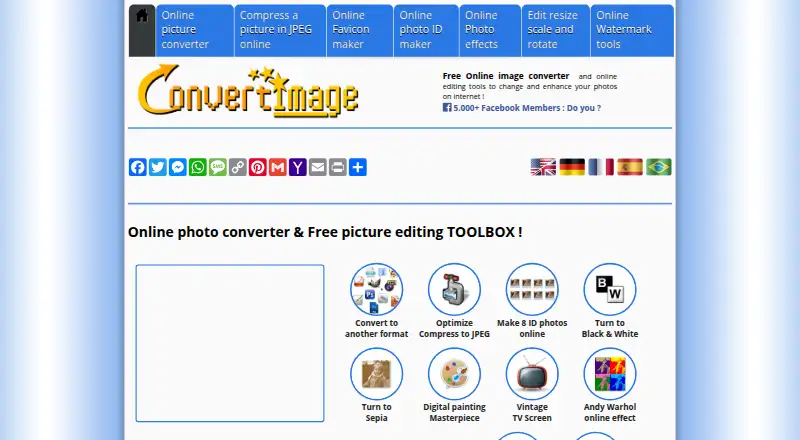
ConvertImage is a free web application for changing image formats and making common image edits. It converts supported files into JPG, PDF, PNG, BMP, GIF, ICO, PSD, TIF, or PCX. Input formats include BMP, CUR, GIF, JPG, PCX, PDF, PICT, PNG, PSB, PSD, TIF, and XCF variants. The site also provides compression, cropping, resizing, rotation, mirroring, watermarking, photo effects, and favicon creation. Its JPEG compressor makes files smaller by reducing image quality while retaining the original ICC profile and dimensions. For ID pictures, a tool arranges eight photos from an uploaded image into a printable board.
The free plan costs nothing, with uploads capped at 24.41 Mb. ConvertImage says uploads are processed anonymously, are not published or used by the service, and are automatically deleted 15 minutes after processing. Its privacy policy describes 256-bit SSL for data sent to and received from the site and states compliance with GDPR, LGPD, and CCPA. The policy also says browser information is used for advertising and anonymous information may be shared with social media, advertising, and analytics partners. A contact form is available for comments, file-format suggestions, and partnership discussions.
Who it suits
ConvertImage suits people who want a web-based way to convert, resize, or make other basic edits to images. Its specialized tools may also help anyone preparing a favicon or a printable set of ID photos.
What it does well
- Converts supported images into ten listed output formats.
- Includes compression, cropping, resizing, rotation, mirroring, and watermarking.
- JPEG compression retains the original ICC profile and dimensions.
- Makes a printable board of eight ID photos.
- Uploads are automatically deleted 15 minutes after processing.
What to know first
- The upload form caps file size at 24.41 Mb.
- JPEG compression reduces image quality to shrink file size.
- The privacy policy says browser information is used for advertising.
Limits
The free plan accepts uploads up to 24.41 Mb. JPEG compression reduces image quality while preserving the ICC profile and image dimensions.
Plans
| Plan | Billed and limits | Price |
|---|---|---|
| Free | Free for everyone · 24.41 Mb max file size | Free |
As convertimage.net lists them, read 9 Oct 2026. The maker's own page has the final word.
Getting started
- Open https://convertimage.net/ in a web browser.
- Choose a conversion or editing tool.
- Upload an image within the 24.41 Mb limit.
- Apply the desired conversion or edit and use the resulting file.
Verdict
Choose ConvertImage for free, browser-based image conversion and a broad collection of editing tools, including favicon and ID photo creation. Consider the 24.41 Mb upload cap and the JPEG compressor’s quality reduction when deciding whether it fits a particular job.
Questions
How much does ConvertImage cost?
Its Free plan costs nothing.
What formats can it convert?
Supported inputs include BMP, CUR, GIF, JPG, PCX, PDF, PICT, PNG, PSB, PSD, TIF, and XCF variants. Listed output formats are JPG, PDF, PNG, BMP, GIF, ICO, PSD, TIF, and PCX.
What can I do besides convert images?
The site offers compression, cropping, resizing, rotation, mirroring, watermarking, photo effects, and favicon creation. Its ID photo tool lays out eight photos on a printable board.
What happens to uploaded files?
ConvertImage says files are processed anonymously, are not published or used by the service, and are automatically deleted 15 minutes after processing.
Which platforms can I use it on?
ConvertImage is a web application.
Facts from ConvertImage's own pages
- Cookies and advertising
- The privacy policy says the site uses browser information for advertising and that anonymous information may be shared with social media, advertising, and analytics partners. · convertimage.net, 9 Oct 2026
- Editing tools
- The site offers tools to compress, crop, resize, rotate, mirror, and watermark images, plus photo effects and favicon creation. · convertimage.net, 9 Oct 2026
- File deletion
- The privacy policy says uploaded files are automatically deleted 15 minutes after processing and are not published or used by ConvertImage. · convertimage.net, 9 Oct 2026
- File size limit
- The upload form lists a maximum file size of 24.41 Mb. · convertimage.net, 9 Oct 2026
- ID photo maker
- The ID photo tool creates a printable board of eight ID photos from an uploaded picture. · convertimage.net, 9 Oct 2026
- Image conversion
- The web tool converts supported image files to JPG, PDF, PNG, BMP, GIF, ICO, PSD, TIF, or PCX. · convertimage.net, 9 Oct 2026
- JPEG compression
- The JPEG compressor reduces file size by lowering image quality while preserving the original ICC profile and image dimensions. · convertimage.net, 9 Oct 2026
- Privacy and compliance
- The privacy policy states that ConvertImage complies with the GDPR, LGPD, and CCPA and processes files anonymously. · convertimage.net, 9 Oct 2026
- Support
- Users can contact the team through a form to send comments, suggest file formats, or discuss partnerships. · convertimage.net, 9 Oct 2026
- Supported inputs
- Supported input formats include BMP, CUR, GIF, JPG, PCX, PDF, PICT, PNG, PSB, PSD, TIF, and XCF variants. · convertimage.net, 9 Oct 2026
- Terms
- The terms limit the license for website materials to personal, non-commercial viewing and say the service is provided as is. · convertimage.net, 9 Oct 2026
- Transmission security
- The privacy policy says the site uses 256-bit SSL for data sent to and received from ConvertImage. · convertimage.net, 9 Oct 2026
Where ConvertImage stands on Freedom251
- Image Converter Software#9 of 36
- Image converters#7 of 10