Freedom251 › File Conversion Software

CloudConvert Audio Converter
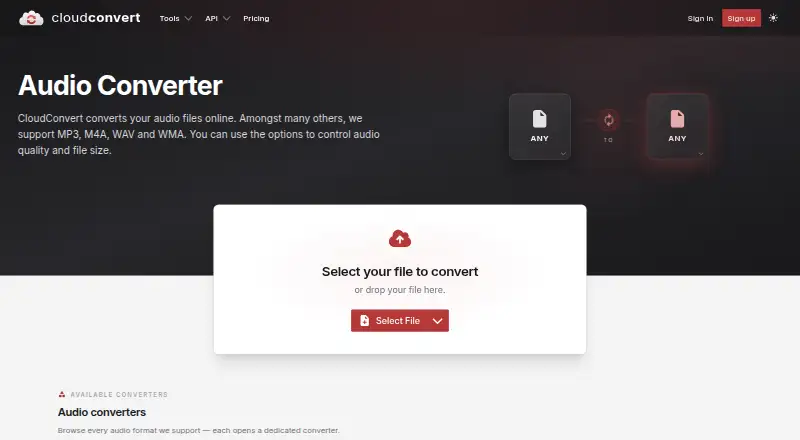
What CloudConvert Audio Converter is
CloudConvert Audio Converter converts audio files online, with a web app and API for automated workflows. It supports formats including MP3, M4A, WAV, WMA, AAC, FLAC, OPUS, and AIFF, among many others. Users can adjust audio quality and file size, and batch conversion is available. The service is used by individual customers and corporate customers through its API. Automation integrations include Zapier, Make, Microsoft Power Automate, and n8n; storage workflows can involve Amazon S3, Google Drive, Dropbox, OneDrive, and SharePoint. Developers can use API v2, official SDKs for PHP, Node.js, Python, Ruby, Java, and .NET, or a CLI. The free plan costs nothing and includes 10 credits per day, a 1 GB file limit, a five-minute processing limit, five concurrent tasks, and low processing priority. CloudConvert says each conversion runs in an isolated container and files are deleted after processing; it does not provide permanent storage.
Who it suits
CloudConvert suits people who need online audio conversion and customers automating conversion through an API. Its integrations and SDKs may also suit teams connecting conversion to automation or storage workflows.
What it does well
- Supports a broad list of audio formats.
- Audio quality and file size are adjustable.
- Batch conversion is available.
- API v2 and official SDKs are listed.
- Free plan includes 10 credits per day.
What to know first
- Free plan limits files to 1 GB.
- Free processing time is capped at five minutes.
- Free plan allows five concurrent tasks.
- Free processing has low priority.
Limits
The free plan provides 10 credits per day, limits files to 1 GB and processing to five minutes, allows five concurrent tasks, and has low processing priority. The listed subscription provides 1,000 credits per month, with unused credits expiring at the monthly reset.
Plans
| Plan | Billed and limits | Price |
|---|---|---|
| Free | €0 · 10 credits/day · 1 GB max file · 5 minutes max processing · 5 concurrent tasks · low priority | Free |
| Subscription | monthly · 1,000 credits/month · monthly credit reset · unlimited file size · unlimited processing time · unlimited concurrent tasks · high priority | $10 a month |
| Package | one-time payment · 1,000 credits · credits never expire · unlimited file size · unlimited processing time · unlimited concurrent tasks · high priority | $18, paid once |
| Enterprise | custom · custom credits · unlimited file size · unlimited processing time · unlimited concurrent tasks · priority support · optional dedicated capacity | On request |
As cloudconvert.com lists them, read 15 Oct 2026. The maker's own page has the final word.
Getting started
- Visit the CloudConvert Audio Converter website.
- Use the web application for online conversions, or choose API access for automated workflows.
- Select a supported input and output audio format.
- Adjust audio quality and file size settings as needed.
- Start with the free plan or choose a package, subscription, or enterprise plan.
- For API development, use API v2, an official SDK, or the CLI.
Verdict
CloudConvert combines audio conversion and adjustable output settings with batch processing, API access, and workflow integrations. Its free plan has daily credits and specific file, time, concurrency, and priority limits; conversions do not provide permanent file storage.
Questions
Does CloudConvert Audio Converter have a free plan?
Yes. The Free plan is listed as free, billed €0, and provides 10 credits per day.
What are the free plan limits?
It allows files up to 1 GB, processing up to five minutes, and five concurrent tasks. Processing priority is low.
Which audio formats does it support?
Listed formats include MP3, M4A, WAV, WMA, AAC, FLAC, OPUS, and AIFF, among others.
Can I use it through an API?
Yes. CloudConvert offers API v2, official SDKs for PHP, Node.js, Python, Ruby, Java, and .NET, and a CLI.
Which platforms and workflow integrations are listed?
The listed platforms are web and API. Automation integrations include Zapier, Make, Microsoft Power Automate, and n8n; storage workflows can involve Amazon S3, Google Drive, Dropbox, OneDrive, and SharePoint.
How do paid plans work?
CloudConvert lists a one-time Package with credits that never expire, a monthly Subscription with 1,000 credits per month, and a custom Enterprise plan. Prices for the listed package and subscription amounts are displayed as “...”.
Facts from CloudConvert Audio Converter's own pages
- Advanced conversion options
- API jobs can set quality, watermarks and many format-specific parameters. · cloudconvert.com, 15 Oct 2026
- API
- The API documentation describes API v2 and lists official PHP, Node.js, Python, Ruby, Java, and .NET SDKs, plus a CLI. · cloudconvert.com, 8 Oct 2026
- Async and sync API
- Conversions run asynchronously with webhook completion notifications by default, while a synchronous API is available for immediate results. · cloudconvert.com, 15 Oct 2026
- Audio controls
- Conversion options let users control audio quality and file size. · cloudconvert.com, 8 Oct 2026
- Audio conversion
- CloudConvert converts audio files online and supports formats including MP3, M4A, WAV, and WMA. · cloudconvert.com, 8 Oct 2026
- Audio formats
- The audio converter lists AAC, AC3, AIF, AIFC, AIFF, AMR, AU, CAF, DSS, FLAC, M4A, M4B, MP3, OGA, OPUS, SF2, SFARK, VOC, WAV, WEBA and WMA converters. · cloudconvert.com, 15 Oct 2026
- Automation integrations
- CloudConvert lists integrations with Zapier, Make, Microsoft Power Automate, and n8n. · cloudconvert.com, 8 Oct 2026
- CLI
- The official command-line client supports batch conversion, PDF operations and custom ffmpeg, ImageMagick or GraphicsMagick commands; it requires Node.js 22 or newer. · github.com, 15 Oct 2026
- Company origin
- CloudConvert was founded in 2012 and is built by Lunaweb GmbH in Germany. · cloudconvert.com, 15 Oct 2026
- Company scale
- CloudConvert reports more than 10,000 active customers, 20 files processed per second on average and 90% of files processed through its API. · cloudconvert.com, 15 Oct 2026
- Data isolation
- Each conversion runs in a separate isolated container, and CloudConvert says staff technically cannot access files unless customers send them for support. · cloudconvert.com, 15 Oct 2026
- Documentation
- API documentation covers v2 terminology, authentication, endpoint references, a visual Job Builder, quickstart examples and integrations. · cloudconvert.tech, 15 Oct 2026
- Encryption and access
- Transfers use SSL encryption, web access supports two-factor authentication and API authentication uses OAuth 2.0 with granular scopes. · cloudconvert.com, 15 Oct 2026
- File handling
- CloudConvert says each conversion runs in a separate isolated container and files are deleted after processing; it does not provide permanent storage. · cloudconvert.com, 8 Oct 2026
- File retention
- Files are retained only for processing and deleted immediately afterward; the service does not provide permanent storage. · cloudconvert.com, 15 Oct 2026
- Format coverage
- The API supports more than 200 formats across audio, video, documents, ebooks, archives, images, spreadsheets and presentations. · cloudconvert.com, 15 Oct 2026
- Founded
- 2012 · cloudconvert.com, 28 Sept 2026
- Headquarters
- Grünwald, Germany · cloudconvert.com, 28 Sept 2026
- Integration scale
- The integrations page says CloudConvert connects to more than 5,000 apps and supports triggers such as new files, emails, forms and webhooks. · cloudconvert.com, 15 Oct 2026
- iOS app capabilities
- The iOS app supports more than 200 formats, website capture, compression, PDF merging, Siri and Shortcuts, job history and ten anonymous free conversions per day. · apps.apple.com, 15 Oct 2026
- iOS requirements
- The App Store listing requires iOS 18 or later for iPhone and iPad, and macOS 15 or later on an Apple M1-or-newer Mac. · apps.apple.com, 15 Oct 2026
- Limit: conversion failures
- Software Advice reviews include complaints that many files failed with unclear error messages and that support mainly offered refunds. · softwareadvice.com, 15 Oct 2026
- Limit: free-tier and credit confusion
- Reviewers report that the free tier limits usage and that conversion minutes or trial wording can be misleading. · softwareadvice.com, 15 Oct 2026
- Limit: mobile and desktop coverage
- A G2 reviewer complains that CloudConvert is web-only and unavailable on desktop, Android and iOS, although an iOS app is listed separately. · g2.com, 15 Oct 2026
Where CloudConvert Audio Converter stands on Freedom251
- File Conversion Software#5 of 69
- File Converter Software#4 of 29
- Image Converter Software#5 of 36
- Image converters#3 of 10