Freedom251 › Batch Photo Processing Software
Converseen
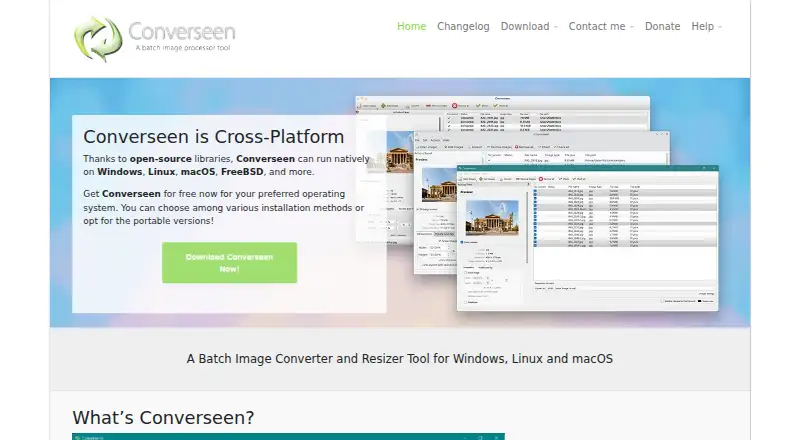
What Converseen is
Converseen is a free batch image processor for Windows, Linux, macOS, and FreeBSD. It converts, resizes, rotates, flips, and compresses images, and can rename image sets using numbering or prefix and suffix values. With ImageMagick, it supports more than 100 formats, including JPEG, PNG, SVG, TIFF, WebP, and HEIC/HEIF. Converseen can also turn a full PDF or selected pages into images with chosen dimensions and formats, and extract images from Windows icon files. It is built with open-source frameworks and libraries such as Qt and ImageMagick, and its source code uses the GNU General Public License version 3. Linux users can install it through several routes, including distribution repositories, Flatpak, Snap, or AppImage. The program does not send information to other networked systems. For PDF processing on Windows and Linux, Ghostscript must be configured. The macOS release is beta and is not currently codesigned.
Who it suits
It suits people who need to process image batches across supported desktop systems, including users who need PDF-to-image conversion or bulk renaming. Linux users can choose among several listed installation methods.
What it does well
- Free software under GNU GPL version 3
- Handles more than 100 image formats
- Supports batch resizing, conversion, and renaming
- Does not transfer information to networked systems
What to know first
- PDF processing requires Ghostscript on Windows and Linux
- macOS release is beta and not codesigned
- Batch automation level is manual
Limits
Converseen is listed as free software under GNU GPL version 3. The listed limitation for PDF processing is the Ghostscript requirement on Windows and Linux.
Plans
| Plan | Billed and limits | Price |
|---|---|---|
| Free | Desktop batch image processing · 100+ image formats · PDF-to-image conversion | Free |
As converseen.fasterland.net lists them, read 15 Oct 2026. The maker's own page has the final word.
Getting started
- Visit the Converseen website.
- Choose Windows, macOS or Linux; Converseen also supports FreeBSD.
- On Linux, install from source, AppImage, Snap, Flatpak or a distribution repository.
- Configure Ghostscript on Windows or Linux if you need PDF processing.
Overview
Converseen is a desktop tool for converting and editing image batches across Windows, Linux and macOS. It suits people who want practical file operations without paying for software; its manual workflow is less suited to jobs that must run unattended. The broad format support is a clear strength, while PDF setup on Windows and Linux and the unsigned macOS beta call for care.
Key features
Built on ImageMagick, Converseen handles more than 100 image formats, from familiar JPEG and PNG to SVG, WebP, HEIC/HEIF, DPX and EXR. It also supports AVIF as an output format. This range is useful when a batch contains a mix of standard and specialist files. RAW processing is supported, but the stated toolkit is conversion, resizing, rotation, flipping and compression rather than a dedicated RAW development workflow.
Batch actions can be combined with renaming by progressive number or by prefix and suffix. That covers common cleanup and preparation work without treating each file separately. The workflow is manual, however, so choose another approach if batches need to run automatically without user involvement.
PDF conversion can turn a whole document or selected pages into images at chosen dimensions and formats. Windows and Linux users need Ghostscript configured for that capability, an extra dependency worth accounting for if PDFs are central to the job. Converseen can also extract an image from a Windows icon file.
Linux users have several installation routes: source code, AppImage, Snap, Flatpak and distribution repositories. The program is built with open-source frameworks including Qt and ImageMagick, and its source is released under GNU GPL version 3. It does not transfer information to other networked systems. The Windows download contains no ads, adware or third-party apps. Support requests and feature suggestions can go through a contact form, while bug reports can be submitted through GitHub.
Pricing
Converseen has one Free plan at no cost. It is free software under GNU GPL version 3, so the image operations do not require a paid tier. There are no separate plan levels to trade off against a lower price.
Platforms
Converseen supports Windows, Linux, macOS and FreeBSD. Linux users can choose among several package formats or install from source. On Windows and Linux, PDF processing depends on Ghostscript being configured. The macOS release is beta and is not currently codesigned, making it a less reassuring choice for users who want a stable, signed release.
Who it's for
Converseen is a good fit for people who need free, local batch conversion and basic image changes across a broad mix of formats. Its renaming tools and resizing, compression and orientation controls suit occasional manual batches. It is less appropriate for automated pipelines or people seeking a dedicated RAW editing workflow.
Pros and cons
- Pro: Support for more than 100 formats makes mixed-format batches practical, including less common image types.
- Pro: Conversion, resizing, rotation, flipping, compression and batch renaming cover a useful range of routine work at no cost.
- Pro: The program does not transfer information to other networked systems, and the Windows package has no ads or bundled third-party apps.
- Con: Batch automation is manual, so it does not suit unattended processing.
- Con: PDF conversion on Windows and Linux requires Ghostscript configuration.
- Con: The macOS release is beta and unsigned.
Alternatives
XnConvert is worth considering for a similar cross-platform batch workflow; it has a free plan for private, educational and nonprofit use, while company licensing is 6.50 EUR for 100+ licenses.
darktable is a free, open-source photography workflow application and RAW developer, making it a better direction for readers whose priority is developing photographs rather than routine batch conversion.
ImageMagick is free image-processing software with API and self-hosted availability as well as desktop platforms, so it may suit readers looking for those deployment options.
RawTherapee is a free GPLv3 alternative for RAW-focused work; it does not include digital asset management, printing or uploading features.
Canon Digital Photo Professional is free and aimed at EOS digital cameras and PowerShot models with RAW capability.
ImBatch is a Windows-only option with free personal use; commercial use requires a license, and its personal license is $39.95, paid once.
IrfanView is a Windows alternative with freeware terms for private, non-commercial use and a commercial license at 18.00 USD.
PhotoScape X offers free photo editing, batch editing and RAW support on Windows and macOS; its Pro features are available as an in-app purchase.
For broader comparisons, see batch photo processing software, photo resizing software, image converter software and file conversion software.
Verdict
Look elsewhere for unattended automation, a dedicated RAW development workflow, or a signed stable macOS release; PDF users on Windows and Linux should also be ready to configure Ghostscript.
Verdict
Converseen covers common batch image operations and a wide range of formats at no cost. Check the PDF dependency and macOS beta status before choosing it for those platforms.
Questions
How much does Converseen cost?
It is free software under GNU GPL version 3.
Which platforms does Converseen support?
Windows, Linux, macOS and FreeBSD are listed as supported platforms.
What image formats can it handle?
ImageMagick enables support for more than 100 formats, including JPEG, PNG, TIFF, SVG, WebP, HEIC/HEIF and AVIF.
Can Converseen convert PDFs into images?
Yes. It can convert a whole PDF or selected pages to images with chosen dimensions and formats. Windows and Linux users need Ghostscript configured.
Is Converseen open source?
Its source code is released under the GNU General Public License version 3.
How can Linux users install it?
Linux installation options include source code, AppImage, Snap, Flatpak and distribution repositories.
Facts from Converseen's own pages
- API and SDK
- The official home, help and repository pages describe a desktop GUI and source distribution but do not document a public API or SDK. · github.com, 15 Oct 2026
- Batch conversion
- The application supports both single-image and multiple-image conversion jobs. · converseen.fasterland.net, 15 Oct 2026
- Batch renaming
- It can rename sets of images using progressive numbers or prefix and suffix values. · converseen.fasterland.net, 1 Oct 2026
- Changelog feature
- Version 0.15.2.5 added folder-import visual feedback and Korean translation support. · converseen.fasterland.net, 15 Oct 2026
- Changelog update
- Version 0.15.2.9 dated 2026-10-05 fixed potential Windows DLL conflicts and included other bug fixes. · converseen.fasterland.net, 15 Oct 2026
- Compression
- Converseen can compress images for web pages. · converseen.fasterland.net, 15 Oct 2026
- Core operations
- It can convert, resize, rotate, flip, and compress images. · converseen.fasterland.net, 1 Oct 2026
- Distribution
- Linux users can install it through source code, AppImage, Snap, Flatpak, and distribution repositories. · converseen.fasterland.net, 1 Oct 2026
- Documentation
- The official help center provides guides for enabling PDF conversion and converting PDFs to images. · converseen.fasterland.net, 15 Oct 2026
- Extensibility
- The maker invites source-code changes, patches, bug reports and translation contributions through GitHub. · converseen.fasterland.net, 15 Oct 2026
- Format support
- ImageMagick support gives Converseen more than 100 image formats, including JPEG, PNG, SVG, TIFF, WebP and HEIC/HEIF. · converseen.fasterland.net, 15 Oct 2026
- Founded
- 2009 · converseen.fasterland.net, 23 Sept 2026
- Icon extraction
- The program can extract an image from a Windows icon file. · converseen.fasterland.net, 15 Oct 2026
- Image formats
- ImageMagick enables Converseen to handle more than 100 image formats, including DPX, EXR, GIF, JPEG, JPEG-2000, PNG, SVG, TIFF, WebP, and HEIC/HEIF. · converseen.fasterland.net, 1 Oct 2026
- License
- Converseen is free software released under the GNU General Public License version 3. · github.com, 15 Oct 2026
- Limit: conversion errors
- A SourceForge reviewer reported AVIF-to-JPG failures that produced zero-byte output files. · sourceforge.net, 15 Oct 2026
- Limit: feature depth
- Softpedia’s review characterizes the program as having few options and identifies watermarking as a missing function. · softpedia.com, 15 Oct 2026
- Limit: installer complaint
- Software Informer reported an older Windows installer bundled force-installed iStartSurf adware and recommended using the portable version. · converseen.informer.com, 15 Oct 2026
- Limit: outdated repositories
- Softpedia notes that Ubuntu’s official repositories may provide an older version than the current release. · softpedia.com, 15 Oct 2026
- Limit: output control
- A SourceForge reviewer complained that the application lacked control over the output directory. · sourceforge.net, 15 Oct 2026
- Linux installation
- Linux users can install through distribution repositories, AppImage, Snap or Flatpak, or compile from source. · converseen.fasterland.net, 15 Oct 2026
- macOS packaging
- MacPorts lists Converseen 0.15.2.9 under GPL-3 for Darwin and shows dependencies on ImageMagick 7, Qt6 QtBase and Qt6 QtTools. · ports.macports.org, 15 Oct 2026
- macOS status
- The macOS build is beta, unsigned and requires Gatekeeper approval to launch. · converseen.fasterland.net, 15 Oct 2026
- Operating systems
- Official downloads cover Windows 7/8/10/11, Linux distributions, macOS and FreeBSD. · converseen.fasterland.net, 15 Oct 2026
Where Converseen stands on Freedom251
- Batch Photo Processing Software#1 of 36
- Image Converter Software#1 of 36
- File Conversion Software#2 of 69
- File Converter Software#1 of 29
- Photo Resizing Software#1 of 28